
Inflearn コミュニティ Q&A
에러가 뜨는데 다 고쳐도 원인을 모르겠어요.
解決済みの質問
作成
·
446
0
깃헙에있는 강사님 소스 내용으로 다 덮어씌어도
똑같은 에러가 뜹니다 ㅠㅠ..
graphqlrest-apireact
クイズ
68%が間違えています。挑戦してみましょう!
REST API 호출을 단순화하고 클라이언트 코드의 일관성을 높이기 위해 사용된 'Fetcher' 유틸리티의 주된 역할은 무엇일까요?
서버 데이터베이스 직접 관리
Axios 호출 로직 추상화
클라이언트 UI 컴포넌트 렌더링
서버 코드 자동 생성
回答 5
0
jaenam
インストラクター
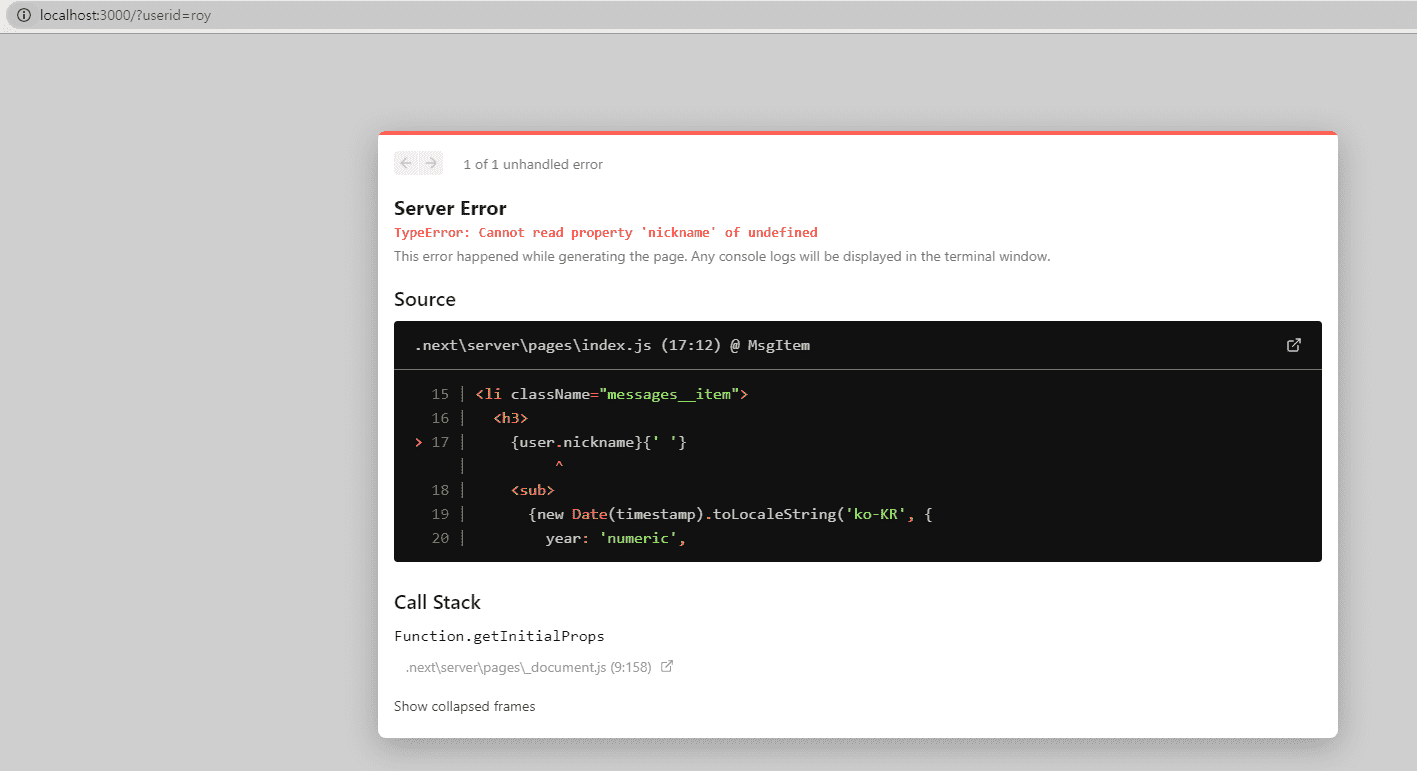
windows의 경우 url을 모두 소문자로 바꿔버리는 현상이 있었네요.
// MsgList
const { query: { userId = '' } } = useRouter()
이 부분에서 userId를 불러오지 못하여 발생한 오류였습니다.
const { query } = useRotuer()
const userId = query.userId || query.userid || ''
이렇게 하면 url queryString의 대소문자 여부에 관계없이 잘 동작하게 될 것 같습니다.
0
0
dohyun0505
質問者
import { useState, useEffect, useRef }
from 'react';
import { useRouter } from 'next/router';
import MsgItem from './MsgItem';
import MsgInput from './MsgInput';
import fetcher from '../fetcher';
import useInfiniteScroll
from '../hooks/useInfiniteScroll';
const MsgList = ({ smsgs, users }) => {
const {query: { userId = '' },} = useRouter();
const [msgs, setMsgs] = useState(smsgs);
const [editingId, setEditingId] = useState(null);
const [hasNext, setHasNext] = useState(true);
const fetchMoreEl = useRef(null);
const intersecting =
useInfiniteScroll(fetchMoreEl);
const onCreate = async (text) => {
const newMsg = await fetcher('post',
'/messages', { text, userId });
if (!newMsg) throw Error('something wrong');
setMsgs((msgs) => [newMsg, ...msgs]);
};
const onUpdate = async (text, id) => {
const newMsg = await fetcher
('put', `/messages/${id}`, { text, userId });
if (!newMsg) throw Error('something wrong');
setMsgs((msgs) => {
const targetIndex = msgs.findIndex(
(msg) => msg.id === id);
if (targetIndex < 0) return msgs;
const newMsgs = [...msgs];
newMsgs.splice(targetIndex, 1, newMsg);
return newMsgs;
});
doneEdit();
};
const onDelete = async (id) => {
const receivedId = await fetcher(
'delete', `/messages/${id}`, {
params: { userId },
});
setMsgs((msgs) => {
const targetIndex = msgs.findIndex(
(msg) => msg.id === receivedId + '');
if (targetIndex < 0) return msgs;
const newMsgs = [...msgs];
newMsgs.splice(targetIndex, 1);
return newMsgs;
});
};
const doneEdit = () => setEditingId(null);
const getMessages = async () => {
const newMsgs = await fetcher(
'get', '/messages', {
params: {
cursor: msgs[msgs.length - 1]?.id || '' },
});
if (newMsgs.length === 0) {
setHasNext(false);
return;
}
setMsgs((msgs) => [...msgs, ...newMsgs]);
};
useEffect(() => {
if (intersecting && hasNext) getMessages();
}, [intersecting]);
return (
<>
<MsgInput mutate={onCreate} />
<ul className="messages">
{msgs.map((x) => (
<MsgItem
key={x.id}
{...x}
onUpdate={onUpdate}
onDelete={() => onDelete(x.id)}
startEdit={() => setEditingId(x.id)}
isEditing={editingId === x.id}
myId={userId}
user={users[x.userId]}
/>
))}
</ul>
<div ref={fetchMoreEl} />
</>
);
};
export default MsgList;
import MsgInput from './MsgInput';
const MsgItem = ({
id,
userId,
timestamp,
text,
onUpdate,
onDelete,
isEditing,
startEdit,
myId,
user,
}) => (
<li className="messages__item">
<h3>
{user.nickname}{' '}
<sub>
{new Date(timestamp).toLocaleString(
'ko-KR', {
year: 'numeric',
month: 'numeric',
day: 'numeric',
hour: '2-digit',
minute: '2-digit',
hour12: true,
})}
</sub>
</h3>
{isEditing ? (
<>
<MsgInput mutate={onUpdate} text={text}
id={id} />
</>
) : (
text
)}
{myId === userId && (
<div className="messages__buttons">
<button onClick={startEdit}>수정</button>
<button onClick={onDelete}>삭제</button>
</div>
)}
</li>
);
export default MsgItem;
0
0


