

npm run start 에러질문
509
投稿した質問数 8
PS C:\Users\KHS\Desktop\web_class\mern\client> npm run start
> client@0.1.0 start
> react-scripts start
There might be a problem with the project dependency tree.
It is likely not a bug in Create React App, but something you need to fix locally.
The react-scripts package provided by Create React App requires a dependency:
"webpack": "4.44.2"
Don't try to install it manually: your package manager does it automatically.
However, a different version of webpack was detected higher up in the tree:
C:\Users\KHS\Desktop\web_class\mern\node_modules\webpack (version: 5.27.2)
Manually installing incompatible versions is known to cause hard-to-debug issues.
If you would prefer to ignore this check, add SKIP_PREFLIGHT_CHECK=true to an .env file in your project.
That will permanently disable this message but you might encounter other issues.
To fix the dependency tree, try following the steps below in the exact order:
1. Delete package-lock.json (not package.json!) and/or yarn.lock in your project folder.
2. Delete node_modules in your project folder.
3. Remove "webpack" from dependencies and/or devDependencies in the package.json file in your project folder.
4. Run npm install or yarn, depending on the package manager you use.
In most cases, this should be enough to fix the problem.
If this has not helped, there are a few other things you can try:
5. If you used npm, install yarn (http://yarnpkg.com/) and repeat the above steps with it instead.
This may help because npm has known issues with package hoisting which may get resolved in future versions.
6. Check if C:\Users\KHS\Desktop\web_class\mern\node_modules\webpack is outside your project directory.
For example, you might have accidentally installed something in your home folder.
7. Try running npm ls webpack in your project folder.
This will tell you which other package (apart from the expected react-scripts) installed webpack.
If nothing else helps, add SKIP_PREFLIGHT_CHECK=true to an .env file in your project.
That would permanently disable this preflight check in case you want to proceed anyway.
P.S. We know this message is long but please read the steps above :-) We hope you find them helpful!
npm ERR! code 1
npm ERR! path C:\Users\KHS\Desktop\web_class\mern\client
npm ERR! command failed
npm ERR! command C:\Windows\system32\cmd.exe /d /s /c react-scripts start
npm ERR! A complete log of this run can be found in:
npm ERR! C:\Users\KHS\AppData\Local\npm-cache\_logs\2021-04-15T20_44_19_476Z-debug.log
이렇게뜨는데요 저기서 제시해준 1~4번부터는 시도해봤습니다만 같은에러가 뜹니다
回答 3
0
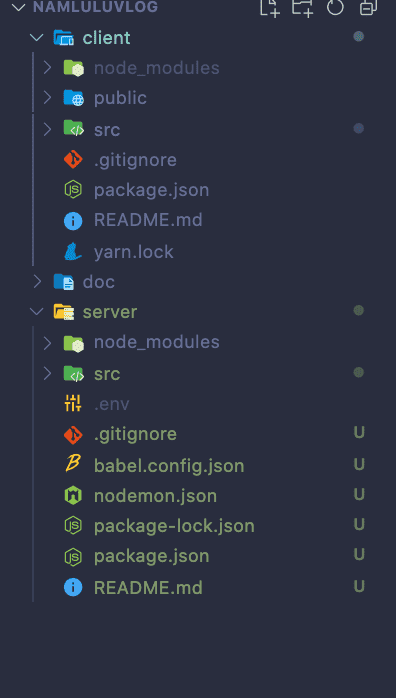
일단 CRA 내장된 것과 뭔가 수동으로 새로 설치한 것이 충돌나면 이런 에러 잘 납니다.
이 에러는 1번따라 하시고, node-modules파일 모두 지워줍니다.
그리고 나서 package.json은 https://github.com/sideproject0214/blog/blob/master/client/package.json
보시고
현재까지 라이브러리 설치된 것들의 버전을 맞춰주시면 해결가능할 것입니다.
예> 단지 예시일뿐입니다.
(수강생 package.json )
"sass-loader": "11.0.1"
(싸플 package.json )
"sass-loader": "8.0.2"
이 경우 본인의 버전을 "0.19.2"로 수정해준다.
npm run dev-watch 오류
0
125
1
npm i react-redex redux-saga react-router-dom connected-react-router bootstrap reactstrap dotenv 명령어 설치하면 에러날까요?
0
473
1
mongodb 자세히 알고 싶습니다
0
313
1
강의 듣으면서...포스트 맨도 안됩니다
0
296
1
혹시 gatsby 생성하는 명령어 하는지 알고 싶습니다
0
320
1
webpack 설정 문제입니다.
0
340
1
Category관련 질문
0
276
1
https://www.ssaple.net/ 블로그 접속이 되질 않아요.
0
355
1
리액트 버전 오류 나시는 분들 참고
0
516
1
react 18버전에서의 connected-react-router 가 설치가안됩니다
0
1105
1
jwt.sign() 에서의 질문입니다.
0
250
1
ssaple.net 접속이 안됩니다.
0
402
1
Media(Video) 파일 첨부관련 질문
0
329
1
페이지 Link를 이용한 페이지 이동이 안됩니다
0
392
1
webpack.config.js 설정
0
867
1
몽고db 사이트가 많이 바뀌어서
0
382
1
선생님 req에 아무것도 안들어오는데 혹시 뭐가문제일까요 ?
0
338
1
안녕하세요 강의 잘 보고 있습니다 질문 하나 있는데요 ..
0
1631
1
그대로 따라하였고 하루종일 reboot하는데 되지않습니다..
0
251
1
Encountered two children with the same key 에러..
0
907
1
강사님 redux에러 질문이요
1
295
2
선생님 왜 저는 백날해도 collapse 내용이 link아래로 갈까요?
0
398
2
postDetail scss 문제
0
289
3
강사님 포스트 디테일 부분을 똑같이 작성하였는데 이런 오류가 나서 도저히 방법을 모르겠습니다 ㅠㅠ
0
244
1