

Custom Wdiget의 리턴값을 액션 필드에 가져오기
525
投稿した質問数 5
안녕하세요.. 선생님의 강의를 통해 앱을 만들 수 있겠다는 자신감을 가지게 되었습니다. 고맙습니다.
꼭 답변을 부탁드리는 내용은 아래와 같습니다.
텍스트필드 위젯에 숫자 입력시 1,000 원 단위를 표시하는 기능을 구현하고자 합니다.
그래서 final double? height;pattern_formatter 라이브러리를 활용해서 custom widget를 구현했습니다
custom widget를 통해서 Update App State 액션을 통해 +Add Field를 하려고 하는데 Value to set 필드에서 해당 custom widget 보이지가 않습니다.
어떻게 해야 필드에서 설정을 할 수 있을지요?
작성한 코드는 아래와 같습니다.
// Automatic FlutterFlow imports
import '/backend/backend.dart';
import '/backend/schema/structs/index.dart';
import '/flutter_flow/flutter_flow_theme.dart';
import '/flutter_flow/flutter_flow_util.dart';
import '/custom_code/widgets/index.dart'; // Imports other custom widgets
import '/flutter_flow/custom_functions.dart'; // Imports custom functions
import 'package:flutter/material.dart';
// Begin custom widget code
// DO NOT REMOVE OR MODIFY THE CODE ABOVE!
import 'package:flutter/services.dart';
import 'package:pattern_formatter/pattern_formatter.dart';
import 'package:google_fonts/google_fonts.dart';
import 'package:provider/provider.dart';
class Thousand extends StatefulWidget {
const Thousand({
super.key,
this.width,
this.height,
this.title,
});
final double? width;
final double? height;pattern_formatter: ^3.0.0
final String? title;
@override
State<Thousand> createState() => _ThousandState();
}
class _ThousandState extends State<Thousand> {
final _textController = TextEditingController();
String userPost = '';
@override
Widget build(BuildContext context) {
return Container(
child: // Generated code for this TextField Widget...
TextFormField(
controller: _textController,
onChanged: (val) {
FFAppState().update(() {
setState(() {
userPost = _textController.text;
});
});
},
autofocus: false,
textInputAction: TextInputAction.done,
obscureText: false,
decoration: InputDecoration(
labelText: widget.title ?? '',
labelStyle: FlutterFlowTheme.of(context).labelMedium.override(
fontFamily: FlutterFlowTheme.of(context).labelMediumFamily,
fontSize: 20,
letterSpacing: 0,
fontWeight: FontWeight.w600,
useGoogleFonts: GoogleFonts.asMap()
.containsKey(FlutterFlowTheme.of(context).labelMediumFamily),
),
hintStyle: FlutterFlowTheme.of(context).labelMedium.override(
fontFamily: FlutterFlowTheme.of(context).labelMediumFamily,
letterSpacing: 0,
useGoogleFonts: GoogleFonts.asMap()
.containsKey(FlutterFlowTheme.of(context).labelMediumFamily),
),
enabledBorder: UnderlineInputBorder(
borderSide: BorderSide(
color: FlutterFlowTheme.of(context).primaryBackground,
width: 0.5,
),
borderRadius: BorderRadius.circular(0),
),
focusedBorder: UnderlineInputBorder(
borderSide: BorderSide(
color: FlutterFlowTheme.of(context).primary,
width: 0.5,
),
borderRadius: BorderRadius.circular(0),
),
errorBorder: UnderlineInputBorder(
borderSide: BorderSide(
color: FlutterFlowTheme.of(context).error,
width: 0.5,
),
borderRadius: BorderRadius.circular(0),
),
focusedErrorBorder: UnderlineInputBorder(
borderSide: BorderSide(
color: FlutterFlowTheme.of(context).error,
width: 0.5,
),
borderRadius: BorderRadius.circular(0),
),
),
style: FlutterFlowTheme.of(context).bodyMedium.override(
fontFamily: FlutterFlowTheme.of(context).bodyMediumFamily,
fontSize: 22,
letterSpacing: 0,
fontWeight: FontWeight.w600,
useGoogleFonts: GoogleFonts.asMap()
.containsKey(FlutterFlowTheme.of(context).bodyMediumFamily),
),
minLines: null,
keyboardType: TextInputType.number,
inputFormatters: [
LengthLimitingTextInputFormatter(15),
ThousandsFormatter(allowFraction: true),
],
));
}
}
回答 3
0
적용을 해 보았는데요..
말씀주신 내용은 텍스트 서식을 마스크(포맷)하는 것인데요..
설명을 잘못드린 것 같습니다.
제가 하고 싶은 것은 텍스트 필드에서 숫자 입력시에 1,000단위로 보이는 것입니다.
이것을 구현하기 위해서 라이브러리( pattern_formatter: ^3.0.0)를 사용해서 custom widget 을 만들어서 구현을 했습니다.
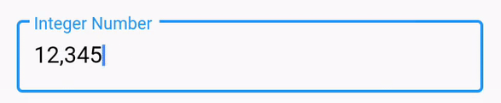
여기까지는 좋았는데, 문제는 custom widget의 텍스트 필드 값을 액션을 이용하여 Update app state를 이용하여 값을 저장하고자 하는데요.. 그러면 Value to set에서 widget state 를 선택해서 필드를 선택해야 하는데 필드에 custom widget이 보이지 않아 선택을 할 수 없습니다.
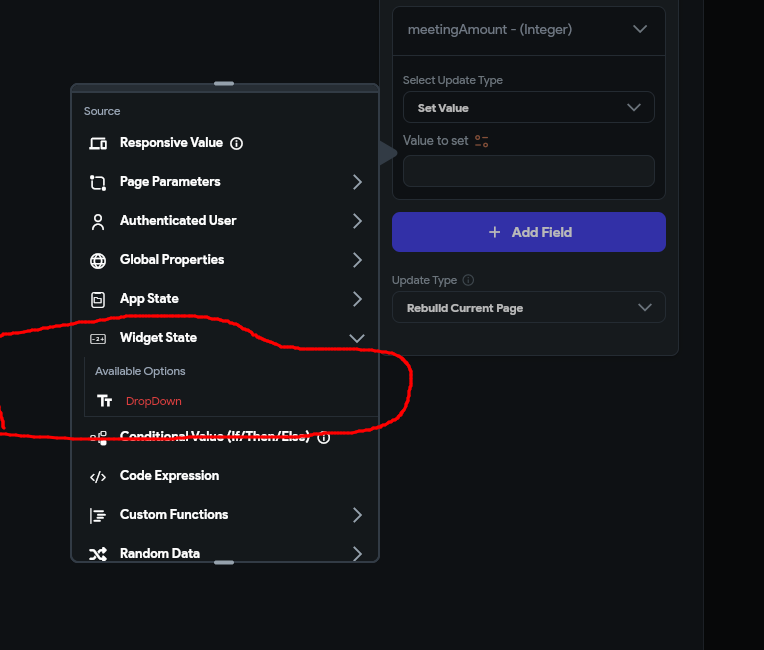 custom widget 항목에 리스트업 되기 위해서는 어떻게 해야 할지요?
0
안녕하세요 제가 답변을 잘못 드렸네요 ㅎㅎ
저도 검색해서 알게 되었는데요
custom function과 action에서는 값 획득이 가능하지만 customwidget은 불가능합니다.
따라서 jason님이 하신 방법으로는 접근 자체가 되지 않습니다
대신 코드를 통해 app state에 저장하는 방식으로 하면 될 것 같습니다
다음 스레드를참조해 주시면 됩니다
https://community.flutterflow.io/custom-code/post/custom-widget-state-UbqB3F6lvpKc86p
그리고 향후 값이 필요하면, app state에 저장한 값을 다른 곳에서 불러오는 방식으로 하면 될 듯 합니다.
감사합니다.
0
안녕하세요 Jaosn 님,
강의 들어주시고 질문 해주셔서 진심으로 감사 드립니다.
그리고 앱을 만들 수 있다는 자신감을 가지시게 되었다니 정말 좋은 소식이네요.
그런데 제가 Custom Widget 은 강의 한 적이 없는데 ㅎㅎ 뜻밖의 질문이기도 하네요. (곧 올라올 고급편에서 다룹니다..!)
1.
우선, 제 생각에는 첫 단위로 컴마를 표시하고 싶다면, Custom Widget 대신 Custom Function을 사용하는 것이 좋을 것 같습니다.
텍스트가 들어가는 곳마다 Custom Function을 쓰면 될 것 같아요,
간단하게 코드는 다음과 같이 썼구요.
String value를 argument로 받습니다.
import 'dart:convert';
import 'dart:math' as math;
import 'package:flutter/material.dart';
import 'package:google_fonts/google_fonts.dart';
import 'package:intl/intl.dart';
import 'package:timeago/timeago.dart' as timeago;
import '/flutter_flow/lat_lng.dart';
import '/flutter_flow/place.dart';
import '/flutter_flow/uploaded_file.dart';
import '/flutter_flow/custom_functions.dart';
import '/backend/backend.dart';
import 'package:cloud_firestore/cloud_firestore.dart';
import '/auth/firebase_auth/auth_util.dart';
String thousandsFunction(String value) {
/// MODIFY CODE ONLY BELOW THIS LINE
// 문자열을 double로 안전하게 파싱
double number = double.tryParse(value) ?? 0.0;
// 숫자를 천 단위 구분자로 포맷
final formatter = NumberFormat('#,##0.###');
// 포맷된 숫자를 문자열로 변환하여 반환
return formatter.format(number);
/// MODIFY CODE ONLY ABOVE THIS LINE
}
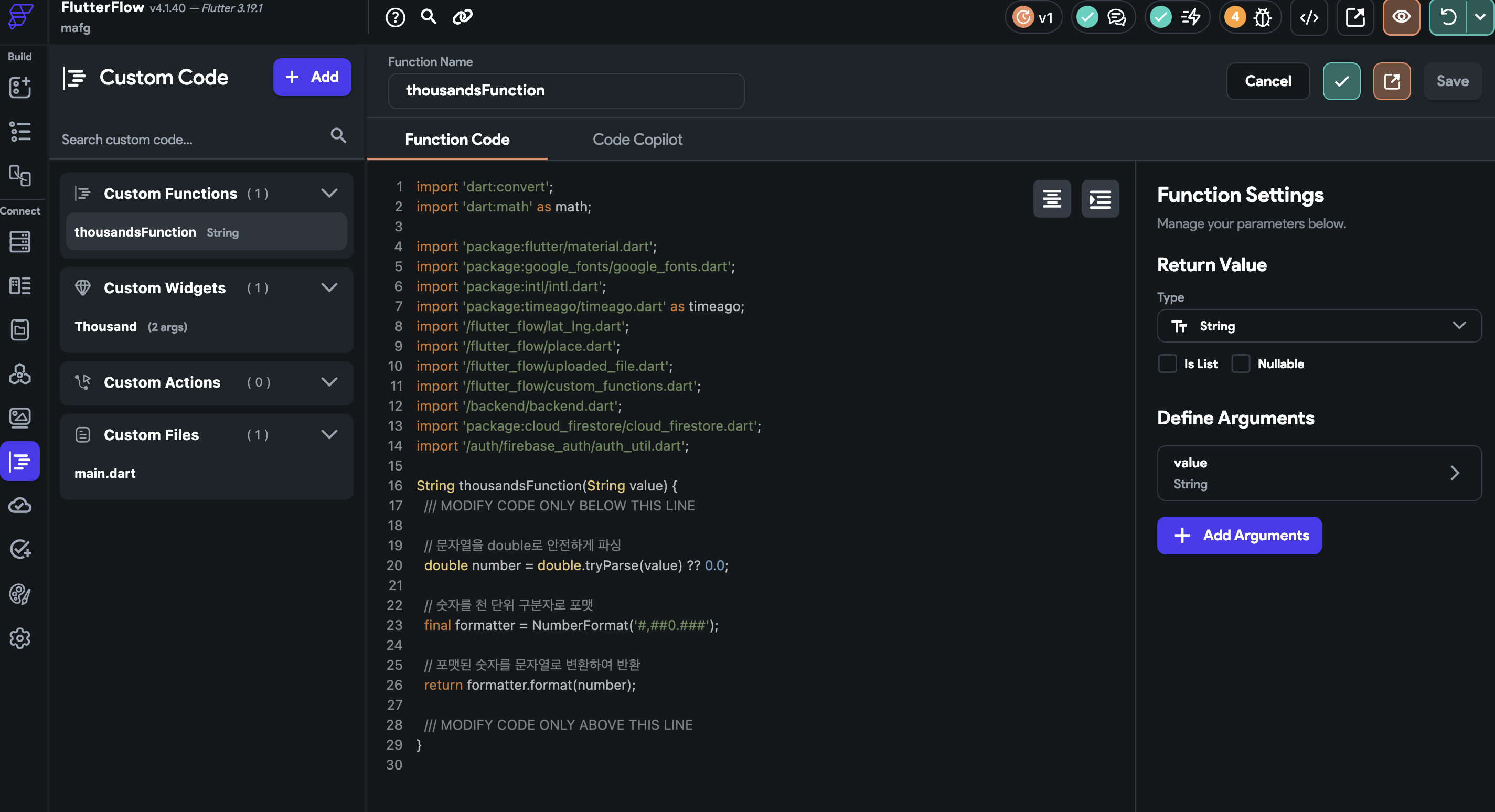
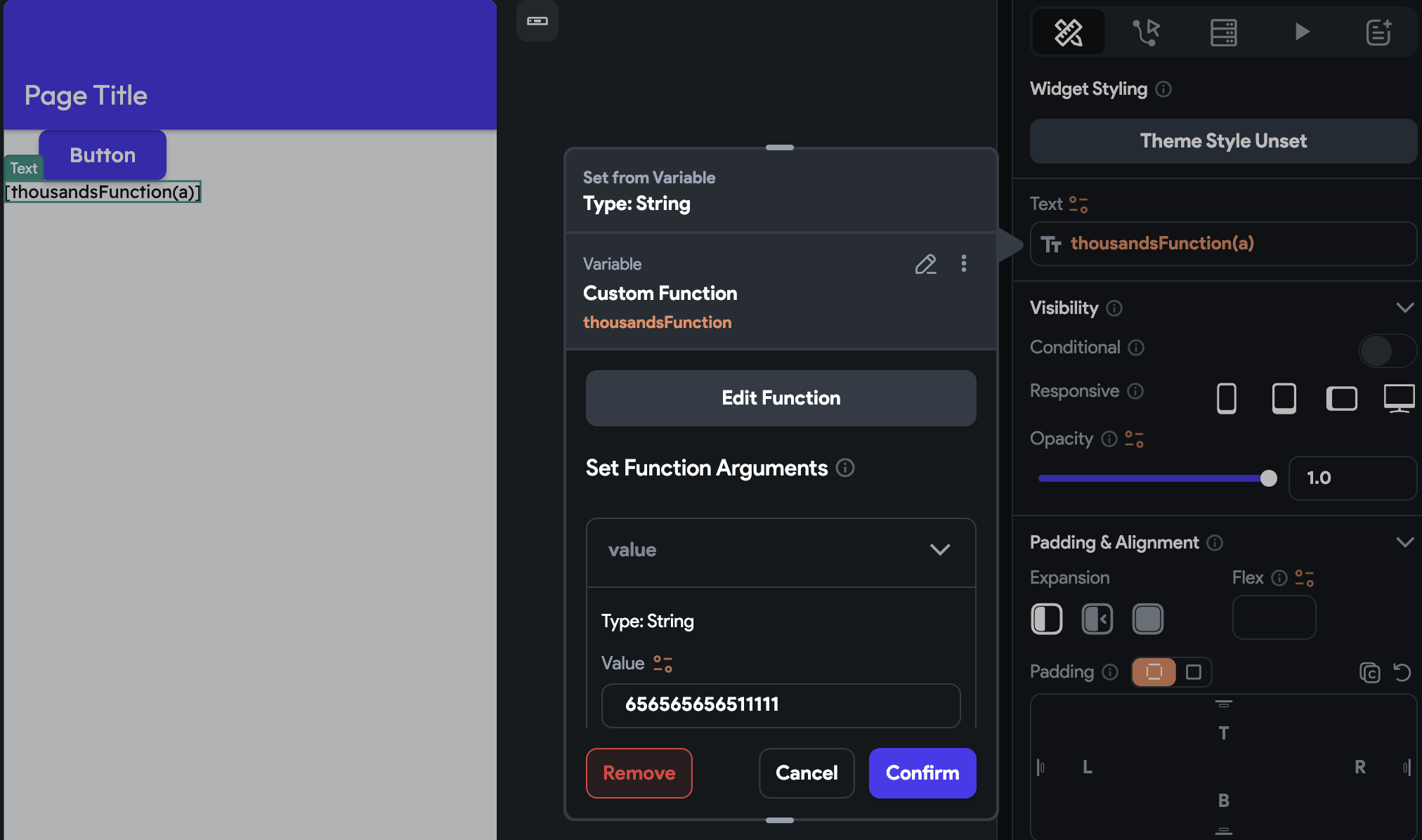
그리고 이는 다음과 같이 불러옵니다.
위젯에서 값 설정 -> Custom Function -> Value에 변환하고자 하는 값 입력 합니다.
2.
조금 더 질문에 충실한 답변을 드리자면,
Custom Widget은 Updatre App State 를 통해 작동하지 않습니다.
위젯 추가 -> 다이아몬드를 클릭하면 Custom Widget이 보입니다.
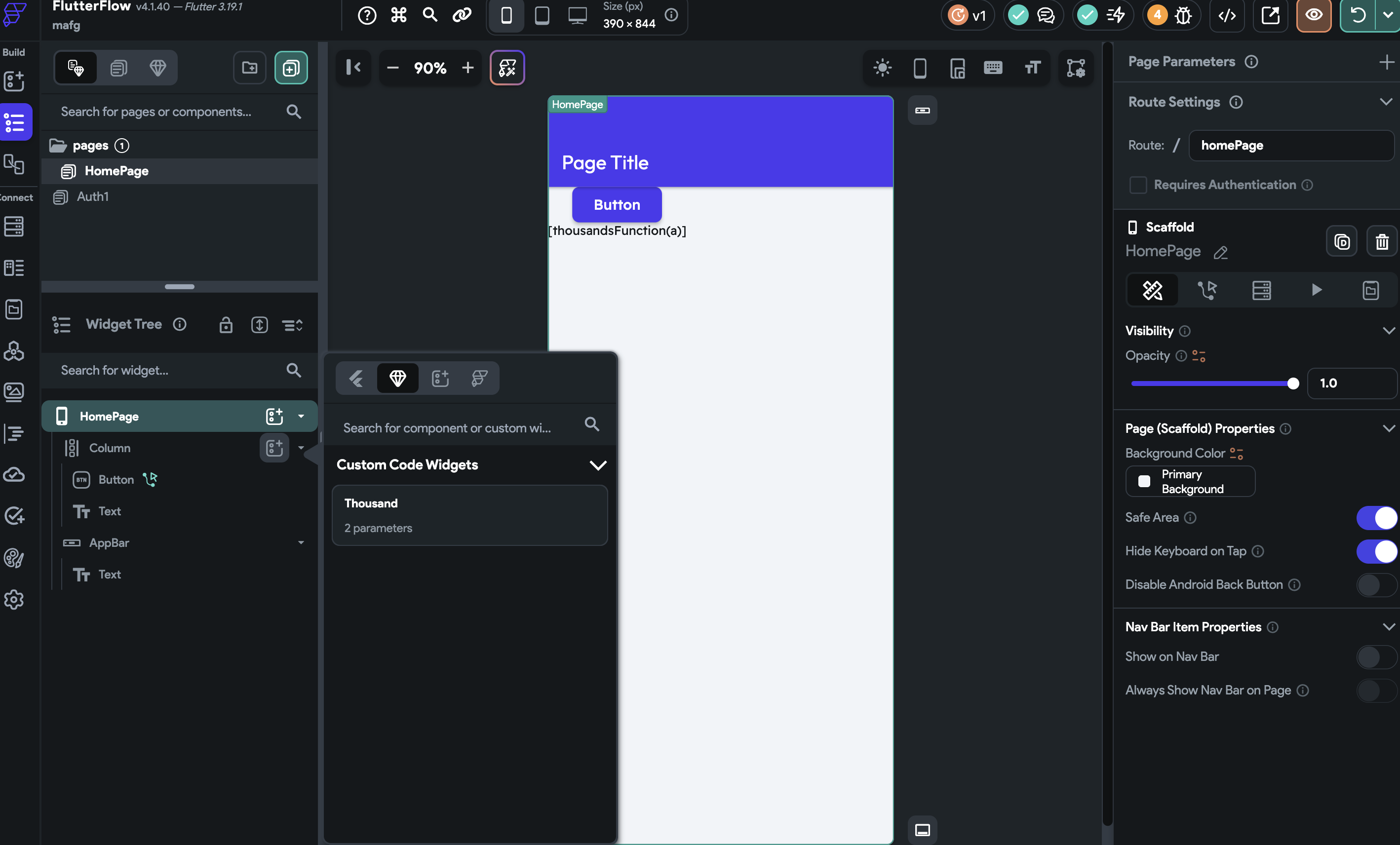
그러면 placeholder가 나오고, 여기에 width, height 그리고 값을 입력하게 됩니다.
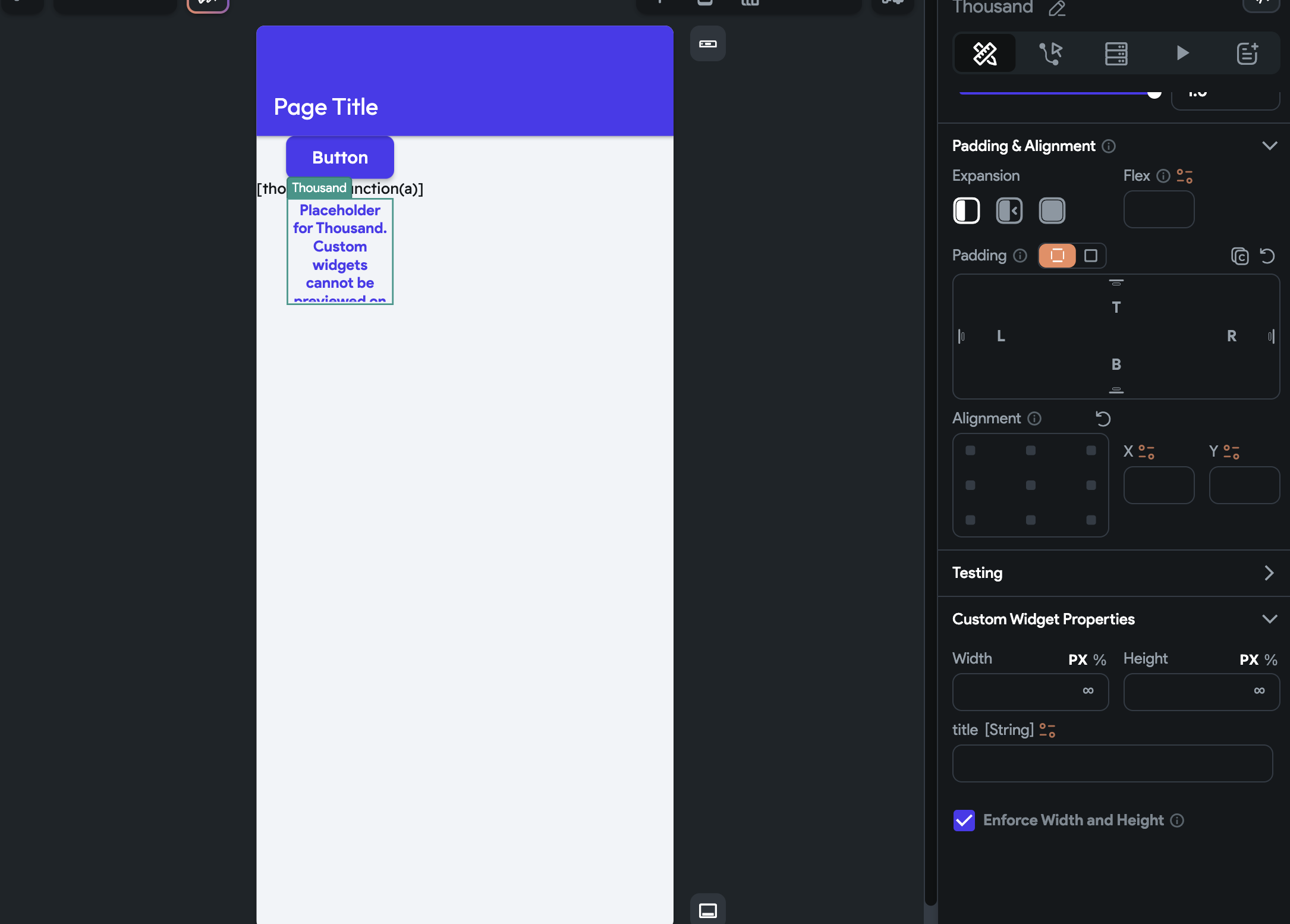
다만 주신 코드를 제가 구동해 보았을 때 Custom Widget이 정상적으로 작동하지 않습니다.
코드를 들여다보니 FFAppState 사용에서 에러가 나네요.
Custom Widget에서 FFAppState 접근을 하는 다른 방법이 있을듯한데.. 저의 능력과 시간의 부족으로 ㅠ 여기까지 해결은 어려울 것 같습니다.
첫번째 전달드린 방법을 추천 드릴게요.
감사합니다.
이미지 업로드해도 프로필에 x만 떠요
0
107
3
로그인 과정에서 이메일 형식 오류 발생합니다.
0
268
2
변수의 활용에서 local page variable이 변화가 없습니다.
0
120
2
10강 (firebase 서버 연동) -> 11강 (로그인 구현)으로 넘어가고 있는데, user collection을 설정하는 부분이 안나옵니다...
0
113
2
홈화면에서 계속 충돌이 발생해요
0
128
2
이미지 표시 안되는것
0
139
2
ToggleIcon 관련 문의드립니다.
0
116
2
프로필 업데이트 회원가입완료 버튼 설정
0
140
2
한글이 잠시 깨진 후 정상적으로 보입니다.
0
159
2
써버 연결후 테스트를 해ㅗ니
0
142
3
강의 내용이 다릅니다
0
155
4
사진 업로드 어디에?
0
161
3
collection 내 image 에러
0
133
3
cros proxy for images 를 none으로 바꿔도 이미지 적용이 되지 않습니다.
0
188
4
9강의 서버연동을 따라하는데 오류가뜹니다
0
153
2
이미지 로딩 오류
0
326
5
path 설정에 'Uploaded File URL' 항목이 안보입니다.
0
101
2
스택 위의 이미지가 움직이면 사라집니다.
0
138
2
특정 하트만 개별적으로 커지게 하는 방법 질문
0
148
2
Project Setup Step 절차가 나오지 않아요, 테마를 어디서 고르죠?
0
108
2
가로 고정 모드 태블릿 앱을 만들고자 합니다.
0
384
2
이미지 업로드 버튼 클릭시
0
143
2
Stack 안에 Container를 절반만 채우고 싶습니다.
0
107
2
연결 관련
0
126
2