

`UpdatePropsManager` is not available on non-native platform. 오류입니다.
환경
운영체제 : win 10
react-native : 0.72.7
node : 20.5.0
안녕하세요
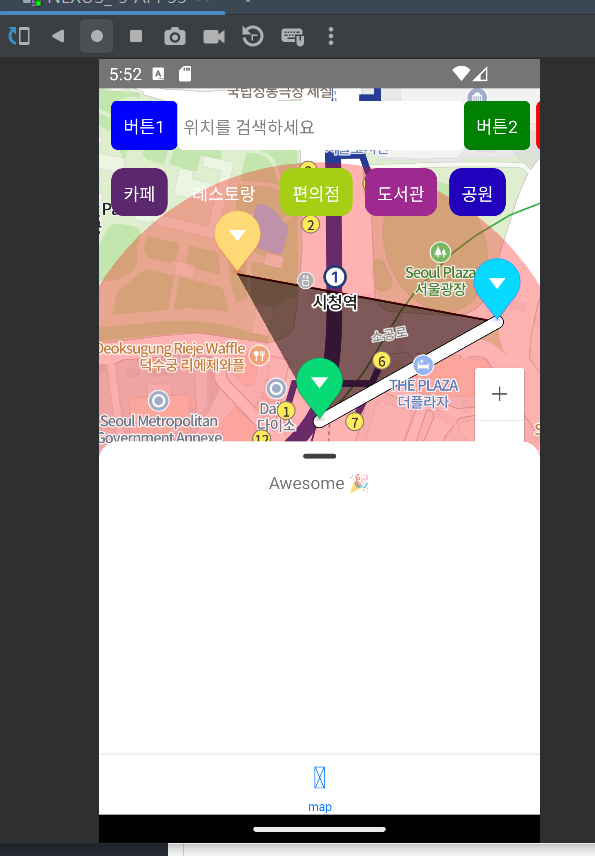
현재 위 처럼 BottomSheetModal이 열려져 있는 상태에서
위치를 검색하세요 라는 view를 클릭할경우 아래 제출한 코드의 <Modal> 컴포넌트가 나오게 되있습니다.
하지만 아래의 오류를 현재 내고 있어 질문드리게 되었습니다..
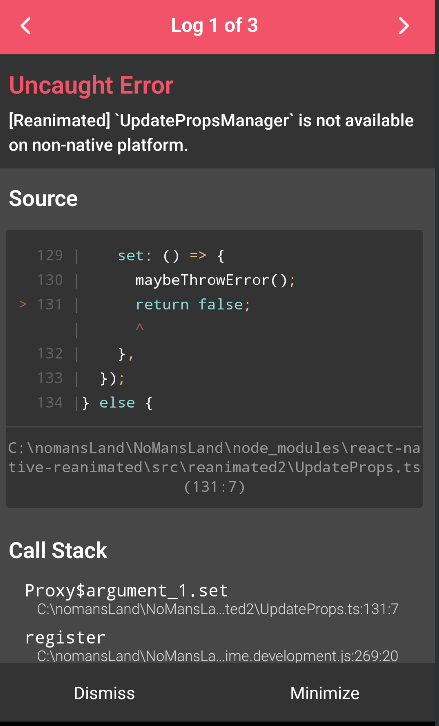
bottom-sheet 라이브러리로
@gorhom/bottom-sheet - npm (npmjs.com)
위 링크를 사용하였습니다.
에러 로그 내용의 전체부분은 다음과 같습니다.
debuggerWorker.js:69 Error: [Reanimated] UpdatePropsManager is not available on non-native platform. at Handler (http://localhost:8081/index.bundle//&platform=android&dev=true&minify=false&app=com.nomansland&modulesOnly=false&runModule=true:123798:38) at BottomSheetDraggableViewComponent (http://localhost:8081/index.bundle//&platform=android&dev=true&minify=false&app=com.nomansland&modulesOnly=false&runModule=true:156784:33) at RCTView at http://localhost:8081/index.bundle//&platform=android&dev=true&minify=false&app=com.nomansland&modulesOnly=false&runModule=true:59381:44 at AnimatedComponent (http://localhost:8081/index.bundle//&platform=android&dev=true&minify=false&app=com.nomansland&modulesOnly=false&runModule=true:128894:38) at RCTView at http://localhost:8081/index.bundle//&platform=android&dev=true&minify=false&app=com.nomansland&modulesOnly=false&runModule=true:59381:44 at AnimatedComponent (http://localhost:8081/index.bundle//&platform=android&dev=true&minify=false&app=com.nomansland&modulesOnly=false&runModule=true:128894:38) at RCTView at http://localhost:8081/index.bundle//&platform=android&dev=true&minify=false&app=com.nomansland&modulesOnly=false&runModule=true:59381:44 at BottomSheetContainerComponent (http://localhost:8081/index.bundle//&platform=android&dev=true&minify=false&app=com.nomansland&modulesOnly=false&runModule=true:160869:32) at BottomSheetGestureHandlersProvider (http://localhost:8081/index.bundle//&platform=android&dev=true&minify=false&app=com.nomansland&modulesOnly=false&runModule=true:160962:38) at BottomSheet (http://localhost:8081/index.bundle//&platform=android&dev=true&minify=false&app=com.nomansland&modulesOnly=false&runModule=true:159277:74) at PortalHostComponent (http://localhost:8081/index.bundle//&platform=android&dev=true&minify=false&app=com.nomansland&modulesOnly=false&runModule=true:162079:21) at PortalProviderComponent (http://localhost:8081/index.bundle//&platform=android&dev=true&minify=false&app=com.nomansland&modulesOnly=false&runModule=true:162134:34) at BottomSheetModalProviderWrapper (http://localhost:8081/index.bundle//&platform=android&dev=true&minify=false&app=com.nomansland&modulesOnly=false&runModule=true:162297:25) at RNGestureHandlerRootView at GestureHandlerRootView at Map (http://10.0.2.2:8081/src\pages\map.bundle//&platform=android&app=com.nomans…d&modulesOnly=true&dev=true&minify=false&runModule=true&shallow=true:30:42) at StaticContainer (http://localhost:8081/index.bundle//&platform=android&dev=true&minify=false&app=com.nomansland&modulesOnly=false&runModule=true:170212:18) at EnsureSingleNavigator (http://localhost:8081/index.bundle//&platform=android&dev=true&minify=false&app=com.nomansland&modulesOnly=false&runModule=true:166073:25) at SceneView
(익명)@debuggerWorker.js:69-
TypeError: $$REQUIRE(...) is not a function
This error is located at:
in PanGestureHandler (created by BottomSheetDraggableViewComponent)
in BottomSheetDraggableViewComponent (created by BottomSheet)
in RCTView (created by View)
in View (created by AnimatedComponent(View))
in AnimatedComponent(View)
in Unknown (created by BottomSheet)
in RCTView (created by View)
in View (created by AnimatedComponent(View))
in AnimatedComponent(View)
in Unknown (created by BottomSheet)
in RCTView (created by View)
in View (created by BottomSheetContainerComponent)
in BottomSheetContainerComponent (created by BottomSheet)
in BottomSheetGestureHandlersProvider (created by BottomSheet)
in BottomSheet (created by BottomSheet)
in PortalHostComponent (created by PortalProviderComponent)
in PortalProviderComponent (created by BottomSheetModalProviderWrapper)
in BottomSheetModalProviderWrapper (created by Map)
in RNGestureHandlerRootView (created by GestureHandlerRootView)
in GestureHandlerRootView (created by Map)
in Map (created by SceneView)
in StaticContainer
in EnsureSingleNavigator (created by SceneView)
in SceneView (created by BottomTabView)
in RCTView (created by View)
in View (created by Screen)
in RCTView (created by View)
in View (created by Background)
in Background (created by Screen)
in Screen (created by BottomTabView)
in RNSScreen
in Unknown (created by InnerScreen)
in Suspender (created by Freeze)
in Suspense (created by Freeze)
in Freeze (created by DelayedFreeze)
in DelayedFreeze (created by InnerScreen)
in InnerScreen (created by Screen)
in Screen (created by MaybeScreen)
in MaybeScreen (created by BottomTabView)
in RNSScreenContainer (created by ScreenContainer)
in ScreenContainer (created by MaybeScreenContainer)
in MaybeScreenContainer (created by BottomTabView)
in RNCSafeAreaProvider (created by SafeAreaProvider)
in SafeAreaProvider (created by SafeAreaInsetsContext)
in SafeAreaProviderCompat (created by BottomTabView)
in BottomTabView (created by BottomTabNavigator)
in PreventRemoveProvider (created by NavigationContent)
in NavigationContent
in Unknown (created by BottomTabNavigator)
in BottomTabNavigator (created by App)
in EnsureSingleNavigator
in BaseNavigationContainer
in ThemeProvider
in NavigationContainerInner (created by App)
in App
in RCTView (created by View)
in View (created by AppContainer)
in RCTView (created by View)
in View (created by AppContainer)
in AppContainer
in NoMansLand(RootComponent)
-------------------------------------------------------------------------------------------------
아래 부분은 사용하였던 코드입니다.. 긴글 읽어주셔서 감사합니다.
回答 2
0
구글에 검색해보셨나요?
react-native-reanimated 설치하신적있나요?
0
게시글에 글자 제약으로 코드는 댓글에 올리게 되었습니다 .
import {
  BottomSheetBackdrop,
  BottomSheetModal,
  BottomSheetModalProvider,
} from '@gorhom/bottom-sheet';
import React, { useState, useRef,useEffect , useCallback ,useMemo} from 'react';
import {Button, Modal, ScrollView, StyleSheet, Text, TextInput, TouchableOpacity, View} from 'react-native';
import { GestureHandlerRootView } from 'react-native-gesture-handler';
import NaverMapView, { Circle, Marker, Path, Polygon, Polyline } from 'react-native-nmap';

function Map() {
  const P0 = {latitude: 37.564362, longitude: 126.977011};
  const P1 = {latitude: 37.565051, longitude: 126.978567};
  const P2 = {latitude: 37.565383, longitude: 126.976292};
  const categories = ['카페', '레스토랑', '편의점', '도서관', '공원', '병원','스키장','피시방','호텔','주유소'];
  const [modalVisible, setModalVisible] = React.useState(false);
  const inputRef = useRef<TextInput>(null);

  useEffect(() => {
    if (modalVisible && inputRef.current) {
      inputRef.current.focus();
    }
  }, [modalVisible]);

  const bottomSheetModalRef = useRef<BottomSheetModal>(null);

  const snapPoints = useMemo(() => {
    const points = [];
    for (let i = 25; i <= 100; i++) {
      points.push(`${i}%`);
    }
    return points;
  }, []);

  const handlePresentModalPress = useCallback(() => {
    bottomSheetModalRef.current?.present();
  }, []);
  const handleSheetChanges = useCallback((index: number) => {
    console.log('handleSheetChanges', index);
  }, []);
  return (
<GestureHandlerRootView style={{ flex: 1 }}>
<View style={{flex: 1}}>
  <NaverMapView style={{width: '100%', height: '100%'}}
                       showsMyLocationButton={false}
                       center={{...P0, zoom: 16}}

                       onCameraChange={e => console.warn('onCameraChange', JSON.stringify(e))}
                       onMapClick={e => console.warn('onMapClick', JSON.stringify(e))}>
      <Marker coordinate={P0} onClick={() => console.warn('onClick! p0')}/>
      <Marker coordinate={P1} pinColor="blue" onClick={() => console.warn('onClick! p1')}/>
      <Marker coordinate={P2} pinColor="red" onClick={() => console.warn('onClick! p2')}/>
      <Path coordinates={[P0, P1]} onClick={() => console.warn('onClick! path')} width={10}/>
      <Polyline coordinates={[P1, P2]} onClick={() => console.warn('onClick! polyline')}/>
      <Circle coordinate={P0} color={"rgba(255,0,0,0.3)"} radius={200} onClick={() => console.warn('onClick! circle')}/>
      <Polygon coordinates={[P0, P1, P2]} color={`rgba(0, 0, 0, 0.5)`} onClick={() => console.warn('onClick! polygon')}/>
  </NaverMapView>
  <View style={{
  position: 'absolute',
  top: 10,
  left: 10,
  width: '100%',
  backgroundColor: 'transparent',
}}>
    <View style={{ flexDirection: 'row', justifyContent: 'space-between' }}>
    <TouchableOpacity style={{ backgroundColor: 'blue', padding: 10, borderRadius: 5 }}>
      <Text style={{ color: 'white' }}>버튼1</Text>
    </TouchableOpacity>

    <TouchableOpacity onPress={() => setModalVisible(true)} style = {{width : '65%'}}>
        <View
          style={{
            height: 40,
            width: '100%',
            backgroundColor: 'white',
            borderRadius: 5,
            padding: 5,
            justifyContent: 'center',
          }}
        >
          <Text style={{ color: 'grey' }}>위치를 검색하세요</Text>
        </View>
      </TouchableOpacity>

    <View style={{ flexDirection: 'row' }}>
      <TouchableOpacity onPress={()=> handlePresentModalPress()} style={{ backgroundColor: 'green', padding: 10, borderRadius: 5, marginRight: 5 }}>
        <Text style={{ color: 'white' }}>버튼2</Text>
      </TouchableOpacity>

      <TouchableOpacity style={{ backgroundColor: 'red', padding: 10, borderRadius: 5 }}>
        <Text style={{ color: 'white' }}>버튼3</Text>
      </TouchableOpacity>
    </View>

  </View>
  <ScrollView
    horizontal
    showsHorizontalScrollIndicator={false}
    style={{
      width: '90%',
      marginTop: 10,
      backgroundColor: 'transparent',
      borderRadius: 5,
      paddingVertical: 5,
    }}
  >
    {categories.map((category, index) => (
      <View key={index} style={{ marginRight: 10, padding: 10, borderRadius: 10, backgroundColor: `#${Math.floor(Math.random()*16777215).toString(16)}` }}>
        <Text style={{ color: 'white' }}>{category}</Text>
      </View>
    ))}
  </ScrollView>

</View>
<Modal
        animationType="slide"
        transparent={false}
        visible={modalVisible}
        onRequestClose={() => {
          setModalVisible(!modalVisible);
        }}
      >
        <View style={{flex: 1, justifyContent: 'center', alignItems: 'center'}}>
        <TextInput
              ref={inputRef}
              style={{
                height: 40,
                width: '60%',
                backgroundColor: 'white',
                borderRadius: 5,
                padding: 5,
              }}
              placeholder="위치를 검색하세요"
              autoFocus={true}
            />
          <TouchableOpacity
            onPress={() => setModalVisible(!modalVisible)}
          >
            <Text>닫기</Text>
          </TouchableOpacity>
        </View>
      </Modal>
</View>
<BottomSheetModalProvider>
  <BottomSheetModal
    ref={bottomSheetModalRef}
    index={1}
    snapPoints={snapPoints}
    onChange={handleSheetChanges}
  >
    <View style={styles.contentContainer}>
      <Text>Awesome 🎉</Text>
    </View>
  </BottomSheetModal>
</BottomSheetModalProvider>
</GestureHandlerRootView>
  );

}
const styles = StyleSheet.create({
  container: {
    flex: 1,
    padding: 24,
    justifyContent: 'center',
    backgroundColor: 'grey',
  },
  contentContainer: {
    flex: 1,
    alignItems: 'center',
  },
});


export default Map;
앱실행시 네이버맵 [401] 에러
0
1215
2
스타일링 라이브러리
0
211
2
expo, cli 선택 중에 고민이 있습니다.
0
228
2
JDK 버전이 달라도 괜찮나요?
0
293
2
dimenstion usewindowdeminstion
0
188
3
[맥 전용]환경 설정하기 1편 & [맥 전용]환경 설정하기 2편의 영상이 안나옵니다.
0
251
1
jdk11 버전과 gradle 버전의 호환성 관련 질문드립니다.
0
457
2
강의 외 질문입니다!
0
197
2
react native랑 맞는 ui 라이브러리 어떤게 좋을까요?
0
1700
2
react native와 spring boot 연결
0
406
1
java가 아닌 .kt에서 code push 에러가 발생합니다.
0
263
2
flipper 239 에러가 발생합니다.
0
211
2
package.json에 /lib/panino.js 문제입니다.
0
537
2
window - mac 협업 과정 질문합니다
0
258
1
ios 빌드 중 RCTBridgeDelegate.h import 오류
0
334
2
ios 앱 빌드 중 hermesEnabled 관련 오류발생
0
288
2
Socket 연결시 질문 드립니다.!
0
201
2
wifi 환경에서 axios 통신이 로컬서버에서 안됩니다.
0
476
2
iOS render error 질문드립니다.
0
472
2
iOS 가상머신 오류
0
210
2
npc react init 명령어 실행시 발생되는 오류
0
250
1
nom start 시 오류
0
157
1
NextJS 기반으로 만들어서 웹뷰 React Native로 배포 가능한가요?
0
1085
2
안드로이드 rn75 버전에 맞게 설정 중에 android13 다운로드에 대해서 막혔습니다!
0
222
2