

직접 어플리케이션 서버에 요청을 보내면 동작하는데, gateway 서버로 보내면 404가 뜹니다
config-server / eureka-server / gateway-server /
그리고 item-service-server 대신에 제가 만드는 rms라는 애플리케이션 서버를 띄웠습니다.
게이트웨이 서버를 통해서 http 요청을 보내면 404가 뜨고
직접 애플리케이션 서버로 요청을 보내면 잘 동작하는 상태입니다.
그래서 config-server의 gateway-server-local.yml 파일에서 spring.cloud.gateway 부분에 문제가 있을거라 추측하고 계속 찾아봤는데... 어떻게 변경해야 할지.. 잘 모르겠어서 질문드립니다.
일단 파일 전체를 공유하겠습니다.
config-server
resources.application.yml
spring:
  application:
    name: config-server
  profiles:
    active: native
  cloud:
    config:
      server:
        native:
          search-locations: classpath:/config
        encrypt:
          enabled: false
server:
  port: 8080
resources.bootstrap.yml
encrypt:
  key: IRON0000
resources.config.eureka-server-local.yml
logging:
  file:
    name: logs/eureka.log
    max-size: 500MB
    max-history: 10
  level:
    root: info
    org.com.iron.eureka-server: debug

spring:
  application:
    name: eureka-server

server:
  port: 8761

eureka:
  instance:
    hostname: eureka-server
  client:
    serviceUrl:
      defaultZone: http://${eureka.instance.hostname}:${server.port}/eureka/
    register-with-eureka: false
    fetch-registry: false

management:
  endpoints:
    web:
      exposure:
        include: "*"
resources.config.gateway-server-local.yml
logging:
  file:
    name: logs/gateway-local.log
    max-size: 500MB
    max-history: 10
  level:
    root: info
    org.hibernate.SQL: debug
#    org.hibernate.type: trace

spring:
  application:
    name: gateway-server
  cloud:
    gateway:
      routes:
      - id: rms
        uri: lb://rms


eureka:
  instance:
    prefer-ip-address: true
  client:
    register-with-eureka: true
    fetch-registry: true
    service-url:
      defaultZone: http://localhost:8761/eureka
resources.config.rms.yml
logging:
  file:
    name: logs/api.log
    max-size: 500MB
    max-history: 10
  level:
    root: info
    org.hibernate.SQL: debug
#    org.hibernate.type: trace

spring:
  datasource:
    url: jdbc:h2:tcp://localhost/~/server-iron
    username: sa
    password:
    driver-class-name: org.h2.Driver

  jpa:
    hibernate:
      ddl-auto: none
    properties:
      hibernate:
        show_sql: true
        format_sql: true
        default_batch_fetch_size: 1000 #최적화 옵션

mybatis:
  mapper-locations: mybatis/mappers/*.xml

springdoc:
  default-consumes-media-type: application/json
  default-produces-media-type: application/json
  swagger-ui:
    operations-sorter: alpha
    disable-swagger-default-url: true
    display-query-params-without-oauth2: true
resources.config.rms-local.yml
logging:
  file:
    name: logs/rms-local3.log
    max-size: 500MB
    max-history: 10
  level:
    root: info
    org.hibernate.SQL: debug
#    org.hibernate.type: trace

spring:
  datasource:
    url: jdbc:h2:tcp://localhost/~/server-iron
    username: sa
    password: '{cipher}'
    driver-class-name: org.h2.Driver

  jpa:
    hibernate:
      ddl-auto: none
    properties:
      hibernate:
        show_sql: true
        format_sql: true
        default_batch_fetch_size: 1000 #최적화 옵션

mybatis:
  mapper-locations: mybatis/mappers/*.xml

springdoc:
  default-consumes-media-type: application/json
  default-produces-media-type: application/json
  swagger-ui:
    operations-sorter: alpha
    disable-swagger-default-url: true
    display-query-params-without-oauth2: true

token:
  expiration_time: 86400000
  secret: IRON0000

eureka:
  instance:
    instance-id: ${spring.cloud.client.hostname}:${spring.application.instance_id:${random.value}}
    prefer-ip-address: true
  client:
    register-with-eureka: true
    fetch-registry: true
    service-url:
      defaultZone: http://localhost:8761/eureka
eureka-server.yml
resources.bootstrap.yml
spring:
  application:
    name: eureka-server
  profiles:
    active: local
  cloud:
    config:
      uri: http://localhost:8080
    loadbalancer:
      ribbon:
        enabled: false
gateway-server
resources.bootstrap.yml
server:
  port: 8070

spring:
  application:
    name: gateway-server
  profiles:
    active: local
  cloud:
    config:
      uri: http://localhost:8080
    loadbalancer:
      ribbon:
        enabled: false

management:
  endpoints:
    web:
      exposure:
        include: refresh, health, beans
rms
resources.bootstrap.yml
server:
  port: 0

spring:
  application:
    name: rms
  profiles:
    active: local
  cloud:
    config:
      uri: http://localhost:8080
    loadbalancer:
      ribbon:
        enabled: false
    refresh:
      extra-refreshable: com.zaxxer.hikari.HikariDataSource

management:
  endpoints:
    web:
      exposure:
        include: refresh, health, beans
build.gradle 파일들도 올려야할까요...
回答 5
2
해결했습니다ㅜ
Boot 3으로 해서인지 gateway server 프로젝트를 만들면서 gateway 라이브러리를 추가하니까
'org.springframework.cloud:spring-cloud-starter-gateway'
가 아니라
'org.springframework.cloud:spring-cloud-starter-gateway-mvc'
가 추가되었더라구요.
그래서
'org.springframework.cloud:spring-cloud-starter-gateway' 로 변경하고
eureka client 서버들 XXXApplication 클래스에 '@EnableDiscoveryClient' 어노테이션을 달고
게이트웨이 서버 실행 후에 약간의 시간이 지나면 정상적으로 요청을 받을 수 있었습니다.
감사합니다 ㅎㅎ 이어서 강의 들으러 가보겠습니다 메리크리스마스여
1
안녕하세요!
문의주신 내용 잘 확인해 봤습니다~
몇 가지 의심되는 점 가이드 드리오니, 아래와 같이 수정 후 재 테스트 부탁드립니다.
1. resources.config.gateway-server-local.yml (라우팅 설정 문제 의심)
- rms쪽에 테스트하실 때 사용하셨던 uri가 있다면, 해당 uri에 대해 gateway 설정에 맵핑 부탁드려요.
spring:
  application:
    name: gateway-server
  cloud:
    gateway:
      routes:
      - id: rms
        uri: lb://rms
        # 하단 부분에 아래와 같이, rms에서 사용하는 uri 패턴을 맵핑해주세요
        predicates:
        - Path=/rms/**
eureka 등록 확인
http://localhost:8761 로 접속했을 때 rms 서비스가 정상적으로 등록됐는 지 확인 부탁드려요.
만약에 등록이 안 되어 있는 경우, eureka server 콘솔 log에 에러 또는 경고문이 출력된 게 있는 지 확인 부탁드립니다.
감사합니다!
0
답글을 위에 잘못 달았네요..ㅜ
eureka-server 콘솔 로그에는
---------------------------------------------
2023-12-20T22:55:27.082+09:00 INFO 35856 --- [eureka-server] [nio-8761-exec-1] c.n.e.registry.AbstractInstanceRegistry : Registered instance RMS/host.docker.internal:e7aff560143dacdbfc5da42ca3f30325 with status UP (replication=false)
---------------------------------------------
위와 같이 등록되었다고 나옵니다.
0
instance-id 에 넣은 변수명?에 값이 매칭되지 않아서
어플리케이션서버(rms)로 온 요청 url에서 오류가 나는 것 같습니다. 제가 이해한 게 맞을까요?
2023-12-21T22:54:20.338+09:00 INFO 28432 --- [rms] [tbeatExecutor-0] c.n.d.s.t.d.RedirectingEurekaHttpClient : Request execution error. endpoint=DefaultEndpoint{ serviceUrl='http://localhost:8761/eureka/} exception=Not enough variable values available to expand 'spring.cloud.client.ipAddress' stacktrace=java.lang.IllegalArgumentException: Not enough variable values available to expand 'spring.cloud.client.ipAddress'
at org.springframework.web.util.UriComponents$VarArgsTemplateVariables.getValue(UriComponents.java:370)
at org.springframework.web.util.UriComponents.expandUriComponent(UriComponents.java:263)
at org.springframework.web.util.HierarchicalUriComponents$PathSegmentComponent.expand(HierarchicalUriComponents.java:983)
at org.springframework.web.util.HierarchicalUriComponents.expandInternal(HierarchicalUriComponents.java:440)
at org.springframework.web.util.HierarchicalUriComponents.expandInternal(HierarchicalUriComponents.java:53)
at org.springframework.web.util.UriComponents.expand(UriComponents.java:172)
at org.springframework.web.util.DefaultUriBuilderFactory$DefaultUriBuilder.build(DefaultUriBuilderFactory.java:403)
at org.springframework.web.util.DefaultUriBuilderFactory.expand(DefaultUriBuilderFactory.java:154)
at org.springframework.web.client.RestTemplate.execute(RestTemplate.java:780)
at org.springframework.web.client.RestTemplate.exchange(RestTemplate.java:663)
at org.springframework.cloud.netflix.eureka.http.RestTemplateEurekaHttpClient.sendHeartBeat(RestTemplateEurekaHttpClient.java:99)
at com.netflix.discovery.shared.transport.decorator.EurekaHttpClientDecorator$3.execute(EurekaHttpClientDecorator.java:92)
at com.netflix.discovery.shared.transport.decorator.RedirectingEurekaHttpClient.execute(RedirectingEurekaHttpClient.java:91)
at com.netflix.discovery.shared.transport.decorator.EurekaHttpClientDecorator.sendHeartBeat(EurekaHttpClientDecorator.java:89)
at com.netflix.discovery.shared.transport.decorator.EurekaHttpClientDecorator$3.execute(EurekaHttpClientDecorator.java:92)
at com.netflix.discovery.shared.transport.decorator.RetryableEurekaHttpClient.execute(RetryableEurekaHttpClient.java:120)
at com.netflix.discovery.shared.transport.decorator.EurekaHttpClientDecorator.sendHeartBeat(EurekaHttpClientDecorator.java:89)
at com.netflix.discovery.shared.transport.decorator.EurekaHttpClientDecorator$3.execute(EurekaHttpClientDecorator.java:92)
at com.netflix.discovery.shared.transport.decorator.SessionedEurekaHttpClient.execute(SessionedEurekaHttpClient.java:77)
at com.netflix.discovery.shared.transport.decorator.EurekaHttpClientDecorator.sendHeartBeat(EurekaHttpClientDecorator.java:89)
at com.netflix.discovery.DiscoveryClient.renew(DiscoveryClient.java:837)
at com.netflix.discovery.DiscoveryClient$HeartbeatThread.run(DiscoveryClient.java:1401)
at java.base/java.util.concurrent.Executors$RunnableAdapter.call(Executors.java:539)
at java.base/java.util.concurrent.FutureTask.run(FutureTask.java:264)
at java.base/java.util.concurrent.ThreadPoolExecutor.runWorker(ThreadPoolExecutor.java:1136)
at java.base/java.util.concurrent.ThreadPoolExecutor$Worker.run(ThreadPoolExecutor.java:635)
at java.base/java.lang.Thread.run(Thread.java:833)
0
instance_id에 docker.internal 이 붙어서 컨테이너로 띄운 것처럼 표시되는 이유는 찾은 것 같습니다.
제가 os는 windows인데 docker desktop을 설치햇다보니 docker desktop에서 'C:\Windows\System32\drivers\etc\hosts' 파일을 변경하여 그런 것 같습니다. 삭제한 후에도 파일이 남아있어서 인스턴스 아이디에 도커가 들어간 것 같구요. 파일을 다시 수정하니 인스턴스 아이디에서 docker.internal은 사라졌습니다.
하지만.. 아직 같은 현상입니다 ㅎㅎㅎ
0
아 넵. 그랬군요.
docker로 실행된 게 아니라면, 그렇다면 instance id 설정하신 건 다시 되돌리셔도 될 거 같습니다.
${spring.cloud.client.hostname}:${spring.application.instance_id:${random.value}}
혹시 소스를 전부 받아볼 수 있을까요? git주소가 있으시면 공유 부탁드리고, 없으면 프로젝트 압축 후 저한테 메일로 보내주시면 좋을 것 같습니다.
- 이메일: ish430@naver.com
보내주시면 제가 한번 확인해보고 어떤 해결 대책이 있는 지 확인 후 공유 드리도록 하겠습니다.
감사합니다!
0
넵. 확인 감사합니다~!
우선 eureka에 정상적으로 등록되어 있는 것을 보아, 말씀하신 대로 Gateway-server상태도 검증할 필요가 있어보입니다만, 그 외에 더 확인 요청드립니다. (eureka에 등록된 instance.id에 랜덤값이 셋팅된 건 크게 신경쓰지 않으셔도 됩니다.)
1. eureka화면에 등록된 hostname을 보니, host.docker.internal로 되어 있네요.
docker container로 실행 후 테스트한 게 맞을까요? 맞다면 아래와 같이 작업 부탁드립니다.
해당 작업은 eureka에 등록된 RMS 컨테이너 IP/PORT정보에 대해 Gateway-server에서 접속이 불가한 경우가 의심되어 체크해보기 위한 작업입니다. (RMS, GATEWAY 프로세스만 해당)
기존: docker run -e HOST_NAME=host.docker.internal --name=rms -d rms
변경: docker run --network=host --name=rms -d rms
2. 404 에러 출력될 때 Gateway server의 콘솔 로그 공유 부탁드립니다.
3. 만약 1번 작업 후 실패한 경우, rms-local.yml 파일에 대해서 instance.id를 다음과 같이 변경한 후,
eureka 화면에서 어떻게 출력되는 지 공유 부탁드릴게요. (변경 대상: GATEWAY, RMS)
[eureka.instance.instance-id 설정]
${spring.cloud.client.hostname}:${spring.cloud.client.ipAddress}:${server.port}
감사합니다!
0
docker desktop을 설치는 했었는데 사용해서 컨테이너를 띄운건 아니었습니다.. 근데 pc에 무슨 설정이 되어있어서 그렇게 되었나? 라는 생각에 지우고 다시 띄워봤는데 그대로네요ㅜ
그래서 3번 말씀대로 instance-id를 바꿔봤습니다.

404일때 게이트웨이 서버 콘솔 로그입니다.
2023-12-21T22:46:26.323+09:00 INFO 20672 --- [config-server] [ restartedMain] c.i.c.ConfigServerApplication : The following 1 profile is active: "native"
2023-12-21T22:46:27.334+09:00 INFO 20672 --- [config-server] [ restartedMain] o.s.cloud.context.scope.GenericScope : BeanFactory id=91a2831a-7668-383d-a33b-f4eecaa804be
2023-12-21T22:46:27.829+09:00 INFO 20672 --- [config-server] [ restartedMain] o.s.b.w.embedded.tomcat.TomcatWebServer : Tomcat initialized with port 8080 (http)
2023-12-21T22:46:27.837+09:00 INFO 20672 --- [config-server] [ restartedMain] o.apache.catalina.core.StandardService : Starting service [Tomcat]
2023-12-21T22:46:27.837+09:00 INFO 20672 --- [config-server] [ restartedMain] o.apache.catalina.core.StandardEngine : Starting Servlet engine: [Apache Tomcat/10.1.16]
2023-12-21T22:46:27.900+09:00 INFO 20672 --- [config-server] [ restartedMain] o.a.c.c.C.[Tomcat].[localhost].[/] : Initializing Spring embedded WebApplicationContext
2023-12-21T22:46:27.902+09:00 INFO 20672 --- [config-server] [ restartedMain] w.s.c.ServletWebServerApplicationContext : Root WebApplicationContext: initialization completed in 1560 ms
2023-12-21T22:46:28.700+09:00 INFO 20672 --- [config-server] [ restartedMain] o.s.b.d.a.OptionalLiveReloadServer : LiveReload server is running on port 35729
2023-12-21T22:46:29.104+09:00 INFO 20672 --- [config-server] [ restartedMain] o.s.b.a.e.web.EndpointLinksResolver : Exposing 1 endpoint(s) beneath base path '/actuator'
2023-12-21T22:46:29.183+09:00 INFO 20672 --- [config-server] [ restartedMain] o.s.b.w.embedded.tomcat.TomcatWebServer : Tomcat started on port 8080 (http) with context path ''
2023-12-21T22:46:29.407+09:00 INFO 20672 --- [config-server] [ restartedMain] c.i.c.ConfigServerApplication : Started ConfigServerApplication in 4.551 seconds (process running for 5.05)
2023-12-21T22:46:47.881+09:00 INFO 20672 --- [config-server] [nio-8080-exec-1] o.a.c.c.C.[Tomcat].[localhost].[/] : Initializing Spring DispatcherServlet 'dispatcherServlet'
2023-12-21T22:46:47.881+09:00 INFO 20672 --- [config-server] [nio-8080-exec-1] o.s.web.servlet.DispatcherServlet : Initializing Servlet 'dispatcherServlet'
2023-12-21T22:46:47.882+09:00 INFO 20672 --- [config-server] [nio-8080-exec-1] o.s.web.servlet.DispatcherServlet : Completed initialization in 1 ms
2023-12-21T22:46:47.985+09:00 INFO 20672 --- [config-server] [nio-8080-exec-1] o.s.c.c.s.e.NativeEnvironmentRepository : Adding property source: Config resource 'class path resource [config/eureka-server-local.yml]' via location 'classpath:/config/'
2023-12-21T22:47:20.120+09:00 INFO 20672 --- [config-server] [nio-8080-exec-2] o.s.c.c.s.e.NativeEnvironmentRepository : Adding property source: Config resource 'class path resource [config/gateway-server-local.yml]' via location 'classpath:/config/'
2023-12-21T22:47:51.159+09:00 INFO 20672 --- [config-server] [nio-8080-exec-4] o.s.c.c.s.e.NativeEnvironmentRepository : Adding property source: Config resource 'class path resource [config/rms-local.yml]' via location 'classpath:/config/'
2023-12-21T22:47:51.159+09:00 INFO 20672 --- [config-server] [nio-8080-exec-4] o.s.c.c.s.e.NativeEnvironmentRepository : Adding property source: Config resource 'class path resource [config/rms.yml]' via location 'classpath:/config/'
2023-12-21T22:47:51.161+09:00 WARN 20672 --- [config-server] [nio-8080-exec-4] o.s.c.c.s.e.CipherEnvironmentEncryptor : Cannot decrypt key: spring.datasource.password (class java.lang.ArrayIndexOutOfBoundsException: arraycopy: last source index 16 out of bounds for byte[0])
2023-12-21T22:48:11.880+09:00 INFO 20672 --- [config-server] [nio-8080-exec-6] o.s.c.c.s.e.NativeEnvironmentRepository : Adding property source: Config resource 'class path resource [config/rms-local.yml]' via location 'classpath:/config/'
2023-12-21T22:48:11.880+09:00 INFO 20672 --- [config-server] [nio-8080-exec-6] o.s.c.c.s.e.NativeEnvironmentRepository : Adding property source: Config resource 'class path resource [config/rms.yml]' via location 'classpath:/config/'
2023-12-21T22:48:11.881+09:00 WARN 20672 --- [config-server] [nio-8080-exec-6] o.s.c.c.s.e.CipherEnvironmentEncryptor : Cannot decrypt key: spring.datasource.password (class java.lang.ArrayIndexOutOfBoundsException: arraycopy: last source index 16 out of bounds for byte[0])
0
답변 감사드립니다.. 이렇게나 빨리 주시다니 ㅜ
제가 이렇게 저렇게 바꿔가며 테스트하다가 질문드리다보니, 혼란이 좀 있었습니다..알려주신 것처럼 매핑도 해보고, 아예 삭제도 해보다가 삭제한 뒤에 보내서 predicates 설정이 빠진채로 질문드렸네요..ㅜ
predicates:
- Path=/rms/**
로 설정해두고
POST 요청을
http://localhost:8070/rms/member/add
로 날렸을때 404가 떳습니다..
랜덤으로 지정된 포트 xxxx
http://localhost:xxxx/rms/member/add
로 요청하면 정상동작은 했습니다..
erureka 서버 ID가 좀 의심스럽기는 했습니다.
강의에서는 item-service라고 떡하니 떠있는데, 저는 암호화된 랜덤값처럼 떳습니다.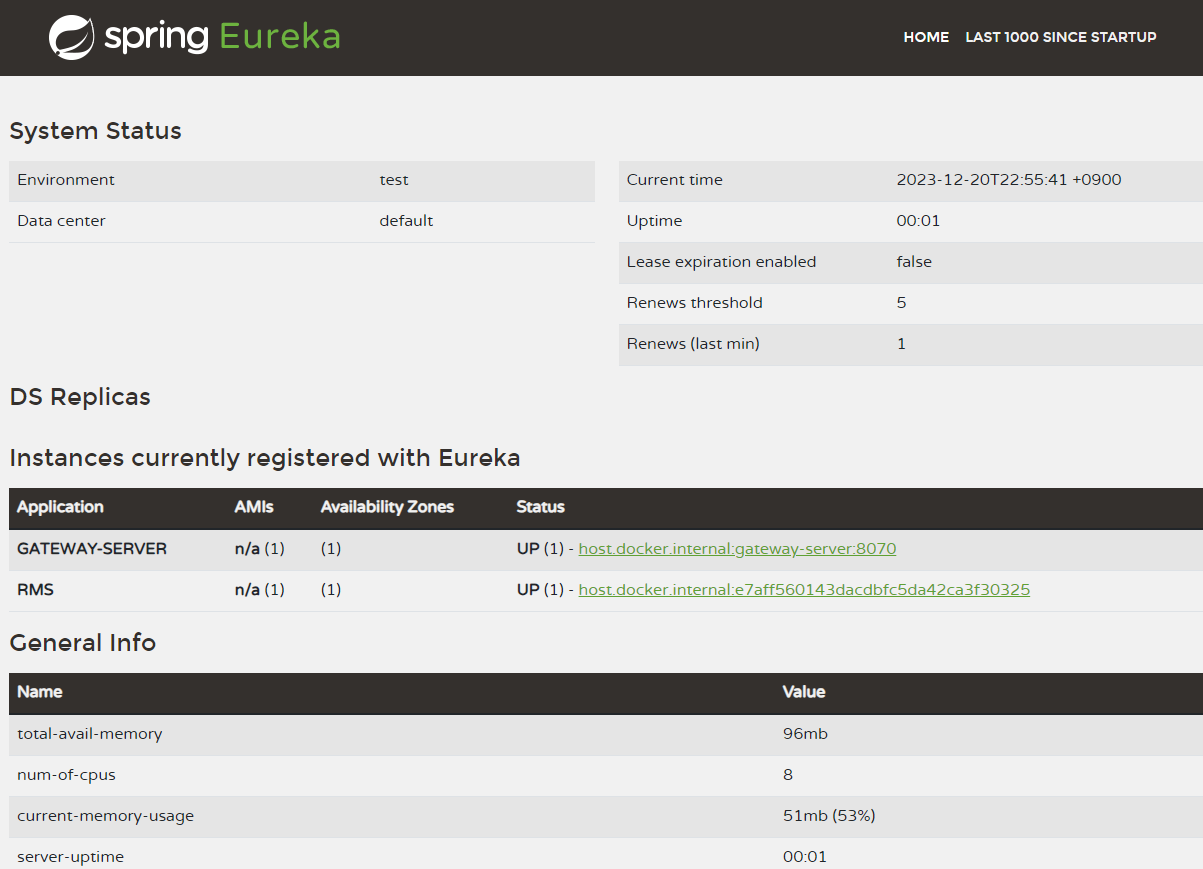
포트와 name을 설정한 gateway-server는
떡하니 gateway-server:8070으로 뜨는데
RMS 서버는 e7aff560143dac.... 로 뜨는걸 보면 이쪽도 좀 수상하긴 해서
config-server의 rms-local.yml 파일에서
eureka.instance.instance-id값에 들어가는 spring.cloud.client.hostname 에 값을 rms로 넣어주기도 해봤는데 그때도 역시 404였습니다..
지금은 알려주신대로 서버를 완전히 똑같이 처음부터 만들어보려고 하고 있습니다.. 어느부분을 확인해야될지 잘 모르겠습니다.ㅜ
IntelliJ IDEA 체험 만료
0
3
1
부하 테스트 시 설정 관련 질문드립니다
1
10
1
HelloSpringApplication.java 클래스 실행 오류
0
5
1
configserver 설정에러
0
6
2
build 시 에러 해결방법 공유(docker.desktop 업데이트 -> 의존성 버전 수정)
0
16
1
예외처리 3강 문의
0
17
1
챌린지 시작일 문의
0
26
0
Inner class로 Config를 지정하는 이유
0
21
1
26년2회 실기기출은 언제쯤...
0
44
2
진짜화면이랑달라서못해먹겟어요먹겟어요
0
57
1
네이버 API | '검색 - 책' API 제공 중단
0
37
2
ArticleReadService 관련 질문
0
27
1
kafka 이벤트 발행 실패 시 at-least-once를 보장하는 방법이 궁금합니다.
1
66
1
SpringCloud Gateway 연동
0
168
1
마이크로 서비스 최종정리 msa 화면 흐름도?를보고 이해되지않아 문의드립니다
0
210
1
Item-service에 접속이 안됩니다.
0
165
0
ci/cd 항목이 없습니다.
-1
302
1
config파일이 생성이 되면.. item-service 프로젝트에서..
0
190
1
제목을 입력하지않았는데 포스트맨에서 제목이 나오지 않습니다.
0
136
0
여전히 타겟을 찾을 수 없습니다..
0
343
1
wmi exporter - prometheus 연동 실패
0
533
2
스케일업 개념 관련 질문드려요
0
495
1
첫번째 MSA 설명 문서 7페이지 model 오타요
1
448
1
/actuator/refresh 가 동작하지 않습니다.
2
740
3