Just like the previous lecture, this was a lecture that explained things in an easy-to-understand way~!!
It was easy to follow because there were subtitles.
5.0
유경식
100% enrolled
It was very helpful for my learning that you explained how to use Naver and Kakao Maps easily. Since you are creating a service, you need to have basic concepts such as Javascript, jQuery, ajax, and DB.
5.0
로빈(Robin)
100% enrolled
It has been a great help in understanding and utilizing the map API.
What you will gain after the course
Building a web-based map service through the Naver Map API
Creation of markers and info windows required for basic map services
Building a coordinate upload page via Kakao API
Building a map service by integrating MongoDB and Mongoose
Clustering functionality for map service optimization
Visualization of administrative districts (provinces) and addition of events
Conquering Map Services with the Developer of Corona Map 🧭
Numerous concerns about creating map services!
"I want to create a map service, but I don't know where to start." "I want to store information about places in a database, how should I go about it?" "As the amount of data on the map increases, I need optimization. What should I do?"
Hello, I am developer Dong-hun Lee. I planned and developed Corona Map and Mask Map, which were used by 14 million people.
'Mask Map', a project that visualized pharmacy mask inventory on a map
'Corona Map,' a project that displayed the movement paths of confirmed cases using dots and lines on a map
One of the most frequent questions I received while operating the service was “I want to create a service like Corona Map, but I don't know where or how to start.” That is why I thought about creating a course, and last year, I provided a course for beginners in map services.
Thanks to the support and interest of many people, I received a lot of positive feedback despite it being my first course. Among the feedback, there were many requests to learn more diverse functions, which led me to plan and create this new course.
In this lecture, I have added more advanced content such as MongoDB, Mongoose, upload functionality, marker clustering, and administrative district visualization, and included the know-how of creating map services gained from operating Coronamap to this day. I have explained the features used in Coronamap, optimization methods, and how to utilize libraries as clearly as possible in the lecture.
I hope this will be of great help in improving your map service development skills. Thank you! :)
Why map services?
Source: Zenly Official Website
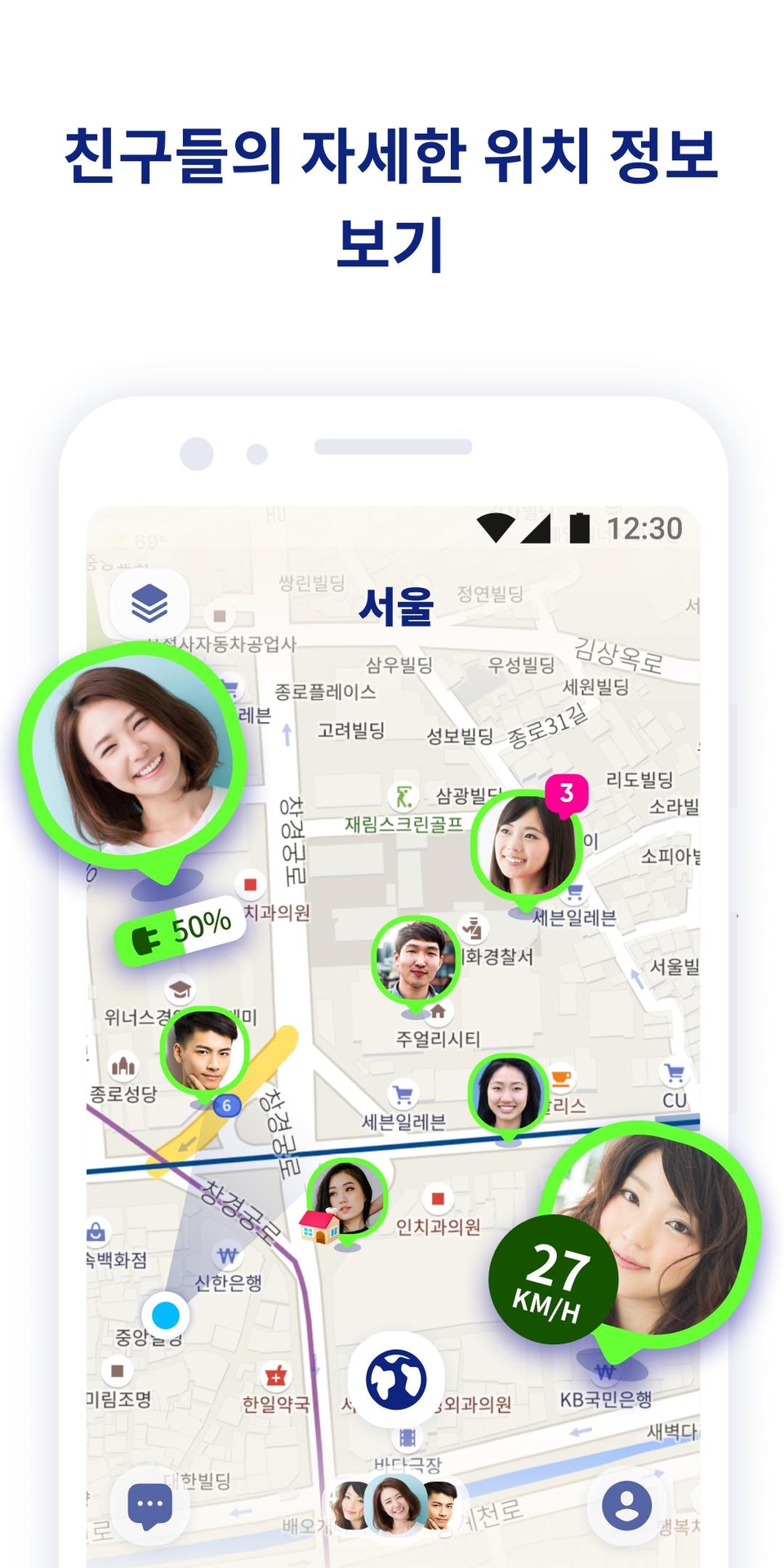
Do you know the app “Zenly - Your World”, which currently has 10 million downloads?
It is a service frequently used by so-called Gen Z, where they share their locations, battery status, and movement speed with friends on a map. Through this, Zenly has rapidly emerged as a popular new way of communicating. It can be said that today's Gen Z is very comfortable sharing their current location and movement paths with others.
Source: Zenly Official Website
This has become a current trend and continues to persist. Therefore, I expect the importance of map services that visualize location information and movement paths will also increase significantly. This is because a map is the best UI for visualizing location information.
Currently, outdoor activities are restricted due to COVID-19, but once we overcome this period, the demand for offline activities will inevitably increase, and related businesses will grow as well. It is the map UI that facilitates these offline activities by visualizing places and coordinates at a glance.
Corona Map also adopted a map UI and provided significant help to over 14 million users. As such, map services can be combined with various other services and possess explosive potential.
I recommend this course to those who want to develop their own unique strengths that set them apart from others.
What will you learn? Learning Content & Course Features
The only one in Korea! Map service creation course
MongoDB / Mongoose / Node.js / Express / Naver map API / Kakao map API
데이터를 바탕으로 마커를 생성하고 인포윈도우를 띄워주는 기능
카카오 api를 활용한 키워드 검색
MongoDB에 위치 데이터 저장
마커 클러스터링 기능
행정구역 데이터 레이어 기능
We provide lectures by selecting the essential features needed for operating a map service.
Supplementary explanations are provided to help you easily understand why and how each feature was used.
Subtitles are provided to create an environment where you can focus more on the lecture.
Section Introduction
Section 0. Course Introduction Through the project and course introduction, we explain the features you can learn in the map service we will be building.
Section 1. Initial Environment Setup This section introduces how to install and configure the initial environment required for project production. We will install and run Node.js, VS Code, and the essential packages needed for development.
Section 2. Building the Map Service Project We will run a server using Express and prepare to create the map service. We will obtain a Naver Map API key and apply it to the project.
Section 3. Creating Markers and Info Windows This section explains how to display markers and add click events to show info windows. You can practice displaying multiple markers, changing marker icons using CSS, and enhancing user convenience by adding events. Additionally, you will learn how to display information on the map using info windows.
Section 4. MongoDB와 Mongoose 활용
We introduce MongoDB, a representative NoSQL database, and explain how to host it. We will also install and run a database management tool called Compass. Additionally, we introduce and install Mongoose, an ODM package for Node.js and MongoDB, and practice creating schemas.
Section 5. Setting up the Initial Environment for the Upload Feature We will implement a keyword search function using the Kakao API and set up the initial environment for the upload feature by adding a function to display the results on a map.
Section 6. Finishing the Upload Function Learn how to store keyword search result data in MongoDB and display it on a map. Build an upload server while testing communication with Postman.
Section 7. Implementing Marker Clustering We will introduce and implement the marker clustering feature, which is one of the ways to optimize map services. When there is a large amount of data to be displayed on a map service, the clustering feature allows you to group and show them together.
Section 8. Displaying Administrative District (Province) Data Layers We introduce how to visualize divisions by administrative districts. Additionally, we will implement features to change the color of each district and display tooltips by adding events for when a district is clicked, or when the mouse hovers over or leaves the area.
Frequently Asked Questions
Q. To what level of depth does the course cover?
This course will provide a broad spectrum of content, ranging from the basics of creating map services to more advanced topics. Therefore, the difficulty level ranges from beginner to intermediate.
Q. Is there a reason why you used both the Naver API and the Kakao API?
This is because each has its own strengths, and I want to make the most of them. I believe the Naver Maps API is well-equipped with additional features and optimization, while the Kakao API offers excellent performance for keyword search functions. Therefore, I intend to adopt both to maximize the advantages of each.
Q. Can non-majors take this course?
Of course it is possible. However, due to the nature of map services, a lot of JavaScript is used, so basic knowledge may be required. Therefore, if you lack relevant knowledge, I recommend taking the course after acquiring basic knowledge of HTML, CSS, and JS through the roadmap provided in this course.
Q. What is the difference from the previous lecture?
The previous course, 'Creating a Map Service with a Coronamap Developer', was an introductory course for map service production!! If you only want to learn basic functions such as simply displaying a map or showing markers, I recommend taking the previous course. This course covers beginner to intermediate topics such as server communication, data handling through MongoDB and Mongoose, marker clustering, Ajax, and displaying data layers. Therefore, I recommend it to those who want to learn more advanced features.
If you want to start building a map service from the absolute basics?
Recommended for these people
Who is this course right for?
Those who want to try creating a map service like Corona Map
Those who want to use map-related APIs but don't know how to go about it
Those who want to create a map service integrated with a database
Those who want to learn about the various features of map services
I planned and developed the original Corona Map, which surpassed 44 million views, and I continue to operate services like Mask Map and Corona Me to resolve inconveniences for many users.
Currently, I have founded a small startup and am working hard as the CTO.
It was very helpful for my learning that you explained how to use Naver and Kakao Maps easily. Since you are creating a service, you need to have basic concepts such as Javascript, jQuery, ajax, and DB.
Just like the previous lecture, this was a lecture that explained things in an easy-to-understand way~!!
It was easy to follow because there were subtitles.
The concept of the lecture was really good~
But there was almost no detailed lecture content related to Map API~
It seemed like a lecture that was just following the code.
The parts that were lacking were personally supplemented to some extent by following the official Map documentation~
But the official documentation also includes Jquery, so...
In order to fully understand and use the codes used in this lecture,
I think I would have to invest time and study the MAP API provided by Naver and Kakao on my own to be able to follow along.
And because it was called Corona Map~
I thought it would be a lecture on displaying Corona-related data on a map,
But it was a basic MAP lecture that simply searched the map, created a marker, and displayed it on the map.
After finishing it~
The title was^^ With Corona Map Developers~~
It wasn't about creating a Corona Map service~
I'm afraid to write an honest review... It's a lecture that ends after following along... No, it's hard to follow. ㅠㅠ. I'm leaving this review for the choice of other students. Really... It's a waste of money and time.. In the end, that's why I have no choice but to listen to it all.... This is the only lecture that can renew my dark history of taking the lecture. (Instructor. You should lower the price. Or make it free. If you compare it to other guidance-related lectures... You won't think I'm being harsh. https://www.inflearn.com/course/%ED%8C%8C%EC%9D%B4%EC%8D%AC-%ED%8F%B4%EB%A6%AC%EC%9B%80-%EC%A7%80%EB%8F%84%EC%84%9C%EB%B9%84%EC%8A%A4#curriculum)

























![Making [R shiny app] as told by DadCourse Thumbnail](https://cdn.inflearn.com/wp-content/uploads/rshiny1.jpg?w=420)