Photoshop design for Woody's YouTube channel operation
Design study? “Why go to an academy? Let’s study on our own with Woody!”
Did you find it helpful today? Then, please give Woody a boost by subscribing, liking, and clicking the notification button 😍
Until the day you become a practical designer, Rolls Story Design Institute will always be with you :)
I like it because it's explained so well and easily.
5.0
ZiK production
52% enrolled
It's well explained and easy to understand.
5.0
빠른 송어
100% enrolled
It was a very informative lecture :)
What you will gain after the course
Photoshop
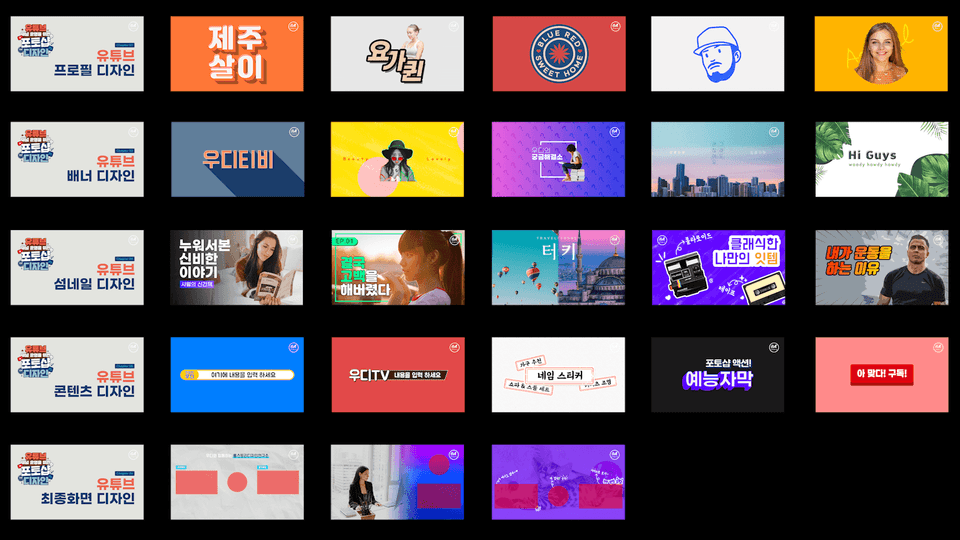
YouTube thumbnail
YouTube Banner
YouTube Profile
YouTube final screen
Entertainment subtitles
YouTube design, don't feel difficult! Learn how to decorate your YouTube channel from start to finish with Roll Story Design Lab~
Design has the power to change the world! The design just felt difficult... Now, let's get started easily with Woody from Roll Story Design Lab :)
🗒 Course Introduction
I'm currently teaching a design course on YouTube under the name 'Roll Story Design Lab'! Inflearn I share my knowledge to help you too :)
"I want to do YouTube too.. but how do I design it??" People who want to decorate their own YouTube channel nicely, gather here~ From YouTube profiles/banners/thumbnails/entertainment subtitles/final screens... We introduce all design decoration methods related to YouTube design with Photoshop!
All of these courses are FREE! We even provide example files :)
🙌 Tools covered here
Adobe Photoshop
The usage environment for this course is Adobe CC and macOS (Apple Computer).
Create all the designs you need to run your YouTube channel using Photoshop
Q. Do I need a book to study? A. It's easier to study if you have a book, but even without it, you can learn through lectures~
Q. How can I get example files? A. If you expand the 'See More' section under each video uploaded to the Roll Story Design Lab YouTube channel, you will find a download link!
Q. Can non-majors learn it too? A. Of course! There are so many things you can do if you learn design! I always teach from the basics with the mindset of teaching someone who is learning for the first time.
Q. Are there any special advantages to this course? A. Mr. Woody teaches it very easily and without making it boring ^~^ Best of all, all the courses come with example files so you can follow along yourself!
Q. What program does this course use? A. We will create all the designs related to decorating a YouTube channel using Photoshop made by Adobe. Of course, we will also teach you how to apply the completed results to actual YouTube!
Q. What would you like to say to your students? A. This is not a course that only those who are interested in YouTube should learn! By learning the overall design related to decorating a YouTube channel one by one, you can apply it to other places. For example, through the course on creating a YouTube profile, you can make it into a company logo, and through the course on creating a YouTube banner, you can use it as a web banner :)
For those who are new to Photoshop, this book provides solid explanations from the basics, so I recommend it to those who want to learn Photoshop systematically and enjoyably.
Let's study hard together and do a good job at designing! All of this is free!