Creating charts using Excel 2013 functions and forms
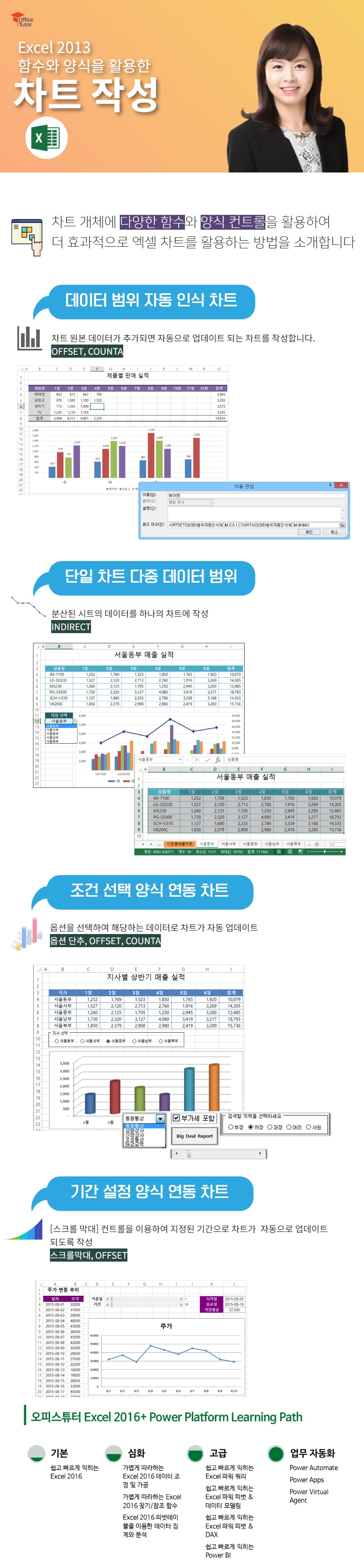
This course is for those who want to create charts more effectively. It introduces how to use various functions and form controls on the chart object to utilize charts more effectively.
In addition to the general chart creation methods, I was able to learn how to use functions and form controls, and it was helpful to learn how to automatically change the data range in the chart with the offset function.
5.0
김승일
100% enrolled
It helped me a lot.
What you will gain after the course
How to effectively use charts by utilizing various functions and form controls in Excel
How to create dynamic charts with various conditions
Excel, use it more effectively by creating charts!
Microsoft MVP (Data Platform, 2018-present)
✨ Career
- Full-time instructor at New Horizon Korea
Headquarters English textbook translation and production, dedicated to corporate training
- PJ Holdings Education Center Education Team Leader
Instructor management, new course planning, etc.
- Dream Presentation Education Planning Team Leader
Presentation production planning, training planning/management, etc.
- OfficeTutor BPA team instructors and freelance instructors
💻 Development experience
- Eulji Hospital: Patient Management Program
- DNV Korea: Process Management Program
- Civa Special Chemical: Accounting Management Program
- Medtronics: Process Management Program
- L'Oréal Korea: Sales Management Program
- Daehan Swiss Chemical: Accounting Management Program
- Lafarge Halla Cement: Project Management
- Lotte Hotel: Education Management Program
- SK Corporation: Participation in groupware development project (Office 2007 part)
🏫 Lectures and books
- Baeum.com: MS-Access (Intermediate) Course
- Chung-Ang University: Visual Basic lecture
Office Tutor: Developing a Course to Maximize Excel Chart Utilization
- SK Corporation:Writing in-house textbooks for Excel 2007, PowerPoint 2007, and Word 2007
- Office Tutor: Word 2007 Course Development
- Digital Books: PowerPoint 2007 textbook in progress
Recommended for these people
Who is this course right for?
People who use Excel chart functions a lot in their work
For those who want to use chart objects more effectively
Founded in 1999 for the development of content and training for Microsoft Office-related programs, OfficeTutor is dedicated to disseminating the know-how accumulated by top experts for each Office product (Microsoft MVPs) to Office users.
The website operated by OfficeTutor (officetutor365.com) has built a knowledge portal for Office users with over 300,000 pages of free courses, Q&A, and Microsoft Office online video courses accumulated over the past 20 years, and regularly holds various educational programs every month through the study membership program 'Monthly Copilot Club' (CopilotClub.kr) for Microsoft 365 Champions.
In addition to the general chart creation methods, I was able to learn how to use functions and form controls, and it was helpful to learn how to automatically change the data range in the chart with the offset function.








![[Pass ITQ Excel A in One Go] in 3 daysCourse Thumbnail](https://cdn.inflearn.com/public/courses/329652/cover/b44e11b6-a47e-4993-86ea-a85da9836bb5/329652-eng.png?w=420)