
inflearn logo

Terraform with Architecture (Terraform Modules)

This covers the process of creating AWS resources based on AWS InfraArchitecture using Terraform modules.

(4.5) 4 reviews

57 learners

Level Basic

Course period Unlimited

AWS
AWS
Terraform
Terraform
infrastructure-as-a-code
AWS
AWS
Terraform
Terraform
infrastructure-as-a-code

What you will gain after the course

  • Terraform

  • InfraArchitecture

  • iac

Building AWS Infrastructure Using Terraform!

This course teaches you how to build AWS infrastructure using Terraform.
Terraform is a tool that allows you to manage infrastructure as code, making it highly useful for infrastructure automation and management in cloud environments. This course is designed for everyone from beginners to novices, and through hands-on practice, you can learn everything from Terraform’s basic concepts to its various features.

The course primarily uses Terraform modules to create and manage AWS infrastructure. 🙂

KRAFTON (Krafton)

Hyundai AutoEver (Entry-Level Hire)

Build infrastructure with code while creating and managing the architecture alongside it! 😀

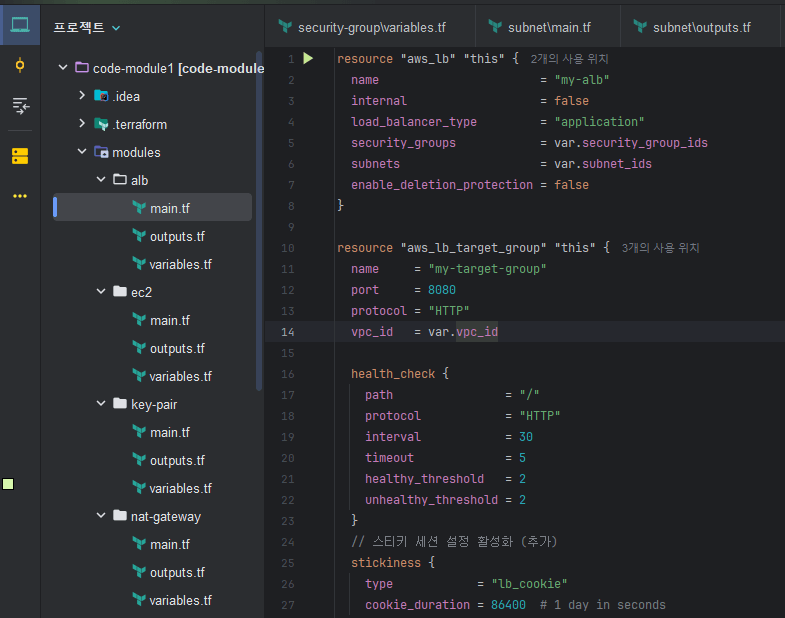
Writing Terraform code

Terraform code defines infrastructure as code, enabling cloud resources based on infrastructure-as-code to be automatically created, managed, updated, and deleted.

You will directly write and practice the relevant content to observe the resource creation process and application operation firsthand.

Writing code using an IDE

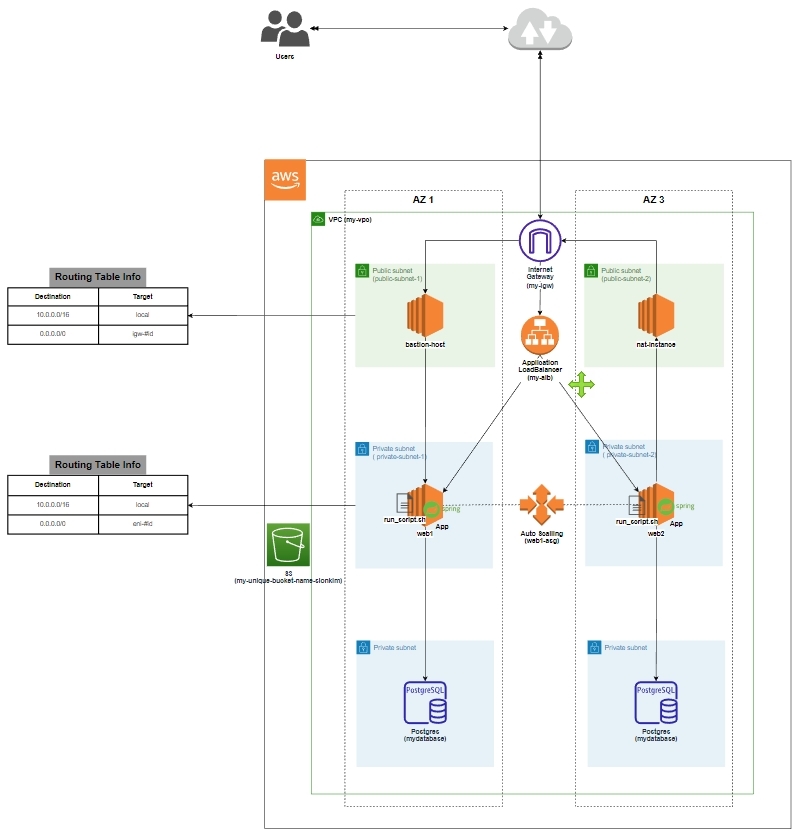
Draw the architecture yourself and manage the infrastructure resources created.

Create an infrastructure architecture for managing cloud-based infrastructure resources generated by Terraform code.

Managing infrastructure resources generated by Terraform code through an architectural structure offers various advantages, including improved visibility, easier problem resolution, change management, and efficient design.

Writing an Infra Architecture

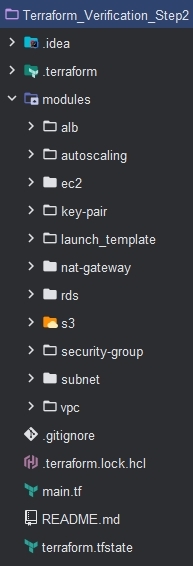
Module-Based Resource Creation for Efficient Infrastructure Configuration

Module: Creating module-based resources in Terraform is highly recommended. Modules enable efficient infrastructure management through code reusability, ease of management, and structured organization. They also make it easier to manage and maintain complex infrastructure configurations.

Root module: The module used by default when running a Terraform configuration, located in the project's top-level directory.

Submodule: A module called by the root module that encapsulates specific functionality or resources for reuse.

Variables and outputs: Modules can exchange data with the outside through the variables.tf and outputs.tf files, enabling data transfer between modules.

Advantages of Writing Module-Based Terraform Code

Reusability: Using modules allows you to reuse the same infrastructure configuration across multiple projects or environments. This reduces code duplication and makes maintenance easier.

Structure: Using modules makes your code more structured and organized. This improves code readability and facilitates collaboration between teams.

Manageability: Using modules allows you to manage specific parts of your infrastructure independently. For example, you can change the VPC configuration without affecting other infrastructure configurations.

Testability: You can test the infrastructure at the module level, minimizing the impact of changes on the overall infrastructure.

Writing module-based code

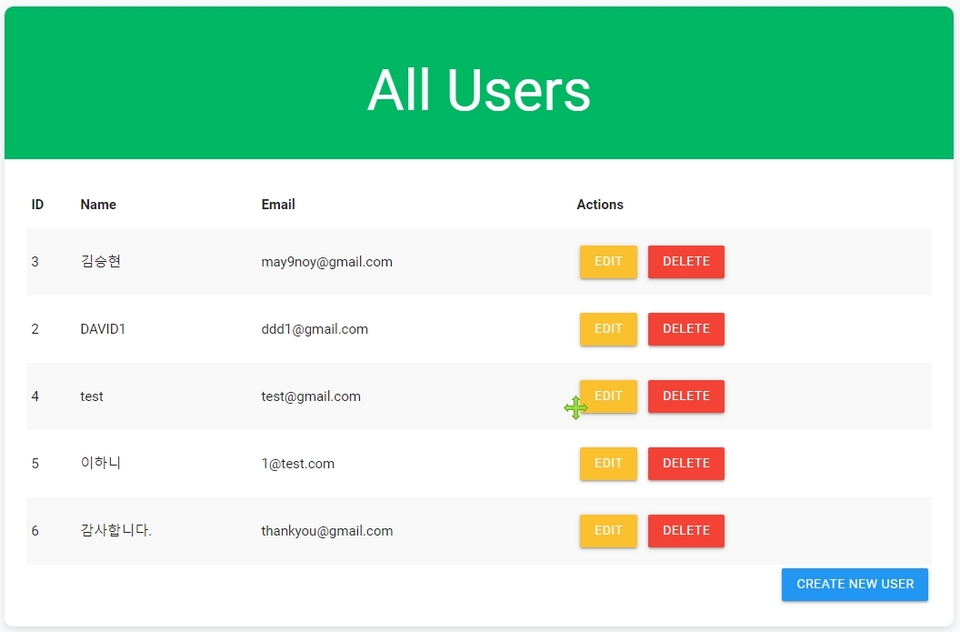
Run an executable sample application on the infrastructure created with Terraform Code, then conduct testing 😆

Deploy and run an application on AWS infrastructure created from Terraform code, then test it

Run the CRUD example application developed with Spring Boot, then
run it on the infrastructure created with Terraform

Check the database connection: Verify that the application connects properly to the RDS database.

Verify network connectivity: Confirm that the application can communicate properly within the VPC and subnet.

Application functionality check: Verify that the application's main features are working properly.

Notes Before Taking the Course

Lecture speed

  • I speak relatively slowly, so it will be much easier to watch if you set the video speed to 1.2–1.5x.

Sharing a personal e-mail address

  • If you have any personal questions, please post them on the Q&A board or contact me at the e-mail address below.

    I’ll do my best to respond as quickly as possible. 😀

  • may9noy@gmail.com

Practice Environment

  • Operating System and Version (OS): Windows

  • Tools Used: IntelliJ IDEA (recommended), Visual Studio Code

  • Database: PostgreSQL (AWS RDS)

  • Cloud service: AWS (Amazon Web Services)

  • Other tools: Terraform, Draw.io, pgAdmin

Example Application

  • Programming language: Java

  • Framework: Spring Boot

  • Build tool: Gradle

  • Database: PostgreSQL (AWS RDS), H2 (for testing)

Learning Materials

  • Learning materials are provided through the learning materials repository. 😀

Prerequisites and Notes

  • Spring Boot (Basic knowledge is helpful)

  • AWS account (Free Tier available)

  • Basic knowledge of cloud and infrastructure

  • GitHub account and Git installation


This environment will allow you to smoothly complete all the hands-on exercises covered in the course. 😃

Recommended for
these people

Who is this course right for?

  • Those who want to design InfraArchitecture using Terraform

  • Those who want to control infrastructure using Terraform

  • Efficient Configuration Using Terraform Modules

Need to know before starting?

  • Experience configuring AWS-based infrastructure

Hello
This is may9noy

Career Verified

2,774

Learners

328

Reviews

26

Answers

4.4

Rating

11

Courses

Hello. 😄

Sometimes I get exhausted from burnout due to childcare and work, 😅

I am an IT worker living each day with gratitude and a joyful heart. 😅


Personal Blog : https://may9noy.tistory.com

GitHub : https://github.com/Nanninggu


I wish you a life and home always filled with good things. 😀

More

Curriculum

All

68 lectures ∙ (6hr 57min)

Course Materials:

Lecture resources
Published: 
Last updated: 

Reviews

All

4 reviews

4.5

4 reviews

  • kyw0201088065님의 프로필 이미지
    kyw0201088065

    Reviews 1

    ∙

    Average Rating 5.0

    Edited

    5

    35% enrolled

    I have taken more than 10 courses on Inflearn, and judging by my experience so far, this is a very kind and helpful course. You might not understand everything at first, but if you keep following along, the instructor explains things again, so you will eventually be able to understand. It covers a significant amount of content for this price, so I highly recommend it to anyone who wants to learn Terraform!

    • may9noy
      Instructor

      Thank you so much for your course review. I wish you nothing but good things always. 😀

  • doroo03253654님의 프로필 이미지
    doroo03253654

    Reviews 2

    ∙

    Average Rating 5.0

    5

    10% enrolled

    It was very beneficial to systematically learn how to create a 3-tier AWS infrastructure using Terraform. The practice was balanced, which was a great help in applying it to real work.

    • may9noy
      Instructor

      Thank you for the course review. 😀

  • cglee2109님의 프로필 이미지
    cglee2109

    Reviews 4

    ∙

    Average Rating 5.0

    5

    31% enrolled

    • may9noy
      Instructor

      Thank you so much for your course review. I hope you’re always blessed with wonderful things. 😀

  • garam427027님의 프로필 이미지
    garam427027

    Reviews 7

    ∙

    Average Rating 4.7

    3

    19% enrolled

    • may9noy
      Instructor

      Thank you for the course review. ^^

may9noy's other courses

Check out other courses by the instructor!

Similar courses

Explore other courses in the same field!

25% off for new members

$28.50

25%

$38.50