강의

멘토링

커뮤니티

BEST
Programming

/

Programming Tool/Software

Chrome Developer Tools that show you what you know

This is a Chrome Developer Tools tutorial for front-end developers. It covers various features and tips that are useful when developing.

(4.8) 76 reviews

2,666 learners

개발자도구
크롬개발자도구
Google Chrome
Chrome DevTools

Reviews from Early Learners

What you will gain after the course

  • Chrome Developer Tools

  • Web Development Basics

With tons of features in developer tools
Grow into a developer with a deep understanding of the web! 🌱

Official Developer Tools Documentation

Check out the Q&A! ✍️

Q. Do I need to know a development language to take the course?

Since this course is related to developer tools used in development, you can take it even if you do not know the development language.

Q. Do you provide a Windows/MacOS development environment?

Since the training is conducted in Chrome, you can take the course regardless of your OS.

Learn this 📖

  • We've included the basic features of developer tools that front-end developers need to know, along with various practical tips!
  • By learning the features of numerous developer tools, you can grow into a developer with a deep understanding of pages.
  • You can learn various functions such as web page debugging, performance analysis, and HTML/CSS editing.
  • Official Developer Tools documentation: https://developer.chrome.com/docs/devtools/

Recommended for these people! 🙆‍♀️

  • Anyone interested in web development
  • Developers who want to learn features that can be utilized in development work

Lecture Features ✨

  • You can learn how to use Chrome Developer Tools.
  • You can learn about various functions that can be utilized in front-end practice.

What you'll learn 📚

Section 0. Developer Tools

  1. Run
  2. Change language
  3. Show ruler
  4. Using the Elements tab
  5. Edit HTML
  6. Edit CSS
  7. Color Picker Tool
  8. Check out the virtual class
  9. Check the box model
  10. Disable JavaScript
  11. Capture the screen
  12. Device Mode
  13. Using the console
  14. Console Notes (let, const declaration)
  15. Adjust video speed
  16. local storage
  17. network
  18. Lighthouse
  19. Performance
  20. Debugging

Recommended for
these people

Who is this course right for?

  • Anyone interested in web development

  • Frontend Developer

Hello
This is

104,727

Learners

2,704

Reviews

163

Answers

4.8

Rating

80

Courses

소개 이미지.png.webp


🧙‍♂ 안녕하세요. 제주코딩베이스캠프입니다.

제주코딩베이스캠프란?


제주에서 가장 핫한 개발자들이 모여 작당한 부트캠프! 열정있는 청년들에게 열정만큼 성장할 수 있는 기회를 제공합니다!

제주코딩베이스캠프는 제주에서 가장 큰 ICT 교육 행사로 카카오, 구름, 제주산학융합원 등 기업 지자체와 함께 진행하고 있습니다.


서비스 구축 성공
경험을 통해 이 취업난 시대에 자신감, 자존감, 성취감, 그리고 자립할 수 있는 능력을 배양해 보세요!

으라차차 청춘 화이팅입니다! 😀


︎ 제주코딩베이스캠프 로드맵

제코베 로드맵.png.webp


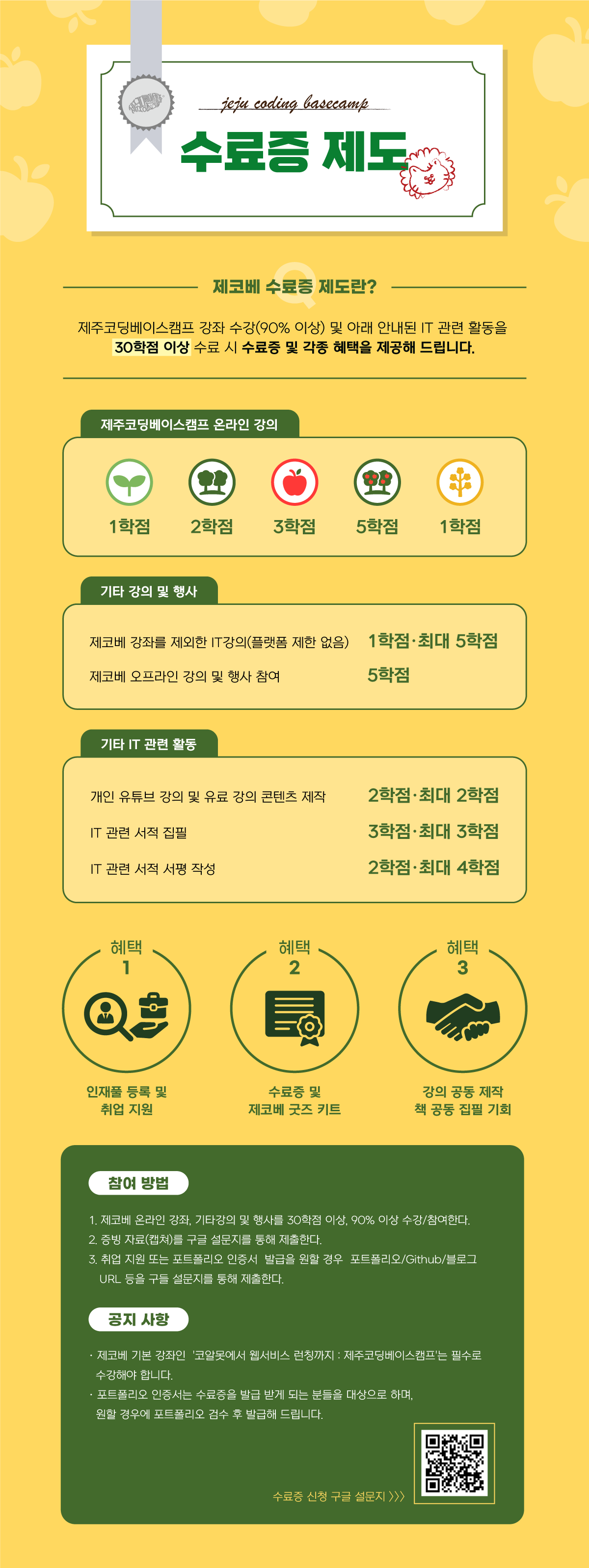
︎ 제주코딩베이스캠프 수료증 제도


- 1.png.webp


Curriculum

All

20 lectures ∙ (1hr 16min)

Published: 
Last updated: 

Reviews

All

76 reviews

4.8

76 reviews

  • 하람님의 프로필 이미지
    하람

    Reviews 5

    Average Rating 5.0

    5

    100% enrolled

    I think you did a great job explaining the Chrome developer tools in a video, which is very helpful to know :) It must not have been an easy decision to offer it for free, even if it was a short lecture, so thank you so much!

    • ubithus님의 프로필 이미지
      ubithus

      Reviews 6

      Average Rating 5.0

      5

      90% enrolled

      This is a great tip!!!

      • systemk님의 프로필 이미지
        systemk

        Reviews 3

        Average Rating 5.0

        5

        95% enrolled

        It's nice that the voice doesn't get sleepy. The fun feature is awesome.

        • onlystudy390582님의 프로필 이미지
          onlystudy390582

          Reviews 18

          Average Rating 4.9

          5

          100% enrolled

          Thank you haha

          • ujdnfjj05010045님의 프로필 이미지
            ujdnfjj05010045

            Reviews 2

            Average Rating 5.0

            5

            100% enrolled

            It explains simple things using Chrome developer tools. If you want to learn about specific functions in detail, you need to study individually, but since the lecture does not require a long time, it seems okay to listen to the lecture if you want to know about simple functions.

            $8.80

            jejucoding's other courses

            Check out other courses by the instructor!