This course will teach you the concepts of server and desktop virtualization and immediately applicable technologies through hands-on practice with Microsoft Hyper-V.
It explains the overall functions of Hyper V in an easy and concise manner. It seems to be suitable for those who want to quickly learn how to use it rather than the internal structure or principles. It seems to be a good starting point for those who want to dig deeper into Hyper V. I enjoyed it.
5.0
y2lee77
50% enrolled
Thank you for explaining the necessary parts well, so I was able to apply it quickly.
5.0
박동군
100% enrolled
Thank you for the great lecture.
What you will gain after the course
How to install, configure, and operate Microsoft Hyper-V
Virtualization concept
Essential learning for server administrators! Learn the fundamentals of virtualization through hands-on practice !
What is Virtualization? 📝
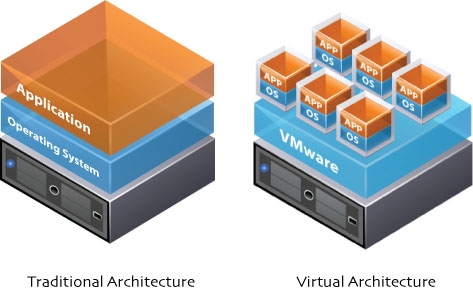
Virtualization is a software technology that virtualizes hardware resources and creates virtual computers. This technology allows multiple operating systems and applications to run on a single server. This virtualization technology offers numerous benefits, including reduced corporate IT infrastructure management costs, easier application deployment, and the ability to leverage and integrate existing servers .
Why you should learn ✒️
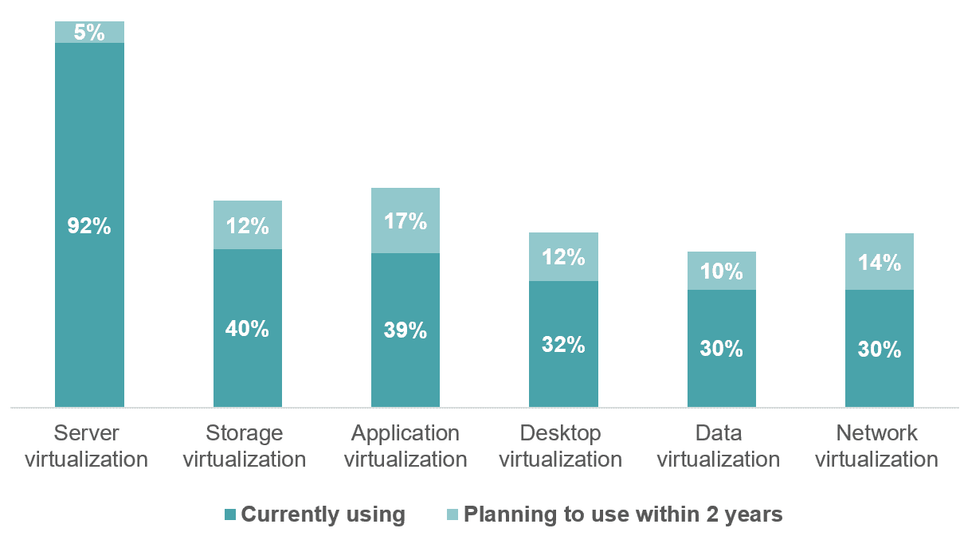
According to market research, more than 90% of servers are virtualized . As such, virtualization technology has become an essential skill for data center server managers. Storage, applications, desktops, data, and networks are also increasingly transitioning to virtualization. This course will help you build a solid foundation in virtualization by understanding the concepts of virtualization and how to build actual virtual machines .
What you will learn in this course ✏️
How to Install Microsoft Hyper-V
Understanding Virtualization
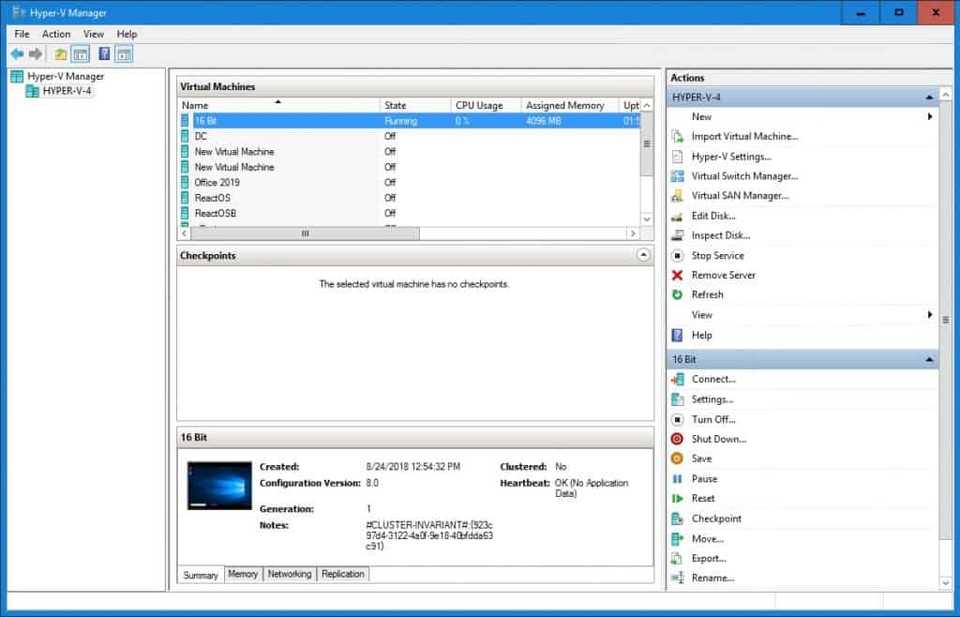
How to create a virtual machine
How to install an OS on a virtual machine
Understanding Virtual Switch Types and How to Set Them Up
How to set up a Hyper-V host
How to set up a Hyper-V virtual machine
How to set up advanced network settings
Copy and move virtual machines
Virtual Machine Migration
Lecture Features 💡
The course is structured so that you can learn most of the skills needed to utilize Hyper-V through hands-on practice during a short lecture period.
Tools covered here 🧰
This course requires Windows 10 Pro or higher. If you're using a Home version of the OS, the course includes instructions on how to download a Windows 10 Enterprise trial version. You can temporarily install that version and take the course.
It explains the overall functions of Hyper V in an easy and concise manner. It seems to be suitable for those who want to quickly learn how to use it rather than the internal structure or principles. It seems to be a good starting point for those who want to dig deeper into Hyper V. I enjoyed it.