강의

멘토링

커뮤니티

NEW
Security & Network

/

System

"Linux Permissions Masterclass – From Basics to Practice, Security, and Service Operations"

Learn about Permission, the most fundamental and important concept in Linux. This course covers everything from the basic structure of permissions that even beginners can understand, to special permissions (Set-UID, Set-GID, Sticky-bit) and ACL (Access Control List) that practitioners must know, step by step. Beginners can accurately understand the principles of permissions, and practitioners can acquire know-how for safe permission settings and management in actual server operations. File and directory permission control is the starting point of Linux security. Master the entire process of permission management with this one course!

6 learners are taking this course

  • linuxmasternet
실습 중심
Linux

What you will gain after the course

  • You can understand and manage the Linux file and directory permission system.

  • You can set and utilize special permissions such as Set-UID, Set-GID, and Sticky-bit.

  • Linux ACL (Access Control List) enables fine-grained permission control.

  • You can directly apply security settings for permissions on a secure Linux server in a production environment.

This course is designed not as a simple lecture that ends at a basic conceptual level of Linux filesystem permission structure, but as a practice-oriented learning process that enables you to resolve permission issues, security risks, and service failures that occur in actual production environments.

While permissions are fundamental to Linux server operations, at the same time, a single misconfiguration can compromise the stability of your entire service and become a direct cause of security incidents. This course systematically blocks these risks in advance and guides students step by step to a level where they can accurately configure, interpret, and diagnose permission structures through systematic understanding.

Linux Permissions cannot be solved simply by memorizing the three letters rwx.
There are many factors to consider in actual environments, such as file owners and groups, ACL, special permissions (SetUID/SetGID/Sticky-Bit), system accounts used by service processes, and directory permissions accessed by DBMS and Web Applications. Only by accurately understanding these can you satisfy both operational and security requirements.

This course covers the following topics in depth, with each session structured around hands-on practice so that anyone can learn by doing.

This course aims to systematically guide students to logically interpret this complex permission system and reach a level where they can independently solve practical problems.

Additionally, for practice convenience, the course provides an installation script that automatically sets up the Oracle 11g XE, Apache Tomcat, and JSP web application environment, as well as a 300-page PDF textbook that systematically organizes all course content.
(However, the PDF is subject to copyright protection, so external sharing and distribution are prohibited, and it may only be used for individual learning purposes by enrolled students.)

This course is designed to provide practical help to everyone who needs to build a deep understanding of Linux permissions, from beginners to server administrators, security personnel, and DevOps engineers.


Section 1. Setting Up the Practice Environment

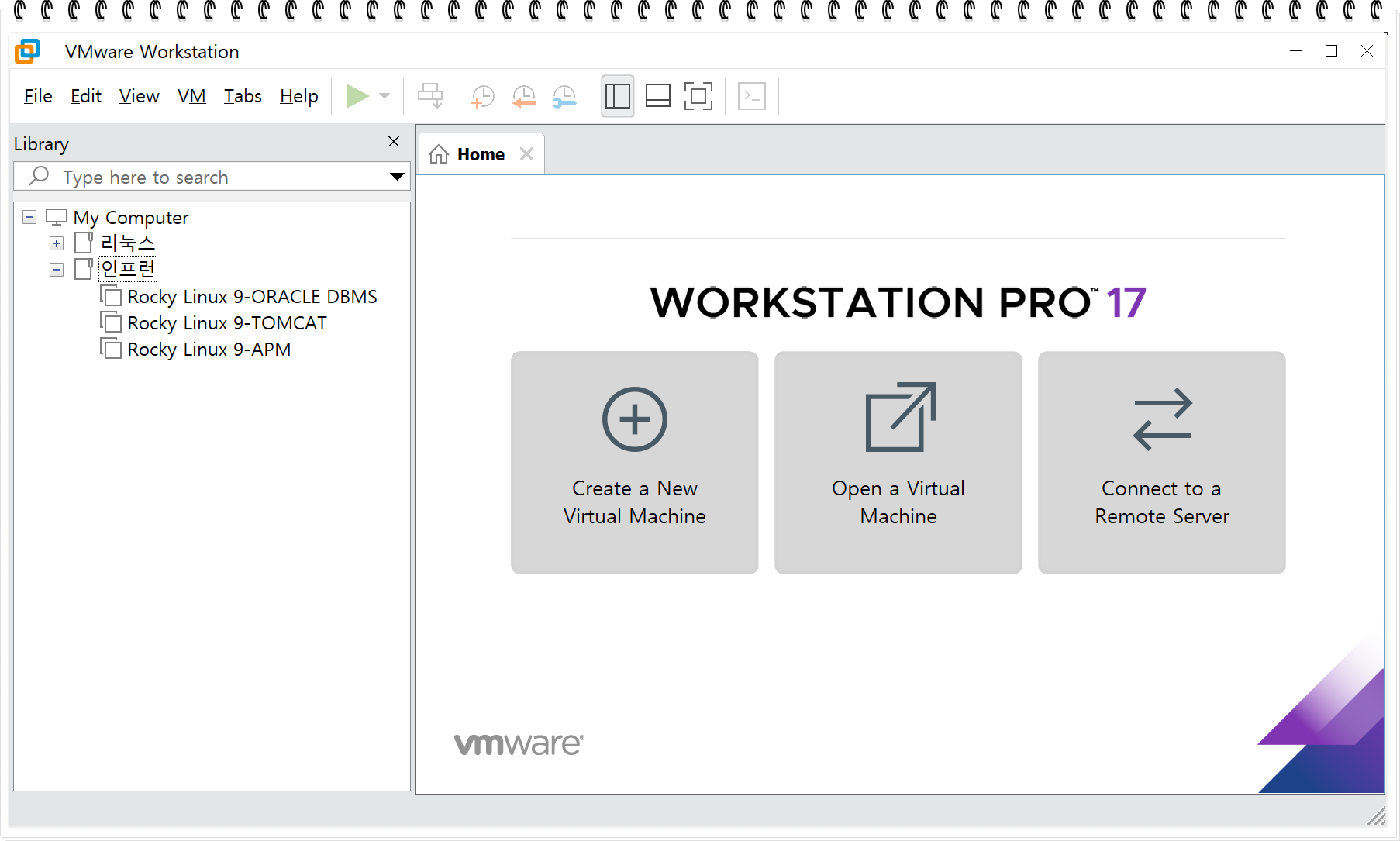
We start by systematically setting up the virtualization environment, OS installation, and terminal access environment that are essential for building permission analysis and services.

We install distributions widely used in actual enterprise environments such as Rocky Linux 9 and Ubuntu 24.04, and establish a foundation so that students can apply the same permission principles on any OS.

Learning Content

  • Course Overview and Overall Learning Objectives Explanation

  • VMware Workstation-Based Virtualization Environment Configuration

  • Rocky Linux 9 & Ubuntu 24.04 Installation Practice

  • Quick Installation and Initial Setup

  • MobaXterm / SSH Terminal Connection Environment Setup

This section serves as the foundation for the entire course, and all subsequent permission exercises will be performed in a Rocky Linux 9 environment.
Therefore, the virtual machines, accounts, services, and directory structures built in this stage will serve as the common foundation for all subsequent learning, including permission analysis, ACL exercises, and service-specific permission configurations.


Section 2. Users and Groups

In this section, you will systematically understand the User and Group structure that forms the core of Linux permissions. We will not only practice account creation, deletion, and modification commands but also explain the structure of the /etc/passwd and /etc/shadow files step by step. In particular, the /etc/shadow file stores encrypted (hashed) password information that should not be exposed to regular users. We will cover how these hash values are generated and verified, how the crypt() function-based SHA512 hash algorithm works, and what role the salt value plays in authentication security.

Additionally, it explains why the /etc/shadow file's access permissions are restricted to root only and what kind of security incidents could occur if the /etc/shadow file is exposed.

Learning Content

  • Understanding User and Group Structure

  • # useradd / userdel / usermod Command Practice

  • # UID/GID Structure Analysis 199987

  • The difference between system accounts and regular accounts

  • # Handling Home Directory When Deleting an Account

  • # Analysis of /etc/passwd File Field Structure The /etc/passwd file is a text file that contains essential information about user accounts on Unix/Linux systems. Each line in the file represents one user account and consists of seven fields separated by colons (:). ## Field Structure Each line follows this format: ``` username:password:UID:GID:GECOS:home

  • Analysis of /etc/shadow File Field Structure

The content you will gain through this section is

  • The Principles of Login Authentication

  • Password Hash Generation Principles

  • /etc/shadow Security Model

  • How Accounts, Groups, and UID/GID Affect Permission Interpretation

  • User Creation, Deletion, and Detailed Management


You will be able to clearly understand the fields.


Section 3. Linux Permissions 1 – Basic Structure of Permissions

This section explains the elements that make up permissions not through simple descriptions, but by focusing on actual operational principles, helping you logically interpret permission decisions. Through this section, you will gain a solid understanding of how permissions are interpreted and applied within the file system.

Learning Content

  • # File Ownership and Permission Structure Prompt tokens: 1715 Response tokens: 11 Total tokens: 1726 Remaining budget: 198274 tokens

  • # How Read/Write/Execute Permissions Work

  • The Difference Between ACL (Access Control List) and Basic Permissions

  • getfacl/setfacl Practice

  • The Impact of Permissions on Service Operations

  • # Permission Change Commands chmod, chown, chgrp Practice

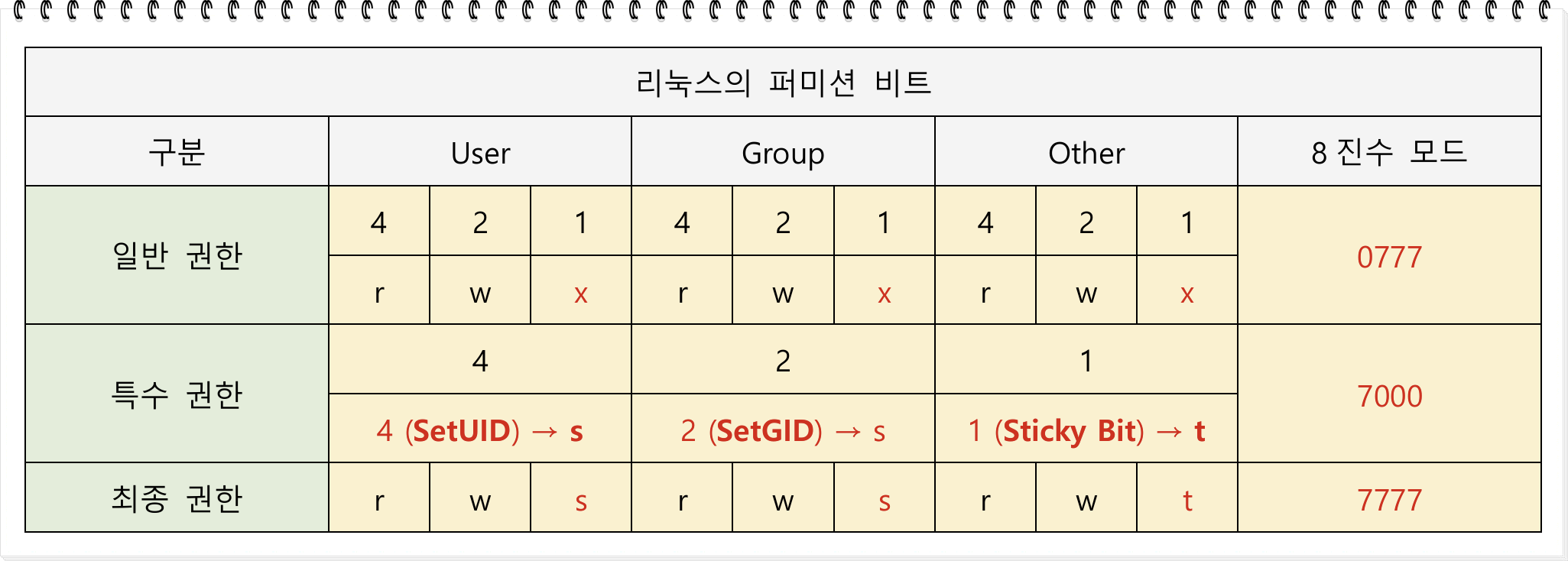
  • Introduction to the Concept and Risks of Special Permissions

  • Testing access to /etc/shadow which should not be accessible by regular accounts


Section 4. Linux Permissions 2 – Regular Permissions (r, w, x) Practice

One of the core aspects of the permission lecture is experiencing permission failure cases firsthand. For each permission, we set up actual test scenarios, compare file access results, and analyze why those results occur.

Learning Content

  • The difference in behavior depending on whether read (r) permission is present or not

  • Differences in behavior based on the presence or absence of write (w) permission

  • The difference in behavior based on the presence or absence of execute (x) permission

  • The Impact of Regular File and Directory Permissions on File Access

This is a hands-on practice section designed not for simple memorization, but to help you independently interpret common causes of malfunctions encountered during service operations.


Section 5. Linux Permissions 3 – Advanced Special Permissions (SetUID, SetGID, Sticky-Bit)

In this section, we go beyond simple conceptual explanations and conduct various hands-on exercises to deeply analyze how special permissions actually work in real systems and what security implications they have.
We take it a step further from general permission levels and cover the impact of special permissions on service operations and system security from a practical perspective.

In particular, since incorrectly configured special permissions can lead to immediate security vulnerabilities, it is very important to accurately understand their operating principles and application criteria.


Learning Content

  • # Analysis of SetUID Operation Method and Understanding the Internal Structure of the passwd Command

  • # How SetGID is Applied in Directories Practice

  • # Security Issue Scenarios That Can Occur in Environments Without Sticky-bit

  • Testing the Potential for Abuse of Programs with Special Privileges

  • The Necessity of Special Privileges in Service and Application Operations and Safe Restriction Methods

Through this section, students will accurately understand privilege escalation vulnerabilities that are frequently exploited in actual hacking and security incidents and acquire proper configuration standards for operating systems securely.


Section 6. DBMS & WEB Services and Permissions

This section goes beyond simple permission training and is an advanced course where you directly practice and understand how permissions are applied in actual service environments and how they affect service operations through DBMS and WEB applications.

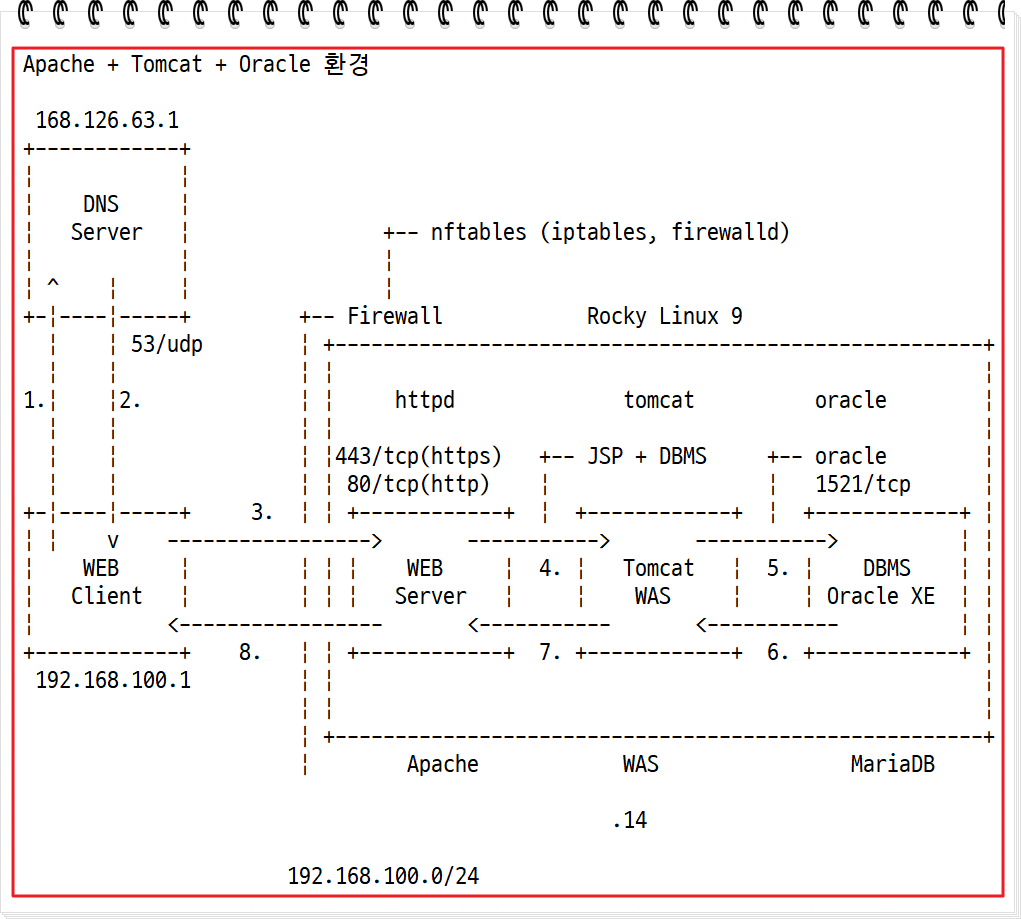
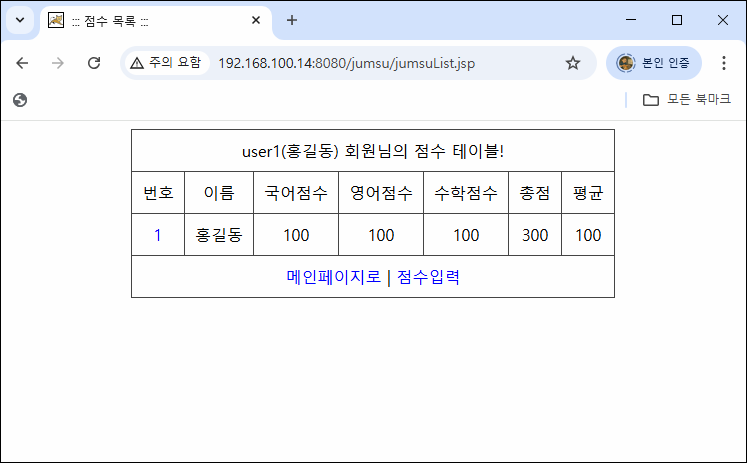
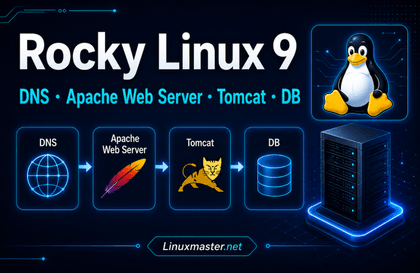
In a Rocky Linux 9 environment, you will directly install Oracle Database 11g XE and Apache Tomcat and practice with a JSP web application (jumsu program) that operates based on JDBC.
The application is distributed as a pre-builtjumsu.war file, and students will deploy this WAR file to Tomcat, then experience the entire process of directly designing and connecting the necessary tables in Oracle DB to make the features work properly.

In this process, by analyzing in detail which directories the web application accesses internally, what permissions are needed for DB connection, and which account the Tomcat process runs under and which directories require read/write permissions,
you can gain a deep understanding of how permissions affect real-world service stability.

Additionally, since installing Oracle 11g XE and Tomcat can be difficult for beginners to follow, this course also provides scripts that automate the entire installation and initial setup to help students quickly build the same environment and focus on practice.

Learning Content

  • Installing Oracle Database 11g XE on Rocky Linux 9

  • Oracle and Tomcat installation automation script provided → Simplifying repetitive deployments

  • Analysis of oradata Directory Permission Structure Where Oracle Data Files Are Stored


  • jumsu.war Web Application Deployment and Execution Procedure Practice

  • # Designing Required Tables for Oracle DB and Testing JDBC Integration


  • Safe Web Root Directory and Application Deployment Path Permission Setting Standards

Through this section, students will
experience the overall structure of how JSP web applications + Tomcat + Oracle DB work organically together and clearly understand from a practical perspective what role permissions play in this process.

This is a core section that goes beyond simple permission learning and enables you to interpret permissions from the perspective of service operations, security, and infrastructure engineering as a whole.


Section 7. Schedule Daemon Service and Permissions (Cron)

In this section, we will thoroughly cover the operational structure and permission model of Cron, an essential scheduling service for Linux server management. Rather than just simple scheduled task configuration, we will explain through hands-on practice how Cron executes with what permissions and how user-specific cron files are created and managed in /var/spool/cron.

We will also practice rsync-based backup automation, which is frequently used in server operations, and directly verify under what permission conditions automated tasks succeed or fail in actual service environments.

In particular, we will analyze the relationship between user Cron and SetUID permissions, as well as permission rights.
In this process, we will also explain in detail the creation method of the /var/spool/cron/username file and the security implications of that file's permissions.

Learning Content

  • Understanding the Structure of Cron Service and How the Scheduler Works

  • Analysis of System Cron's /etc/crontab

  • Configuring Automatic Backup Schedule Using rsync

  • # Differences and Comparison Between System Cron and User Cron

  • Analysis of the /var/spool/cron/ file structure when a user cron is created


  • Setting up Cron based on conditions (day of week/time/cycle)

Through this section, students will be able to understand not just simple schedule configuration, but also what user permissions Cron runs with and how file permissions and directory permissions affect scheduled tasks from a practical perspective.


Section 8. DNS Service and Permissions

DNS is a very important network service in Linux server environments and is a representative service where failures frequently occur due to permission setting mistakes. In particular, the permissions of the /var/named directory directly affect not only security but also the normal operation of the DNS service, so accurate understanding is essential.

In this section, we cover DNS from basic principles to BIND installation and configuration, forward zone setup, and automated script creation for primary and secondary DNS servers based on practical experience. Through hands-on practice, we clearly analyze how DNS services operate within authority structures and what errors occur when specific permissions are lacking.

Additionally, you can learn the process of writing scripts to automate DNS installation and removal, and deploying them to remote servers.

Learning Content

  • # Understanding DNS Concepts and Name Server Structure

  • Setting up vim environment for DNS configuration

  • # BIND-Based DNS Server Installation and Configuration Practice

  • Preliminary Preparation for Primary and Secondary DNS Server Configuration

  • # Forward Zone File Configuration and Query Testing

  • # Writing DNS Installation and Removal Automation Scripts

  • Deploy the written script to a remote server to execute installation/deletion

  • # Detailed Analysis of Key Configuration Items in named.conf ## Overview named.conf is the main configuration file for BIND (Berkeley Internet Name Domain), which is the most widely used DNS server software. This file defines how the DNS server operates and manages zones. ## Main Configuration Structure ### 1. options Block The most fundamental configuration section that defines global server behavior. ```bind options { directory "/var

  • /var/named Directory Permission Structure and Security Configuration Standards

  • Analysis of DNS Query Failure Cases Caused by Incorrect Permissions

This section is designed not just for simple DNS setup, but to completely understand DNS operations and permission models from a Linux permissions perspective. By understanding not only how DNS services work but also the mechanisms by which permission errors lead to actual service failures, it greatly helps in grasping Linux permissions from an overall service operations perspective.


Practical outcomes you can achieve through the course

By taking this course, you will acquire the following practical skills.

  • The ability to perfectly understand and configure permission structures from the ground up

  • Understanding the Difference Between ACL and Default Permissions, and Considerations for Service Operations

  • The Dangers of Special Privileges and Acquiring Appropriate Defense Strategies

  • DBMS, WEB, DNS services and other authority structure analysis capabilities

  • User and system account management, Cron operations, file ownership management, and other essential operational skills acquisition

  • The ability to directly resolve permission-related issues that occur in real-world work environments

This course contains essential content for everyone from beginners to practitioners, security personnel, and server administrators, and is designed as an in-depth course that encompasses the entire service operation based on permissions.


Section 9. APM Service and Permissions (Coming Soon)

APM (Apache · PHP · MariaDB) based web services are the most widely operated structure in Linux environments, but
due to incorrect permission settings, issues such as installation errors, upload failures, DB connection errors, and web shell vulnerabilities are prone to occur.


In particular, it is essential to accurately understand which user the Apache web server runs as, which directories PHP accesses, and the permission structure required by actual services such as WordPress, Gnuboard, and phpMyAdmin.

In this section, we cover the entire process from an operational perspective, including APM environment setup, Apache configuration file analysis, and hands-on installation of Gnuboard, WordPress, and phpMyAdmin. Through step-by-step practice,
we clearly analyze how web services operate with what permissions and as which users.


Additionally, we reproduce common issues such as permission errors, directory write failures, and access control problems that frequently occur during web service installation and initial setup based on real-world cases, and present safe permission configuration methods to resolve them.


Learning Content

  • APM (Apache · PHP · MariaDB) Environment Setup

  • # APM Installation and Service Operation Account Analysis

  • # GNU Board Installation and Data Directory Permission Configuration Practice

  • # WordPress Installation Process and wp-content/uploads Directory Permission Standards Analysis This appears to be a title or heading for a document about WordPress installation and directory permissions. I need to translate this naturally while preserving the technical terms and structure. Key points: - "WordPress" should remain as is (proper noun/brand name) - "설치 과정" = "Installation Process" - "wp-content/업로드" = "wp-content/uploads" (this is a technical path, "업로드" should be translated to "uploads" as that's the actual directory name in WordPress) - "디렉터리" = "Directory" - "권한 기준" = "Permission Standards" - "

  • phpMyAdmin Installation and config Directory Security Settings

  • # Analysis of Key Directives in Apache Configuration Files (httpd.conf, vhost.conf) Apache configuration files (httpd.conf, vhost.conf) contain various directives that control the web server's behavior. Below is an analysis of the main directives: ## Core Server Directives ### ServerRoot - Specifies the base directory where Apache server files are located - Example: `ServerRoot "/etc/httpd"` ### Listen - Defines the port and IP address the server will listen on - Example: `Listen 80` or `Listen 192.168.1.100

  • Analysis of Permission Error Cases Occurring During Web Service Operations


  • Web Service Directory Structure Permission Models and Secure Permission Setting Standards

  • Principle of Minimum Privilege Operation for Apache Process Execution Account

  • Analysis of Web Security Vulnerabilities Caused by Incorrect Permissions (Web Shells, Arbitrary File Upload, etc.)


This section is designed not simply to build a web service, but to ensure you fully understand from a Linux permissions perspective how permission models are actually applied in an APM environment and what impact they have on service stability and security.

By clearly understanding what role permissions play at every stage—from installation to operation and security—you will build practical capabilities to manage web service operations comprehensively and stably.

Recommended for
these people

Who is this course right for?

  • Beginners who are new to Linux

  • Server administrators and developers who operate or manage servers

  • Linux learners who want to properly understand file/directory permission management

  • Learners who want to build a solid foundation in Linux permission security basics for certification and practical work preparation

Need to know before starting?

  • Learners who understand basic Linux usage

Hello
This is

[경력사항]

  • (현)리눅스마스터넷 대표

  • 2014년 KISA(한국인터넷진흥원) 원장상 수상

  • 대검찰청,알리안츠생명,BC카드,동부증권 정보시스템 모의해킹 및 취약점 진단 수행

  • (전)한국정보통신진흥협회 전문위원(리눅스마스터)

  • (전)대학생 정보보안 연합동아리(SUA) 멘토

  • (전)(사)한국해킹보안협회 교육팀장

[강의이력]

  • KISA(한국인터넷진흥원) 리눅스보안 강의

  • 서울현대직업전문학교, KH정보교육원, 코리아IT아카데미 정보보안 강의

  • 한국정보통신기능대학, 전남대학교, 우석대학교, 호서대학교 정보보안 특강

  • 문화체육관광부, 한국정보화진흥원등 다수 개인정보 및 정보보안 특강

  • 포스코A&C, 일산백병원, 현대백화점, 현대 HDS등 다수 개인정보 및 정보보안 특강

  • 해군, 선거관리위원회등 다수 정보보안 특강

Curriculum

All

78 lectures ∙ (21hr 59min)

Course Materials:

Lecture resources
Published: 
Last updated: 

Reviews

Not enough reviews.
Please write a valuable review that helps everyone!

Limited time deal

$44.00

42%

$77.00

Similar courses

Explore other courses in the same field!