Git and Github for your own use - from basics to collaboration

The goal of the lecture is collaboration. We will learn how to use Git and Github directly and collaborate :)

(4.8) 수강평 99개

강의소개.상단개요.수강생.short

난이도 입문

수강기한 무제한

GitHub
GitHub
Git
Git
GitHub
GitHub
Git
Git

먼저 경험한 수강생들의 후기

먼저 경험한 수강생들의 후기

4.8

5.0

jhhur

100% 수강 후 작성

I learned a lot about Git through this short but intense lecture.

5.0

Yang HyeonBin

100% 수강 후 작성

Thank you! Thanks to you, I learned how to contribute to open source :) I was able to get a little more familiar with the confusing branch-related commands by using them!

5.0

김경태

100% 수강 후 작성

Thank you so much. It made learning GitHub so much easier.

강의상세_배울수있는것_타이틀

  • How to use Git/Github and how to collaborate in practice

  • Handling Git/Github directly using SourceTree

If you're a developer, you should know!
Collaborating with Git and GitHub 👨‍👩‍👦

Git and GitHub for Development Collaboration 🖥️

Git and GitHub's numerous features are difficult to learn and utilize. While I didn't have any trouble learning basic concepts like Git init and commit, I found it challenging to apply them in actual collaboration.

When collaborating with others, it's crucial to understand the collaborative flow. This process can be difficult to grasp unless someone guides you, and it can be difficult to grasp the necessity of it when developing alone. However , version control using Git is an essential skill for developers . I learned Git firsthand through open source, and I want to help those new to it learn how to use it effectively.

If you're trying to learn Git but find it difficult to understand books or online articles, or if you've made commits but don't know how to collaborate with others, I recommend taking this course.

The features and commands used for collaboration on Git and GitHub are largely fixed. In this course, you'll learn the basics of Git and GitHub , covering essential features for collaboration and workflow . Designed for beginners, this course combines lectures and hands-on practice . Try applying the Git and GitHub concepts you've learned in your own development projects.

Through Git and GitHub
Source Code Management

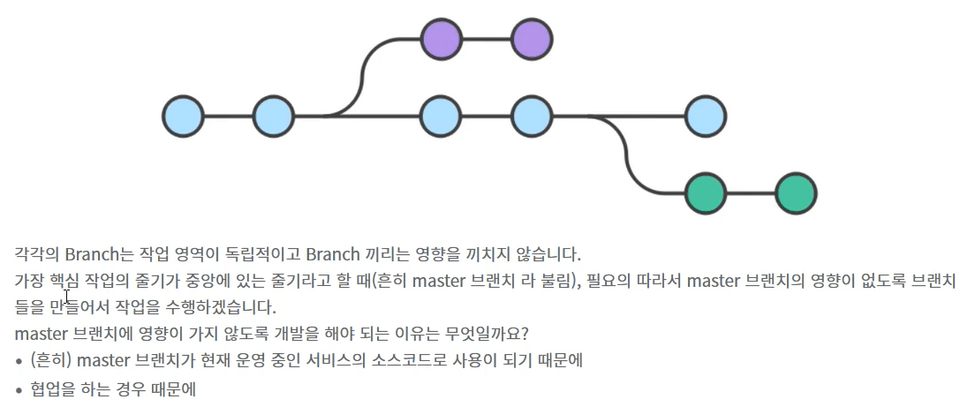
Branch
Why it's needed

Within GitHub
Progress with development


I recommend this to these people 🙋

Git and GitHub
First time users

I studied Git, but
For those who want to make better use of it

Git and GitHub
Anyone who wants to use it for collaboration

Join us for this lecture! 😁

  • The goal of this course is to collaborate with others using Git/GitHub.
  • Learn how to use it for everything from the most basic to open source and work projects.
  • Learn Git and GitHub by working directly with open source committers.

What you'll learn 📚

1. From basic essential concepts

  • While the goal is to leverage Git/GitHub for collaboration, it's not just about hands-on learning. A basic understanding of the theory is essential.
  • Before we begin, let's take a look at the overall course content and essential concepts.


2. Learn through hands-on practice

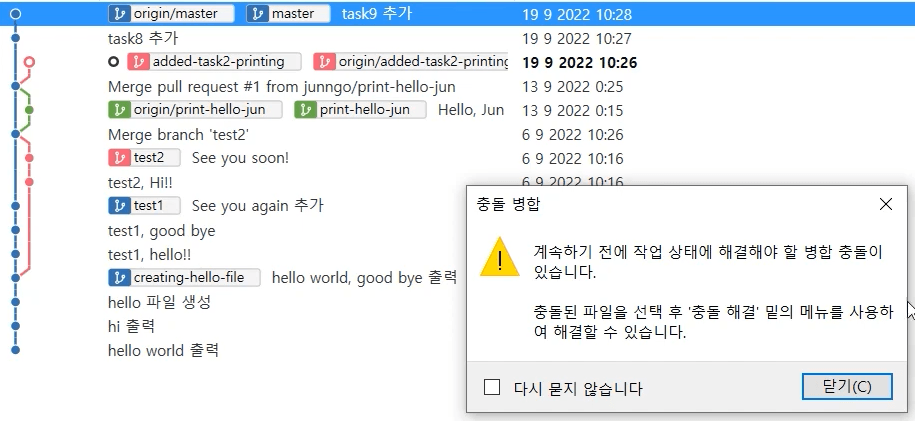
  • When I first learned Git, the commands were cool. But as I started developing, I realized there was nothing as easy and convenient as SourceTree.
  • Even those new to Git can use a tool called SourceTree to easily and enjoyably use Git.
  • Tools are great, but the most fundamental thing is Git commands! We'll learn Git commands alongside source trees.


3. Create your own situations and learn.
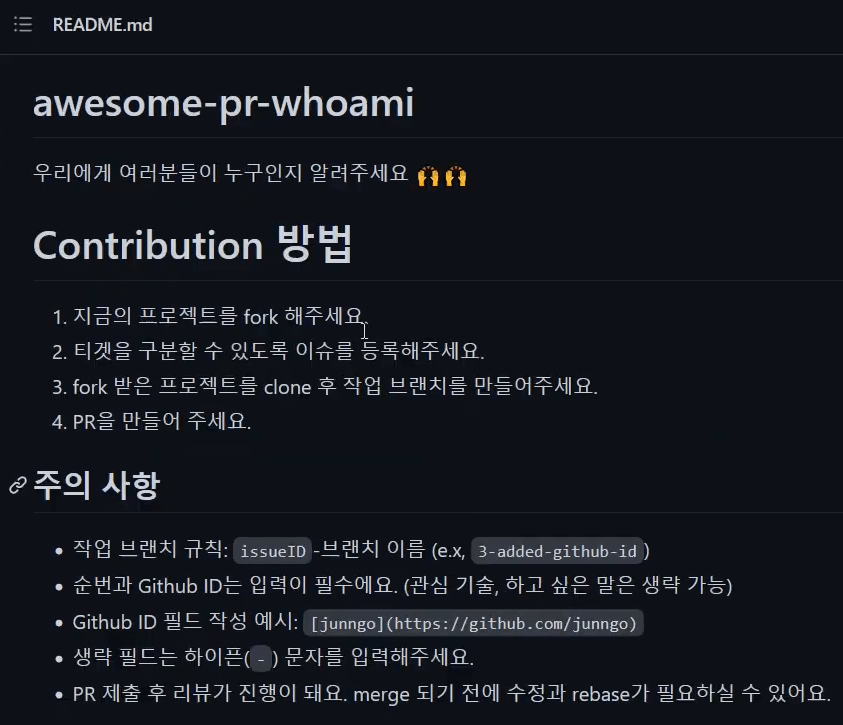
  • Why do we need branches? How do we deal with conflicts? You'll create and experience these situations firsthand.
  • Let's create an issue and PR to see how collaborative work is developed.
  • There's even a collaborative project at the end, allowing you to collaborate using GitHub. Let's practice collaboration together.


Expected Questions Q&A 💬

Q. I'm new to Git and GitHub. Can I still take the course?

Of course :) This lecture is an introductory lecture on Git and GitHub.

Q. What level of content is covered in the class?

Our goal is collaboration using Git and GitHub! Let's learn together, starting from the basics.

Q. Can I use SourceTree on Mac or Ubuntu?

You can use the SourceTree tool on Mac or Windows, but you can't use SourceTree on Ubuntu. 😢 You won't be able to practice using the SourceTree tool, but you can learn Git commands and collaboration flow.

Q. Will I learn all the features of Git and GitHub?

You won't learn every feature, but you'll learn the ones necessary for collaboration. After completing the course, you'll gain a solid understanding of Git and GitHub. Therefore, you'll be able to find and implement additional features as needed.


Introducing the Knowledge Sharer ✒️

History

  • Current Mozilla open source committer
  • Former Fintech startup developer
  • Former Global Professional Developer at the Ministry of Science and Technology
  • Former) Hyosung Billing Development Team (Settlement DB Development)

강의소개.콘텐츠.추천문구

학습 대상은 누구일까요?

  • For those new to Git and Github

  • People who want to collaborate using Git and Github

  • People who learned Git but had difficulty using it in practice

강의소개.지공자소개

4,081

수강생

188

수강평

33

답변

4.7

강의 평점

3

강의_other

Hello. This is MJ Coding😀

Thank you for your interest in the course and for enrolling :)

The course content may not feel light when you first encounter it, but I have prepared it in a way that ensures you can understand it and actually put it into practice.

I hope this will be helpful for your career and practical work.

I also run a YouTube channel for learning programming. (Click for YouTube link)

I hope you find the information you need and that it proves helpful to you.

Thank you! ^^

더보기
강의 게시일: 
마지막 업데이트일: 

수강평

전체

99개

4.8

99개의 수강평

  • hbhereiam님의 프로필 이미지
    hbhereiam

    수강평 2

    평균 평점 5.0

    5

    100% 수강 후 작성

    Thank you! Thanks to you, I learned how to contribute to open source :) I was able to get a little more familiar with the confusing branch-related commands by using them!

    • mjcoding
      지식공유자

      Hello, Yang HyeonBin :) I checked the patch you made!! nice work😀😀 If you continue to use git in the future, you will quickly get used to it and be able to use it betterㅎㅎㅎ I hope you find the learning content useful. Thank you ^^

  • yungjoon22554님의 프로필 이미지
    yungjoon22554

    수강평 21

    평균 평점 4.5

    5

    29% 수강 후 작성

    Thank you, I enjoyed it

    • sms171847님의 프로필 이미지
      sms171847

      수강평 3

      평균 평점 5.0

      5

      57% 수강 후 작성

      I like it because you explain it slowly and well!

      • kmc63816495님의 프로필 이미지
        kmc63816495

        수강평 1

        평균 평점 5.0

        5

        100% 수강 후 작성

        Thank you. Thanks to you, I think I will master the sauce tree!

        • I admit it

        • mjcoding
          지식공유자

          Hello, Mincheol :) As someone who uses Git when developing, I feel that SourceTree is a very convenient tool. 😢 I hope this lecture was helpful in using Git. Thank you ^^

      • june760614님의 프로필 이미지
        june760614

        수강평 15

        평균 평점 4.4

        5

        100% 수강 후 작성

        I learned a lot about Git through this short but intense lecture.

        • mjcoding
          지식공유자

          Hello jhhur :) Thank you for your compliments😀 I hope that through the lecture, you will be able to use Git and Github directly while developing, and create a better development environment. Thank you ^^

      비슷한 강의

      같은 분야의 다른 강의를 만나보세요!

      무료