Looking at new hires or junior designers joining companies these days, I can see a few patterns. One is that they have basic skills and management capabilities regarding design systems, and another is that they have the ability to create responsive designs in Figma.
I think the reason is quite simple. Having this ability means you can be "deployed directly into the field". Conversely, if you join a company without design system and responsive design capabilities, from the company's perspective, they would need to invest a significant amount of cost and time to provide training, which is no small matter.
However, not all applicants possess this ability. In my experience, only a few had this capability. This means that if you develop this skill, you'll quickly stand out and have a higher chance of advancing to the interview stage.
That's why one of the things I strongly emphasize that UX/UI design beginners and job seekers should definitely acquire these days is responsive design. If you develop this skill, you can gain significant competitive advantage in the job market.
And if you're a junior designer or currently working in the field but don't know how to do responsive design, I highly recommend that you acquire this skill. This is because having this ability allows you to work much more efficiently and significantly improves communication effectiveness with developers.
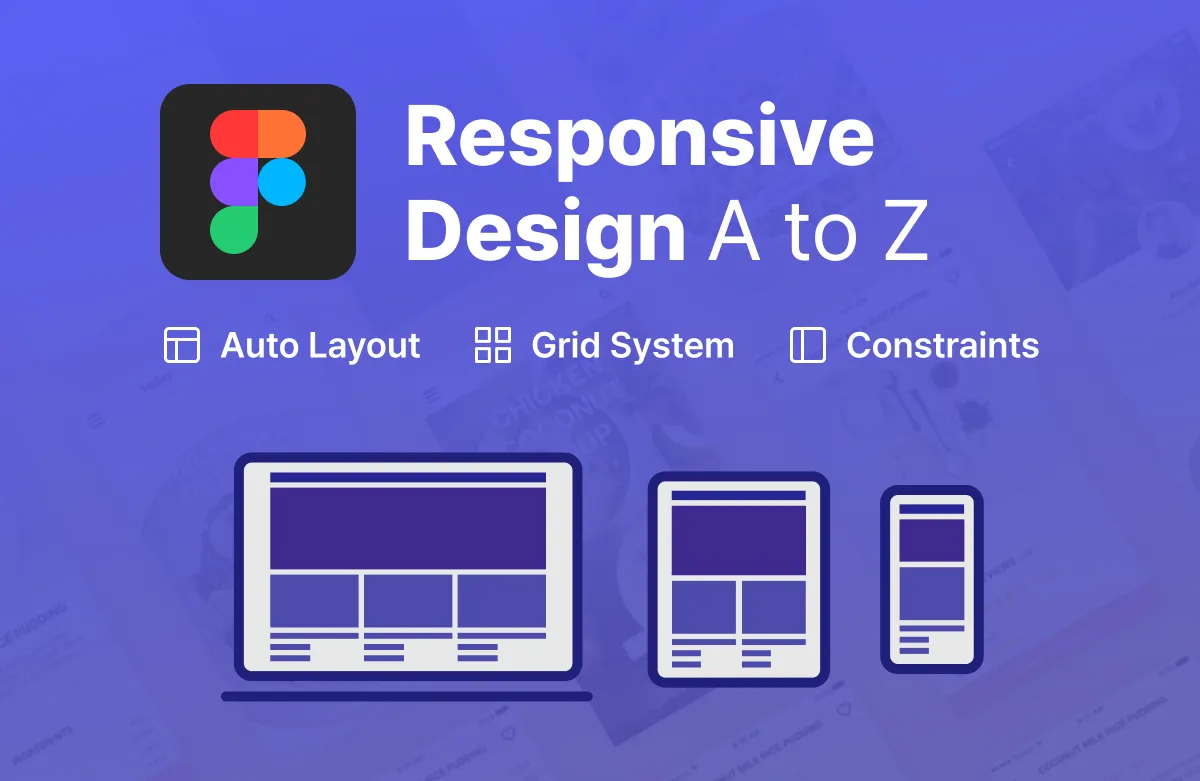
We're launching the "Complete Mastery of Responsive Design with Figma" course this week. (We're offering an early bird 50% discount coupon.)
Earlier, I mentioned the importance of responsive design. This week (around Wednesday), I'm launching a course that intensively covers responsive design, allowing you to directly create many things using Figma - from responsive apps to web, cards, components, and more. If you've been wondering what responsive design is and how to get started, this course will serve as a great starting point for you.
From basic concepts to hands-on practice, step by step, this course is designed to help you directly grasp the principles of responsive design using Figma and equip yourself with practical skills.
Key Concepts of Responsive Design Summarized
Understanding and Utilizing Auto Layout, Constraints, and Layout Grid
Composed of content frequently used in practical work
Master Both Responsive Web and Apps
If you're curious about the detailed curriculum and content of the course, please click this link to check it out.
✨ Early Bird 50% Discount Information and Application Form
For those interested in the course, we've specially prepared early bird benefits this time. If you participate in the simple survey at the link below, we plan to provide you with a coupon that allows you to take the course at a 50% discounted price when it launches.
>> Early Bird Registration (50% Discount): https://forms.gle/reSTKbdhMn1Yo6ni8
Those who want to receive the early bird discount benefit should apply by this Thursday (6th).
Thank you.
Hello, this is Eric.
I hope you are staying warm during this cold winter.
Following 2021, UX tools has released statistics on the use of UX/UI design tools for 2022. UX tools releases this every year, so it’s good to know how the UX/UI design tool market is flowing and which tools are being used the most. I’ve summarized the results of the statistical survey. (Statistics source: uxtools.co )
Conclusion "Figma is unrivaled" : In order to do UX and UI design, you need to do various activities. There are wireframes, UI design, and design systems. From 2020 to 2021, Figma has been used much more than other tools, widening the gap, and now it seems to be almost unrivaled.
1. Who participated in this survey? "Designers from around the world"
This survey was conducted with 4,260 UX designers or people working in related industries around the world.
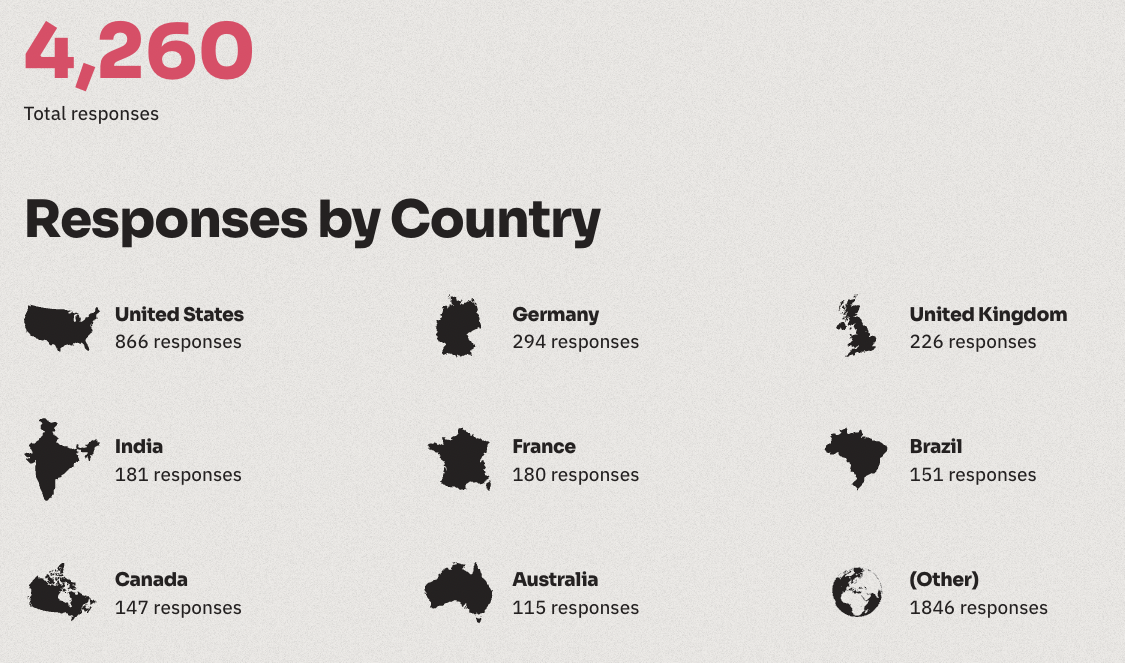
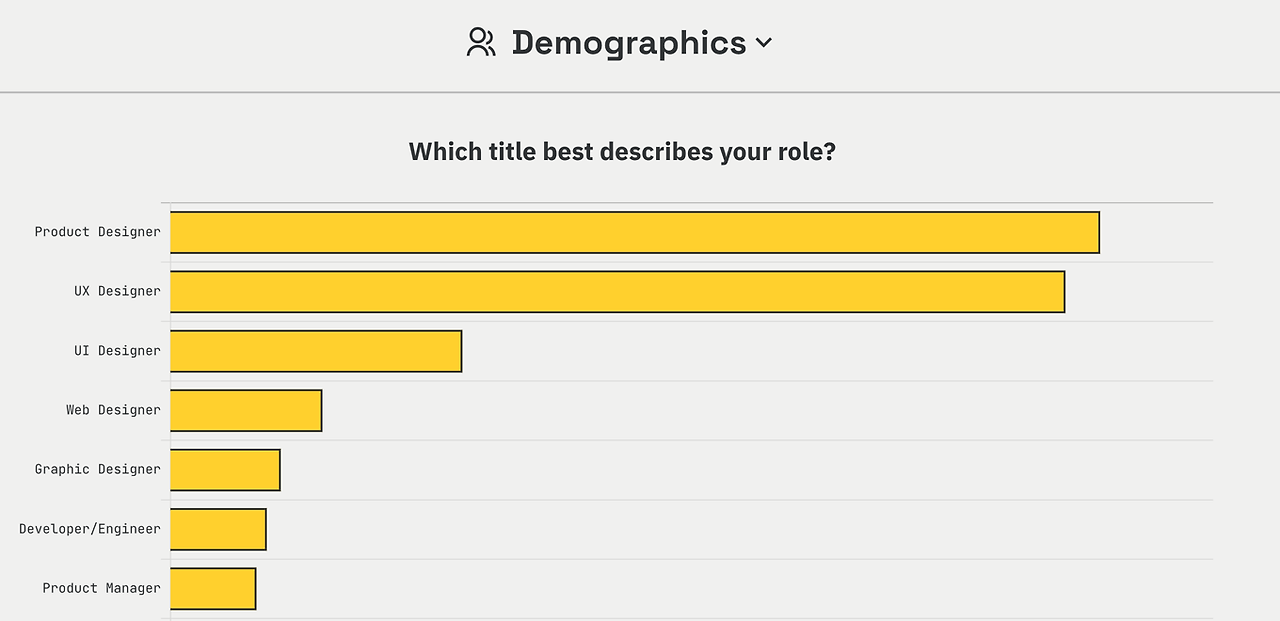
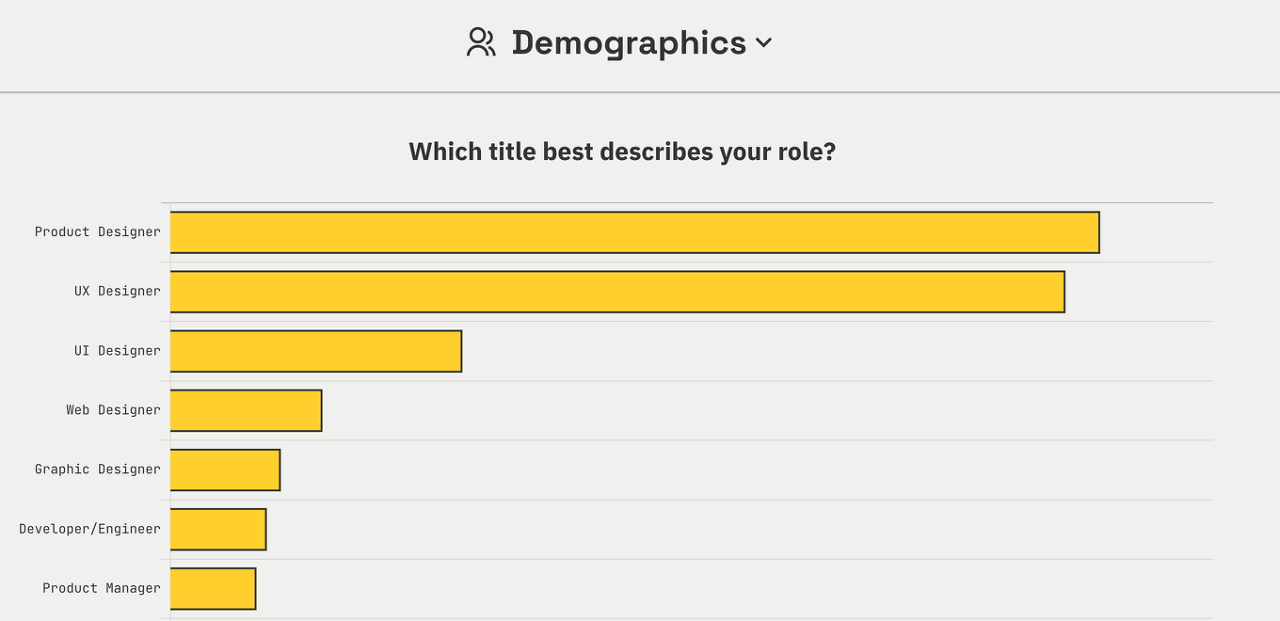
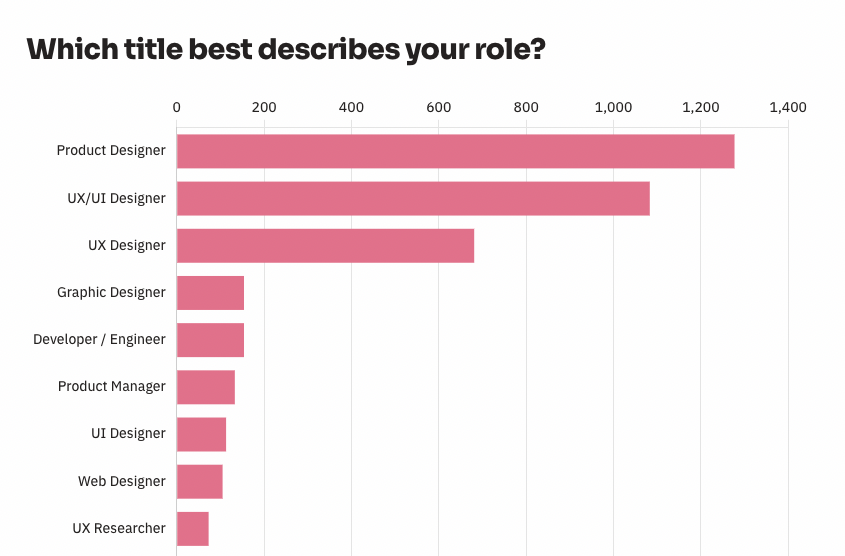
2. What kind of professionals are participating the most? "We have discovered a trend where there are more product designers who do both UX and UI, and UX/UI designers."
The most popular occupations were product designers and UX/UI designers. This part shows a change compared to the 2021 results.
In the tech industry, as Agile and Lean Startup are utilized, there is a trend of gradually hiring UX/UI designers or product designers who can do both UX and UI, rather than hiring UX designers and UI designers separately. In the flow where rapid iteration is required for product development and updates, it seems natural to want more product designers who can encompass everything. From that perspective, there is a change where the number of UX designers and UI designers is decreasing and the number of product designers and UX/UI designers is increasing.
Occupations of 2021 participants (below)
Occupations of 2022 participants (below)
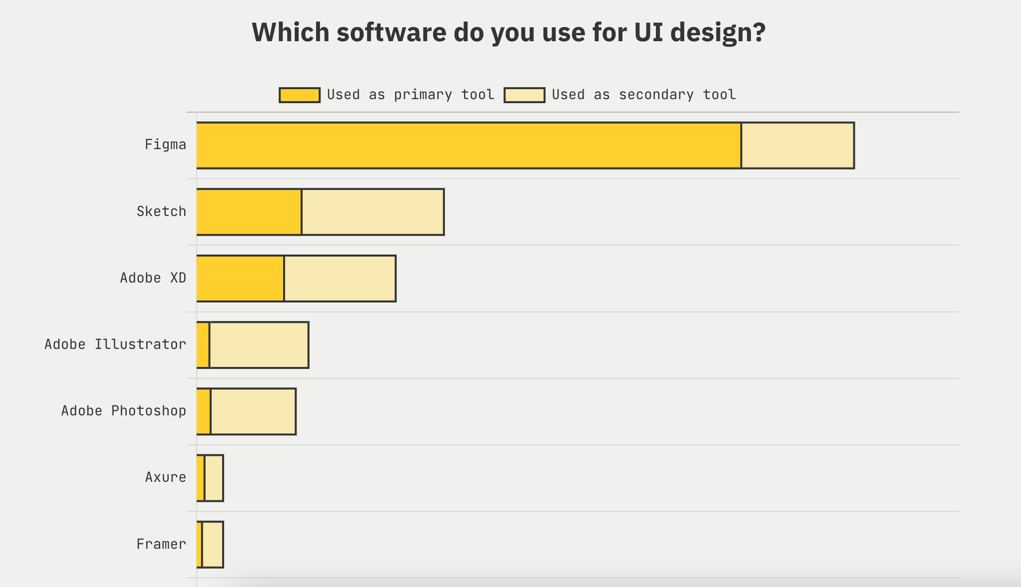
3. UI Design Tool Survey Results: “Figma is the End”
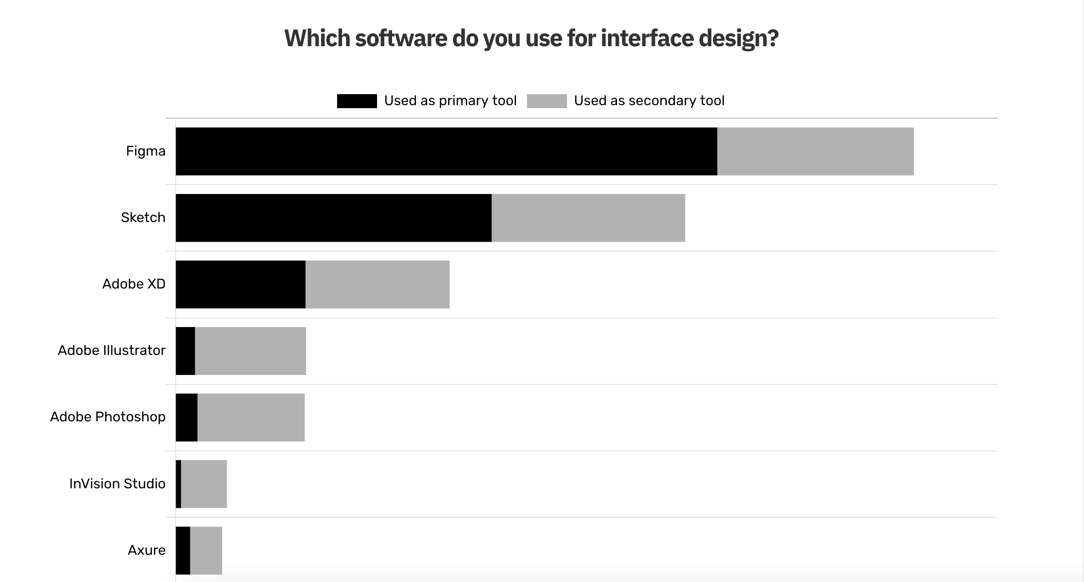
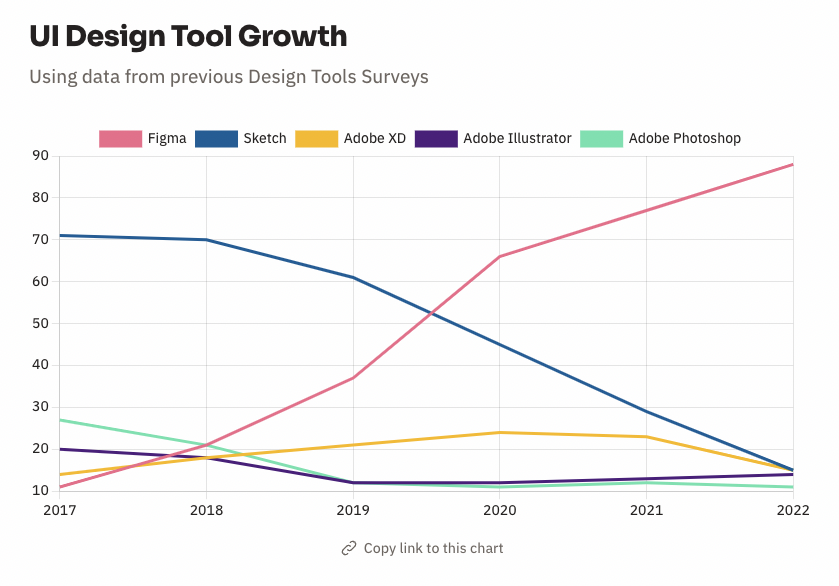
The hottest sector in the UX, UI design tool market is UI design. Hand sketches and wireframes are not necessarily UI design-specific tools, but there are other alternative software or methods. For example, wireframes can be created using PowerPoint. However, UI design requires the use of a dedicated tool and requires the acquisition of specialized tool usage skills. That is why it is important to know how much better the dedicated tool is. Last year, Figma was overwhelmingly ahead of other tools, but this time, the gap has widened to the point where it is difficult to simply compare. This means that designers around the world are using Figma a lot.
So, if you are thinking about getting started with UI design, I recommend learning Figma first.
2021 UI Design Tool Survey Results
2022 UI Design Tool Survey Results
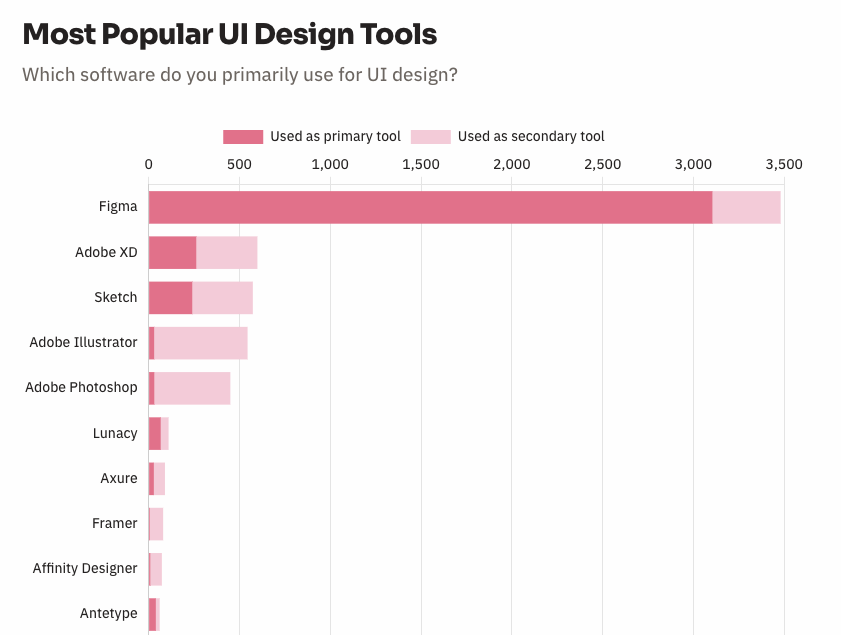
UI Design Market Share by Year (I thought Figma had already widened the gap, but it has widened it even further;)
4. UI Prototyping "Figma for Basic, ProtoPie for Advanced"
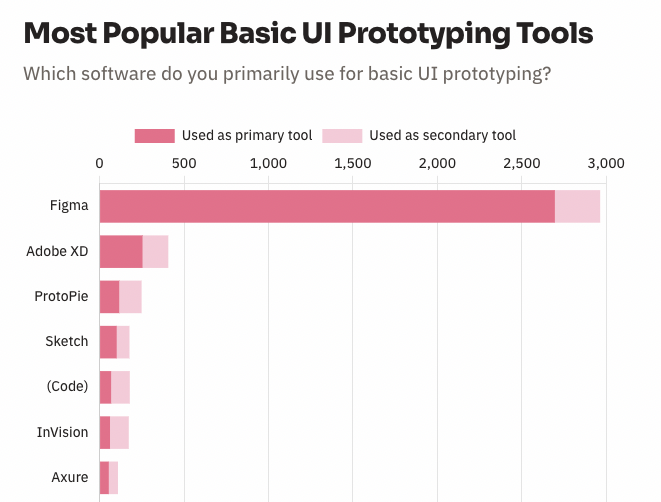
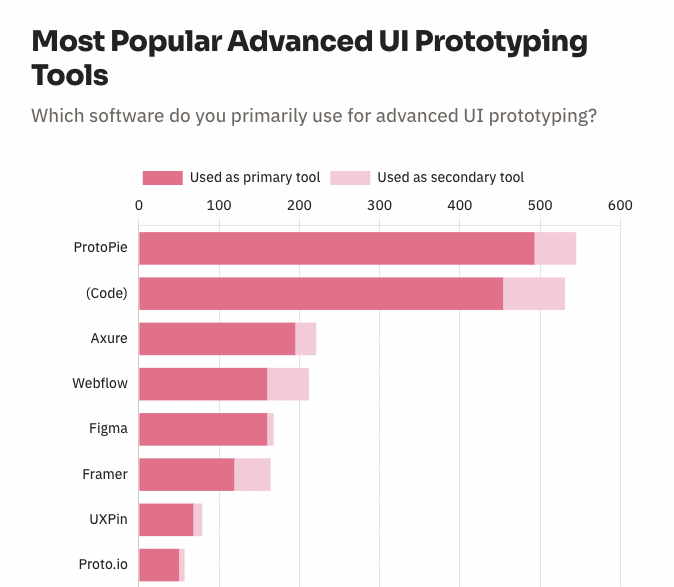
This year's UI Prototyping Survey was divided into two sections. One is Basic, and the other is Advanced. Basic is basically about how the screen looks and works, light animations, and making the screen clickable, while Advanced is about much higher quality prototyping. Figma took first place in Basic, and Protopie, a software made in Korea, took first place in Advanced.
5. Design System “This is also Figma”
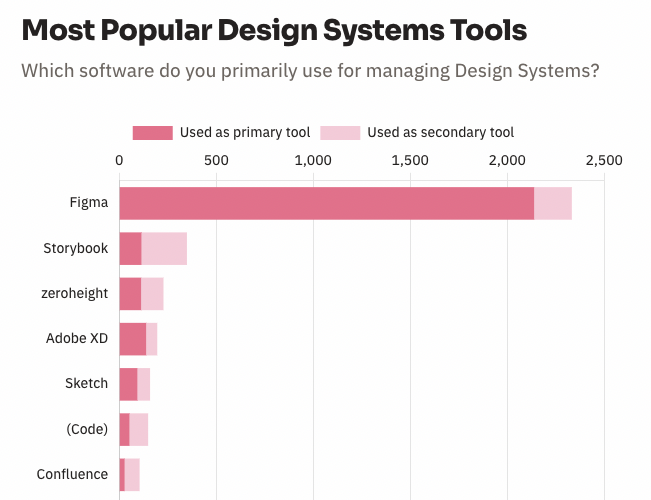
Figma is also overwhelmingly popular in terms of design systems. Storybook is a software that shares components including developers and code. It ranked second because it manages with designers. Incidentally, many developers also participated in this survey. I think it is because there is a lot of collaboration. Developers also use Figma a lot as a viewer.
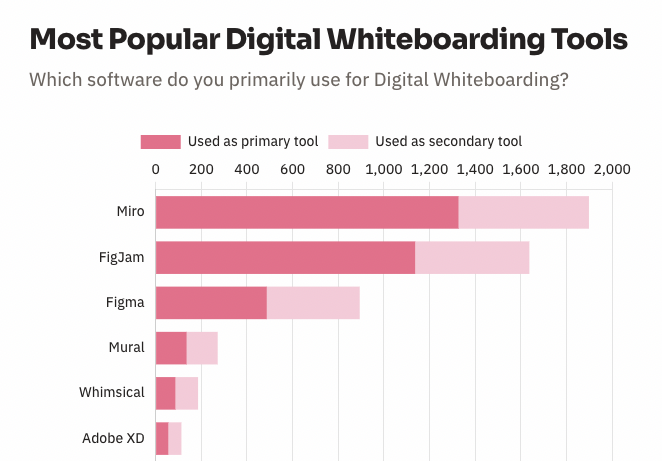
6. Digital Whiteboard "Competition between Miro and Pigjam made with Figma"
The digital whiteboard market is being competed by Miro and Figma, which are almost the same as last year. Pigjam has the advantage of being convenient for Figma users to use right away. Nevertheless, Miro is maintaining its first place, perhaps because it has clearly taken over the market first. With online collaboration becoming more important, the competition in the digital whiteboard market is likely to heat up in the future.
* In addition, there are surveys on user research software and user research recruiting tools, so please take a look.
Summary and Thoughts
1. Figma provides solutions for almost all processes for UX and UI design. From Pigjam for brainstorming, wireframes, UI design, design systems, and even prototyping. Plus, the number of plugins and open source templates keeps increasing, so it seems to be continuously becoming more and more overwhelming.
2. Figma was recently acquired by Adobe. Since it has such a big influence in the market, I don't know how Adobe will change Figma right away, but I hope Figma will continue its current direction and focus on user convenience. I think it is a well-made and convenient tool from a designer's perspective.
3. The competition in the digital whiteboard market also seems to have many interesting points. As non-face-to-face collaboration becomes more important, it is necessary software for idea meetings with non-designers.
4. I feel that the demand for product designers and UX/UI designers is increasing. I think it would be good for beginners to take this into consideration when planning their careers.
Source:
UX tools 2022 statistics results
UX tools 2021 statistics results
etc:
2021 UX Design Tool Statistics Announcement "Figma's Dominance"
[Advertisement] Are you planning to learn UI design and the Figma tool?
Introducing Infraon's "UI Design Using Figma, From Introduction to Practice" course.
For those who want to get started with UI design through Figma , I opened a course called "UI Design Using Figma, From Introduction to Practice" on Inflearn. As someone who only did planning work and became a product designer, I entered UI design late in life and included insights I gained through trial and error, how to use the Figma tool, and things you need to know to become a UI designer. Since I entered the field late in life, I organized it so that even non-majors can easily follow along, starting from the basics of UI design and moving on to advanced features used in practice. If you are thinking about getting started with UI design, I recommend this course.
• Preview video of the relevant lecture on Inflearn (free):
1. The story of how I, who only did planning work, acquired UI design skills in just 3 months
.
Following last year, UX tools released statistics on the use of UX/UI design tools in 2021. This time, I participated in the survey, so I was curious about how the announcement would turn out and watched it more closely. I summarized the statistical survey results. (Statistics source: uxtools.co)
For those of you who are pressed for time, check out this summary:
_
Summary and Thoughts:
"Figma outperforms other tools in almost every area of the UX/UI design process"
Figma, which provides comprehensive functions for UX and UI design with a single tool, seems to be gradually surpassing other tools in most areas. The design tool market is changing so rapidly and there have been some ups and downs in the past 5-6 years, so I don't know what will happen next year. However, since it is common for a tool to be easy to use once it is easy to move to another tool, I think Figma will maintain its market dominance for the time being.
_
Summary of statistical results
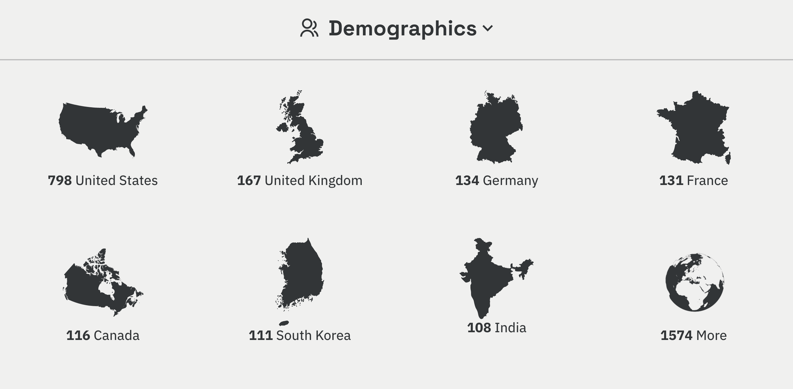
We conducted a survey of 3,100 people working in UX, UI design, and other related industries in 111 countries around the world. There were some interesting parts related to demographic information. One of them was that when looking at the number of participants by country, our country had 111 participants, ranking 6th. It seems that this is because our designers participated more than last year, and it seems that this kind of presence is a good thing in many ways.
: Ranking of participants by country
Here is the ranking of participants by job type. Product designers who do both UX and UI design were the most common, followed by UX design and UI design. It seems that product designers are now firmly establishing themselves as one of the most popular job types. I think this is because product designers are preferred in Agile/Lean organizations.
: Ranking of participants by occupation group
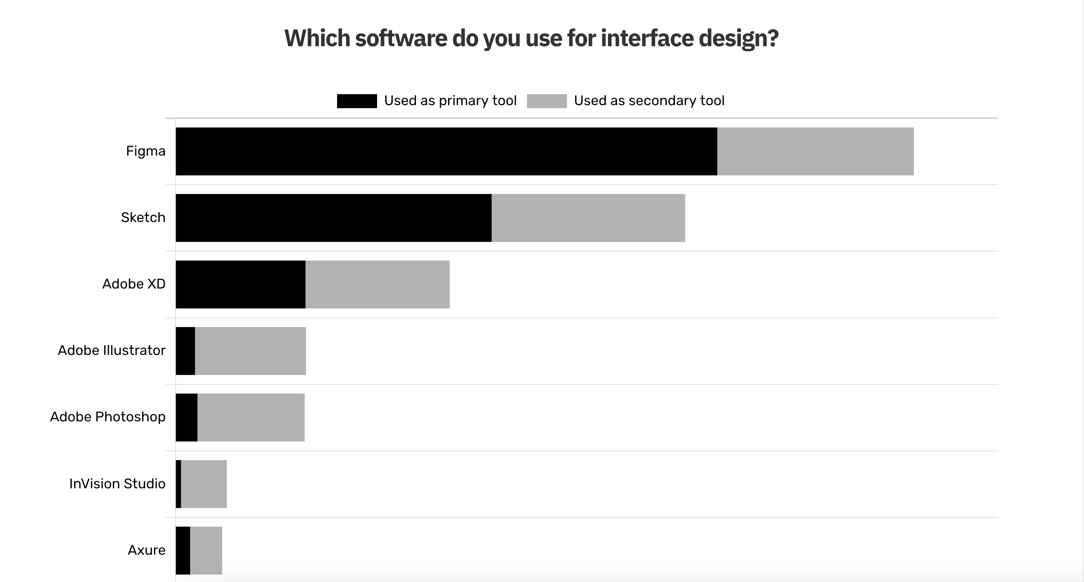
This statistical survey is about which tools are used the most in each area, such as UI design, prototyping, and whiteboard, in relation to UX/UI design. The conclusion is , 'Figma is unrivaled.' Last year, Figma began to overtake Sketch in key indicators, and this year, it seems to be solidifying its lead.
So let’s take a look at the results by area. (Source: UXtools.co)
_
1. UI Design: “Unique Figma”
In the UX, UI design tool market, I think the UI design field is the most all-out war. In the design process, brainstorming, whiteboards, and wireframes, which are at the front end (planning, ideation), can use tools with relatively low entry barriers, so you don't necessarily have to use specialized UI design tools, and there are alternative tools. Brainstorming can be done with paper and pen, and wireframes can be done with tools such as PowerPoint or Balsamic. However, UI design requires specialized tools, so I think it is very meaningful to capture this market.
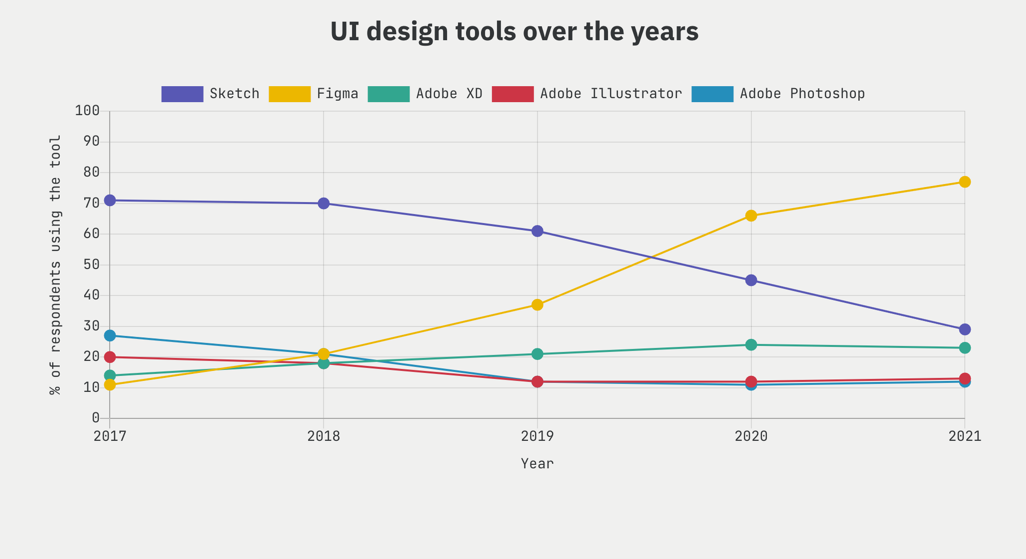
The statistical results show that Figma achieved the top spot for the second year in a row, but by an even greater margin. Below is the ranking for 2020, and it was also the year that Figma surpassed Sketch for the first time to take the top spot. Sketch still had a presence.
: 2020 UI Design Tool Rankings
The 2021 statistics show Figma running so far ahead of other tools that it could be said to have crushed them.
: 2021 UI Design Tool Rankings
: Changes in UI design market share by year
_
There are probably many reasons why Figma is doing well, but I think the biggest reasons are as follows. (By the way, this is also the reason why I use Figma. Haha)
• Figma can be used on Windows as well as macOS, unlike Sketch.
• Figma's community features. Various plugins and templates available.
• Easy to collaborate with other team members as well as designers. Even non-paid members can leave comments in View mode.
• Since it also supports functions such as prototyping and handoff, there is no need to install and use other apps separately (all-in-one effect)
_
2. UI Prototyping: “Figma is the best”
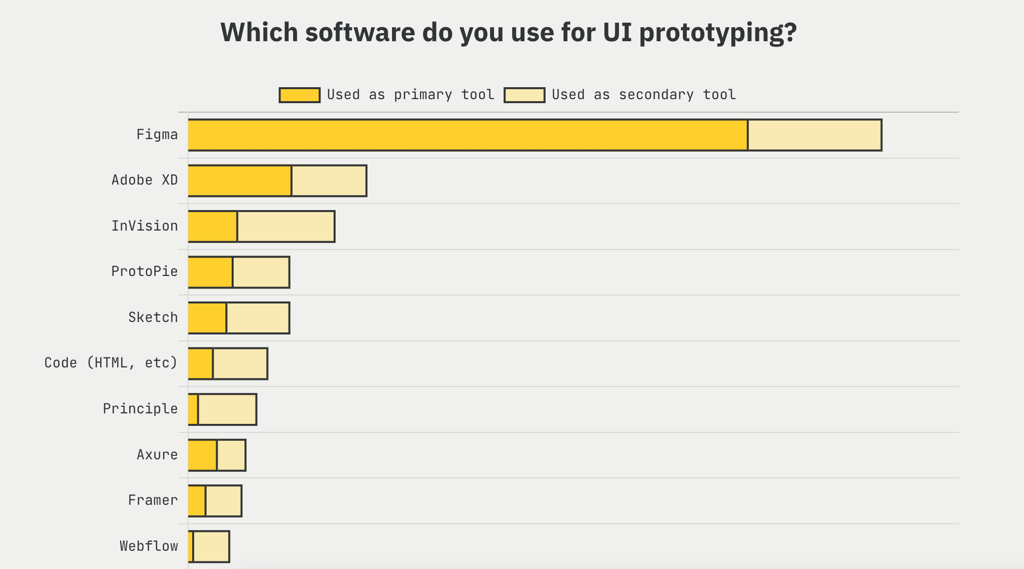
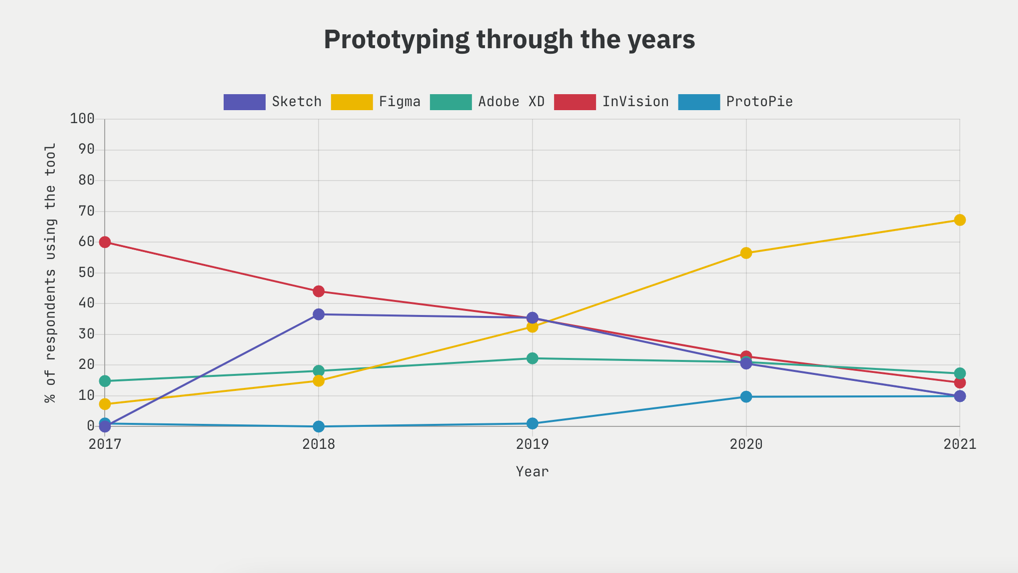
Here are the results of prototyping for user testing, etc., to make the screen actually workable. Here again, Figma is overwhelming. In my personal opinion, Figma is lacking in detailed parts such as creating animations compared to tools such as Principle. Nevertheless, I think the reason it is doing so well is because you can prototype UI designs in Figma right away without the help of other apps.
Invision, which was once popular for its ease of use, now seems to have almost disappeared. In addition, there were some interesting points. One is that Adobe XD is quietly but steadily revealing its presence. Another is that ProtoPie, made in Korea, has risen to 4th place in the prototyping market. I hope ProtoPie continues to grow and do better in the future.
: UI Prototyping Tool Rankings
: UI Prototyping Tool Market Share by Year
_
3. Design System, Handoff
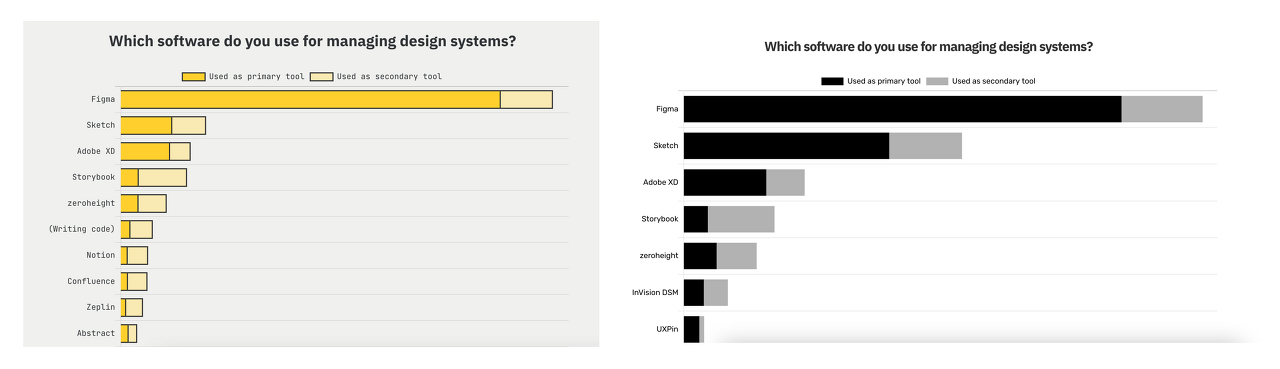
For the design system that is utilized for the unity/consistency of design elements such as colors and fonts, and also for UI design, Figma is ranked first, with a large gap from the second and third tools. I think it has an advantage in the market because Figma's component and style functions are easy to use, and when used in a team, team members can share it through the library, so there is no need to use other tools.
Handoff is where Figma solidifies its lead over Zeplin.
: Changes in the ranking of design system tools
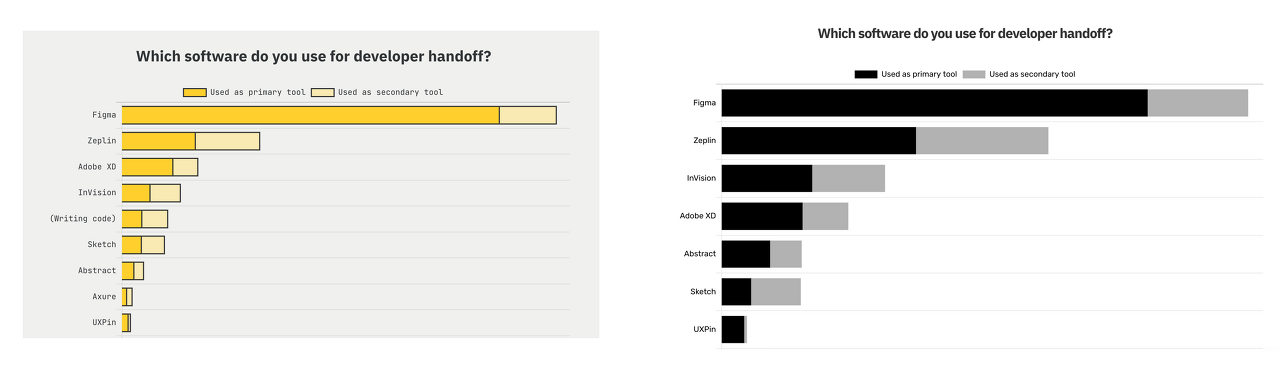
: Changes in handoff tool rankings
_
4. Digital Whiteboard, Brainstorming:
"Figjam, with Figma on his back, catches up with #1 Miro"
As non-face-to-face collaboration becomes more important due to the pandemic, competition among digital whiteboard tools needed for meetings or sharing and viewing documents together seems to be intensifying. Figma also released the Pigjam app, which specializes in whiteboards, this year.
The results showed that Miro came in first. It is impressive that Figjam is chasing Miro in second place even though it has only been around for a short time. This is probably because it is a function provided by Figma, which has many design users. From the user's perspective, it seems convenient to be able to do UI design and whiteboarding in one place. As a side note, according to UXtools, the reason why Miro, a paid tool, came in first (even though Figjam was available for free this year) is because of its high satisfaction with its functions, at 4.3 out of 5.
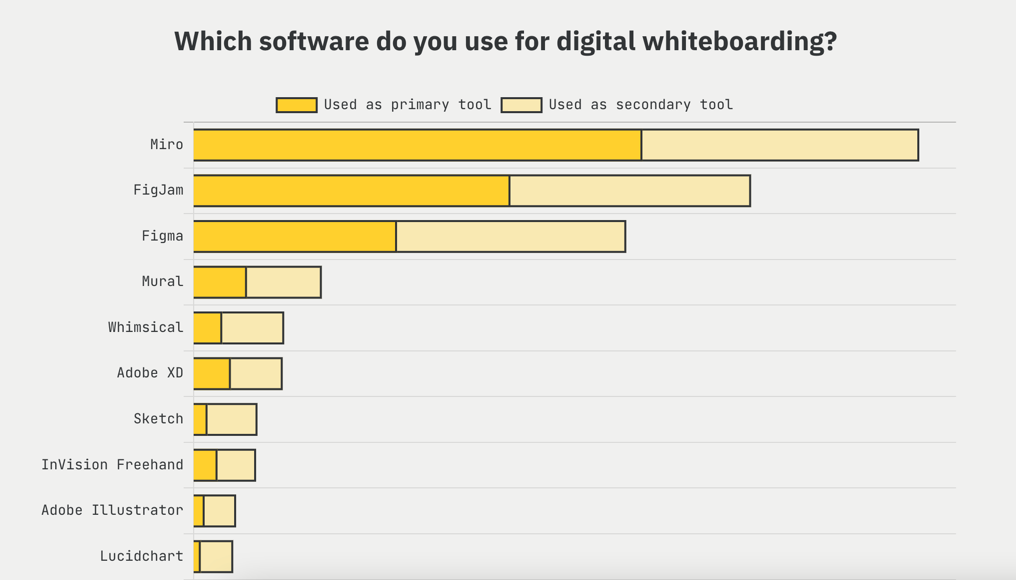
: Digital Whiteboard Rankings
_
To summarize,
From the perspective of design thinking, Figma, which provides the overall functions required for the UX/UI design process, seems to be surpassing all other tools and becoming the world's most unique UX/UI design tool. From a designer's perspective, it feels good to have such a convenient tool and to have more designers using it.
[Advertisement] Are you planning to learn UI design and the Figma tool?
Introducing Infraon's "UI Design Using Figma, From Introduction to Practice" course.
For those who want to get started with UI design through Figma , I opened a course called "UI Design Using Figma, From Introduction to Practice" on Inflearn. As someone who only did planning work and became a product designer, I entered UI design late in life and included insights I gained through trial and error, how to use the Figma tool, and things you need to know to become a UI designer. Since I entered the field late in life, I organized it so that even non-majors can easily follow along, starting from the basics of UI design and moving on to advanced features used in practice. If you are thinking about getting started with UI design, I recommend this course.
• Preview video of the relevant lecture on Inflearn (free):
1. The story of how I, who only did planning work, acquired UI design skills in just 3 months
2. What you will gain from this class
_
Source:
UX tools 2021 statistics results
UX tools 2020 statistics results
etc:
2020 UX Design Tool Statistics Announcement "Overwhelming Figma"
In the previous article, "The first reason I started teaching UX design," I talked about the need to provide orientation on UX design to the developers, product managers, and especially the new team members who joined our team. This was because in situations where we had to collaborate and discuss design, it was fatal for team members to not know about UX and UX design.
The orientation materials created in this way have been upgraded in content based on the events we will discuss today.
People started asking me questions about UX design.
My friends and their friends started asking me about UX design. For example, they said something like this:
1. Wife of a developer who worked with me at an American company (customer service employee)
"I'm currently working at a customer service center, but I want to change my job to UX design. I think I started thinking this way because UX has a bright future and a high salary. Can I get some advice on what this job is like, what I need to know, and whether I, a person who didn't major in design, can do this job?"
2. A friend of a friend who works in visual design
"I'm currently working in visual design, but I heard that UX has a better future prospect. If I want to get started in UX design, where and how should I start? How should I create a portfolio? Is there a way to utilize my strengths in visual design?"

3. Design major students who want to become UX designers
"I'm studying to become a UX designer, but most of what I'm learning at school is theoretical, and the professors are far from the actual industry. So there's a disconnect with reality. I'm curious about how things are actually done in the industry. I'm also curious about the journey of becoming a designer overseas."
To answer these questions, I felt the need to organize my thoughts on UX, UX design, and product design from a wider range of angles than the document I created to orientate team members. While the previous document was simply a summary of what I do, I now think about it from the perspective of creating a career roadmap for someone who wants to have this job.
The goal was to show the life of a UX designer as it is.
So, through conversations and consultations, I ended up adding content to the UX design lectures. And this process was quite rewarding for me. I told them about my life and work in various environments, such as tech companies, startups, freelancers, and corporations in Korea and the US, and since these were the career paths they wanted to take, I think it was very realistic and helpful.
What helped them the most was showing them the real picture of my life as a product designer/UX designer.
As I felt this sense of accomplishment, I became more interested in this "teaching" and "mentoring." So I started to think that I wanted to help more people in earnest. So I started giving lectures to more people than just my acquaintances.
I feel rewarded when I give lectures and students leave comments like these in their reviews.
"There was a limit to how much information I could get from YouTube and blogs, but this class helped me gain a fundamental understanding of UX."
"It was nice to be able to hear vivid stories from the field as well as theory."
"I was able to draw a picture of what I need to prepare to become a UX/UI designer in the future and how I should design my career."
(You can see a more detailed review on my lecture page here.)
So, at first, I started giving lectures through lecture platforms, and through this lecture, I opened this "Introduction to UX Design" lecture through Infraon to let more people know what a UX designer is and what this field does, based on my experience and knowledge, and to help those who want to become UX designers achieve their dreams.
We will support each and every step of those who are starting out in UX design!
thank you
I have been teaching and teaching the "Introduction to UX Design for Beginners" class through a platform called Tal-ing. And recently, I have started an online lecture called Infraon. I have been working in the field, but I have never thought that I would be teaching.
But I would like to talk a little about the process of how I came to open the class and conduct the lecture.
"I felt the need for a UX design orientation for team members."
It started like this.
The company I work for operates as an agile organization. What this means is that the people I work with most closely as a team, as a product designer, are product managers and engineers. And this is not only in our team, but also in the teams next door. This type of team organization is called a squad.
There were a lot of junior product managers, interns, and new engineers coming and going on our team. In these cases, they had little basic knowledge of UX design, and in some cases, they had never heard of the word UX before. The problem was that I had a lot of work to do with these people.
Problem identified: The new employee who has to work with me doesn't know UX or UX design.
In order to proceed with UX and UI design, there are many decisions made through numerous communications and discussions with team members. In fact, this part was big. If we had to work together and they didn't know what I did, I couldn't convey what I was talking about in more depth. And they couldn't do their jobs better either.
As I've said before, in a lean organization, product managers, engineers, and product designers create and collaborate on countless things together. In such a situation, there's nothing more fatal than not knowing what each other is doing.
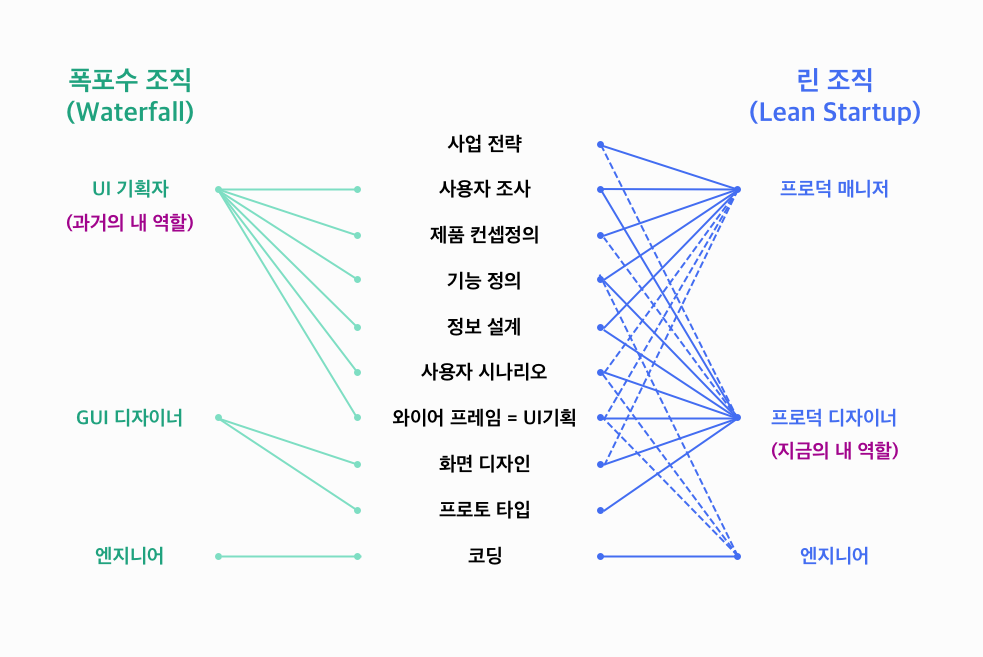
Related article: "The changing role of designers in waterfall organizations and lean startups"
So, to make it simple, I started making UX design orientation materials to help people understand what UX is, what UX design is, and what role a product designer plays in our team. I made it very simple at first.
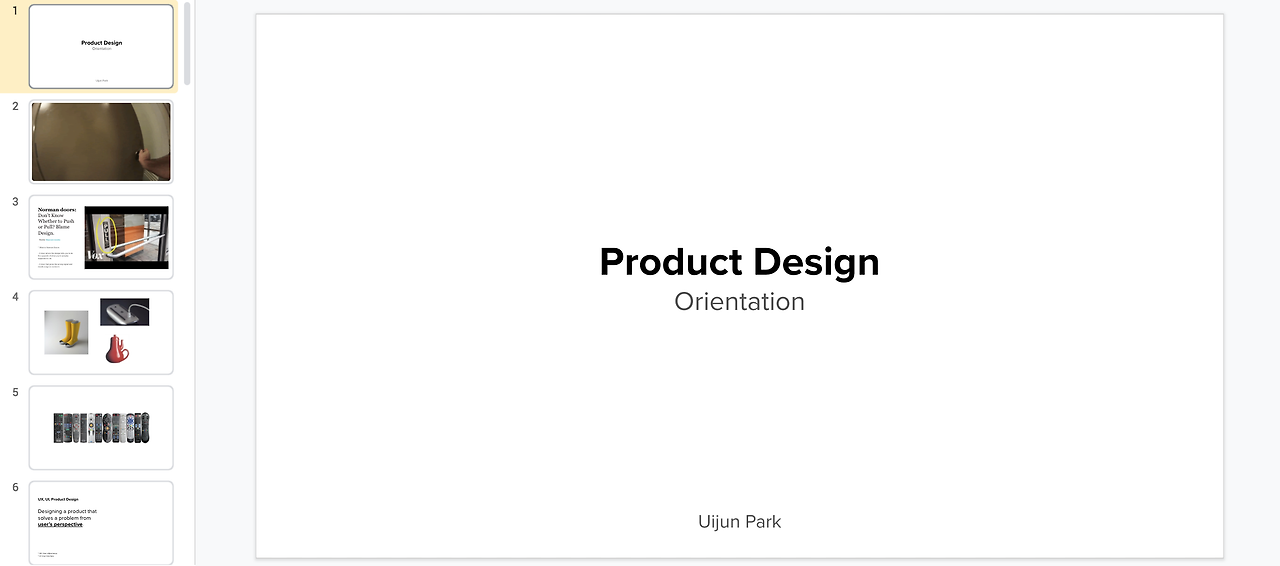
> UX design orientation materials I created at my company
As I started giving orientations about what I do, two things started to change.
First, it became easier to collaborate with team members who understood UX and UX design.
"This is how our team members have changed"
This orientation material contained the thought process that UX designers go through to make decisions about design. When the other party understood this, they understood better why I had to design the product this way. And there was even a change in the team members defending and defending the design from the perspective of UX and UX design.

Second, I was able to reorganize what I do and redefine it so that beginners can easily understand it. When I tried to give an orientation, I actually had a lot of difficulties. Terms like UX and UI, which I understand so daily and in my bones, were difficult to explain to beginners. I needed to refine these parts and redefine them so that they could be understood from the perspective of someone hearing them for the first time. To do this, I read books, searched Google, English YouTube (unfortunately, there are many good YouTube channels about UX and UI in the US, and not many in Korea), and articles, and reorganized them. This work helped me to be able to easily explain what I do to anyone.
This is how I started teaching UX design. I never thought I would teach in my life. I only worked in companies, and I never thought I had any talent for teaching. However, because of this need, I tried various things to do my job better, and I ended up experiencing and starting a new field called "teaching."
In the following article, I will tell you how I came to teach an introductory UX design course to not only my team members but also others, especially non-majors and UX beginners.
- I recently visited IKEA and noticed that they had started selling winter blankets as winter approaches.What was fun was that they applied different colors to the package depending on how warm the blanket was.The red one was very warm and the yellow one was a bit thinner.
 > I applied color to the comforter package.I was impressed by how IKEA used the psychological meaning of colors to help users easily identify the characteristics of their products. The yellow-orange-red spectrum is also used in thermometers, so it has psychological meanings about temperature. I think IKEA has used this well.It was because I could tell the thickness of the blanket much more quickly and intuitively by looking at the color than by feeling it and feeling it.
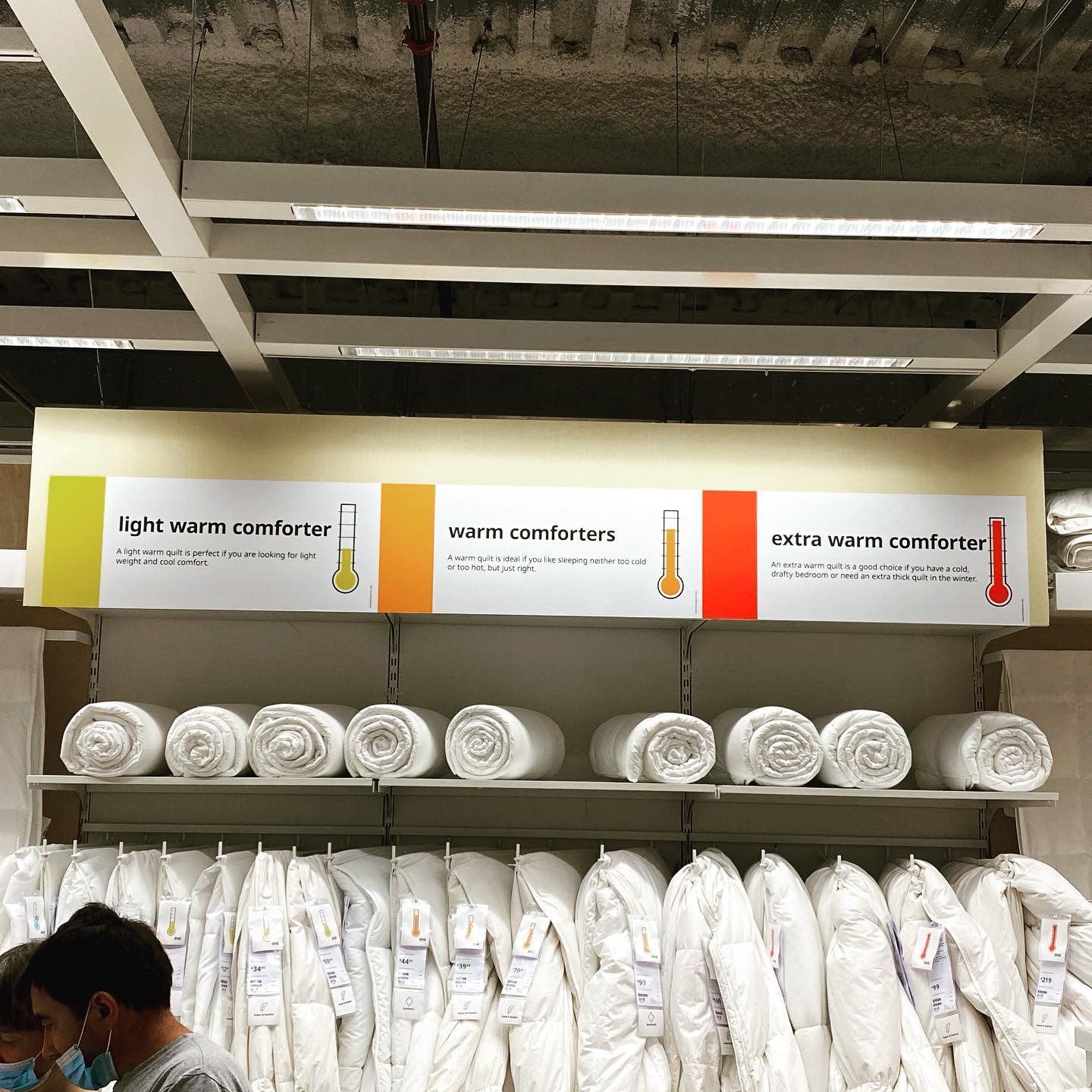 > Wow~! Just in case there's someone who doesn't know the meaning of the colors, you even explained it in detail... And as expected, IKEA uses icons really well.Although it is a service in the physical realm, I think there are many things we can learn from IKEA. I think the parts that are considerate of the user really stand out.After all, it is important for UX designers to provide users with a better experience, to make it easier for them to experience, understand, and use the product.For reference, I bought an orange colored comforter hahaIt's quite warm^^
 I often go to IKEA to buy furniture and home goods. From a UX design perspective, I think there is a lot to learn from IKEA. One of the things I like most about IKEA is the guide map that shows the IKEA journey well.
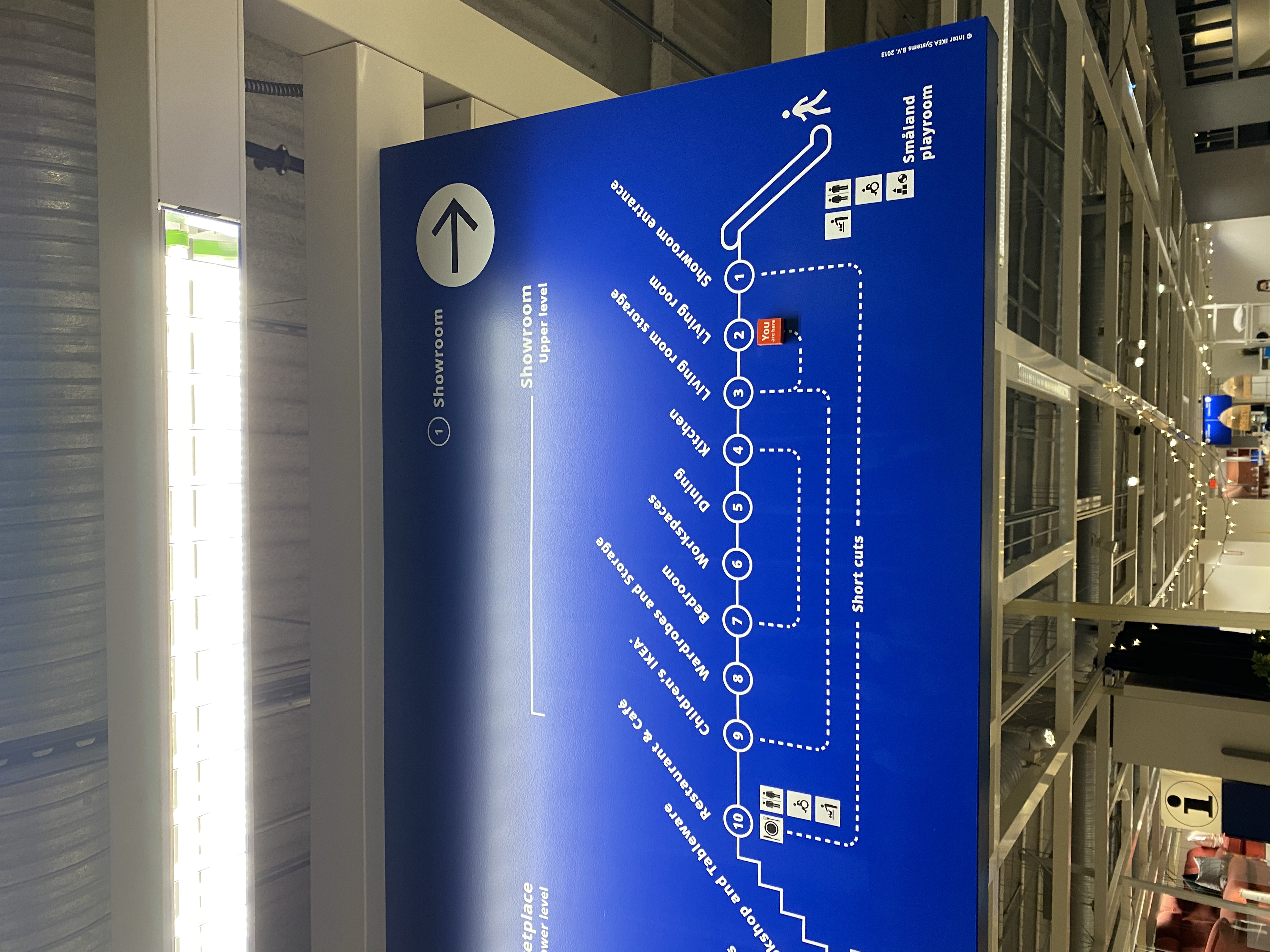
-> Guide map of IKEA's journey
I think this guide map was designed with two main user groups in mind.
1. Beginners, first-time visitors: The scale of IKEA can be overwhelming when you first visit, but if you follow the guide map provided by IKEA, you will discover and easily learn about IKEA's products and showrooms.
2. Advanced users
IKEA has also taken into consideration advanced users, with shortcuts placed throughout the site. If you are already familiar with IKEA products, this allows you to easily reach the section you want.
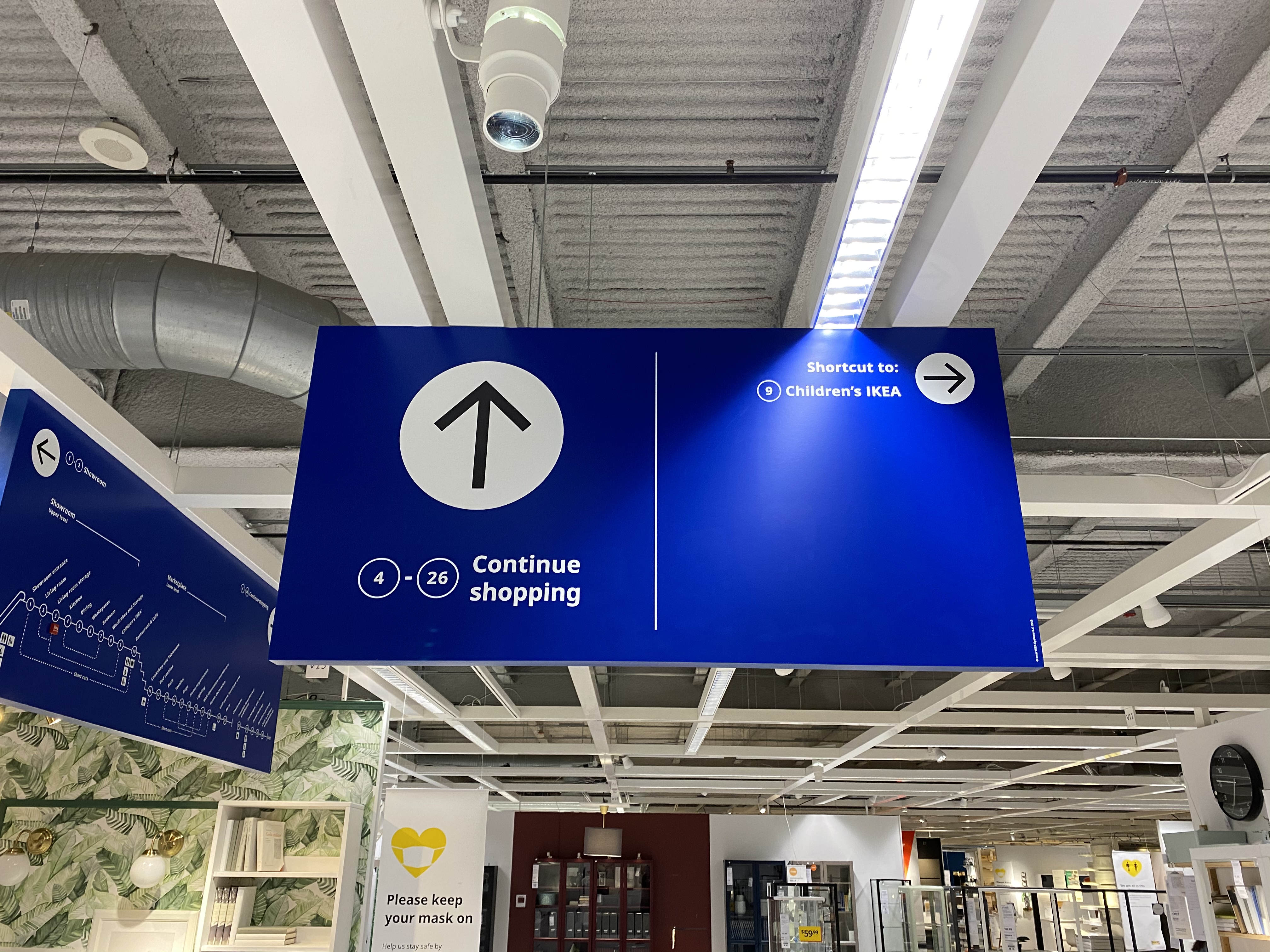
-> IKEA has created a great shortcut.
Even when designing a website or app, UX designers must consider both layers of users when designing user experiences, so I think there is a lot to learn from IKEA, even though it is in the physical realm.
This part is covered in detail in the UX Design Introduction lecture. We will tell you what to consider and how to design UX depending on the user's skill level and intention.
Then have a nice day!
📗 This is the book that first opened my eyes to UX design, users, and user mistakes: "Design of Everyday Things (Korean edition: Design and Human Psychology)".
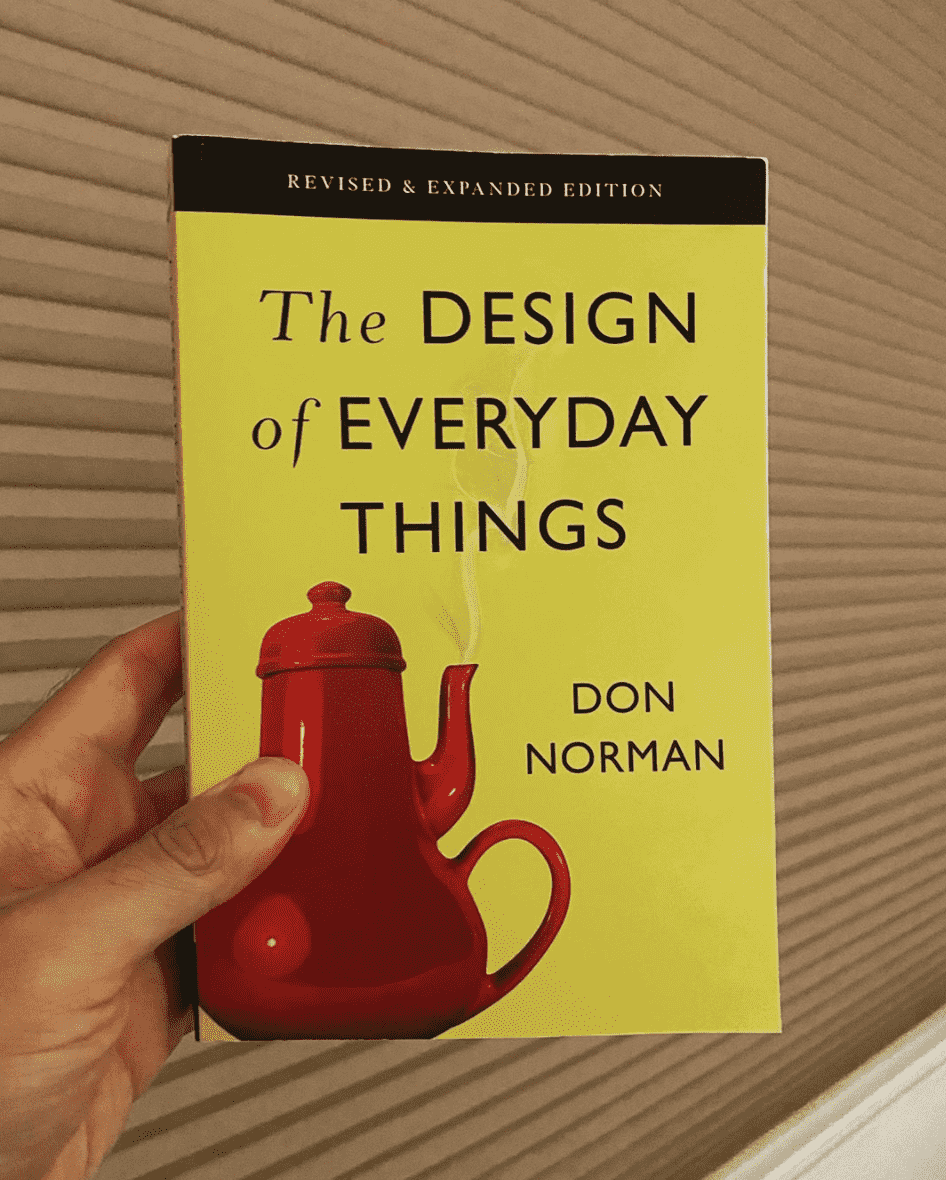
When I was an undergraduate student studying industrial design, I thought that the most important thing about design was that it was cool and aesthetically beautiful.
After I came back from the military, I learned through this book that users make mistakes and that it is not their fault. ⚡ It was like a 'sparkle of light'. It was a whole new world. I used to think that if you don't handle digital products well, you are a machine, but that wasn't the case. That was completely the designer's responsibility. I learned that perspective and decided to become someone who does user-centered design. That's how I came into the UX design industry.
This book also contains important concepts that you need to know to get started with UX design, such as mental models, concept models, and affordances.
In this "Introduction to UX Design" lecture, several chapters of the UX theory section are based on this book. It is already an interesting theory, but in order to make it easier and more fun for beginners to understand, we have covered several cases of how it can actually be applied.