

Introduction to UX Design for Beginners by a New York Product Designer
This is an introductory UX design course for non-majors who have never studied design, students who are just starting to study UX design, and job seekers in UX and UI design. We will "release" methods to become a UX, UI designer with solid fundamentals in a short period of time from a practitioner's perspective.
1,216 learners
Level Beginner
Course period 36 months


2022 UX Design Tool Statistics Announcement "Unrivaled Figma"
Hello, this is Eric.
I hope you are staying warm during this cold winter.
Following 2021, UX tools has released statistics on the use of UX/UI design tools for 2022. UX tools releases this every year, so it’s good to know how the UX/UI design tool market is flowing and which tools are being used the most. I’ve summarized the results of the statistical survey. (Statistics source: uxtools.co )
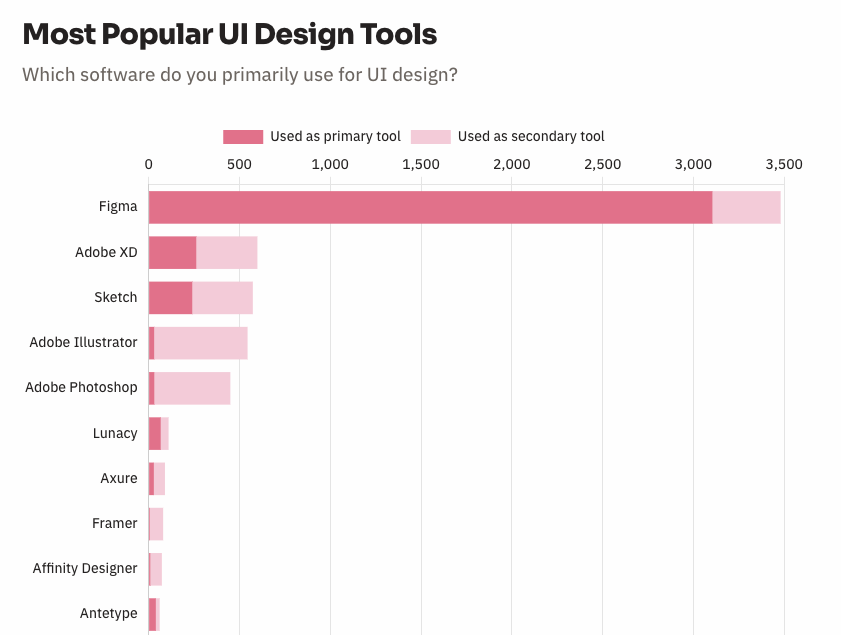
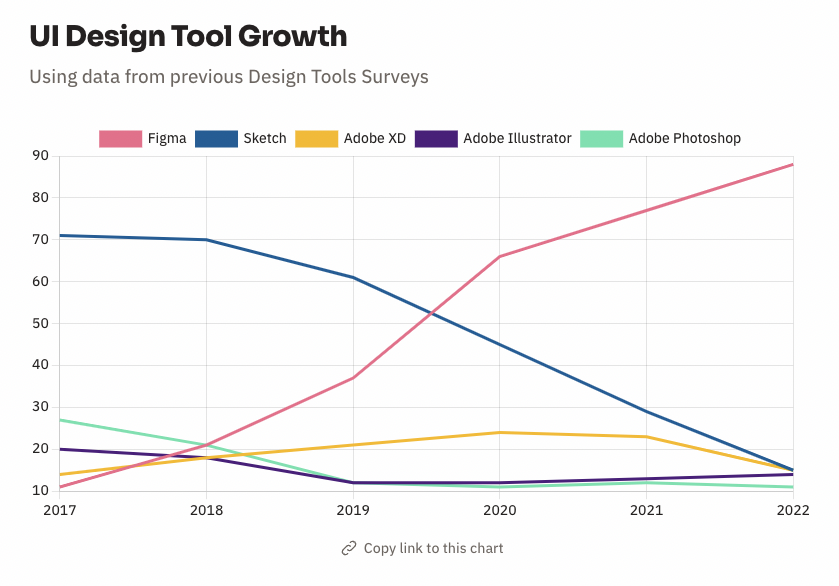
Conclusion "Figma is unrivaled" : In order to do UX and UI design, you need to do various activities. There are wireframes, UI design, and design systems. From 2020 to 2021, Figma has been used much more than other tools, widening the gap, and now it seems to be almost unrivaled.
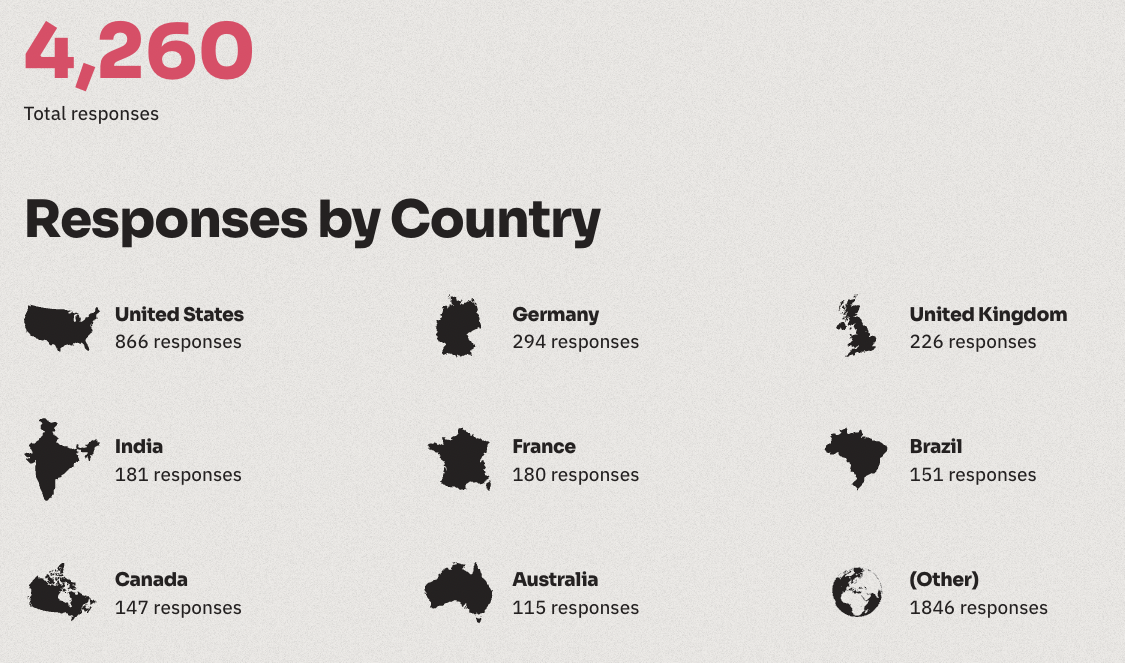
1. Who participated in this survey? "Designers from around the world"
This survey was conducted with 4,260 UX designers or people working in related industries around the world.
2. What kind of professionals are participating the most? "We have discovered a trend where there are more product designers who do both UX and UI, and UX/UI designers."
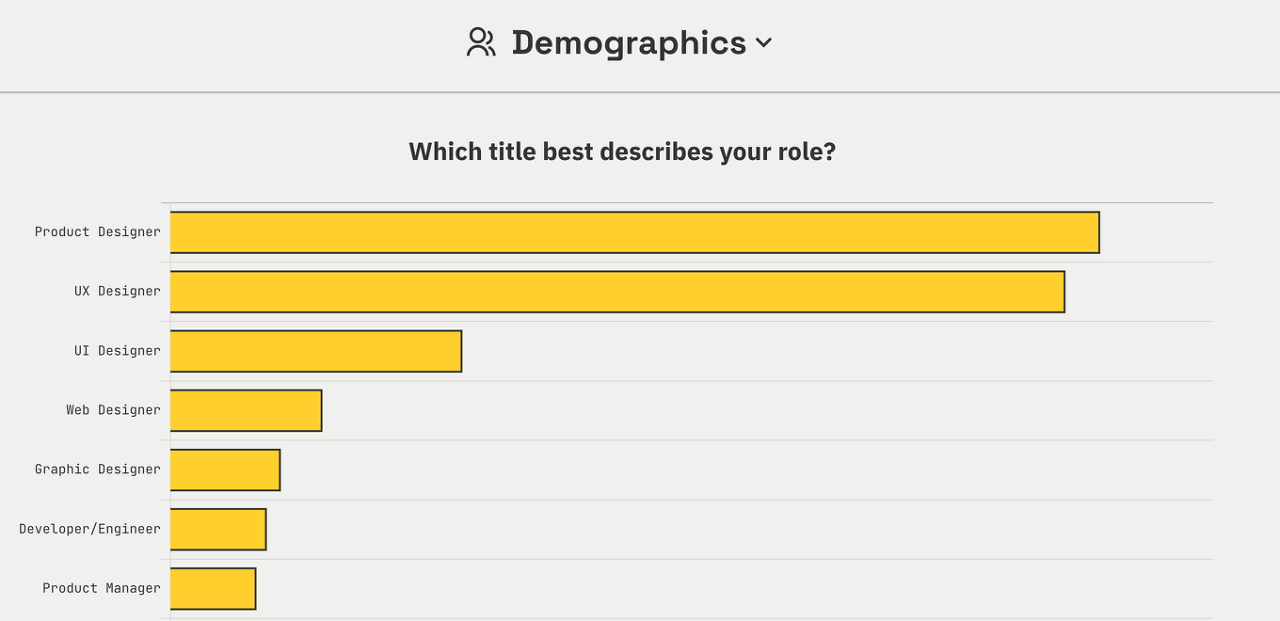
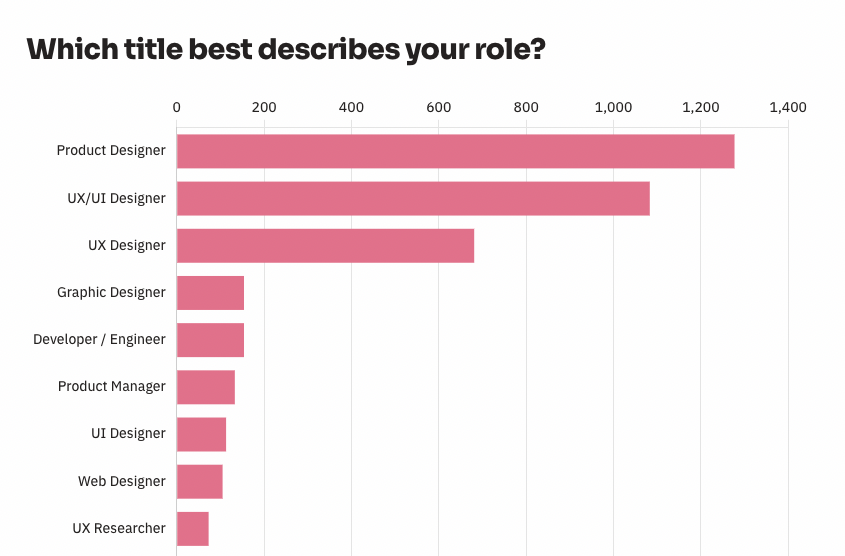
The most popular occupations were product designers and UX/UI designers. This part shows a change compared to the 2021 results.
In the tech industry, as Agile and Lean Startup are utilized, there is a trend of gradually hiring UX/UI designers or product designers who can do both UX and UI, rather than hiring UX designers and UI designers separately. In the flow where rapid iteration is required for product development and updates, it seems natural to want more product designers who can encompass everything. From that perspective, there is a change where the number of UX designers and UI designers is decreasing and the number of product designers and UX/UI designers is increasing.
Occupations of 2021 participants (below)
Occupations of 2022 participants (below)
3. UI Design Tool Survey Results: “Figma is the End”
The hottest sector in the UX, UI design tool market is UI design. Hand sketches and wireframes are not necessarily UI design-specific tools, but there are other alternative software or methods. For example, wireframes can be created using PowerPoint. However, UI design requires the use of a dedicated tool and requires the acquisition of specialized tool usage skills. That is why it is important to know how much better the dedicated tool is. Last year, Figma was overwhelmingly ahead of other tools, but this time, the gap has widened to the point where it is difficult to simply compare. This means that designers around the world are using Figma a lot.
So, if you are thinking about getting started with UI design, I recommend learning Figma first.
2021 UI Design Tool Survey Results
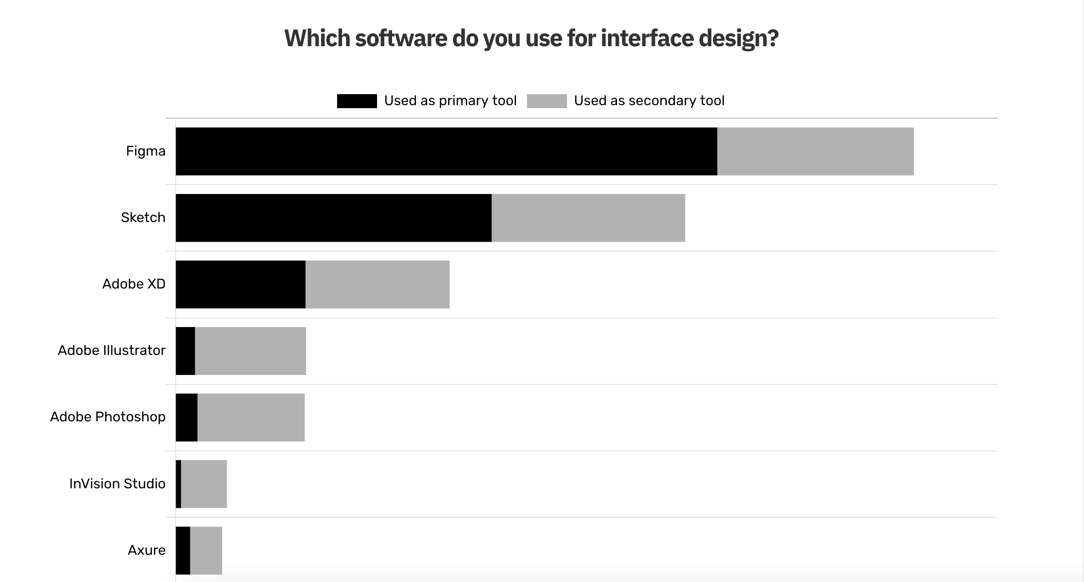
2022 UI Design Tool Survey Results
UI Design Market Share by Year (I thought Figma had already widened the gap, but it has widened it even further;)
4. UI Prototyping "Figma for Basic, ProtoPie for Advanced"
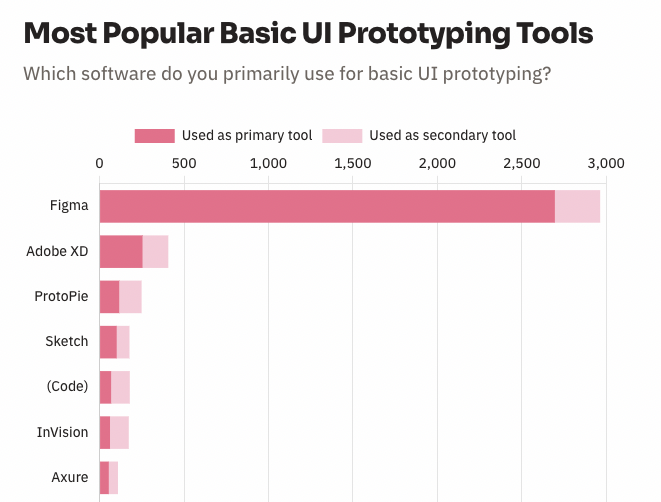
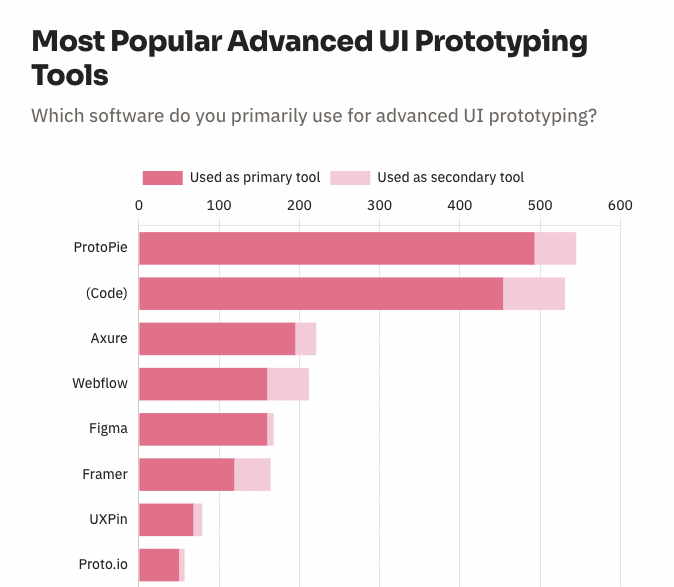
This year's UI Prototyping Survey was divided into two sections. One is Basic, and the other is Advanced. Basic is basically about how the screen looks and works, light animations, and making the screen clickable, while Advanced is about much higher quality prototyping. Figma took first place in Basic, and Protopie, a software made in Korea, took first place in Advanced.
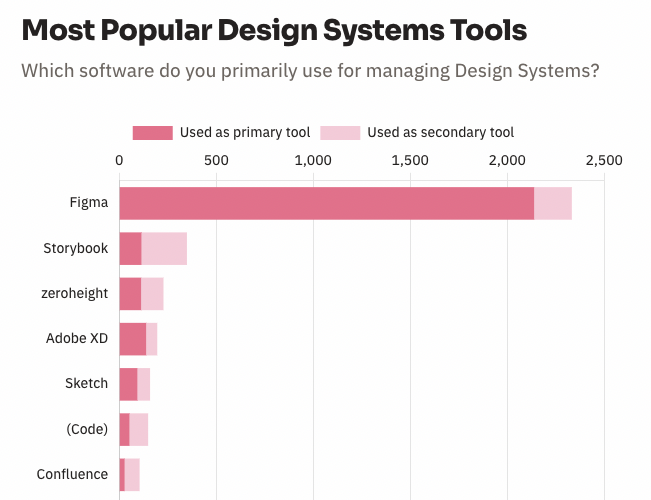
5. Design System “This is also Figma”
Figma is also overwhelmingly popular in terms of design systems. Storybook is a software that shares components including developers and code. It ranked second because it manages with designers. Incidentally, many developers also participated in this survey. I think it is because there is a lot of collaboration. Developers also use Figma a lot as a viewer.
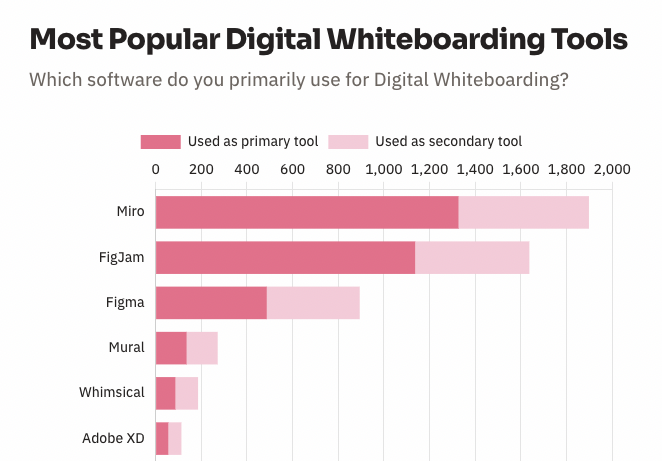
6. Digital Whiteboard "Competition between Miro and Pigjam made with Figma"
The digital whiteboard market is being competed by Miro and Figma, which are almost the same as last year. Pigjam has the advantage of being convenient for Figma users to use right away. Nevertheless, Miro is maintaining its first place, perhaps because it has clearly taken over the market first. With online collaboration becoming more important, the competition in the digital whiteboard market is likely to heat up in the future.
* In addition, there are surveys on user research software and user research recruiting tools, so please take a look.
Summary and Thoughts
1. Figma provides solutions for almost all processes for UX and UI design. From Pigjam for brainstorming, wireframes, UI design, design systems, and even prototyping. Plus, the number of plugins and open source templates keeps increasing, so it seems to be continuously becoming more and more overwhelming.
2. Figma was recently acquired by Adobe. Since it has such a big influence in the market, I don't know how Adobe will change Figma right away, but I hope Figma will continue its current direction and focus on user convenience. I think it is a well-made and convenient tool from a designer's perspective.
3. The competition in the digital whiteboard market also seems to have many interesting points. As non-face-to-face collaboration becomes more important, it is necessary software for idea meetings with non-designers.
4. I feel that the demand for product designers and UX/UI designers is increasing. I think it would be good for beginners to take this into consideration when planning their careers.
Source:
UX tools 2022 statistics results
UX tools 2021 statistics results
etc:
2021 UX Design Tool Statistics Announcement "Figma's Dominance"
[Advertisement] Are you planning to learn UI design and the Figma tool?
Introducing Infraon's "UI Design Using Figma, From Introduction to Practice" course.
For those who want to get started with UI design through Figma , I opened a course called "UI Design Using Figma, From Introduction to Practice" on Inflearn. As someone who only did planning work and became a product designer, I entered UI design late in life and included insights I gained through trial and error, how to use the Figma tool, and things you need to know to become a UI designer. Since I entered the field late in life, I organized it so that even non-majors can easily follow along, starting from the basics of UI design and moving on to advanced features used in practice. If you are thinking about getting started with UI design, I recommend this course.
• Preview video of the relevant lecture on Inflearn (free):
1. The story of how I, who only did planning work, acquired UI design skills in just 3 months
