
강의

멘토링

커뮤니티

Programming

/

Back-end

Create your own API server without coding with Strapi

This is a process of creating your own backend API server, using Node-based Strapi v4, without any additional coding, with just a few clicks, and deploying it to AWS EC2. Almost the same can be applied to Strapi v5. Please refer to the lecture A/S as well~

(5.0) 3 reviews

44 learners

  • teracokr
tts
strapi
Node.js
ec2
MySQL
backend

What you will gain after the course

  • Node-based backend server development

  • Creating and configuring an EC2 instance

  • Install and operate MySQL directly

  • Serving the Web with PM2 and NGINX

Creating your own Rest API server using Strapi

This course is a process of quickly creating your own backend using Strapi v4 , a Node-based headless CMS, and deploying it to AWS EC2 for frontend development and commercialization.


This was created for developers who are not confident in building backend servers and cannot find a backend developer, but want to build both the backend and frontend on their own.


If you follow along, you can easily have your own backend server without any special coding, and you can use this server to launch a frontend service.

Learn about these things

  1. Strapi is a Node-based headless CMS that automatically creates a Rest API upon installation.

    • Headless means there is no UI, it only provides an API, and allows you to create the front-end in an environment you are familiar with.

    • CMS stands for Content Management System, and it is a system that allows you to manage content using a web UI, like WordPress or Gnuboard.

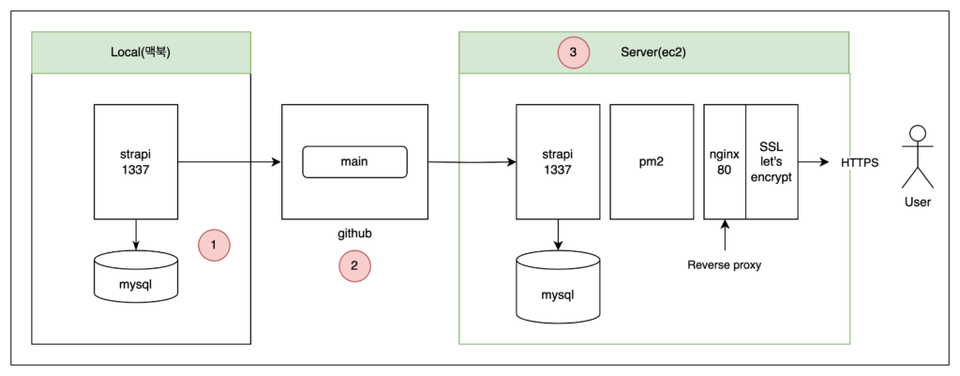
  2. The server is running Ubuntu 22.04 on AWS's EC2 .

  3. The web server uses NGINX , and the DB will be installed as MySQL 8 version on EC2 local.

  4. I installed Strapi on top of PM2 , a process manager that gives wings to Node .

  5. Let's set up NGINX as a reverse proxy to provide a stable web service.

  6. Let's create a secure SSL service using Let's Encrypt, a free certificate service for https.

Things to note before taking the course

Practice environment

  • Development Environment Operation : This lecture explains based on the macOS development environment.

    • There is no separate explanation for the Windows development environment.

  • Tools to use : Please prepare by installing Docker Desktop, DB client (Sequel Ace or Pro), VS Code, etc. in advance.


Preparation

  • Please sign up for AWS.

  • Get or purchase a cheap domain to install a free SSL certificate.

    • If you'd like to purchase a domain, please visit hosting.kr . This explanation is based on that site.

Player Knowledge and Precautions

  • You should know github and basic linux commands.

  • You should have basic knowledge of domain setup.

    • This lecture provides sufficient explanation based on hosting.kr , but it is difficult to respond to third-party services.


Recommended for
these people

Who is this course right for?

  • Front-end developer who needs a back-end server

  • Anyone who needs a simple backend to use as a side project

  • People who want to quickly build a Node-based backend

Need to know before starting?

  • macOS-based development environment

  • Basic git and linux commands

  • Please sign up for AWS membership.

  • Please purchase a domain.

Hello
This is

234

Learners

20

Reviews

5

Answers

4.8

Rating

2

Courses

안녕하세요. 코딩 및 개발을 체험하면서 서비스까지 만들어보는 강의를 하는 체험코딩입니다.

Curriculum

All

26 lectures ∙ (2hr 14min)

Published: 
Last updated: 

Reviews

All

3 reviews

5.0

3 reviews

  • zealouscha3990님의 프로필 이미지
    zealouscha3990

    Reviews 2

    Average Rating 5.0

    5

    32% enrolled

    I thought it would be difficult because it was intermediate, but I was able to follow along without difficulty because they kindly explained the environment settings. It's fun.

    • teracokr
      Instructor

      Oh~ Thank you for the review. It's not difficult, but I made it intermediate level because I was worried that my explanations might be lacking, but even beginners can do it.

  • terybuster3360님의 프로필 이미지
    terybuster3360

    Reviews 1

    Average Rating 5.0

    5

    100% enrolled

    • vidkid님의 프로필 이미지
      vidkid

      Reviews 7

      Average Rating 5.0

      5

      96% enrolled

      strapi I saw it for the first time and it's useful I watched the lecture with sincerity I totally recommend it And the appendix contents are also informative~ Please also give in-depth lectures on Google authentication, importing Google photos, etc. I am a student who was moved at 2 AM.

      • teracokr
        Instructor

        Hello, I was touched when I saw this class review at 4:30 in the morning~ You all completed the class!! Thank you so much. I will quickly prepare for the next advanced course!!

    $17.60

    teracokr's other courses

    Check out other courses by the instructor!

    Similar courses

    Explore other courses in the same field!