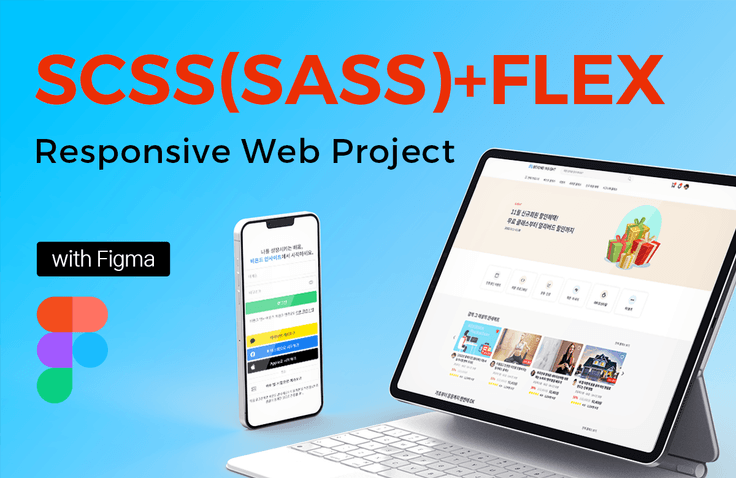
SCSS(SASS)+FLEX Practical Responsive Web Project with Figma
Master SCSS (SASS) and FLEX Layout in practice! This is a systematic responsive website project production course where you will design the main page and core sub-page UI of an entire website using Figma, create an HTML wireframe structure with consistent class names, and complete the publishing process. Throughout more than 41 hours of coursework, you will thoroughly learn core theories and practical application skills. By designing and building responsive layouts for PC, mobile, and tablet, you will not only gain experience and know-how in responsive web projects but also significantly improve your core jQuery theory and practical application skills.
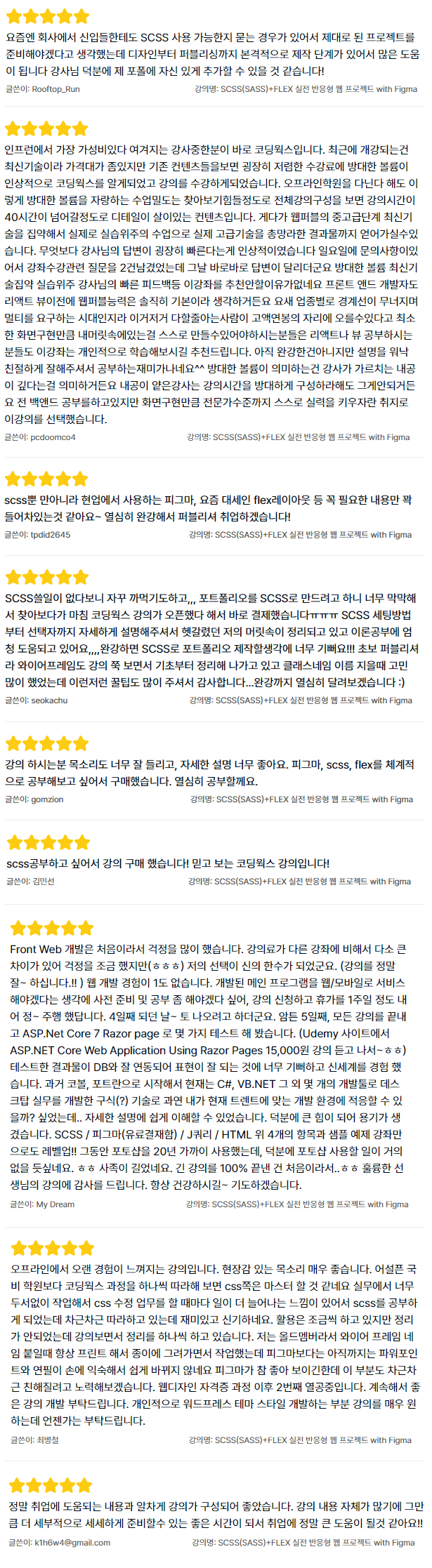
I was worried because it was my first time developing a front-end web.
The tuition fee was a bit different from other courses,
so I was a little worried (lol)
but my choice turned out to be a godsend.
(The lectures are really good!!)
I have no experience in web development at all.
I thought I should prepare and study in advance because I wanted to service the main program I developed on the web/mobile, so I applied for the course and took a week off to study. On the 4th day~ I was going to come out on Saturday.
Anyway, on the 5th day, I finished all the lectures and
tested a few things with ASP.Net Core 7 Razor page.
(After taking the 15,000 won ASP.NET Core Web Application
Using Razor Pages lecture on the Udemy site~lol)
I was so happy that the test results were well-linked with the DB and expressed well, and I experienced a new world.
I started with COBOL and FORTRAN in the past, and now I have developed desktop work with C#, VB.NET, and several other development tools. I wondered if I could adapt to the current development environment that fits the trend..
I was able to understand it easily with the detailed explanation.
Thanks to this, it gave me courage and helped me a lot.
SCSS / Figma (paid) / JQuery / HTML
I leveled up just with the above 4 items and sample example lectures!!
I have used Photoshop for nearly 20 years, but thanks to this, I think I will hardly ever use Photoshop. ㅎㅎ
That was a long postscript.
It is the first time I have finished 100% of a long lecture..ㅎㅎ
Thank you for the great lecture, teacher.
I will always pray for your good health.
5.0
pcdoomco4
83% enrolled
One of the instructors considered to offer the most cost-effectiveness in Inflearn is Coding Works. Recently opened courses are a bit pricey because they are cutting-edge technologies, but looking at the existing content, I was impressed by the low tuition and the vast volume, so I found Coding Works and took the course. Even if you go to an offline academy, it is hard to find a class density that boasts such a vast volume, and if you look at the entire lecture structure, the content is so detailed that the lecture time exceeds 40 hours. In addition, it is a class that focuses on practical training by integrating the latest intermediate and advanced technologies of Webpub, so you can obtain results that cover all of the actual advanced technologies. Above all, the instructor's response was very impressive. I had an inquiry on Sunday, so I left two questions about the course, and they were answered right away that day. There is no reason not to recommend this course with its vast volume, the latest technology-intensive practice, and the instructor's quick feedback. I honestly think that web publishing skills are basic for front-end developers before React and View. These days, boundaries between industries are collapsing and multi-tasking is required, so those who know how to do everything can get high salaries. Those who need to be able to create what's in their heads at least as much as screen implementation, I recommend that those studying React or View take this course on their own. It's not yet complete, but the explanations are so kind and good that studying is fun^^ The vast volume means that the instructor has deep teaching skills. Even if an instructor with shallow skills is asked to organize the lecture time extensively, that won't work. I'm studying back-end, but I chose this course with the intention of improving my skills to an expert level, such as screen implementation.
5.0
문유연
17% enrolled
The best class ever...!
I've taken many courses so far, but I don't think I've ever met a teacher who explains things as thoroughly yet simply as you do. Thanks to you, I was able to learn so much.
I highly recommend this to anyone who is hesitating about taking the class. Even if you don't have any prior knowledge, the teacher explains everything so easily and in such detail that you definitely won't regret it.
What you will gain after the course
Systematic responsive website project production process
Core SCSS (SASS) Theory and Practical Application Skills
Core Theories of FLEX Layout and Practical Application Skills
Design and production of responsive layouts for PC, mobile, and tablet.
Core jQuery theory and practical application skills for responsive web project development
Website UI design skills using Figma
Ability to design systematic HTML wireframe structures and class names
Creating the Best Responsive Web Portfolio for Web Publishers and Developers
Looking for an overwhelming portfolio for web publishers and developers? SCSS(SASS)+FLEX Responsive Online Lecture Site Project!
"Complete your systematic responsive website project production skills with the SCSS(SASS)+FLEX Practical Responsive Web Project with Figma course" "Over 41 hours of extensive learning content"
Since SCSS (SASS) publishing might be somewhat unfamiliar, it could be a bit overwhelming for absolute beginners, but beginners will be fully able to complete it if they follow along sequentially through each section.
Perfectly utilize SCSS(SASS) and FLEX in practice!
Point 1. Creating SCSS(SASS)+FLEX website UI design with Figma Point 2. Detailed production of HTML wireframes for all pages of the SCSS(SASS)+FLEX website Point 3. Publishing and creating various multiple web pages using SCSS(SASS)+FLEX Point 4. Designing, creating, and perfectly publishing responsive layouts for PC, Mobile, and Tablet Point 5. Core jQuery theory and practical application skills for creating responsive web projects
This course contains the intermediate-to-advanced publishing production know-how that Coding Works has taught through numerous offline academies and personal portfolio website creation courses. In particular, since this is a responsive web publishing project based on SCSS(SASS)+FLEX, you can maximize your SCSS(SASS)+FLEX skills. I am confident that after completing the course, you will possess significantly improved intermediate-to-advanced responsive web publishing skills!
SCSS Essential Theory Video Update (5 hours 9 minutes)
We have updated the SCSS Essential Theory to ensure smooth SCSS (SASS) + FLEX practical responsive web project publishing. The SCSS Essential Theory videos cover almost all theories of SCSS over 5 hours and 9 minutes, allowing you to study SCSS core concepts in sufficient depth.
From Section 5 onwards, you do not need to study all the additional videos added for publishing work. The essential theory videos for publishing work starting from Section 5 are as follows, so studying only these will not hinder your publishing tasks at all.
1. SCSS Core Theory (01) - Selector Nesting
2. SCSS Core Theory (02) - Parent Selector Reference (&) and Commenting
SCSS Core Theory (07) - Exiting Parent Selector Nesting with @at-root
SCSS Core Theory(08) – Automatically generating CSS properties using prefixes
SCSS Core Theory (09) – Reducing Selector Duplication with the :is Pseudo-class
SCSS Core Theory (10-1) - Variables 01
SCSS Core Theory (10-2) - Variables 02
SCSS Core Theory (10-3) - Variable Scope and CSS Variable Declaration
SCSS Core Theory (11-1) - Importing External Files @import
SCSS Core Theory (11-2) - Importing Partial Files with @import
SCSS Core Theory(12) - Operations, Removing the Output Window
SCSS Core Theory (13-1) - Declaring groups with @mixin, Using groups with @include
SCSS Core Theory (13-2) - Applying @mixin and @include
SCSS Core Theory (13-3) - Button design using @mixin and @include
SCSS Core Theory (13-4) - Using @mixin parameters (arguments) with @include
SCSS Core Theory (14) - @extend to inherit selector properties
SCSS Core Theory (15) - Placeholder selector % used with @extend
SCSS Core Theory (16) - Multiple Variable Declaration, Built-in Function (map-get)
Course Review Event to Celebrate the Launch😋
For those who write a review for this course, we will provide the SCSS(SASS)+FLEX Core Theory PDF textbook and practical example files. The provided PDF textbook and files will serve as a great reference for the <SCSS(SASS)+FLEX Real-world Responsive Web Project with Figma> publishing work and your future professional projects.
For the course review, please write your honest thoughts after watching the lectures. Once you have written your review, take a screenshot and send it to the email address below. We will then email you the [SCSS(SASS)+FLEX Core Theory and Practical Examples File].
The course review event will run for a limited time of 4 weeks during the course opening discount period. ※ We have decided to run the course review event indefinitely, so you can write a review at any time.
■ Period: 4 weeks (July 1, 2023 – July 28, 2023) ■ Eligibility: Everyone who has written a review for this course ■ Email: webnlife@naver.com
🚩Provided Files
- SCSS(SASS) Core Theory Textbook (PDF, 67 pages) and completed practical examples - FLEX Core Theory Textbook (PDF, 36 pages) and completed practical examples
※ The completed practical examples are the finished versions of all examples featured in the textbook. ※ View detailed introduction of SCSS(SASS)+FLEX core theory textbook and provided files: https://inf.run/qzdx ※ GRID core theory textbook and practical examples are not included. ※ The provided files will be sent within 24 hours once you send a confirmation email after writing a course review.
SCSS(SASS) proficiency is a preferred qualification and a must-have 👍
Both in the past and now, when looking at job postings for web publishers and front-end developers at large-scale companies, SCSS (SASS) proficiency is always treated as a 'preferred qualification' in hiring. A preferred qualification means it is not a mandatory requirement, but you will be given better treatment if you can do it. In other words, it means you will have a high competitive edge compared to other applicants.
🔥 As a publisher or developer, simply stating during job applications and interviews that you have SCSS(SASS) skills is not enough. There are many applicants who have only heard of or briefly tried SCSS(SASS) but claim they know how to use it during interviews. People don't easily believe publishing or development skills that are only backed by words. However, showing a responsive web project actually built using SCSS(SASS) will be the best way to prove your proficiency, and you will naturally receive preferential treatment in the hiring process.
Even as recently as last year, most job postings listed SCSS (SASS) proficiency as a preferred qualification for web publishers. It wasn't as common to see SCSS (SASS) skills required for developers. However, while checking job postings after finishing preparations for this course, I've noticed that SCSS (SASS) proficiency is now frequently listed as a basic requirement for web publishers, and often as a preferred or even mandatory qualification for developers as well. Notably, quite a few places are also requiring Figma proficiency for web publishers.
▼ Recent JobKorea actual job postings for Web Publishers and Web Developers
Build a virtual lecture site yourself and definitely level up your skills.
💡 Through the [SCSS(SASS)+FLEX Practical Responsive Web Project with Figma] course, you can elevate your skills to an upper-intermediate level in core SCSS(SASS) theory and practical application, core FLEX Layout theory and practical application, and designing and building responsive layouts for PC, mobile, and tablets.
Coding Works will produce a virtual online lecture website called 'Beyond Insight' . You can think of it as being similar to Inflearn or Class101. This is a responsive website production project for intermediate to advanced skill improvement, where you will code various pages and layouts from the main page to sub-pages as a project concept using SCSS (SASS), with all layouts built using FLEX Layout.
SCSS(SASS) Core Theory and Practical Application Skills
Core theories of FLEX Layout and practical application skills
Design and production of responsive layouts compatible with PC, mobile, and tablet
Core jQuery theory and practical application skills for responsive web project creation
Website UI design skills using Figma
Systematic HTML wireframe structure and class name design skills
Perfect mastery of essential jQuery interactions that are strictly necessary for practical work.
All production resources provided (Figma design files, publishing source files, lecture material PDFs, completed publishing versions)
Just being able to use SCSS (SASS) gives you a strong competitive edge when applying for or switching jobs as a publisher. However, I am confident that if you use SCSS (SASS) to create a stunning responsive website project, those skills and results will give you a greater competitive advantage than anyone else. Of course, since the course content and volume are close to an intermediate-advanced level, it won't be easy, but if you follow along well, I believe you will achieve greater results than with any other Coding Works lecture.
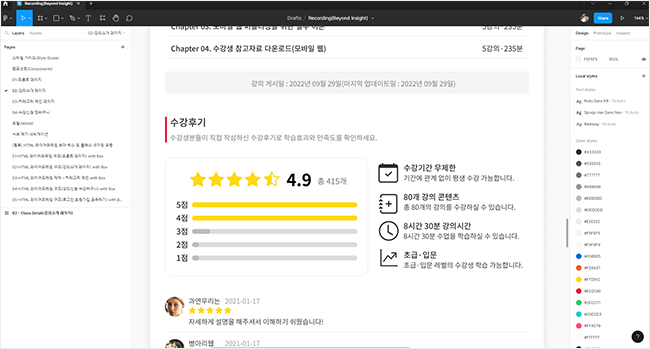
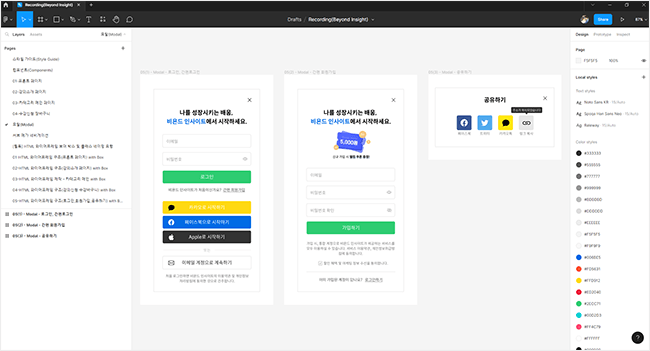
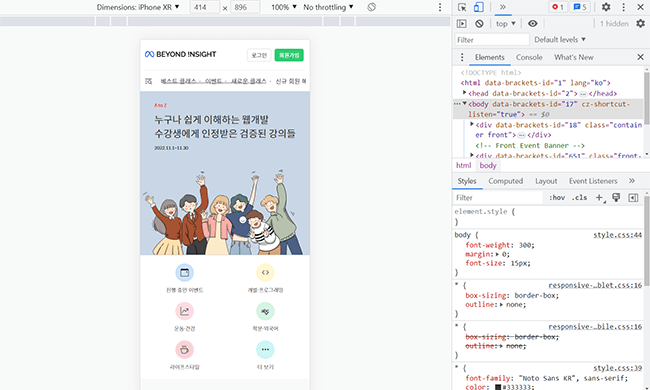
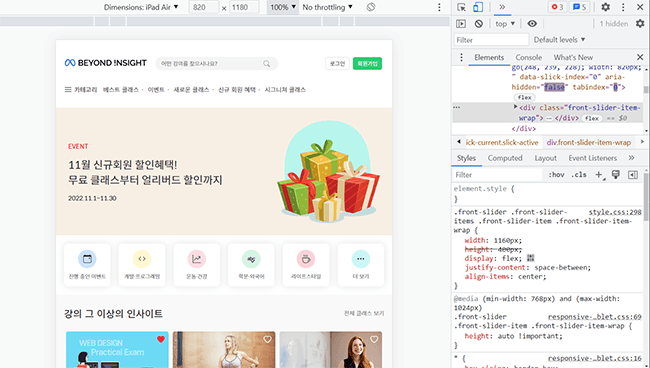
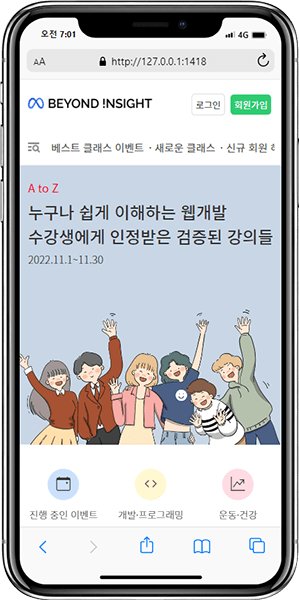
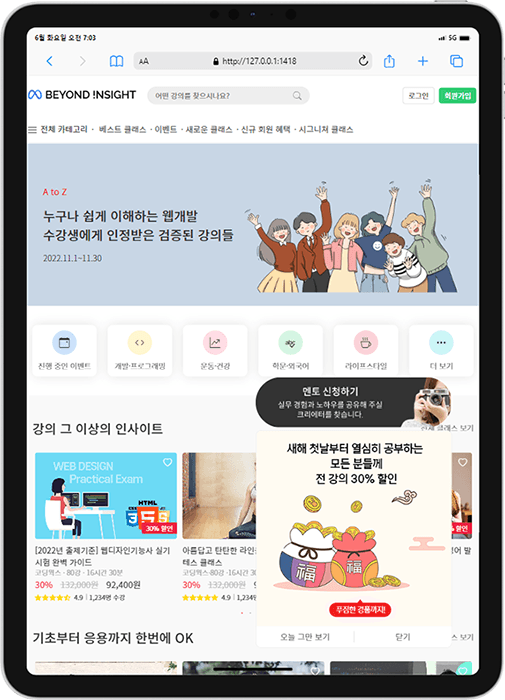
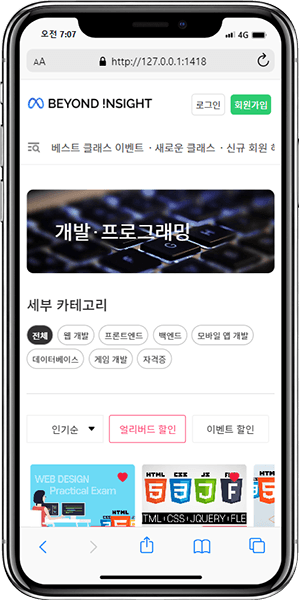
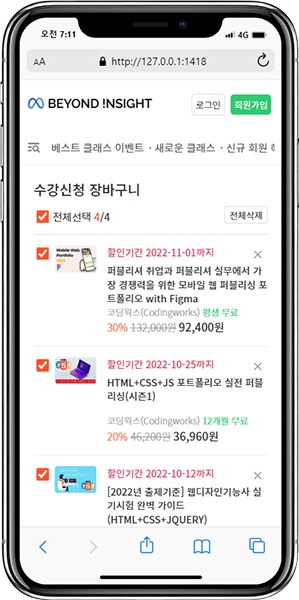
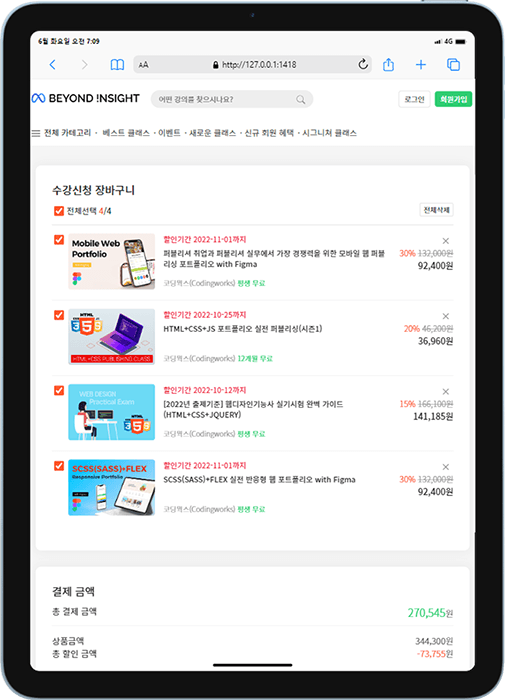
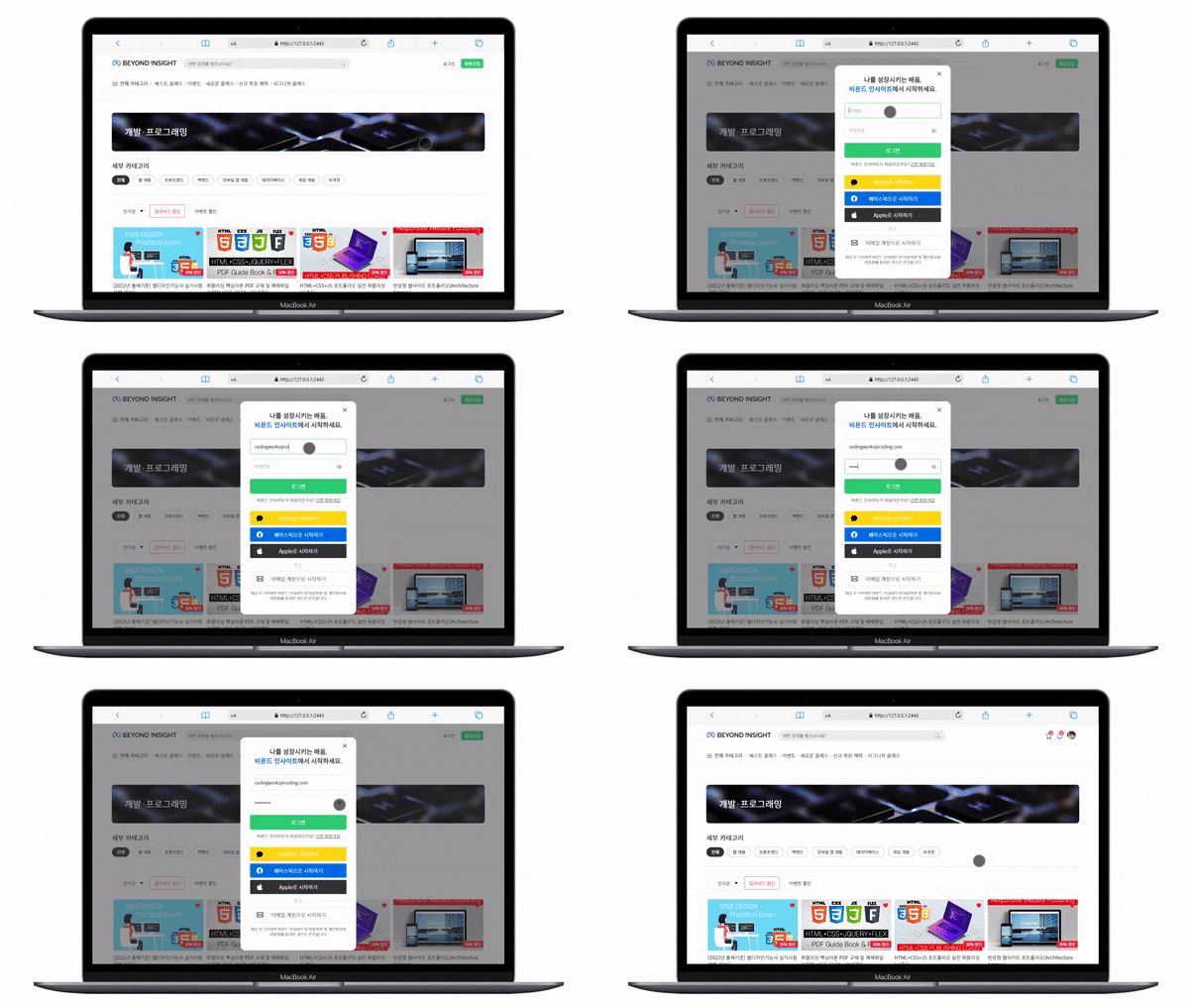
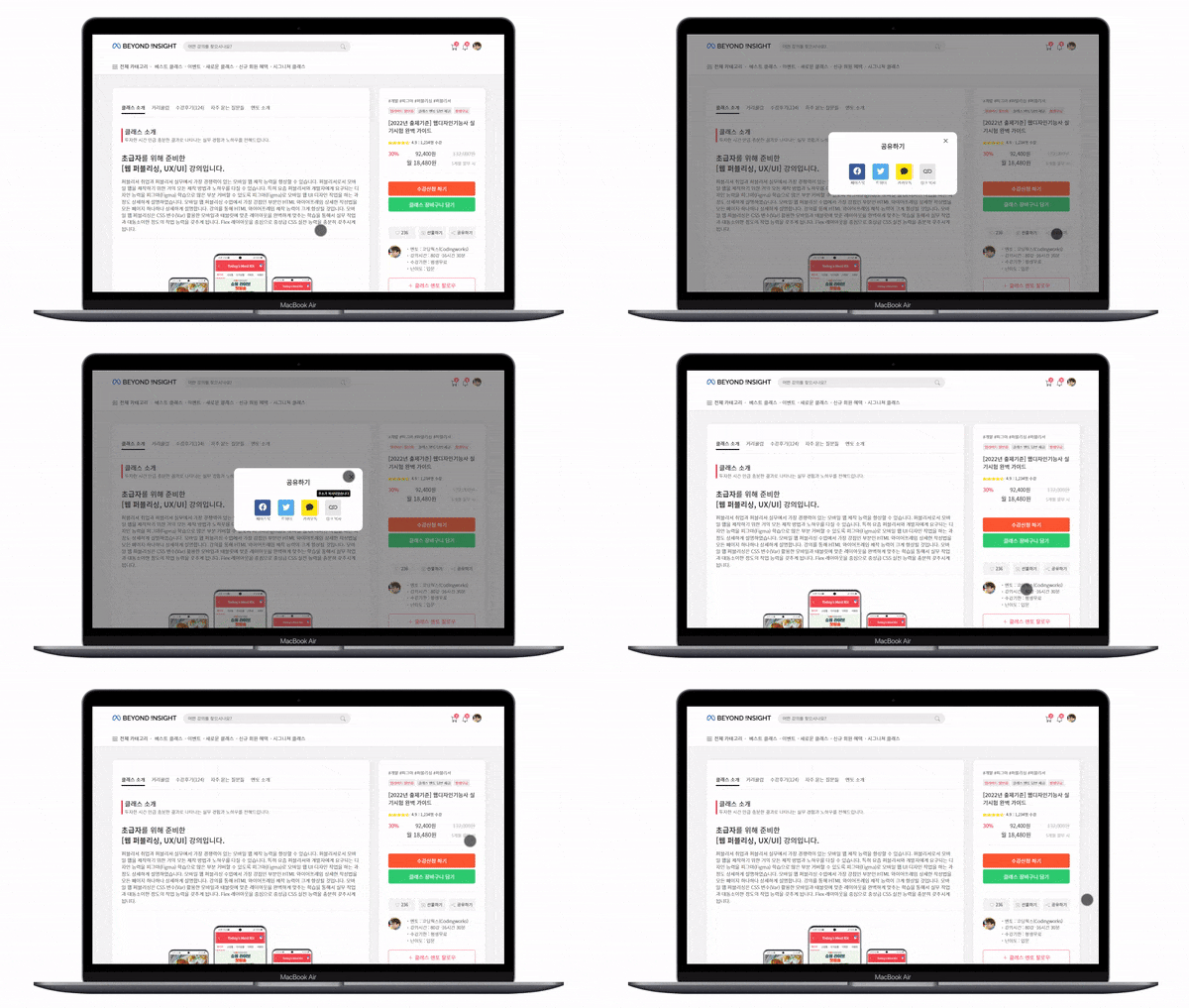
The responsive web project created in this course is not just about making a single main page. It covers a total of 5 pages, which are the most important pages of an entire website: the Front Page, Course Introduction Page, Category Main Page, Enrollment & Shopping Cart Page, and Sign-up Page. This course involves responsive publishing work that adapts all pages into PC, Mobile, and Tablet layouts. Additionally, you will learn various jQuery interactions and create several types of modals.
Responsive Web Project Course Learning Order 🙆♀️
Step 01. Responsive Website PC Layout Figma UI Design
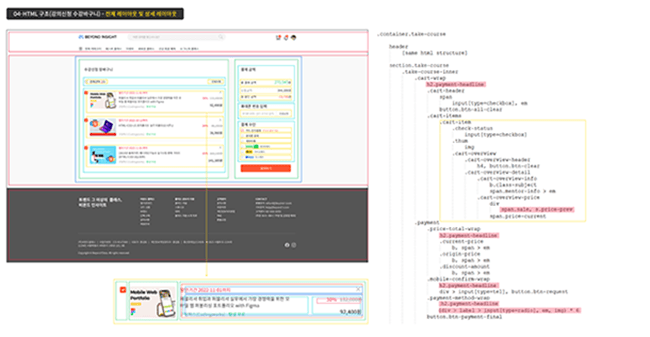
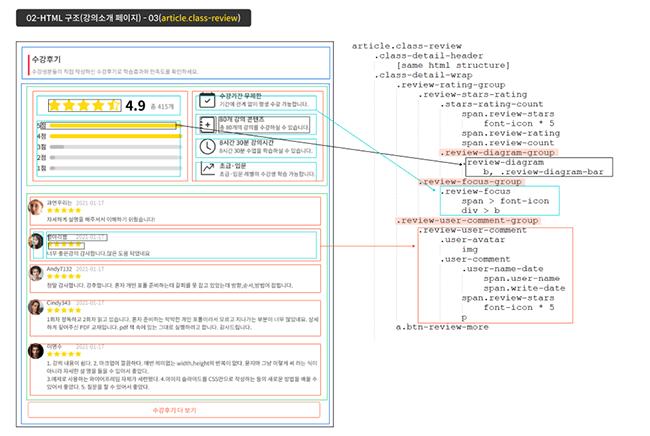
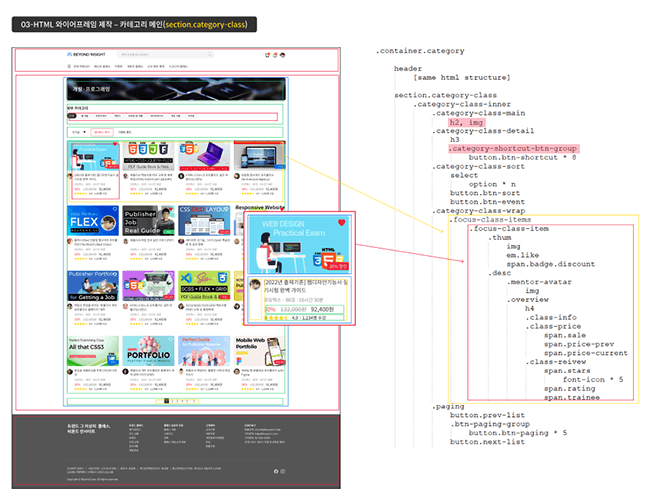
Step 02. Designing HTML wireframe structures with class names in Figma
Step 03. HTML coding with a text editor
Step 04. SASS(SCSS) coding with a text editor along with jQuery interaction work
Step 05. Publishing to change PC layout to Mobile layout
Step 06. Publishing to change PC layout to Tablet layout
Step 07. Final detailed publishing work for all web pages
1) Creating UI design for a practical responsive web project with SCSS(SASS)+FLEX using Figma
2) Creating HTML wireframe structures for practical responsive web projects using SCSS(SASS)+FLEX with Figma
3) HTML coding with a text editor based on the HTML wireframe structure
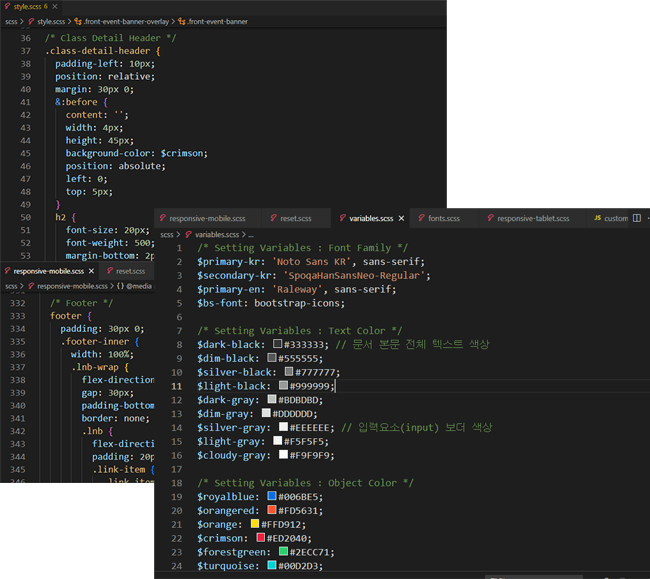
4) Coding SCSS (SASS) with a text editor based on the HTML wireframe structure
5) Work on changing to a mobile-responsive web layout
6) Work on changing to a tablet-responsive web layout
7) jQuery interaction work for all web pages and detailed final publishing finishing touches
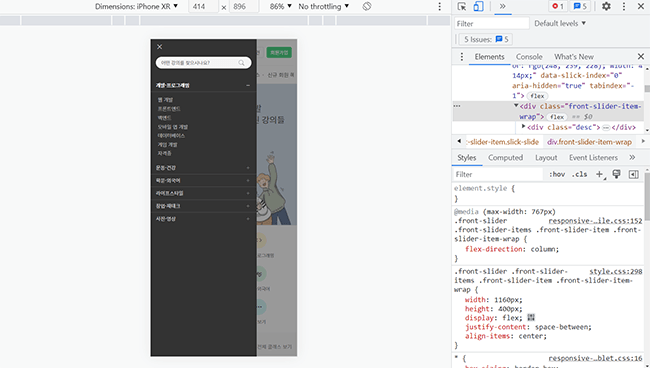
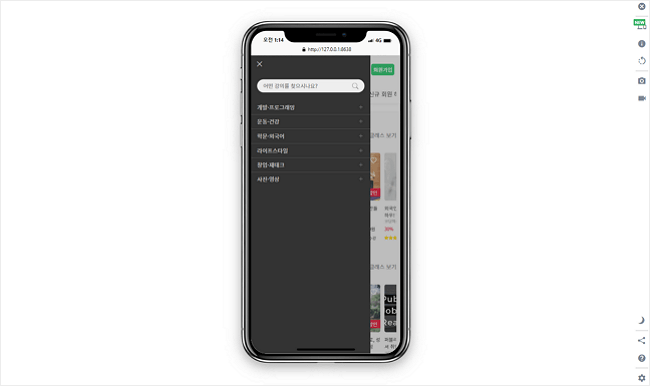
▼ Detailed finishing work on various types of actual device mockups
Publishing Final Version Preview & Function Definition 🙆♀️
The web pages created in this course include the front page, course introduction page, category main page, enrollment/shopping cart page, and sign-up page. This is a course where responsive publishing work is performed to adapt all pages into PC, Mobile, and Tablet layouts. Additionally, various modals will be created together.
If you watch the [Publishing Completion Preview & Functional Definition] video in the section below, you will find a detailed explanation of the publishing functional definitions and what will be created in this course. You can also view the table of contents for the course materials as images in the [Full Curriculum].
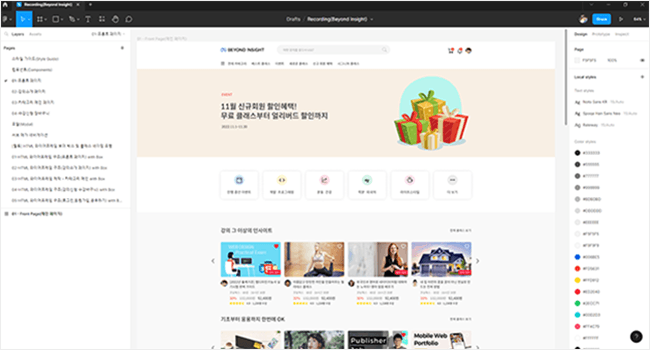
▼ SCSS(SASS)+FLEX Practical Responsive Web Project: Front Page
🚩 Front Page
Figma UI design and HTML wireframe structure creation
Full publishing production using SCSS(SASS) and FLEX layout
As the first page of the website, it shows the identity of the website to the user.
How to manage complex HTML structures and create well-organized hierarchies (Clean Coding)
Used if-condition branching for scripts that operate the PC & Tablet layout navigation and the Mobile navigation.
Used a script to fix the Header to the top when scrolling past a certain point
Display mentor application and event modals on the front page
Created the main slider and lecture item slider using Slick Slider
Componentizing the Header & Footer, which are common across all pages, using jQuery
Using a countdown timer plugin
Converting the footer navigation into a dropdown accordion format for the mobile layout
Inserting font icons into search form elements and using :focus and ::placeholder
Using font icon Unicode with pseudo-classes :before and :after
Figma UI design and HTML wireframe structure creation
Figma UI design and HTML wireframe structure creation
Complete publishing production using SCSS (SASS) and FLEX layout
Creating shapes using :before and :after pseudo-classes
Cart confirmation modalautomatically closes after 4 seconds using setTimeout
Various files provided 🗂️
📝 [SCSS(SASS)+FLEX Practical Responsive Web Project with Figma] All Completed Files
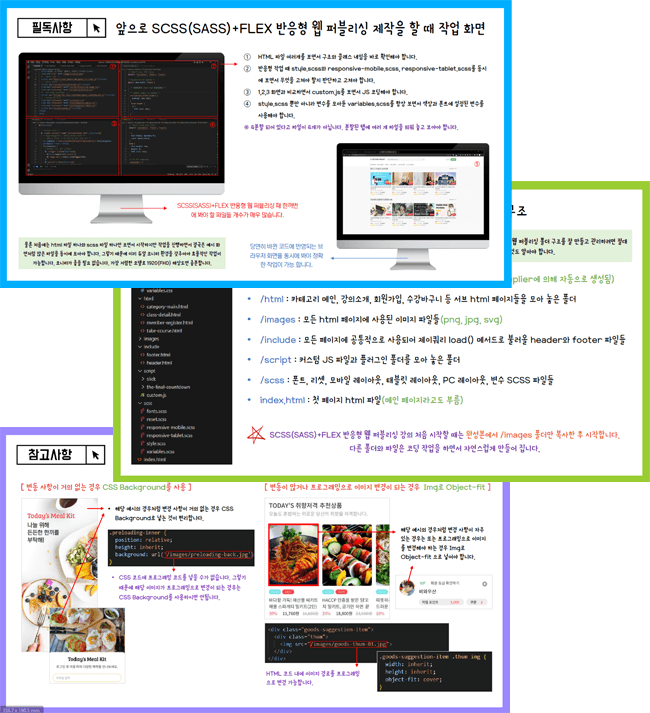
In Section 7, all source files for the course production are provided along with the final design and publishing versions. Additionally, PPT files used for explaining core theories and key points in the lectures are also provided as PDFs.
[Download] Design Work (Beyond Insight)
[Download] HTML Wireframe Structure (Beyond Insight)
[Download] Publishing Work (Beyond Insight)
[Lecture Notes PDF] SCSS(SASS)+FLEX Practical Responsive Web Project with Figma
📝 Video PPT lecture materials used in the lecture provided as PDF
Providing various reference materials for design and publishing work
[Lecture Notes] SCSS(SASS)+FLEX Practical Responsive Web Project with Figma (Total 39 pages)
The Standard of SCSS(SASS)+FLEX Clean Coding🧽
As you take the [SCSS(SASS)+FLEX Practical Responsive Web Project with Figma] course, I believe your skills will grow in various areas, including Figma UI design, HTML wireframing, and the ability to use SCSS(SASS) + FLEX Layout for publishing. While these aspects are very important, you will most importantly learn the 'Standard of Clean Coding for Publishing Like an Experienced Professional'. All publishing in this course has been written under these principles.
In this course, in particular, I frequently emphasize the need to write SCSS (SASS) code sequentially according to the hierarchical structure. In the case of SCSS (SASS), the selector hierarchy is much more important than in standard CSS.
Learning the coding principles and habits of <The Standard of Clean Coding for Publishing Like a Professional>—such as placing comments where necessary, coding CSS selectors in the same order as the HTML structure, and organizing common CSS selectors into a "Common CSS" section for future maintenance—will be incredibly helpful in real-world practice.
In particular, when applying for a job, hiring managers or equivalent personnel will review the applicant's publishing results and look at the source code. In such cases, even a brief glance at the source code allows them to judge the applicant's fundamental publishing skills.
💡 What are the special highlights of this course?
Through practical Figma production, you can acquire the ability to create responsive web UIs.
You will learn how to create detailed HTML wireframes that significantly improve your publishing skills.
You will learn the standard of Clean Coding to publish like an experienced professional.
We explain the creation of various pages and layouts, provide easy-to-understand explanations, and cover in-depth concepts in detail.
It explains everything a student needs to know for responsive web publishing.
You will gain a deep understanding of SCSS (SASS) and FLEX, along with the ability to apply them effectively.
You will learn sequential and systematic methods for SCSS(SASS) coding based on hierarchical structures.
You will gain a solid understanding of FLEX by directly applying it to practical tasks and learning how to use it in real-world scenarios.
The best portfolio for publisher employment and career changes, featuring SCSS (SASS) responsive web projects
Notes before taking the course 📢
🌈 Practice Environment (Text Editor)
The text editor was created using Visual Studio Code.
You may use other text editors such as Brackets or Sublime, but the text editor must support Live Sass Compiler as an extension for you to follow along with the lecture.
To code in SCSS (SASS), you must use the Live Sass Compiler, which is an extension for Visual Studio Code. For this lecture, please make sure to use Visual Studio Code in order to use the Live Sass Compiler.
Download Learning Materials
All learning materials can be downloaded from the section below. They are provided as compressed files for each folder, so please unzip them after downloading and follow the lectures in order.
💡 How to use the downloaded files and folder contents
① Materials needed for design and publishing work ② Materials needed when starting design work ③ Completed publishing materials
💡 Publishing Work Text Editor <Visual Studio Code>
This course, <SCSS(SASS)+FLEX Practical Responsive Web Project with Figma>, was created using Visual Studio Code. Visual Studio Code is a free program with no usage restrictions. All lecture videos are explained based on Visual Studio Code.
Please learn the basic usage through the CodingWorks YouTube video below before proceeding to <Section 3. Detailed Mobile Web Publishing (HTML+CSS+JS)>.
Visual Studio Code Usage and Configuration (Watch Video)
How to use Emmet in Visual Studio Code (Watch Video)
Installing and Using Essential Visual Studio Code Extensions (Watch Video)
Preventing Full Reload that jumps to the top when editing CSS in Visual Studio Code (Watch Video)
✅ The installation video for the Live Sass Compiler Extension is not on YouTube, but you must install it.
✅ Before publishing, you must learn how to install and use the Live Sass Compiler extension in the section below.
Q&A 💬
If you have any questions other than the frequently asked questions below, please leave them on the course community Q&A board, and I will do my best to answer them.
Q. I have never studied SCSS (SASS) or FLEX before; will I be able to keep up with the class?
🔊 FLEX Prerequisite Learning FLEX is such a universal topic that if you search for "Flex Layout" or "CSS Flex" on YouTube, you will find many videos that summarize the theory of Flex in about 20 to 30 minutes. Watching one or two of these videos and practicing along will be sufficient for prerequisite learning. Flex layout doesn't have as much theoretical content as you might think.
🔊 SCSS (SASS) Prerequisite Learning For SCSS (SASS) prerequisite learning, studying Section 4. SCSS Essential Theory included in the course will be more than sufficient.
Q. How much prior knowledge of publishing is required?
If you have basic experience using HTML+CSS, you will be able to follow along and achieve the level of skill improvement and results you expect. However, it may be burdensome for those whose CSS skills are at a very basic stage. As long as you have a certain level of CSS proficiency, you will be able to follow along without any problems.
And for those who are new to SCSS(SASS), Section 4. SCSS Essential Theory includes over 5 hours of theory lessons. By studying Section 4, you will be able to follow along through Sections 5 to 7 and successfully complete the project.
Q. There are already two SCSS (SASS) courses among Coding Works' lectures; how is this one different from them?
Yes. Among the existing Coding Works courses, there are two: <SCSS(SASS)+GRID+FLEX Practical Portfolio Publishing> and <SCSS(SASS) FLEX GRID Core Theory (PDF) Textbook and Practical Examples>.
<SCSS(SASS)+FLEX Practical Responsive Web Project with Figma> is a video-based course that covers the core theories and practical applications of SCSS(SASS). However, unlike this current course, it does not involve building an entire website with SCSS(SASS), so the difficulty level is less burdensome for students. Therefore, it is a suitable course for those new to SCSS(SASS) to gain experience and create practical examples using SCSS(SASS).
<SCSS(SASS) FLEX GRID Core Theory (PDF) Textbook and Practical Examples> is not a video-based course, but a course that provides a textbook and practical example files. It will be helpful to keep as a reference for your work as a publisher. không phải là bài giảng video mà là khóa học cung cấp tệp giáo trình và ví dụ thực hành. Sẽ rất hữu ích nếu bạn lưu giữ nó để làm tài liệu tham khảo với tư cách là một người làm nghề Publisher.
Even if you haven't completed the two courses mentioned above, there will be no problem taking this SCSS(SASS)+FLEX Responsive Web Project course. However, you should have a certain level of CSS proficiency.
Q. I have no experience with graphic programs; can I still do design with Figma?
As mentioned in the introductory video, Figma offers excellent performance relative to the effort invested. If you can use PowerPoint at a basic level, you will be more than capable of following the Figma design classes. However, to better digest the lessons, please watch the video <[Must-Read] SCSS(SASS)+FLEX Practical Responsive Web Project Figma Basic Course (ft. Using Dual Monitors)> and complete the prerequisite learning through the introduced YouTube channel.
Q. What is the differentiating core content?
Since this is a design course at a level where someone with no prior knowledge can utilize Figma well, rather than for design experts, the <Section 1. SCSS(SASS)+FLEX Responsive Web Project UI Design Production with Figma> Figma design work class is at a level that is easy for a beginner to follow rather than being a class for experts. However, the <Section 2. SCSS(SASS)+FLEX Responsive Web Project HTML Wireframe with Figma> class is taught using the most reliable and systematic method to improve publishing skills, drawing from my experience as a long-time publishing instructor. I believe the core of this course lies in its design to lead students step-by-step toward high-quality results in the unfamiliar and challenging task of mobile web publishing.
In particular, since Section 4 covers over 5 hours of SCSS Essential Theory for SCSS (SASS) responsive web projects, you will be able to master the core concepts of SCSS perfectly.
I believe you will develop intermediate-to-advanced publishing skills by creating HTML structures for various layouts across different pages and publishing them.
Q. Is this a course that non-design majors can also take?
It is definitely possible. My major was also completely unrelated to design. As mentioned in the Section 1 video <[Must-Read] SCSS(SASS)+FLEX Practical Responsive Web Project Figma Basic Course>, if you are proficient enough to use PowerPoint, you will have no trouble learning and utilizing Figma. I also studied Figma for a short period of time for this course, yet I was able to achieve great design results.
Q. I am a designer and proficient in Figma. Do I still need to study the Figma design in Section 1?
As mentioned in the introduction video, I am not someone who has used Figma for a long time or is an expert at it. Therefore, if you are confident in your Figma skills, you may skip <Section 1. SCSS(SASS)+FLEX Responsive Web Project UI Design Production with Figma> and go directly to <Section 2. SCSS(SASS)+FLEX Responsive Web Project HTML Wireframe with Figma> to begin your studies.
Starting from creating the HTML wireframe structure in Section 2, it is a publishing lecture area, not a design area.
Q. Why should I take the SCSS(SASS)+FLEX Responsive Web Project creation course, and what are the specific expected benefits?
Through the [SCSS(SASS)+FLEX Practical Responsive Web Project with Figma] course, you can elevate your core theory and practical application skills in SCSS(SASS) and FLEX Layout, as well as your ability to design and produce responsive layouts for PC, mobile, and tablet, to an intermediate-advanced level.
Specific expected outcomes vary from person to person. However, what Coding Works can say for certain is that your 'ability to create HTML wireframe structures will significantly improve'. By creating various HTML wireframe structures, you will receive sufficient training on how to systematically organize complex HTML hierarchies. Additionally, the lessons will cover in detail how to name and share consistent class names while building them together.
<Section 2. SCSS(SASS)+FLEX Responsive Web Project HTML Wireframe with Figma> involves creating various HTML wireframe structures, and through the training up to the practical web publishing application stage in <Sections 5-7. SCSS(SASS)+FLEX Responsive Web Project Detailed Publishing>, you will gain the confidence to create almost any web UI layout in the future.
Q. To what level of depth does the course cover?
Due to its nature, the SCSS(SASS)+FLEX Responsive Web Project involves a large number of files and folders. Therefore, the course progresses at a fast pace covering a lot of content. While the "level" can vary depending on individual standards, the course content is designed to be at a sufficient level to serve as a publisher's personal portfolio.
The SCSS (SASS) + FLEX Responsive Web Project course is at a beginner-intermediate level, but you can consider it closer to intermediate. In other words, it covers a vast amount of content. While it may be overwhelming for beginners, I believe you will feel that your publishing skills have grown significantly once you complete the course.
Q. I have taken the <Mobile Web Publishing Portfolio with Figma> course among Coding Works' lectures.
If you have taken the Mobile Web Publishing Portfolio with Figma course, you do not necessarily need to study the contents of [Section 1. SCSS(SASS)+FLEX Responsive Web Project UI Design Production with Figma Design]. (However, I recommend trying to create it quickly if possible.)
[Section 2. SCSS(SASS)+FLEX Responsive Web Project HTML Wireframe with Figma] It is okay to start your learning from here.
Q. What is the total duration of the course?
The total video lecture time is over 41 hours, providing ample class time for in-depth learning. The overall course ratio consists of 15% Figma design work and 85% publishing work. In the total video content, Section 1 covers Figma UI design work, while the remaining sections focus on responsive web publishing.
Q. Are there any reference notes regarding the course (required environment, other precautions, etc.)?
The course contains a lot of content and moves at a fast pace. However, it does not skip over things without sufficient explanation; instead, it provides detailed instructions. I believe you will be able to follow along well. However, I strongly recommend setting up a dual monitor environment rather than studying with a single monitor. Please make sure to watch the [Must-Read] SCSS(SASS)+FLEX Practical Responsive Web Project Figma Basic Course (ft. Using Dual Monitors) video in Section 1 before signing up for the course.
About the Instructor ✒️
[SCSS(SASS)+FLEX Real-world Responsive Web Project with Figma] Course creator Coding Works has taught publishing theory, application, and personal portfolio website creation to over 300 government-funded publishing course students to date. In particular, as an instructor who has specialized in publishing lectures for many years, I guide the entire preparation process for employment as a publisher from A to Z perfectly, so that most students can find a job immediately after completing the course. Additionally, while conducting publishing-related lectures on Inflearn, I have received feedback that my courses have been very helpful to Inflearn students as well.
🙋🏻♂️ Please make sure to read this before asking a question!!
Please ask any questions you have while learning. When asking a question, you must include a description of what is not working, the code, and a screenshot of the browser result screen. For the code, you must provide all HTML, CSS, and JS code so that I can provide an accurate answer.
If you only describe the problem in text without including your code, it is difficult to provide an accurate answer unless it is a very simple issue. In that case, I will have no choice but to reply with, "Please upload your HTML, CSS, and JS code along with a browser screenshot," which ultimately makes getting a solution more cumbersome and time-consuming.
▲ Please check the Frequently Asked Questions in the community for this lecture first~
⚡ For effective learning, please be sure to refer to Coding Works Publishing YouTube.
Please follow along with the theoretical video lectures on the CodingWorks Publishing YouTube channel. While not all theoretical videos are on the YouTube channel, almost all of the important ones are available. Since there are many videos, it is recommended to search for them as shown in the example below to find what you need.
[HTML+CSS+JS Practical Portfolio (Season 3)] Lecture creator Coding Works has taught publishing theory, application, and personal portfolio website creation to over 300 government-funded publishing course students to date. In particular, as an instructor who has specialized in publishing lectures for many years, they provide a perfect A-to-Z guide for all preparation processes for employment as a publisher, so that most students can find a job immediately after completing the course. Additionally, while conducting publishing-related lectures on Inflearn, they have received evaluations that their courses have been very helpful to Inflearn students as well.
Recommended for these people
Who is this course right for?
Those who need core theory and practical application skills in SCSS (SASS)
Those who need a portfolio for a systematic responsive website project.
Those who want to discover the true essence of publishing as a frontend developer
Those who need the most competitive responsive web project as a publisher
Those who want to gain a competitive edge on their resume with SCSS (SASS) skills
■ [Current] Government-funded Publishing & Frontend Instructor ■ [Current] Freelance Frontend Publisher ■ [Current] Operator of HTML+CSS+JQUERY Publishing YouTube Channel 'Coding Works' ■ Green Computer Academy Web Publishing Instructor ■ The Joeun Computer Academy Web Publishing Instructor ■ Ezen Computer Academy Web Publishing Instructor ■ Frontend Publisher, Professional Frontend Publishing Instructor ■ UI/UX Web Design Portfolio Lectures ■ Web Design Technician Practical Certification Class Lectures ■ Easy & Edu Frontend UI/UX Design and Publishing
I was worried because it was my first time developing a front-end web.
The tuition fee was a bit different from other courses,
so I was a little worried (lol)
but my choice turned out to be a godsend.
(The lectures are really good!!)
I have no experience in web development at all.
I thought I should prepare and study in advance because I wanted to service the main program I developed on the web/mobile, so I applied for the course and took a week off to study. On the 4th day~ I was going to come out on Saturday.
Anyway, on the 5th day, I finished all the lectures and
tested a few things with ASP.Net Core 7 Razor page.
(After taking the 15,000 won ASP.NET Core Web Application
Using Razor Pages lecture on the Udemy site~lol)
I was so happy that the test results were well-linked with the DB and expressed well, and I experienced a new world.
I started with COBOL and FORTRAN in the past, and now I have developed desktop work with C#, VB.NET, and several other development tools. I wondered if I could adapt to the current development environment that fits the trend..
I was able to understand it easily with the detailed explanation.
Thanks to this, it gave me courage and helped me a lot.
SCSS / Figma (paid) / JQuery / HTML
I leveled up just with the above 4 items and sample example lectures!!
I have used Photoshop for nearly 20 years, but thanks to this, I think I will hardly ever use Photoshop. ㅎㅎ
That was a long postscript.
It is the first time I have finished 100% of a long lecture..ㅎㅎ
Thank you for the great lecture, teacher.
I will always pray for your good health.
Among the classes I've taken while doing practical work, this is the most helpful.
I realize how much I've been coding in circles until now.. ^^;;
I'm reflecting a lot each moment.
Taking the course with a truly grateful heart!!!
The best class ever...!
I've taken many courses so far, but I don't think I've ever met a teacher who explains things as thoroughly yet simply as you do. Thanks to you, I was able to learn so much.
I highly recommend this to anyone who is hesitating about taking the class. Even if you don't have any prior knowledge, the teacher explains everything so easily and in such detail that you definitely won't regret it.
One of the instructors considered to offer the most cost-effectiveness in Inflearn is Coding Works. Recently opened courses are a bit pricey because they are cutting-edge technologies, but looking at the existing content, I was impressed by the low tuition and the vast volume, so I found Coding Works and took the course. Even if you go to an offline academy, it is hard to find a class density that boasts such a vast volume, and if you look at the entire lecture structure, the content is so detailed that the lecture time exceeds 40 hours. In addition, it is a class that focuses on practical training by integrating the latest intermediate and advanced technologies of Webpub, so you can obtain results that cover all of the actual advanced technologies. Above all, the instructor's response was very impressive. I had an inquiry on Sunday, so I left two questions about the course, and they were answered right away that day. There is no reason not to recommend this course with its vast volume, the latest technology-intensive practice, and the instructor's quick feedback. I honestly think that web publishing skills are basic for front-end developers before React and View. These days, boundaries between industries are collapsing and multi-tasking is required, so those who know how to do everything can get high salaries. Those who need to be able to create what's in their heads at least as much as screen implementation, I recommend that those studying React or View take this course on their own. It's not yet complete, but the explanations are so kind and good that studying is fun^^ The vast volume means that the instructor has deep teaching skills. Even if an instructor with shallow skills is asked to organize the lecture time extensively, that won't work. I'm studying back-end, but I chose this course with the intention of improving my skills to an expert level, such as screen implementation.
I landed a job after taking your class two years ago, but due to financial difficulties, I'm preparing for another job search 😭😭 I haven't used SCSS yet, so I'm taking this class to study it! It's so great~! Thank you!





































![[Beginner] Sass in 40 minutesCourse Thumbnail](https://cdn.inflearn.com/public/courses/327348/cover/1bcbc86c-d3cb-444a-9d03-4c0597b2e642/썸네일_Sass_fin.png?w=420)


![[Fantasy Pig's Feet] From design to codingCourse Thumbnail](https://cdn.inflearn.com/public/courses/332845/cover/5d0ef569-50e5-4300-96ed-3205d526795b/332845.png?w=420)