QGIS Beginner All-in-One Starter Pack (Theory/Practice-based)

This is a theory-and-practice QGIS course that covers everything from analysis basics to advanced functions and visualization techniques. Start your QGIS journey with this unprecedented all-in-one course!!

(4.9) 36 reviews

185 learners

Level Beginner

Course period Unlimited

QGIS
QGIS
GIS
GIS
data-analysis
data-analysis
data-visualization
data-visualization
spatial-data
spatial-data
QGIS
QGIS
GIS
GIS
data-analysis
data-analysis
data-visualization
data-visualization
spatial-data
spatial-data

Reviews from Early Learners

4.9

5.0

DONGJIN YEOM

100% enrolled

I work in the forestry sector. I signed up for this course because I felt limited by studying only with QGIS textbooks, and it has been incredibly helpful. The last four practical exercises were challenging, but it was useful to see how various functions are combined and applied. It would be great if you could create a separate course in the future consisting entirely of these types of practical, hands-on problems. Since there is no time limit, I plan to rewatch the lessons frequently until I fully master them. Thank you so much for all the hard work you put into preparing this course!!

5.0

차태영

100% enrolled

The lecture was at a sufficient level for GIS beginners, and it allowed me to learn about each function and application method step by step, which was appropriate for the lecture title. It wasn't just an explanation of the functions, but a 5-explanation + 5-practice format, which made it easy to get the hang of it. Solving appropriate example problems in between helped me understand more. Overall, it was a satisfactory lecture :)

5.0

트레비

55% enrolled

I have always wanted to learn about the entire QGIS function, but it was difficult to find a suitable lecture. This lecture was great because I could learn everything from analysis to visualization by taking just one. Thank you. I look forward to other lectures!!!

What you will gain after the course

  • Basic GIS Concepts and Theory

  • QGIS Vector/Raster/Data Type Analysis

  • QGIS Vector/Raster Visualization

  • Practice of the analysis process using real-world data

There has never been a QGIS course like this before 😲
An all-in-one starter pack to learn both QGIS theory and practice in a single course 🚀

#QGIS #GIS #data-analysis #data-visualization #spatial-data #GIS-lecture #GIS-education

This course is suitable for both QGIS beginners and experienced users,
covering basic GIS concepts and theories, QGIS analysis and visualization, and analysis methodologies applying actual analysis processes.

You can rapidly improve your skills with this all-in-one QGIS course, the likes of which have never been seen before.

This QGIS course consists of 4 main sections, and each section is detailed as follows:
[GIS Basics and QGIS Core Functions, Vector Layer Analysis and Visualization, Raster Layer Analysis and Visualization, 4 Real-world Practice Examples]

Section Introduction

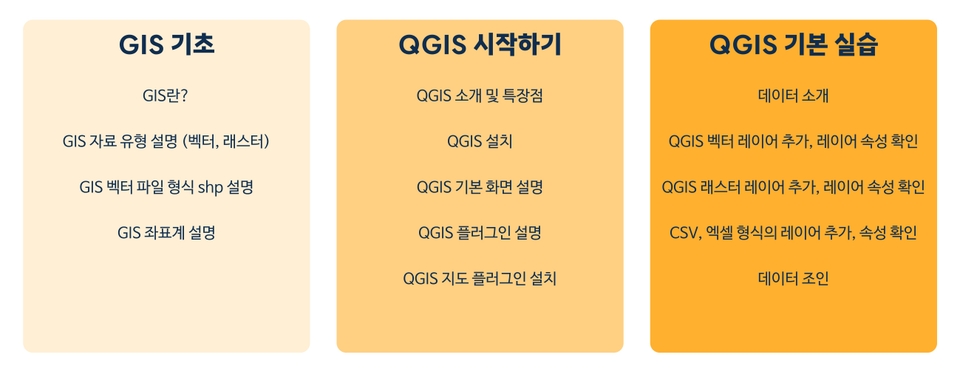
🟨Section 1. GIS Basics and Basic QGIS Functions

Learning basic GIS prerequisite knowledge required before starting the lecture

Learning GIS data types/formats and coordinate system concepts

Introduction to QGIS installation and basic program configuration

Checking attributes by QGIS input data type and practicing basic functions

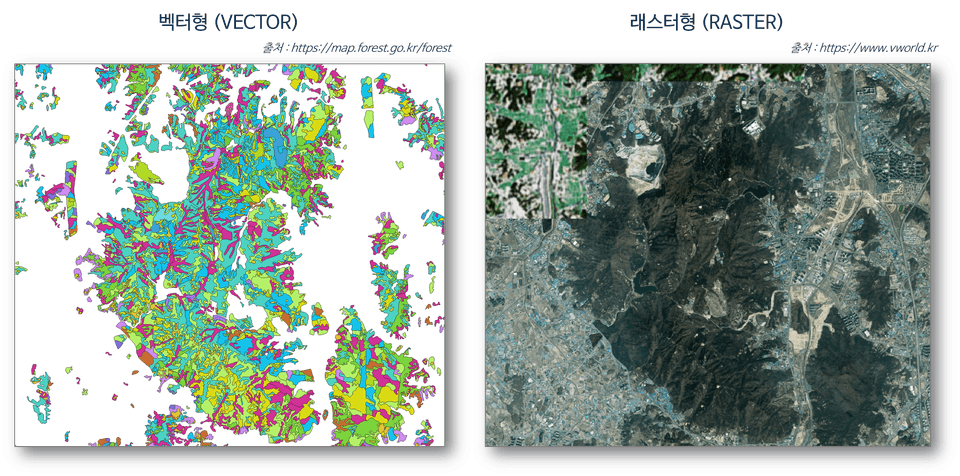
[Examples of vector and raster data descriptions]

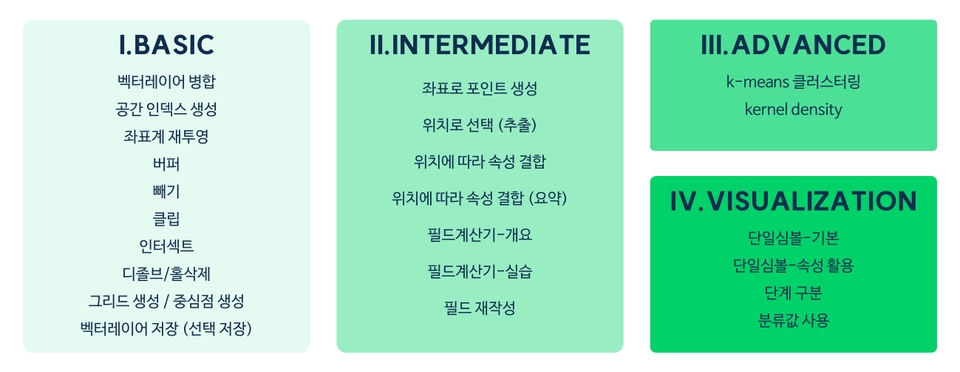
🟩Section 2. Vector Layer Analysis and Visualization

Practice of basic-intermediate-advanced analysis functions using vector layers

Introduction and practice of the attribute table to utilize the attribute values of the data

Advanced analysis practice, including K-means clustering and Kernel Density.

Introduction and practice of various visualization concepts using vector layers

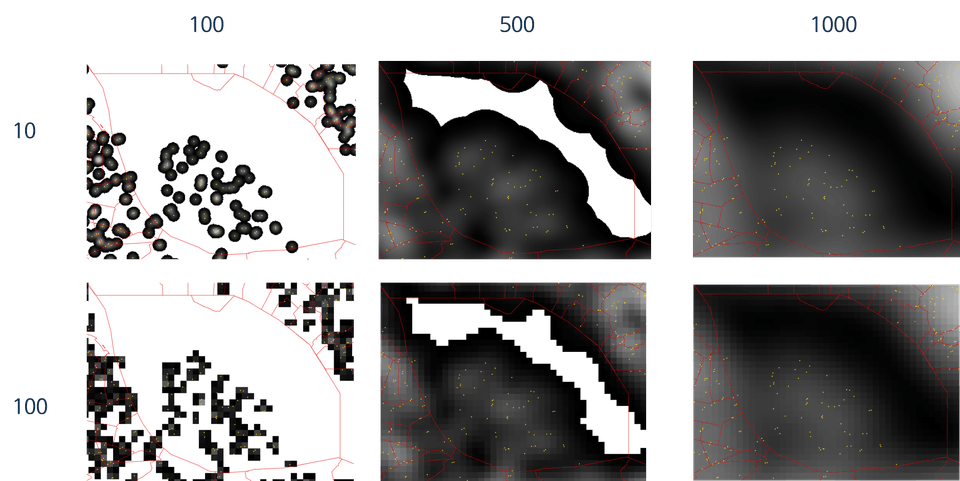
[Kernel Density Analysis Practice Results]

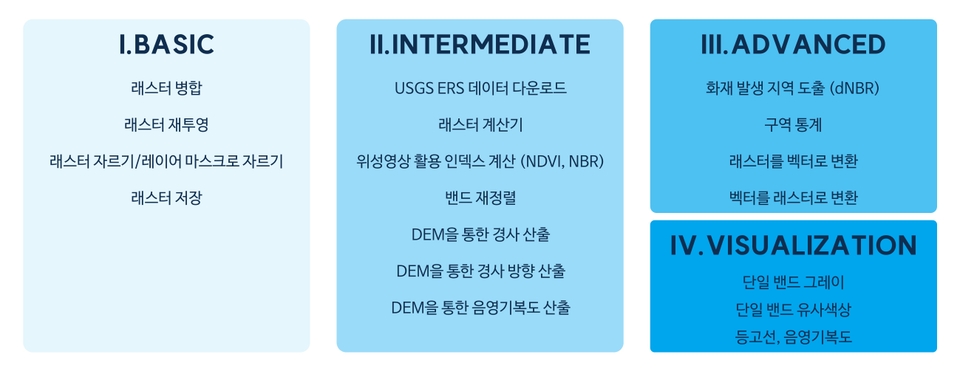
🟦Section 3. Raster Layer Analysis and Visualization

Practice of basic functions such as mosaicking and clipping of raster layers

Introduction to USGS satellite imagery download methods and practice with the raster calculator

Practice of raster data analysis functions in connection with vector data

Introduction to visualization concepts and hands-on practice using single-band raster layers

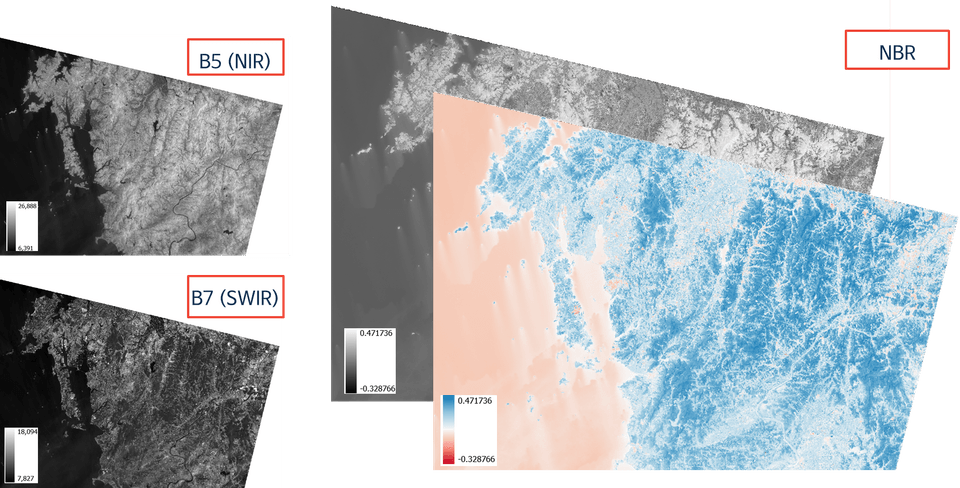
[Spectral Index NBR Calculation Practice Results]

🟥Section 4. Practical Example 4

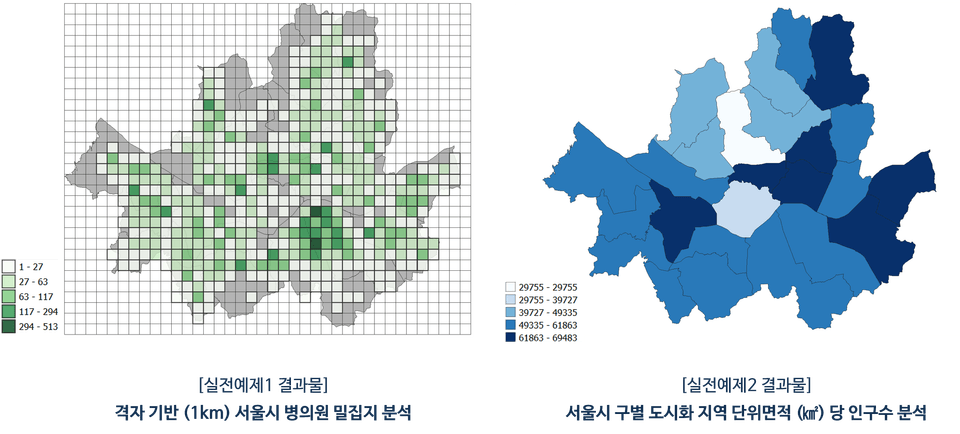
P1. Grid-based analysis of hospital and clinic density in Seoul

P2. Analysis of Population per Unit Area of Residential Zones by District in Seoul

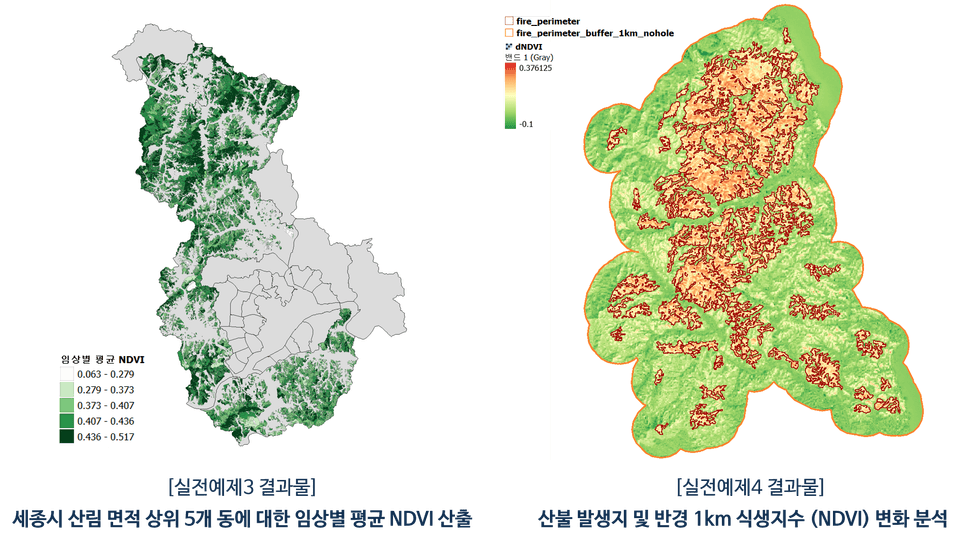
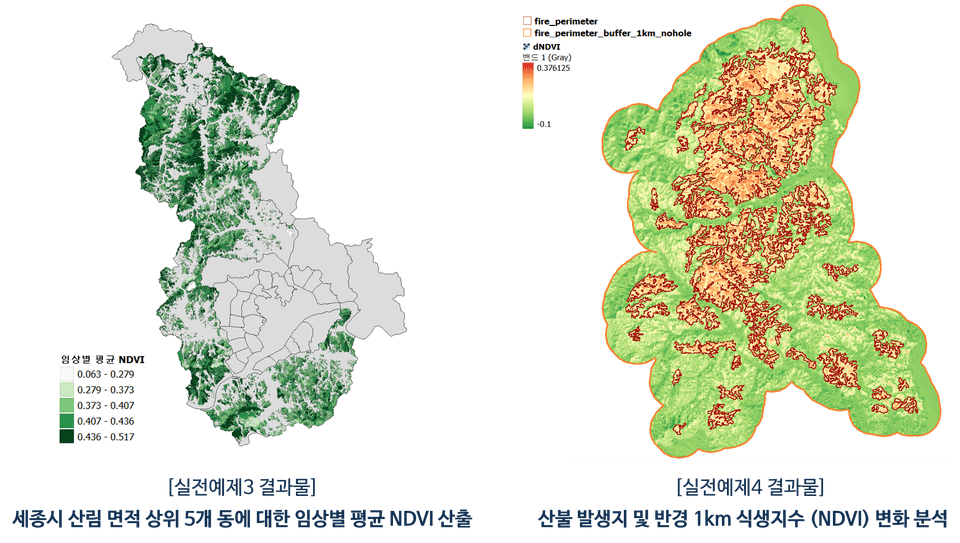
P3. Analysis of average vegetation index by forest type for the top 5 neighborhoods with the largest forest area in Sejong City

P4. Analysis of changes in vegetation index at wildfire sites and within a 1km radius

[Results for Practical Examples 3 and 4]

Why should you take this course?

Increasing Importance of GIS

  • Today, it is difficult to find a field where spatial information is not used, and GIS software and the
    analysis performed through it are being used as core tools for various research, policy applications, decision-making, and business.

  • By learning QGIS, you can improve your ability to apply it across various fields and build a competitive career that spans across different majors and professional sectors.

High-quality lectures

  • Based on years of GIS education experience, this course is designed so that even those who are new to QGIS can easily follow along, and all materials required for the course are organized and provided by section.

  • In addition, the instructor has exclusively released multiple QGIS courses on Inflearn, providing
    practical help to over 600 students, and has planned this course to help learners acquire overall QGIS proficiency.

Wide-ranging Versatility

  • QGIS is a free and powerful open-source GIS software that provides excellent features for spatial data analysis,
    visualization, map creation, and statistics.

  • After taking the course, you will be able to understand QGIS as a whole and acquire analysis/visualization skills, which can then be
    applied to various fields including environment, urban planning, forestry, water quality, transportation, and specific research/analysis projects.

Recommended for the following people:

GIS-related professionals/majors

  • UPGRADE my skills even further

  • Maximizing the scope of GIS application

  • Reduce time spent on work/assignments


Spatial data utilization researcher

  • Acquiring analytical skills through examples

  • Applying even more advanced methodologies

  • Creating figures to showcase research results

Office workers dreaming of enhancing their specifications

  • Connecting your job field with GIS

  • Creating new results using GIS

  • New ideas for planning

In addition, I recommend this lecture to anyone interested in QGIS!!

Internalizing learned functions through practical exercise (🟥 Section 4) solutions

Make QGIS functions your own through practical exercises where you solve problems yourself using the features you've learned.

  • Through the four practical examples in Section 4, you will actually apply the content practiced in class.

  • Practical exercises 1 and 2 utilize vector layers, while exercises 3 and 4 are primarily composed of problems centered around raster layers.

  • As you progress through the problems, the difficulty of the analysis gradually increases, and the number of functions required increases proportionally.

  • It is composed of functions that are actually used in real-world analysis, so it can be usefully applied when conducting GIS projects in the future.

Detailed introduction of learning functions by section

🟨Section 1. GIS Basics and QGIS Core Functions

🟩Section 2. Vector Layer Analysis and Visualization

🟦Section 3. Raster Layer Analysis and Visualization

Notes before taking the course

PC Environment

  • QGIS processing time may vary depending on the data used, analysis functions, and the user's PC environment.

  • The instructor recorded the lectures and conducted the QGIS software practice on a Windows OS PC.

Learning Materials

  • All learning materials are based on data publicly available on the internet, and for the students, the materials used for each section have been divided, compressed, and provided all at once
    .

  • The source of the data has been documented in the "출처.txt" file within the learning materials zip file.

Inquiries Before / During the Course

  • For this course, both pre-enrollment inquiries and Q&A during the course are available.

  • If you leave a question, I will try to answer as quickly as possible :)

FAQ

Is it okay to select and take only the parts of the lecture that I need?

Yes, this course covers a wide range of functions available in QGIS. Therefore, even if you already know
parts of the course content or choose to take only the specific sections you need, there will be no problem following the course.

Can I immediately apply this to my specific field (work/major/research, etc.)?

Yes, although the data used as examples in this course may differ in format or type from the materials you are currently using,
the analytical functions utilized within QGIS are essentially the same, so you will be able to apply them practically immediately after the hands-on practice.

What should I do to learn more advanced content?

This course covers QGIS in general, and besides this course, two other QGIS courses are available exclusively on Inflearn.

These are a practical course on QGIS analysis automation using Python and a course focused on QGIS visualization & layout functions, respectively. If you are interested in more advanced analysis methods and visualization, please check out the corresponding courses below :)

I would also like to introduce other QGIS courses by the instructor 🔗
(Click the image to go to the course page)

표지

[Free] A Quick Taste of QGIS Visualization

표지v2

Curious about QGIS automation?

표지

Curious about QGIS visualization?

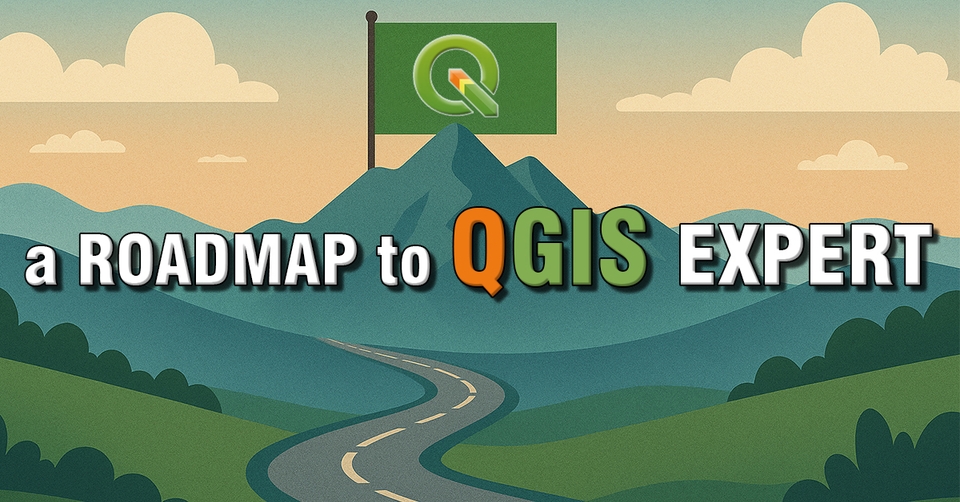
Check out the roadmap categorized by topic and difficulty level!!

표지

Roadmap to becoming a QGIS expert

Instructor introduction page: upwise.co.kr

Recommended for
these people

Who is this course right for?

  • GIS User

  • Users of data containing spatial information

  • Those who need GIS analysis and visualization for assignments, research, reports, etc.

  • Those who want to improve their work scope and skills

Hello
This is UPWISE

Career Verified

1,040

Learners

107

Reviews

74

Answers

4.9

Rating

4

Courses

Hello. I am UPWISE, an expert in analysis, research, and lecturing using GIS/RS.


Basic Information

  • Obtained a Master's degree from Seoul National University Graduate School of Environmental Studies

  • Completed doctoral coursework at Seoul National University Graduate School of Environmental Studies

  • Majored in research using spatial data such as GIS and Remote Sensing

  • Extensive experience in research and analysis using GIS

  • Extensive research experience in data analysis using Python and its integrated application with GIS data.

  • Instructor Introduction Page https://upwise.co.kr/

  • KakaoTalk Open Profile https://open.kakao.com/me/upwise (Inquiries for lectures, research-analysis requests, etc.)


Special Lecture History

  1. -Data Visualization that Transforms Reports- Data Utilization Competency Enhancement Training (2nd Session); Hosted by Gyeonggi-do Provincial Human Resources Development Institute; 2022.12.07. & 09.

  2. Capacity Building Training for Water Industry Employees - Digital Program Practice (Beginner) & Q-GIS Practice (Intermediate); Hosted by K-water; 2023.06.19.-20.

  3. QGIS Basic Special Lecture; Hosted by the Instructor; 2023.10.07-08.

  4. WISE-UP WORKSHOP Urban Spatial Data Analysis; Hosted by SNU Graduate School of Environmental Studies-BK21 Smart City Research Group; 2024.02.23.

  5. Creating Our School Map Using Public Data (Dongbuk High School); Organized by Seoul National University Center for Continuing Education; 2024.05.11.

  6. Creating Our School Map Using Public Data (Samsung High School, Seomun Girls' High School); Hosted by Seoul National University Institute for Continuing Education; 2024.07.08. - 10.

  7. "2024 Water Company Employee Competency Enhancement" Training - Digital Program Practice (Basic) - Q-GIS Practice; K-water; 2024.10.02.

  8. 2024 Comprehensive Evaluation Plan for Regulated Pests - Visualization of Fire Blight Outbreaks Using QGIS; Chungnam Agricultural Research and Extension Services; 2024.10.16.

  9. Data Analysis Expert Training Course; Korea Environment Corporation; 2024.10.25.


  10. Data Analysis Expert Training Course; Korea Environment Corporation; 2025.04.23.


  11. Big Data Analyst Training Course Using AI; SeSAC; 2025.07.08-16.

  12. Understanding GIS and Spatial Analysis via DBMS & Data Visualization (Basic); Hyundai NGV; 2025.10.23-24.

  13. Understanding GIS and Spatial Analysis & Data Visualization via DBMS (Advanced); Hyundai NGV; 2025.11.10-12.

More

Curriculum

All

62 lectures ∙ (10hr 41min)

Course Materials:

Lecture resources
Published: 
Last updated: 

Reviews

All

36 reviews

4.9

36 reviews

  • 5ppanice7765님의 프로필 이미지
    5ppanice7765

    Reviews 1

    Average Rating 5.0

    5

    100% enrolled

    The basic course is well-structured and easy for beginners to understand. The practice sessions in the latter half are somewhat difficult, so it seems like a review will be necessary. Thank you for preparing such great lecture materials.

    • upwise
      Instructor

      Hello Jong-gil Kim. Thank you for taking the course and leaving such an encouraging review :) Please look forward to our other upcoming courses. Best regards, UPWISE

  • fallnight님의 프로필 이미지
    fallnight

    Reviews 1

    Average Rating 5.0

    5

    82% enrolled

    I am learning QGIS for the first time because I think it will be useful for my work. It was very helpful. I think I should try to use all the functions in the lecture at least once.

    • upwise
      Instructor

      Thank you for the helpful course review!! I hope it will be of great help to your work. If you have any questions about the lecture content or QGIS during the course, please feel free to contact me. Thank you!! 😀 UPWISE Dream

  • kfshoi2201님의 프로필 이미지
    kfshoi2201

    Reviews 2

    Average Rating 5.0

    5

    95% enrolled

    It was great to have almost all the basic functions explained in detail. The best!!

    • upwise
      Instructor

      Thank you for the encouraging reviews!! I hope it was helpful in your field of work, and if you have any questions about the lecture or other inquiries, please feel free to contact us. Thank you!! 😀 UPWISE Dream

  • aerolbn님의 프로필 이미지
    aerolbn

    Reviews 37

    Average Rating 5.0

    Edited

    5

    97% enrolled

    It is valuable because Qgis lectures are rare, and it is even more valuable because the lecture content is excellent. I received a lot of help with using Qgis. Please continue to provide good lectures related to GIS in the future. =============Additional Review.=============== The lecture content is good, and you also answer questions very sincerely and quickly. I highly recommend it.

    • upwise
      Instructor

      Thank you for the great review. It really helped me as a lecture creator!! :) I aim to open at least one lecture every year, and I will come back next year with another helpful lecture. Also, if you have any questions about the lecture or QGIS, please feel free to contact me anytime. Thank you!! 😀 UPWISE Dream

  • bglee1044님의 프로필 이미지
    bglee1044

    Reviews 6

    Average Rating 5.0

    5

    100% enrolled

    • upwise
      Instructor

      Thank you for the helpful course review!! I hope my lecture was of great help to you in your field. Thank you!! 😀 UPWISE Dream

Similar courses

Explore other courses in the same field!