






inflearn logo
inflearn logo

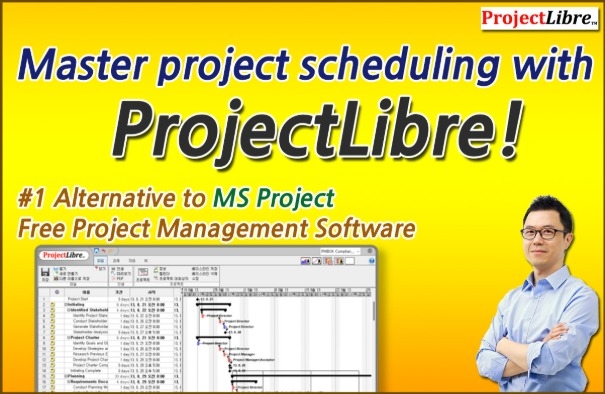
Master project schedule management with ProjectLibre! It's OK even without MS Project!

This course introduces how to efficiently manage project schedules using ProjectLibre, a free-to-use open-source tool. As an alternative to MS Project, it allows for more systematic integrated management of schedules, resources, and costs than Excel. Furthermore, because it is similar to MS Project, completing this course will allow you to quickly adapt to MS Project in the future. This course uses a practical, follow-along approach that enables anyone to easily create a real-world project schedule. If you want to enhance your scheduling capabilities and increase the likelihood of project success without any cost burden, be sure to take this course! * Version used: 1.9.8 Windows version

(4.5) 2 reviews

19 learners

Level Beginner

Course period 3 months

Project Management (PM)
Business Productivity
Project Management (PM)
Business Productivity

What you will gain after the course

  • Skills required to interpret and prepare professional project schedules or project plans using ProjectLibre

  • How to set the task type (e.g., Fixed Work, Fixed Duration, Fixed Units)

  • The Impact of Effort-Driven Scheduling on Projects

  • Concepts of Critical Path, Total Slack, and Free Slack

  • Setting constraints and deadlines

  • Apply Lead/Lag and various task dependencies

  • How to allocate and manage resources for tasks

  • How to manage project schedule progress by setting a baseline

  • How to find and resolve over-allocated resources

  • How to create a Gantt chart that reflects the characteristics of each task

Mastering Schedule Management with ProjectLibre! No MS Project? No problem!

Do you want to apply systematic project schedule management to your work without expensive licensing costs?
In this course, you can learn integrated schedule, resource, and cost management methods at the level of MS Project using ProjectLibre, a free open-source tool. Move beyond Excel-based scheduling and experience higher accuracy and efficiency. Stop managing schedules with Excel now!

This course aims to help you master the core functions of ProjectLibre through hands-on practice and develop the skills to apply them immediately to project management tasks.


ProjectLibre???


ProjectLibre Desktop is the global #1 alternative to MS Project and is
free open source!

ProjectLibre Desktop –  #1 Global Alternative to Microsoft Project. Free, Open-Source Project Management Software


Over 7,600,000 downloads across 193 countries on 7 continents!

https://www.projectlibre.com/

Key Features

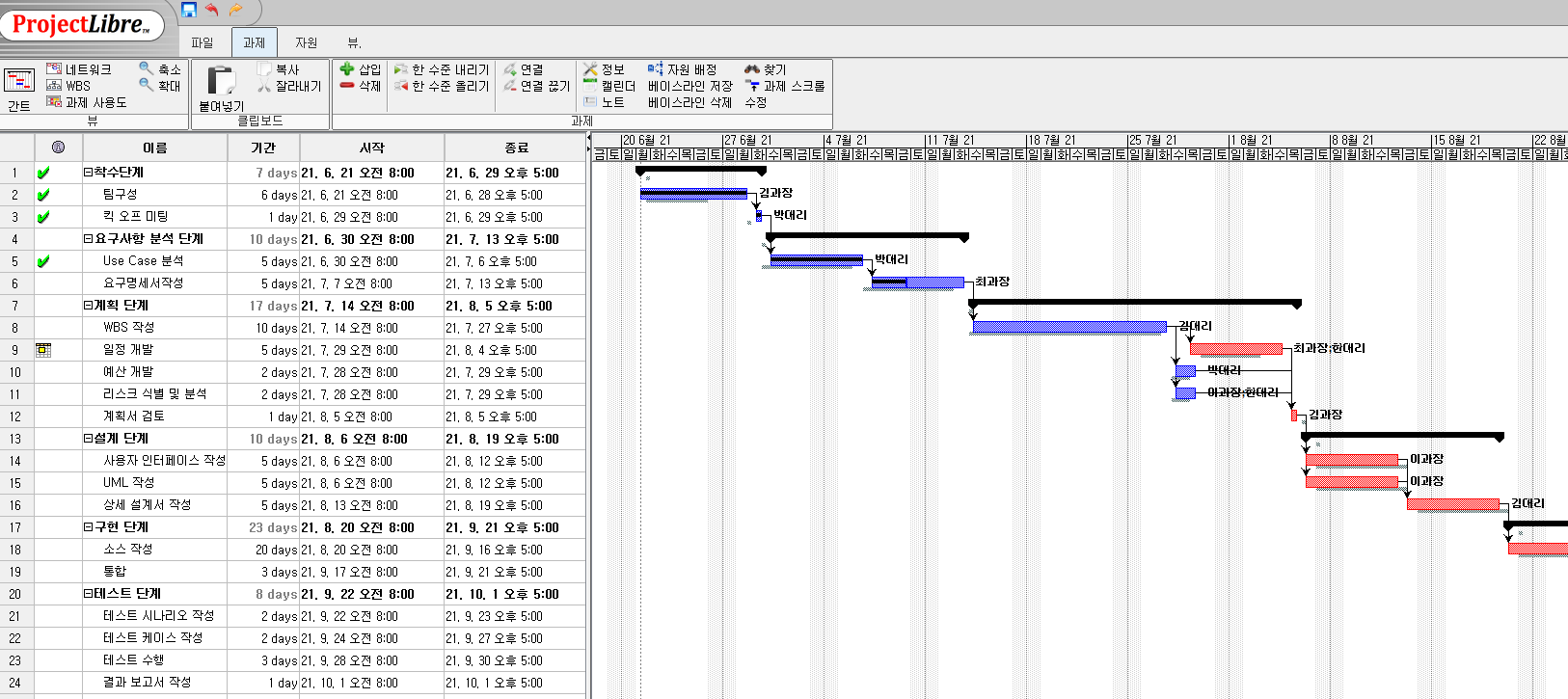
  • Gantt Chart

  • Compatible with Microsoft Project

  • Network Diagram

  • WBS (Work Breakdown Structure)


  • Resource Management

  • Resource Histogram

  • Earned Value Management (EVM) and Performance Management


Recommended for these types of people

People who are experiencing continuous schedule delays due to a lack of project scheduling and resource planning.

People who find managing schedules with Excel inefficient and need a more effective scheduling tool.

Those who want to execute projects that meet target deadlines using Gantt Charts and Critical Paths.

After completing the course

  • You can understand and utilize the basic interface of ProjectLibre.


  • You can plan project schedules and create Gantt charts.


  • You can set relationships between tasks, assign resources, and adjust schedules.

  • You can effectively manage schedules using the Critical Path.


Features of this course

Key Strengths of This Course (1)

The practice-oriented structure allows for immediate application in real-world tasks.

*Practice project examples: SW development, new business planning, etc.

Key strengths of this course (2)

It provides a detailed explanation of systematic methods and related terminology for project schedule management. Since tools are meant to apply knowledge, you will also learn the foundational knowledge of schedule management methods.

What you will learn

1. Intro

  • Instructor Introduction

  • Why did I prepare this lecture?

  • Project management scheduling software and the positioning of ProjectLibre

  • Course Curriculum Guide

2. ProjectLibre Overview and Installation

  • What is ProjectLibre?

  • Installation Method


3. Interface and Shortcuts

  • Interface Introduction

    • Quick Access Toolbar, Shortcut buttons, Tabs, Groups, Command buttons, Gantt Chart view, Scroll bars

  • Shortcuts

4. Essential Knowledge for Project Schedule Management

  • Project Schedule Management Overview

  • Schedule Management Process


5. Start Schedule Development

  • Create New Project

    • Enter project information

  • Default Calendar Settings

    • Create new calendar, set holidays, set working hours

  • Utilizing existing projects


6. Create Task List and Estimate Duration

  • Task Entry and Structuring

    • Meaning of Task, deriving Activities from WBS


  • Set Task Type

  • Estimating Task Duration


    • Minute, Hour, Day, Week, Month


7. Setting Task Relationships

  • Setting Task Predecessor/Successor Relationships

  • Setting Lead and Lag


8. Setting Constraints and Deadlines

  • Setting constraints

  • Setting deadlines


9. Critical path and slack time

  • Critical path

  • Slack time (Float)


10. Resource Setup and Assignment

  • Resource Entry and Understanding Types

    • Work, Material

  • Resource calendar settings

  • Resource Allocation

    • Assignment, removal, replacement

  • Check and adjust over-allocation


11. Baseline Setting and Progress Management

  • Set Baseline

  • Progress Management


12. Schedule Performance Measurement

  • What is Earned Value?

  • Earned value related terminology

  • Calculating CV, SV, CPI, and SPI

13. Printing and Saving Reports

  • View/Print Report

  • Save Report


14. Wrap Up

  • Advantages

  • Limitations

  • Conclusion

The person who created this course

  • Donghwan Han, Ph.D.

  • CEO of PM Inside

  • Ph.D. in Business Administration

  • Lecturing on project management since 2005

  • Author of PMP Pass Study Guide

  • Former President of PMI South Korea Chapter

  • Former Adjunct Professor at Kwangwoon University Graduate School of Information and Communication (2007~2008)

  • Lectured at numerous organizations including Samsung Electronics, LG Electronics, SK Hynix, KT, NH Nonghyup Bank, Starbucks Korea, IKEA Korea, Hyundai Motor Company, Hyundai Mobis, Nexon, Nonghyup Information & Communication, and Lotte Innovate.


Do you have any questions?

Q. Can PMP holders earn PDU credits?

Yes, you can apply for 5 PDUs under the Education category.

PMI.org > Report PDU > Education > Course or Training

  • Provider: Inflearn.com

  • Course: Master project scheduling with ProjectLibre!

  • Date Started: The date you started the course

  • Date Completed: The date you completed the course

  • PDUs Claimed: Way of Working - 5 PDU

Q. Do I need prior knowledge of project management?

It is helpful if you have some, but you will have no trouble following the class even without it.

Notes before taking the course

Practice Environment

  • Operating System and Version (OS): Windows

  • Tools used: ProjectLibre desktop Windows version 1.9.8


Provision of learning materials

  • Lecture slide PDF files

  • POD example files for each module (ProjectLibre file format)


Prerequisites and Noticed Items

  • It is helpful to have a basic understanding of project management concepts.

  • The copyright for the lecture and learning materials belongs to PM Inside and may not be shared with others.

Recommended for
these people

Who is this course right for?

  • People who want to develop and manage schedules more effectively than using Excel

  • Someone who wants to know how to develop a professional project schedule

  • Those who want to better understand project schedule management theory through hands-on practice

  • Those who want to systematically utilize Gantt Charts and the Critical Path.

  • People who want to manage project schedules well

Need to know before starting?

  • Project Management Fundamentals

Hello
This is pminside

165

Learners

34

Reviews

24

Answers

4.6

Rating

4

Courses

Hello.

This is PM Inside, a professional project management education company!

Curriculum

All

14 lectures ∙ (5hr 9min)

Course Materials:

Lecture resources
Published: 
Last updated: 

Reviews

All

2 reviews

4.5

2 reviews

  • iamcccman1977님의 프로필 이미지
    iamcccman1977

    Reviews 3

    Average Rating 4.3

    4

    29% enrolled

    It's great to be able to hear detailed explanations about effective tools for PM work.

    • pminside
      Instructor

      Thank you so much for leaving such a positive review. I'm very pleased to hear that the 'Project Schedule Management with ProjectLibre' course has been helpful for your PM work. I will continue to provide useful content that you can apply directly to your work. Thank you once again for taking the course, and I hope you have a great day!

  • thesun5745님의 프로필 이미지
    thesun5745

    Reviews 1

    Average Rating 5.0

    5

    36% enrolled

    The professor's lectures are so easy to follow and understand. Thank you. You are the best.

    • pminside
      Instructor

      Thank you so much for leaving such a warm review. 😊 As an instructor, nothing is more rewarding than knowing the course content was delivered effectively. I tried my best to explain both how to use the tool and the essence of schedule management through ProjectLibre, and I am glad that my intentions were well-received. I hope this lecture serves as a solid reference point when you plan and manage project schedules in your practical work. Please feel free to reach out anytime if you have questions or topics you would like to explore further while learning. Thank you once again, and I sincerely wish you the best of luck with your future projects. Thank you!

pminside's other courses

Check out other courses by the instructor!

Similar courses

Explore other courses in the same field!

$42.90