inflearn logo

Let's use AI to create a 2D RPG in just one month and release it on Steam and mobile!

We will guide you through the entire process of using AI to quickly and efficiently create a 2D RPG at a commercial game level and release it on Steam and mobile.

3 learners are taking this course

Level Beginner

Course period Unlimited

unity3d
unity3d
AI
AI
unity3d
unity3d
AI
AI

What you will gain after the course

  • How to use AI

  • Advanced Game Development Techniques

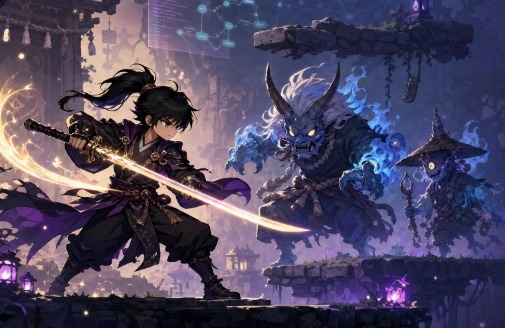
This course covers the entire process of using Unity and generative AI to develop a game idea into a playable 2D platformer action RPG.

It doesn't stop at simply asking the AI to "make a game." You will learn the practical workflow of defining the game's scope, writing a design document with AI, implementing a playable prototype, and then creating characters, monsters, backgrounds, platforms, and animations to apply them in Unity.

Through this course, students will be able to learn the following.

- How to flesh out vague game ideas into implementable planning documents

- How to write development prompts that are easy for AI to understand

- How to scale down a large game into a completable prototype unit

- The process of implementing movement, jumping, attacks, monsters, and platforms in Unity

- How to directly run and verify results generated or modified by AI

- How to create graphic concepts and character designs that suit the game

- How to separate characters and monsters from images and organize them into transparent background assets

- How to create idle, movement, and attack animations for characters

- The process of applying generated images and videos as Unity game assets

- How to fix issues that occur during actual gameplay, such as character position, jump height, and collision areas

- How to manage original AI-generated assets, their modified versions, filenames, and license information

The biggest problem this course aims to solve is the difficulty of "knowing how to use AI tools, but not knowing how to actually complete a game with them."

Even if AI generates code, it often fails to run in Unity, or requesting too many features at once leads to a cluttered project structure. Many also create stunning images but struggle to actually implement them into a game. This course demonstrates planning, prototyping, testing, graphic production, animation, and Unity implementation as one seamless, connected process.

It is especially effective for the following people.

- Those who want to make a game but don't know where to start

- Beginners who want to learn Unity while creating actual projects

- Those who lack programming experience but want to challenge themselves with game development using AI

- Those who have generated code using Claude or ChatGPT but struggled with error resolution and verification

- Those who have created characters and backgrounds with AI but do not know how to apply them to Unity

- Solo developers who want to quickly create and launch small games on their own

- Game planners or artists who want to experience AI-based prototyping

- Those who want to expand their AI game development process into YouTube content, lectures, or portfolios

However, this course is better suited for those who want to execute tasks themselves, identify issues, and complete the game, rather than those looking for ways to use AI-generated results without any review. Since the basic installation processes for Unity and AI tools are not covered in detail to ensure fast-paced progress, you will need to be prepared to install the programs and launch the basic interface on your own.

The biggest "cheat code" of this lecture is not just a few features of a specific AI tool or some prompts, but the process of judging AI results from a game developer's perspective, based on over 25 years of real-world game development experience.

Through actual projects, we explain which functions to entrust to AI, how much scope to request at once, what to verify in the generated results, and which gameplay elements to complete before the graphics. You will learn not only the scenes where AI generates results but also the human decision-making process of adjusting scope, identifying errors, and modifying content to fit the game.

Furthermore, rather than fragmented practice sessions that only involve creating planning documents or writing code, you will experience the entire production cycle as follows.

Idea Refinement → AI Game Design Document Creation → Unity Prototype Implementation → Execution and Error Checking → Setting Graphic Direction → Character and Monster Creation → Animation Production → Unity Application → Gameplay Adjustment → Final Testing

By the end of this course, students will not just have the experience of copying completed code, but will possess the standards and repeatable workflows for collaborating with AI to turn their own ideas into small-scale games.

Recommended for
these people

Who is this course right for?

  • Those who want to learn how to utilize AI

  • Those who want to make a fun game

Need to know before starting?

  • Basic knowledge of Unity3D is required.

Hello
This is mrttoo0

Career Verified

I have been developing games for 25 years. I participated in the development of RYL Online and led a team of 30 as the director for S4 League Online, overseeing it from inception to launch and generating 50 billion KRW in cumulative sales. Furthermore, I founded Cocosoft as a solo entrepreneur and led a team of four to develop Punch Hero, which achieved 20 million downloads and 9 billion KRW in cumulative sales. I also directed a team of 30 developers to create Boxing Star, which reached 30 million downloads and 150 billion KRW in cumulative sales.

More

Curriculum

All

7 lectures ∙ (53min)

Course Materials:

Lecture resources
Published: 
Last updated: 

Reviews

Not enough reviews.
Please write a valuable review that helps everyone!

Similar courses

Explore other courses in the same field!

Limited time deal

$107.80

29%

$152.90