



![Successful Real iOS Design Guide - [Autolayout With Code]Course Thumbnail](https://cdn.inflearn.com/public/courses/332142/cover/4c1ff99b-27a5-4c1c-b2c1-194b170e5144/332142-eng.png?w=420)
Successful Real iOS Design Guide - [Autolayout With Code]
enilv0529
A practical lecture to learn the iOS UIKit design system - You can learn the real Design Guide from an 11-year developer.
Basic
iOS Autolayout, Mobile App Design, iOS
The beginning of iOS. Don't hesitate and take this course. We have prepared only the essentials for developers with more than 10 years of experience.
27 learners
Level Beginner
Course period Unlimited


Things to prepare to get started with iOS
Introduction to Programming Concepts
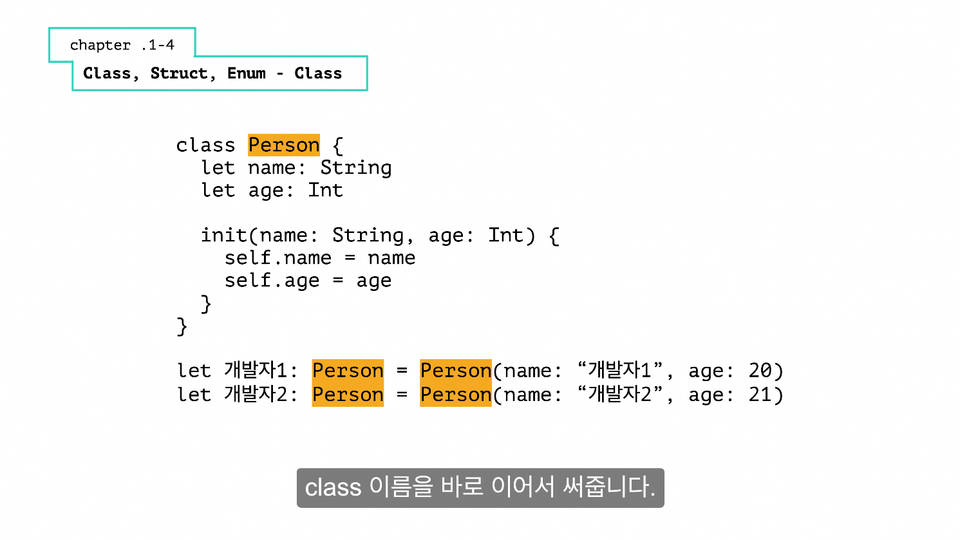
Understanding the grammar of the Swift language
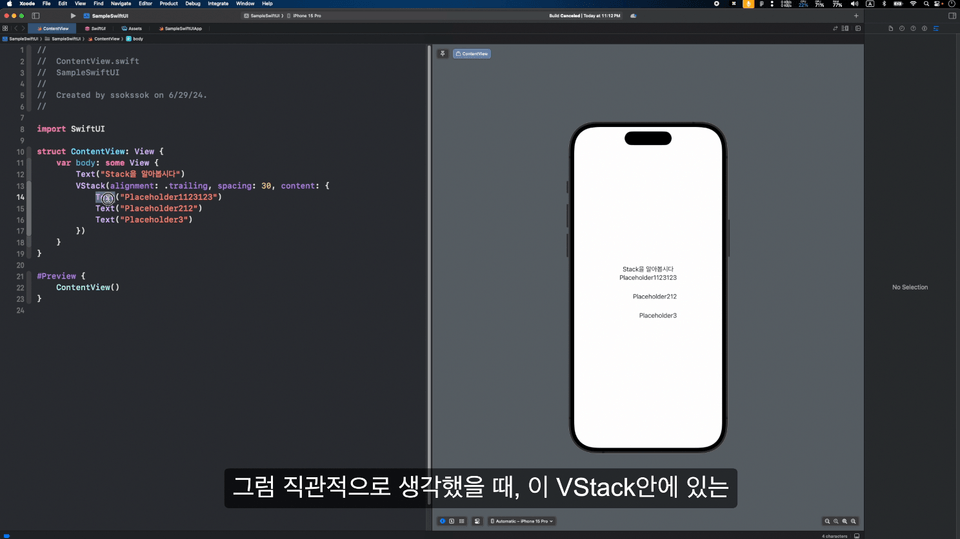
Understand and compare SwiftUI and UIKit
Easy and simple sample app development using SwiftUI-based API
🤔 If you are thinking of starting iOS development,
Do you feel burdened by the need to know a lot? 😵💫
This course is designed to teach you only the essential basic knowledge. 👏👏
This is a lecture taught directly by a developer with more than 10 years of experience in iOS development.
Start developing iOS with confidence with this course ! 🙋♂ 🙋♀ 🙆♀ 🙆♂

Starting iOS... There's so much to learn😭
Don't worry.
Only what is really necessary
I will explain it to you in an easy-to-understand manner.

Where to start
I can't even imagine it.
What foundations should be prepared?
I will let you know step by step.

SwiftUI, AutoLayout
What is that..?
All the ways to draw the view
I will let you know as I develop it.
In this lecture, you will learn the basics you need to know to get started with iOS.
We're here to help you understand Swift, SwiftUI, and AutoLayout concepts more easily .
To learn the concepts, we explain them with prepared keynotes.
Learn concepts by practicing together.
If you utilize a server when building an app, the scope of development expands dramatically. That makes server utilization crucial!
Let's create an App Store search app using iTunes API documentation.
From how to read the documentation, API specs, and how to call the server,
Even handling management
Learn about the possibilities of your future apps.
📌 From a beginner's perspective, we will help you create the app you want by selecting only the essentials .
📌 We've put a lot of effort into the video quality so you can feel that this course was never made easy .
📌 We also provide subtitles so you can watch the lectures anywhere .
💯 You will understand how to build iOS apps.
💯 You will be able to understand SwiftUI and AutoLayout.
💯 Now that you have the basics, you can start building your app.
The lecture will be held on MacOS Sonoma 14.3.
The Xcode version is 15.4, the latest version at the time of writing this course.
We are moving towards Swift 5.10.
Who is this course right for?
Anyone who wants to quickly learn only the basics of iOS language
I want to try iOS development, but I'm having trouble figuring out what to do.
I've just started, but I don't have any idea
All
26 lectures ∙ (4hr 56min)
Course Materials:
10. 3.1 Text
17:56
11. 3.2 Button
12:33
12. 3.3 Image
07:38
13. 3.4 TextField
10:17
14. 3.5 Slider
10:33
15. 3.6 Toggle
07:02
16. 3.7 Picker
19:23
All
2 reviews
Explore other courses in the same field!