Thank you so much for your kind guidance on how to utilize gptapi.
5.0
changyeollee
100% enrolled
It was a helpful lecture
What you will gain after the course
How to use the OpenAI GPT API
How to program with ChatGPT
Python
Lecture Topic 📖
You will learn how to use the GPT API to create a program with your desired functions that operates on a chatbot basis.
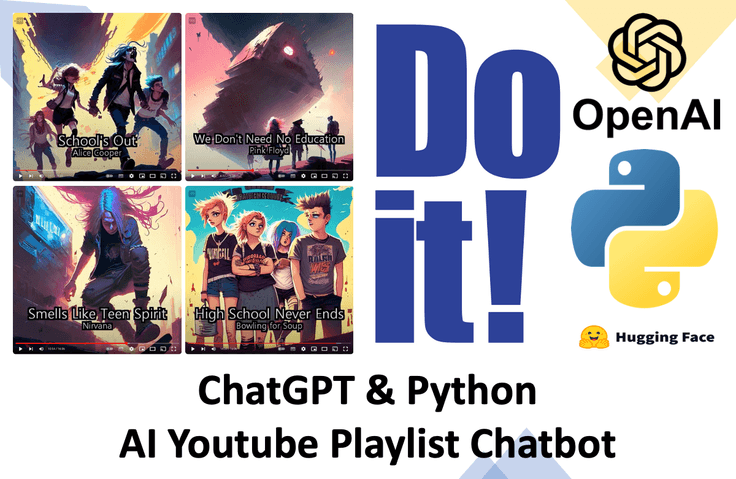
Create a playlist video through a conversation with a chatbot using a GPT-based app I built.
If you describe the mood you want, the chatbot will automatically download the music, generate images that match the songs, and create a video for you.
Demonstration of the program created through this course
Follow along with the contents of the book together with the author.
Creating a YouTube PD App that handles everything from planning and data preparation to design and video editing alone
Published by EasysPublishing on November 10, 2023, you can now follow the bestseller!! <Do it! Creating an AI Employee with ChatGPT & Python> through videos with the author.
People who want to utilize ChatGPT's chatbot functionality within their own programs
People who want to learn how to use OpenAI's API
People who have learned the basics of Python but want to try a new side project
People who want to automatically create YouTube playlist videos
Student Concerns & Solutions
There are many lectures on how to use GPT, but it is difficult to find ways to actually create a program that fits my specific purpose.
This course teaches you how to combine your own custom functions with the capabilities of GPT.
Changes in students after taking the course
You will learn how to use the GPT API and how to create the chatbot you want using prompts.
Understand efficient ways to program with the help of ChatGPT and identify its limitations.
Create playlist videos through conversations with the chatbot you built.
Course Features ✨
While there are many lectures that provide fragmented knowledge on how to use GPT, there are not many that cover the process of controlling GPT's uncertainty (hallucination) and integrating it with functions I have programmed myself.
Together, we will go through the process of creating a program with a clear objective in the form of a chatbot by integrating the strengths of GPT.
In the process, you will experience the strengths and limitations of GPT, and by leveraging its strengths, you will be able to create your own truly useful program.
What you will learn 📚
This course evolves the program by developing the desired functions first and then integrating those functions with GPT to make them operational. The content developed in each section does not remain as independent pieces; rather, everything is connected so that it can be utilized in the form of a chatbot within the program we are building.
Section 0. Introduction We will take a look at the program created in this course and discuss the principles of how it operates. We will also cover the process of setting up the environment before starting the project.
Section 1. GPT API Basics We explain how to use the GPT API for those who are new to it. You will learn how to guide GPT to provide different responses by changing the prompts. Additionally, you will learn how to transform it into a chatbot format.
Section 2. Turning it into an App Convert the program that ran in the terminal into a Windows or Mac application. In this process, by using ChatGPT, we will cover how to collaborate and the limitations when programming with ChatGPT.
Section 3. Utilizing GPT's Creativity Explore GPT's uncertainty and creativity, and develop it into a DJ chatbot that selects music. Learn how to control GPT's response format into the specific style you want.
Section 4. Controlling GPT's Hallucinations GPT often gives nonsensical or incorrect answers. We will learn how to control these incorrect responses to develop a program that serves our intended purpose. As an example, we will check on YouTube whether the songs selected by GPT actually exist, and if they do, download the audio in mp3 format.
Section 5. Image Generation Using Stable Diffusion Model Generate an image that matches the song. This section covers how to generate images using your favorite models from Hugging Face. We summarize the song information using GPT and use that summarized information to generate an image via text-to-image.
Section 6. Image Generation Using Dalle-2 Generate images that match the song. The method in Section 5 requires sufficient GPU performance on your computer. However, by using Dalle-2, you can generate images via OpenAI regardless of your computer's performance.
Section 7. Creating Playlist Videos Finally, we will create a playlist video. You can use the images generated previously, or you can create a playlist video using videos you have recorded in advance.
Expected Q&A 💬
Please write at least 3 questions and answers that students might be curious about before taking the course. We recommend providing answers that reflect your unique personality as a knowledge sharer, rather than generic or formal responses.
Q. How well do I need to know Python? A. This course does not require a high level of Python proficiency. If you understand the concepts of variables, loops, functions, and classes, you will be able to follow along just fine.
Q. Can I get the source code? A. Yes. You can receive the source code via a GitHub repository or as a compressed file. You can use the results exactly as they were committed & pushed in the video.
Q. Is this a course that non-majors can take? A. Yes. This course is designed so that anyone with basic Python knowledge can follow along. If there are any parts that are difficult to understand, please ask questions through the Q&A.
Notes before taking the course 📢
Practice Environment
The course was conducted based on Windows, and the code has been written so that it can also be executed on Mac.
In cases where there are differences between Mac and Windows, I will mention them separately or provide a dedicated video.
Image generation using Stable Diffusion may not run depending on your computer specifications. However, we provide instructions on how to run it in Google Colab so that you can still practice. We also explain how to use Dalle-2 to ensure there are no issues in creating the final results.
Using the OpenAI API may incur charges from OpenAI, but since you receive $16 in credits upon signing up, you can follow along with this course without incurring any costs.
Learning Materials
The code written during this course is provided via GitHub and as a compressed file.
The videos required for the section on creating playlist videos are provided via a OneDrive link.
Prerequisite Knowledge and Important Notes
You must have a basic understanding of Python syntax.
Questions are accepted through the Q&A section, and if there are any future changes to the GPT API, a separate announcement will be made.
About the Instructor ✒️
I am the author of "Do It! Django + Bootstrap: The Standard of Python Web Development," and I have also taught courses on Python task automation and Django web development on Inflearn.










![[Python beginner] ChatGPT voice translation app made with FlutterCourse Thumbnail](https://cdn.inflearn.com/public/courses/333668/cover/94589a80-ab05-4bd1-ad98-1e42b75a47fc/333668.png?w=420)
![[Complete Automation Conquest] Instagram Mobile Phone, Web Automation Program DevelopmentCourse Thumbnail](https://cdn.inflearn.com/public/courses/329289/cover/0d38eeb1-b3ff-4593-81f5-8da64078b140/329289-eng.png?w=420)
![[Kim Left Hand's Left Hand Coding] ChatGPT X Python for Programming QuittersCourse Thumbnail](https://cdn.inflearn.com/public/courses/331689/cover/837c709b-807b-492c-b35a-971713e67447/썸네일.png?w=420)
![[AICE] Customized lecture for passing the Basic levelCourse Thumbnail](https://cdn.inflearn.com/public/files/courses/340280/cover/01kg1n8gst8sm6hwvag3bxccb9?w=420)
![[AI Cheat Sheet] The secret to finishing work instantly, Agentic AICourse Thumbnail](https://cdn.inflearn.com/public/files/courses/340717/cover/ai/1/3b5cb844-25b5-4576-8224-d293d0989376.png?w=420)

![[Coding Basics All-in-One Package] Global Talent Development ProjectCourse Thumbnail](https://cdn.inflearn.com/public/courses/330666/cover/a0d165df-f81a-4fe2-99c6-a567bac4d9db/codesprint_01.png?w=420)