

inflearn logo

Claude Code for Non-Developers: From Delegating Tasks to AI to App and Workflow Automation

I got answers from AI, but am I still doing the work myself? From the basics of using Claude Code to building apps, automating Instagram carousel posts, and researching competitors’ social media. Follow along while watching the screen and learn how to apply it to your own work. This includes 11 beginner-focused desktop app lessons, along with hands-on practice for real-world tasks.

(5.0) 1 reviews

17 learners

Level Beginner

Course period Unlimited

AI
AI
claude
claude
AI
AI
claude
claude

What you will gain after the course

  • How to Convey the Purpose and Context of a Task to Claude Code and Review the Results

  • The process of building a full-stack app and applying design with AI

  • How to Use AI to Create Instagram Carousel Posts and Research Competitors’ Social Media

  • How to organize reusable work rules with CLAUDE.md and Skills

Learn “Your First Encounter with Claude Code” through video.

We turn a 190-page introductory book into 11 video lessons.

From installation to practical use, just follow along by looking only at the Claude desktop app screen.

The black screen (terminal) never appears.


Features of This Course

✅ Systematic structure based on the book — Covers all 11 parts of 「Claude Code for Beginners」 without missing anything

✅ Desktop app only — Complete everything from start to finish using only buttons and chat windows.

✅ For non-developers — Designed for people in planning, marketing, design, and operations roles

✅ Concepts + hands-on practice — Practice with screen captures and review the concepts through animations.


This is for those who:

• People who are curious about what Claude Code is but don’t know where to start

• Office workers who want to delegate repetitive tasks to AI

• Solopreneurs who want to try using AI agents for work without any development knowledge

• Those who want to go beyond simply copying and pasting with ChatGPT


Curriculum (11 episodes total, approximately 3 hours)

EP01. Understanding Claude Code (~15 minutes)

What it is, how it works, and how it differs from chatbots. From the agentic loop, tools, and pricing plans to choosing a model.


EP02. Getting Started with the App (~22 minutes)

Installing and logging into the desktop app. Creating your first session, connecting a project, and practicing file operations.


EP03. Using It Safely (~14 minutes)

Understanding the permissions system. Approval modes, undoing changes, and protecting sensitive files.


EP04. How to Give Good Instructions (~22 min)

5 Elements of a Good Request. Providing context, showing examples, and giving step-by-step instructions.


EP05. Making It Remember (~14 minutes)

Document team rules with CLAUDE.md. How to use project memory and automatic memory.


EP06. Skills — Add Specialized Knowledge (~18 minutes)

The concept and structure of Skills. Create your own skill and practice it hands-on.


EP07. Agents — Delegate the Entire Task (~18 min)

Sub-agent concepts. Agent usage patterns and practical examples.


EP08. Automation (~22 min)

Hooks, Plugins, MCP connectors. Designing automation for repetitive tasks.


EP09. Use It Anywhere (~11 minutes)

Mobile app, Slack integration, and Chrome extension.


EP10. Practice and Operations (~21 min)

Work-specific recipes, 20 prompt patterns, cost management, and FAQs.


EP11. Wrap-up (~9 min)

Using the Skill Shop and guidance on next steps.


Things to Prepare Before Taking the Course

• Computer (Mac or Windows)

• Claude paid subscription (Pro plan or higher)

• “Introduction to Claude Code” book (optional — the course can be taken without it)


What You’ll Be Able to Do After the Course

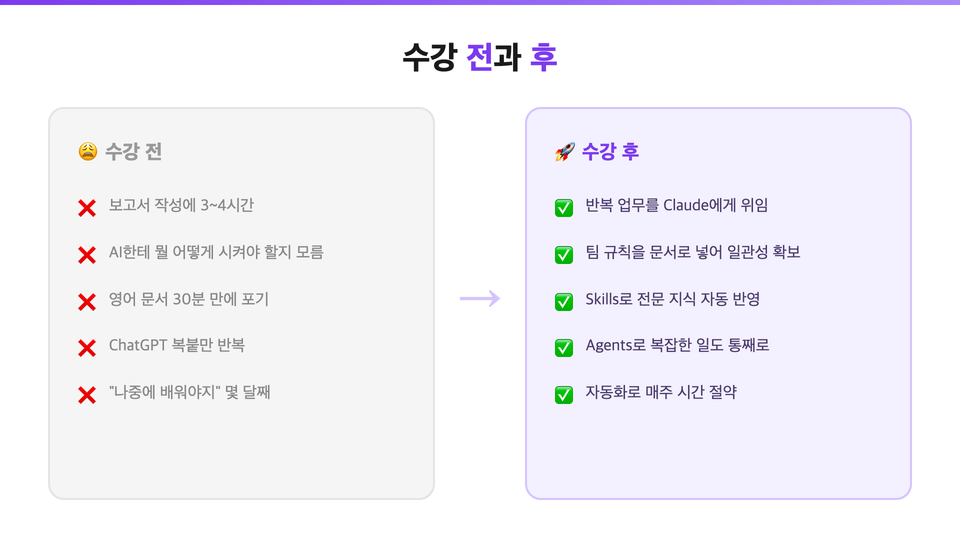
• You can delegate file organization, data processing, and document drafting to the Claude desktop app.

• You can document team rules and specialized knowledge using CLAUDE.md and Skills

• You can delegate complex tasks end-to-end using Agents.

• You can reduce repetitive tasks with Hooks and automation

• You will gain a precise understanding of the role of the person who reviews and evaluates the results.


Course Information

There are 11 episodes in total, totaling approximately 3 hours.

1–2 lessons will be released sequentially each week.


Frequently Asked Questions

Q. Is it okay if I have no knowledge of development at all?

That’s okay. This is not a coding course, but a course on how to use the tool. Just follow along by looking at the desktop app screen.


Q. Is a paid Claude subscription required?

Yes, a paid subscription is required to use Claude Code. You can start with the Pro plan.


Q. Can I take the course without the book?

Yes. The lessons alone are sufficient. The book is useful as supplementary material for review.


Q. What if the lectures are too fast to follow?

Each episode is 15–22 minutes long, with time to pause and follow along. You can also adjust the playback speed.

Before and after taking the course

Recommended for
these people

Who is this course right for?

  • For those who have installed Claude Code but feel unsure how to get started with their first task

  • Those who want to start building apps and automating tasks with AI without development experience

  • Planners, marketers, and operators who want to apply AI to repetitive tasks such as creating card news and researching materials

  • Non-developers and solo entrepreneurs who want to create a service

  • For those who want to move beyond copying and pasting AI responses and have it handle actual tasks.

Need to know before starting?

  • No programming knowledge is required. It is enough to know how to handle documents and emails on a computer.

  • A paid Claude subscription (Pro plan or higher) is required for the exercise.

  • An Open Mind Toward Problem-Solving Using AI Tools

Hello
This is evan

Hello, I'm YouTuber Maker Evan.

Curriculum

All

22 lectures ∙ (4hr 54min)

Published: 
Last updated: 

Reviews

All

1 reviews

5.0

1 reviews

  • asdjklfsdf님의 프로필 이미지
    asdjklfsdf

    Reviews 1

    ∙

    Average Rating 5.0

    5

    36% enrolled

    Thank you for introducing such a practical workflow. Thanks to you, I've learned some great information.

    Similar courses

    Explore other courses in the same field!

    25% off for new members

    $194.10

    25%

    $254.10