Cloning Netflix UI with Flutter + Firebase [Just Do It Flutter]
This course is a clone coding lecture where we build the Netflix UI using Flutter and Firebase!
Start learning Flutter, the fastest way to study app development :)
Rather than trying to understand all the concepts, it would be helpful to just follow along first. I think you can find out more detailed widget usage and grammar by looking them up.
5.0
Clark
38% enrolled
I took a quick look and it seemed like a very good lecture for practice, so I decided to study it. I hope you have a healthy military life.
5.0
RyanJ.k
100% enrolled
It was nice to be able to quickly learn Flutter.
What you will gain after the course
Building UI with Flutter by Following Along Step-by-Step
Netflix clone coding including the "My List" (save) feature
Fetching data by integrating Flutter and Firebase
How to use various Flutter packages
Netflix clone coding! Build fast and excellent native apps with Flutter.
The fastest way to start app development, Flutter
Flutter is an app/web/desktop app development framework developed by Google. In the early days, there were difficulties due to the unfamiliar language called Dart, but it is gaining great popularity by boasting app performance and development speed that easily surpass React Native.
Many developers who have experienced Flutter have concluded that it is capable of fully replacing native app development.
Learn Flutter quickly now by recreating the Netflix UI!
💡 Course Features
FULL subtitles for the entire course!Fast-paced coding!
(The editing quality and pace of the first four lectures are not great ㅠㅠ The subsequent lectures are smooth..!!)
"Just Do It Flutter" is a course designed for you to follow along with the code first while minimizing explanations for each line, allowing you to study and reflect on it yourself. là dạng bài giảng tối giản hóa việc giải thích từng đoạn mã để bạn có thể làm theo mã trước, sau đó tự mình suy ngẫm và nghiên cứu.
Since the explanations in this course may be insufficient, I plan to upload separate lectures later covering the widgets and logic featured here; therefore, this course may not be a good fit for those who need a prior understanding of basic concepts.
I will provide a more detailed and friendly explanation later in the "Getting the Most Out of Flutter" course!
✏️ What you will learn in this course
In this course, you will learn the following!
☑️ How to build a UI with Flutter ☑️ How to send and receive data by linking Flutter with Firebase Firestore ☑️ How to create a Flutter app with a bottom tab bar structure
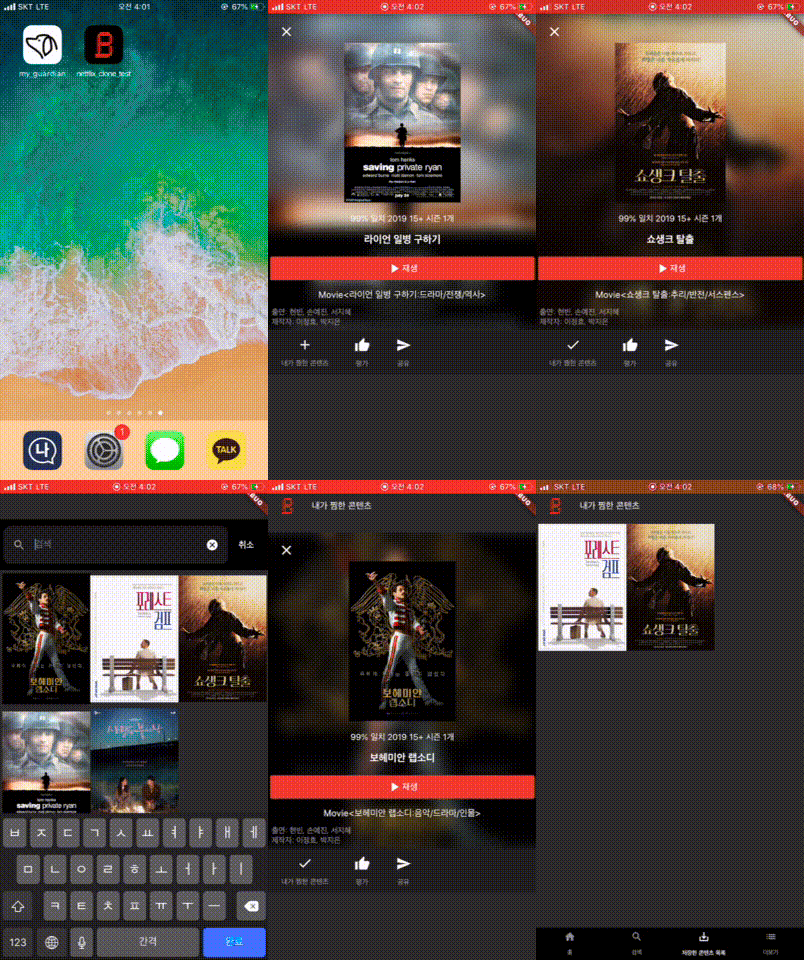
📖 The Netflix UI that will be completed by the end of this lecture
By the end of the course, you will be able to complete the Netflix UI below:) (The logo image was created by Guinness! Thank you haha)
🛠 Required Development Environment
Any environment where you can develop with Flutter is fine! Since there is no separate introductory lecture, please have it ready in advance :)
Q. Do I have to make it exactly as shown in the lecture? A. The instructor is not an expert developer, so there may be some poorly written code. Also, since my experience with Flutter isn't very long, there might be unnecessary code at times. T_T I will study more and show you improved code and lectures in the future! :)
Q. I'm curious about Flutter Widgets! A. In Flutter, everything is a Widget! From something as large as a screen unit to something as small as a single piece of text, Flutter considers it a Widget. It might be helpful to think of them as similar to components in other development frameworks.
Q. I'm curious about state management in Flutter A. In Flutter, the most basic form of state management is handled using StatefulWidget and createState(). To advance further later on, let's learn methods such as BLoC and Provider!
💡 If you liked the lecture..!
Since this is a free course, the creator can work hard thanks to your support and encouragement!
Graduated from Korea University, School of Cybersecurity (2020.02)
Early graduation from Hansung Science High School (2016.02)
Experience
Intern at VoyagerX Inc., Lead of Flutter app/backend server maintenance (2019.07 ~ 2019.09)
Completed Software Maestro 8th Mentee Program (2017.08 ~ 2017.12)
Co-founded 'Picasso', a YouTube data analysis startup (2017.12 ~ 2018.06)
Founding President of DevKor, a development club at Korea University's School of Cybersecurity (2018.12 ~ 2020.02)
Freelance Developer at O2Job / Wishket (2018.06 ~ )
Introduction
I am Taebbong Kwon, a developer dreaming of becoming a "Dev-signer" (Developer + Designer). I have been programming since middle school and have since engaged in various development-related activities with the goal of starting my own business. After gaining experience in a startup last year, I decided to leave to pursue my own ideas. Currently, I am focusing on studying development and creating educational lectures.
Rather than trying to understand all the concepts, it would be helpful to just follow along first. I think you can find out more detailed widget usage and grammar by looking them up.




![Building a Quiz App/Server in 1 Hour with Flutter and Django [Blind Full-Stack]Course Thumbnail](https://cdn.inflearn.com/public/courses/325095/course_cover/75f893a3-d50a-4f83-824e-5e18be7d364b/ktp-flutter-django-quiz.png?w=420)



![[Full-Stack Completion] Clone 3 Websites with Supabase (Next.js 14)Course Thumbnail](https://cdn.inflearn.com/public/courses/332907/cover/2975d3d7-5dcc-4e2a-977c-98b11134cfb6/332907.jpg?w=420)

![[2021] Who builds paid web services these days? Everything about Firebase - Vue.jsCourse Thumbnail](https://cdn.inflearn.com/public/courses/326594/cover/451fb778-2c07-4da1-bff9-c5ec71712928?w=420)
![[Code Factory] [Introduction] Completely master the Dart language in 4 hoursCourse Thumbnail](https://cdn.inflearn.com/public/courses/328577/cover/d7cd62c2-db07-45d8-af8d-a3fa728cd8e7/inflearn-logo.jpg?w=420)


![[CLI] Build Flutter Apps Without Coding with AICourse Thumbnail](https://cdn.inflearn.com/public/files/courses/344365/cover/01m28ccjzp5ecbs85z3warw0r0?w=420)
![[Python beginner] ChatGPT voice translation app made with FlutterCourse Thumbnail](https://cdn.inflearn.com/public/courses/333668/cover/94589a80-ab05-4bd1-ad98-1e42b75a47fc/333668.png?w=420)