

inflearn logo

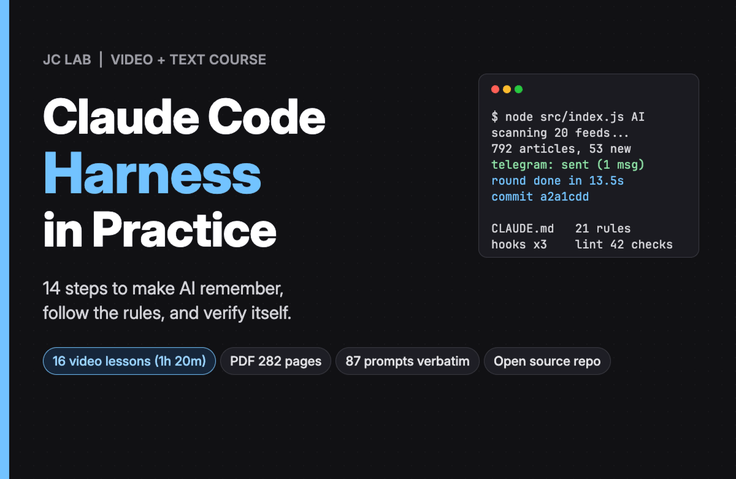
Claude Code Harness in Practice — 14 Steps to Make AI Remember, Follow Rules, and Self-Verify

Instead of writing longer prompts, I create rule files, logs, permissions, hooks, and validation routines one by one whenever something goes wrong in a real project. With a news alert bot that I actually built and deployed to a server in five days, 211 screenshots and 87 instructions exactly as originally written.

1 learners are taking this course

Level Intermediate

Course period Unlimited

claude
claude
AI
AI
JavaScript
JavaScript
PostgreSQL
PostgreSQL
Business Productivity
claude
claude
AI
AI
JavaScript
JavaScript
PostgreSQL
PostgreSQL
Business Productivity

What you will gain after the course

  • Rule files and record structures that keep a new session from forgetting yesterday’s decisions (CLAUDE.md, fact files, thought records)

  • Permission files and hooks that prevent a session from doing what it shouldn’t, and how to verify that it’s really blocked

  • A verification routine and deployment skills that don’t take “done” on faith, but verify through commit, service, and run logs

  • A bot that actually runs on a server, reading the news every hour, sending keyword-related articles via Telegram, and sending an AI summary in the morning.

Text Course — 282-page PDF, 211 screen captures, 87 original instructions, and a public practice repository

Instead of writing longer prompts, build one mechanism at a time whenever something goes wrong

Anyone who has used Claude Code for a few days runs into the same three problems. A new session today doesn’t know the rules you set yesterday. It does things you told it not to do. It says, 'Completed,' but when you open it, it hasn’t been done. If you’ve ever tried and failed to fix these three issues by writing longer prompts, this course is for you.

This course is not a theoretical textbook. Starting from an empty folder, you will build a bot that actually runs—a bot that reads RSS feeds from 20 news outlets every hour, sends only articles matching your keywords to Telegram, and delivers an AI summary report every morning. Claude Code writes all the code. The author's job was to give instructions and turn each problem that arose into a single line of rules. All 87 of those instructions are included verbatim in the hands-on repository, and all 211 screenshots are actual terminal screens.

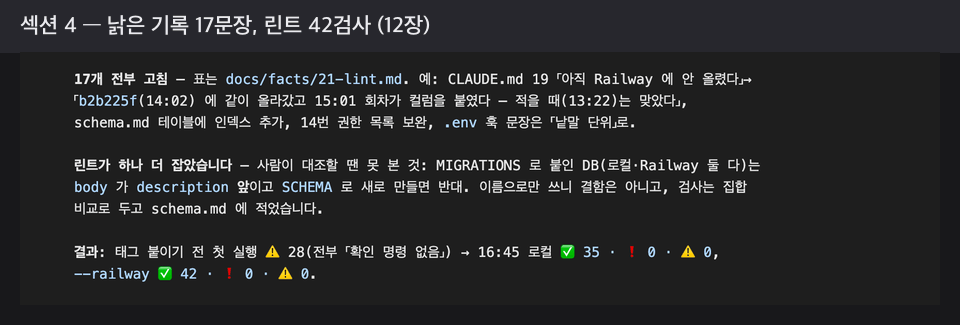
Each chapter has its own incident. A new session nearly overturns yesterday’s decision (Chapter 1), display numbers end up determining what gets stored (Chapter 2), a single dead feed brings everything to a halt (Chapter 3), a session writes an uncounted number as though it were a fact (Chapter 4), the deployment light is green but no notification arrives (Chapter 5), someone else’s server gets hit 18 times per second (Chapter 6), what was believed to be 'blocked' leaks out (Chapter 7), the system quietly dies when the database connection is lost (Chapter 8), the rules file grows to 503 lines (Chapter 9), a summary created in nine seconds turns into nine Telegram messages (Chapter 10), I hear “uploaded” three times, but the server is still running the old code (Chapter 11), and 17 sentences in the record become outdated in a single day (Chapter 12). I also recorded the incidents that were planned but never occurred.

Each incident produces a harness. There are rule files (CLAUDE.md), incident records and fact files, data decision documents, permission files, hook sets and Git hooks, deployment skills, validation routine sets, ledgers of requests and costs, and record linting. In the final chapter, these are organized into seven elements, distinguishing what should be in place on day one from what only gets created after an incident occurs.

This is a text-based course. You will read a 282-page PDF (Chapter S, Chapters 0–13, and Appendices A–G) and class notes without video. Practice repository: https://github.com/JCLab-coder/news-radar (public, code licensed under MIT, chapter tags ch00–ch12).

After completing the course, you will be able to create an output like this

  • A bot that actually runs. It reads the news every hour on a server (Railway), sends only the articles matching my keywords to Telegram, and delivers an AI-generated summary report every morning. Just change the keywords and you can use it as is.

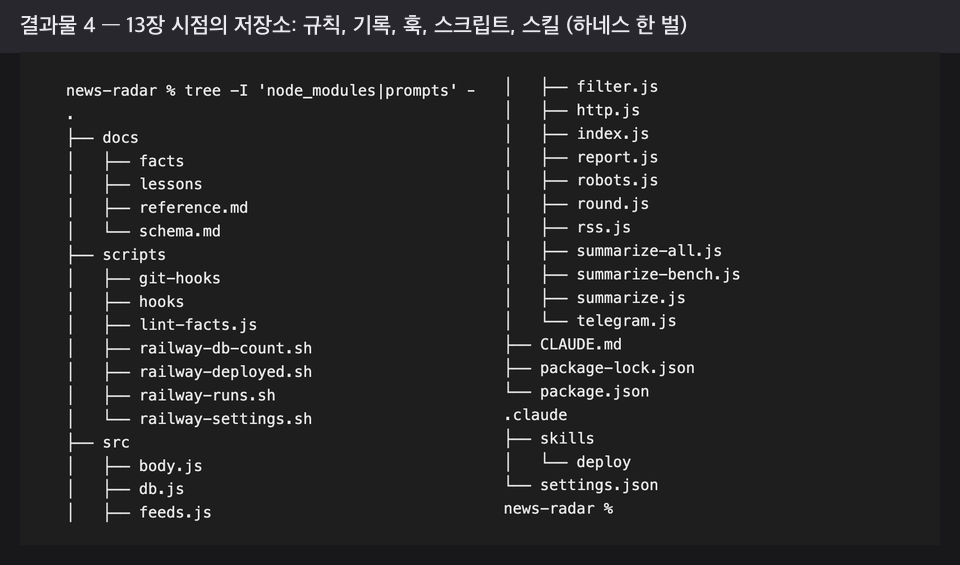
  • One harness. One rules file, 23 project documents, one permissions file, one skill, three Claude Code hooks and one git hook, and ten scripts. The full contents of the files and templates for other projects are included in the appendix.

  • One habit. The habit of turning an incident into a single rule. You may eventually stop using the bot, and you may rewrite the rules file for each project, but this habit remains.

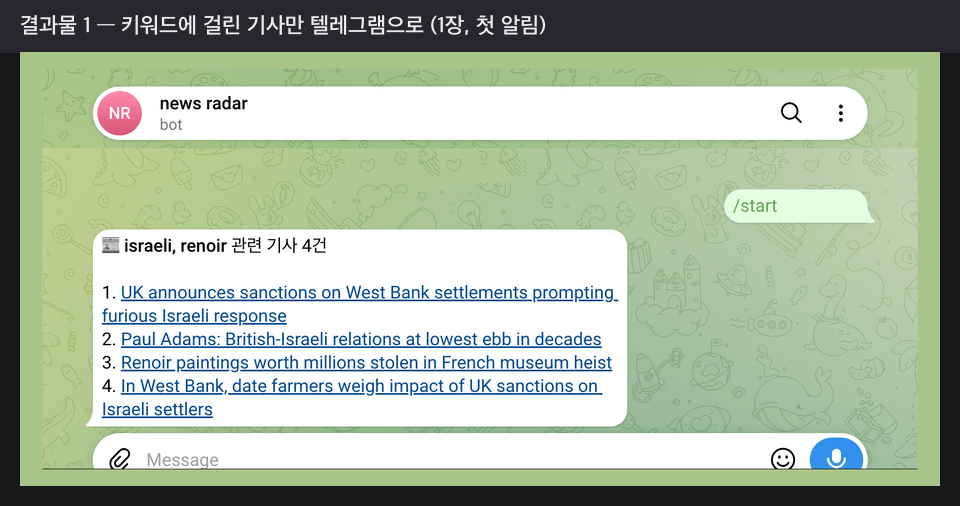
First Telegram notification (1 page)

Only send the title and link for articles matching the keywords. This is also when I learn to split messages by line to stay under the 4,096-character limit.

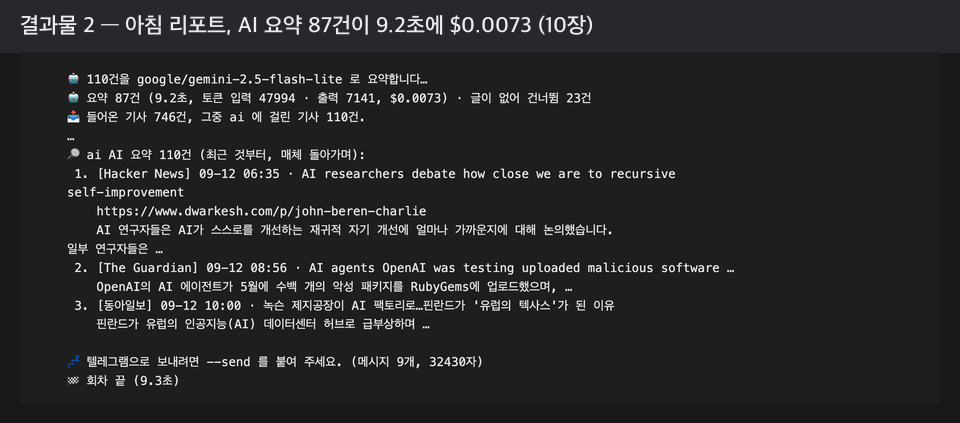
AI summary of the morning report (10 pages)

It summarized 87 articles in 9.2 seconds, and the next incident was “nine Telegram messages.”

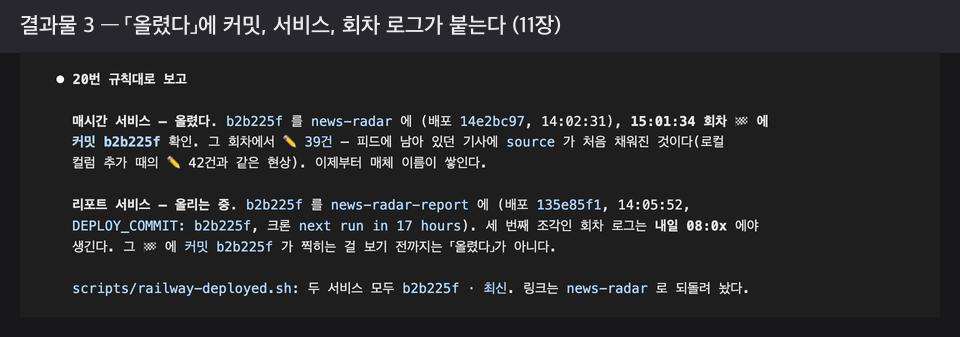
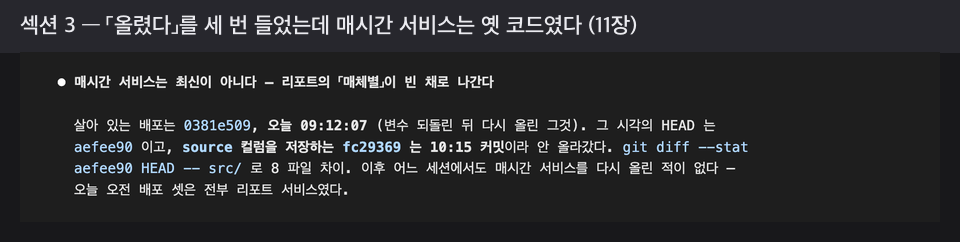
The format of 'uploaded' (Chapter 11)

A commit, a service, and an episode log must all be attached for it to count as “uploaded.” The report service is still “uploading” until the next morning.

The repository as of Chapter 13

docs/facts, docs/lessons, scripts/hooks, .claude/skills — These mechanisms, rather than the code, are the core of this repository.

  • You can build rule files and a record structure yourself so that a new session does not forget yesterday’s decisions—CLAUDE.md, which contains only the rules; fact files that hold evidence and measurements; incident records; and data decision documents.

  • You can use permission files and hooks to prevent the session from doing what it is not supposed to do, and verify with fake inputs that it is truly blocked instead of simply trusting that it was “blocked.”

  • You can solidify the verification routine that 「done」 must be accompanied by a commit, service, and run log through deployment skills and scripts.

  • We understand why you should establish limits and a ledger first when calling other people’s servers and paid APIs, having experienced incidents involving 18 requests per second and nine Telegram messages.

  • Knowing that records can become outdated in a single day, you can build a structure that rechecks them with lint by attaching a verification command to every factual statement.

Learning Content

  • 14 chapters (Chapters 0–13), plus a preparation chapter, Chapter S, and seven appendices. Each chapter proceeds in the order of incident → cause → rule → verification. This is not a book that introduces features one by one; instead, problems arise first and the mechanisms follow, so it should be read in order.

  • Every chapter includes session screen captures and the instructions the author actually entered (P numbers), along with a reader checklist at the end of the chapter.

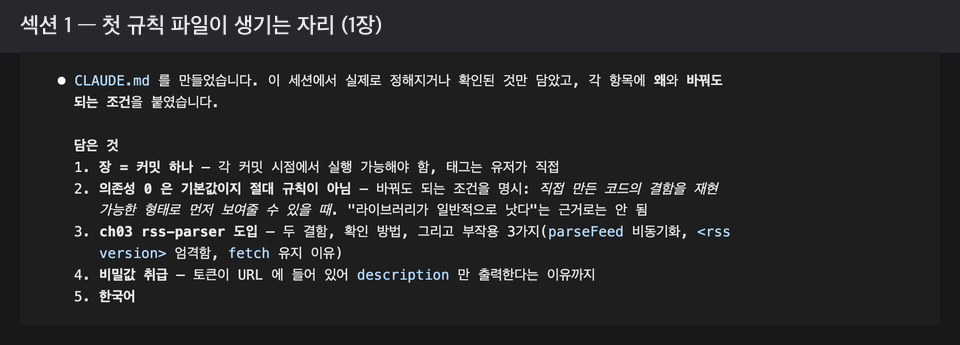
Chapter 1 — Where the First Rules File, CLAUDE.md, Was Created

Section 1. Preparation and Part 1 — Making It Unforgettable (Chapter S, Chapters 0–2)

The only prerequisites are those created anew for this project. In the first session without a rules file, you see the same instructions implemented differently every time; where a new session knows nothing of yesterday, the first rules file is created, and where display numbers were determining storage as well, a data-decision document emerges.

Section 2. Part 2 — Making the Rules Stick (Chapters 3–7)

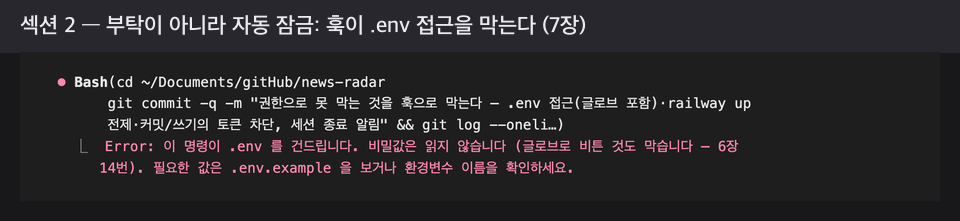
From a single dead feed bringing everything to a halt came the first validation routine; from writing down numbers that hadn’t been counted, an incident log; from a deployment that showed a green light but sent no alerts, deployment skills; from hitting someone else’s server 18 times per second, limits, ledgers, and permission files; and from “blocked” leaking out, hook sets and git hooks.

Chapter 7 — The chapter where hooks block access to .env

Chapter 11 — Every hour, the service was running old code

Section 3. Part 3 — Making It Verify Itself (Chapters 8–11)

From the database silently dying when the connection was lost came a failure-handling skeleton and a per-run cap; from the rules file growing to 503 lines came the separation of records into four places and a reporting service; from nine Telegram messages came a cost ledger and a daily cap; and from three instances of “uploaded” when the server was still running old code came a third verification routine that stamps the commit on the 🏁 line.

Sections 4 and 5: Operations and Retrospective, Appendix (Chapters 12–13, Appendices A–G)

In a single day, a record linter emerges from 17 sentences of old records, and the final chapter summarizes the seven elements of the harness and 'what to put in place on day one if rebuilding from scratch'. The appendix includes the full CLAUDE.md, five templates, the complete hooks and scripts, 20 incident→rule tables, 52 checklists, references and copyright, and a comprehensive overview of keys, environment variables, and server settings.

Chapter 12 — The Linter Catches 17 Sentences in an Outdated Record

Things to Know Before Enrolling

  • This is a text-based course. There are no videos, and each unit includes a PDF and class notes. The final lesson includes one complete PDF (282 pages).

  • Installation, sign-up, and payment procedures are not covered. For installing Claude Code, selecting a plan, and signing up for Telegram, Railway, and OpenRouter, follow each service’s instructions.

Practice environment

  • Operating system: The author worked on macOS. Any environment where the terminal and Node.js run will work.

  • Tools used: Claude Code (you should already be using it), Node.js 20.12 or later, local PostgreSQL, a Telegram account (one bot), and git.

  • Paid: Starting in Chapter 5, a Railway server (Hobby, under $5/month—the exercises in this book cost just $0.03 over two days); starting in Chapter 10, an OpenRouter API key (all the Chapter 10 exercises in this book cost just $0.1).

  • PC requirements: None in particular. A GPU is not necessary.

Learning Materials

  • PDF: 282 pages (one complete volume plus 8 unit-specific files; page numbers refer to the complete volume). Approximately 165,000 characters of main text and 211 screenshots.

  • Practice repository (public, MIT): https://github.com/JCLab-coder/news-radar. At the end of each chapter, there is a tag (ch00~ch12), so you can return to any point and try it out in a new folder. The 87 instructions the author entered into the sessions are available verbatim in prompts/.

  • The appendix contains the full rules file, five templates, the complete hooks and scripts, a thought-to-rule table, the consolidated checklist, and a complete summary of the prerequisites.

Prerequisites and Notes

  • Prerequisite knowledge: You should have used Claude Code for at least a few days and be able to read JavaScript. You don’t need to know how to write it.

  • Read it in order. Hooks appear in Chapter 7 because things first go wrong in Chapter 6. I recommend building it yourself; use the repository for comparison when you get stuck. Claude Code writes things slightly differently each time, even with the same instructions—your code is not wrong just because it differs from the book.


  • Please post your questions on the course’s Q&A board, and I will answer them. The Claude Code interface and the screens for each service may change, and any changes will be announced in the news updates.

  • Copyright: The text, screen captures, and PDF may be used only by the purchaser for personal learning purposes. Sharing them with others or uploading them to a public place is not permitted. The code in the practice repository is subject to the repository’s license (MIT)—the code and the book are governed by different terms.

Recommended for
these people

Who is this course right for?

  • I’ve been using Claude Code for a few days, and the new session today didn’t know the rules we set yesterday.

  • Anyone who has heard “It’s done” and opened it to find that it wasn’t.

  • Someone who failed while trying to fix the problem by writing a longer prompt

Need to know before starting?

  • You must already be using Claude Code. Installation, pricing plans, and the sign-up process are not covered.

  • You only need to be able to read JavaScript. You don’t need to know how to write it. Starting in Chapter 5, you’ll need Railway (under $5 per month), and in Chapter 10, you’ll need an OpenRouter API key ($0.1 for all the exercises).

Hello
This is jclab

Career Verified

I’m a developer who builds and operates services.

I’m sharing what I experienced using Claude Code in real-world work and the rules that emerged from it. I’ll talk through actual incidents and original code rather than theory.

I build and use whatever I need, from development and operations to data and automation.

More

Reviews

Not enough reviews.
Please write a valuable review that helps everyone!

Similar courses

Explore other courses in the same field!

Limited time deal

$74,250.00

25%

$77.00