Blender beginner's basic course
nodeep777
Free
Beginner / Blender
4.9
(205)
14,100+
This is a lecture for beginners that focuses more on practice than theory. You can learn Blender's menus and functions.

Beginner
Blender

You can learn the MVVM pattern in C# MAUI. Unnecessary content has been removed and only the core essentials are included. This is recommended for those who want to quickly understand the MVVM pattern. Since I don't have an iPhone or MacBook, testing will be conducted on Windows machines and Android. Additionally, you can also learn how to customize controls.
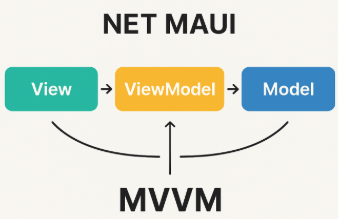
You can learn Maui's MVVM pattern.
Since I don't have an iPhone and MacBook, I'll proceed with testing using a Windows machine and Android.
You can learn about Custom Control.
Multi-platform App UI: Develop Android, iOS, macOS (Mac Catalyst), Windows apps simultaneously with a single C#/.NET codebase and XAML.
The next generation of Xamarin.Forms, using a handler architecture instead of renderers to improve performance and customization.
Single Project structure (centralized management of shared assets and resources), hot reload, built-in DI, Essentials (device API) integration.
MVVM (Model–View–ViewModel) is an architectural pattern that connects the UI (View) and data/logic (Model) through a ViewModel.
Model
Actual data, business logic, API call results, DB entities, etc.
Example: BookItem { Title, Link }
View (XAML, Code-Behind)
The layer that defines the UI.
ViewModel properties and commands Binding.
Minimize code logic (business) as much as possible → Only responsible for drawing UI.
ViewModel
A medium that connects View and Model.
Automatically reflect data changes to the View using ObservableObject, INotifyPropertyChanged, ICommand, etc.
Process user actions (button clicks, list selections, etc.) as Commands.
Responsible for UI logic (preparing data to display on screen, state management).
Separation of UI and Logic → Easy testing and maintenance
Reusability → ViewModel can be utilized in other Views as well
Easy to test → ViewModel has no UI-dependent code, making unit testing possible
Clear data flow → Clean View ↔ ViewModel ↔ Model structure
This course teaches you how to practically apply the MVVM (Model–View–ViewModel) pattern while developing cross-platform apps using .NET MAUI.
The goal is to separate UI and business logic, understand data binding and command structures, and design an app architecture with excellent maintainability and scalability.
.NET MAUI provides various basic controls, but in actual projects, more detailed UI and functionality are often needed. In the bonus section, we'll examine the process of creating custom controls using BindableProperty step by step and introduce methods to enhance reusability and extensibility.
Who is this course right for?
Someone who has learned MAUI
Someone who has learned Xamarin
Someone who wants to develop with MAUI in collaboration with multiple people
Those who need to develop programs for Windows, Android, iPhone, and macOS with a single development effort
Need to know before starting?
You need to have at least beginner-level skills in MAUI or Xamarin to understand this.
Those who haven't experienced MAUI can also follow along.
15,780
Learners
309
Reviews
72
Answers
4.8
Rating
14
Courses
I began my career as a developer for computer programs such as production and quality control systems, POP, smart factories, and PMS before transitioning into teaching. Program development is not as difficult as one might think. Anyone can get into it once they master the right way to study.
All
17 lectures ∙ (1hr 33min)
Course Materials:
All
1 reviews
Check out other courses by the instructor!
Explore other courses in the same field!
25% off for new members
$12.00
25%
$22.00


![MAUI [Cross-Platform Applications & C#]Course Thumbnail](https://cdn.inflearn.com/public/courses/332442/cover/89ee60dc-f139-4b63-ae28-abd8a6036cb8/332442-eng.png?w=420)