




inflearn logo

AI Shorts Factory: Zero-Cost Automation Without Video-Generating AI

Automate the entire short-form video production process with zero video-generation costs—no expensive AI tools required. We help you build an affordable automation system, even if creating and monetizing Shorts feels overwhelming.

1 learners are taking this course

Level Beginner

Course period Unlimited

Youtube Creator
Youtube Creator
Business Productivity
Video Production
Video Production
Content Creation
Content Creation
AI
AI
Youtube Creator
Youtube Creator
Business Productivity
Video Production
Video Production
Content Creation
Content Creation
AI
AI

What you will gain after the course

  • Automate Shorts creation and uploading without video-generation AI, at zero video-generation cost.

  • How to Design and Assign Roles and Tasks to AI

  • Built the entire YouTube Shorts workflow, from topic selection to scripting, sourcing materials, editing, and review.

  • Title, description, and hashtag optimization for views and monetization

  • Build a repeatable content production system and analyze and improve its performance.

  • Create and publish three videos for an automated Shorts channel through a hands-on project.

Just say “Make me a Short,”
and a Short is ready.

From “Run the Shorts factory” to the upload package, in no time.

We don't use video-generation AI even once. Claude draws the images, numbers, and subtitles in code.

※ Caution!

'Zero cost' refers to video generation costs.

The Claude subscription fee is separate, and the voice (Gemini TTS) costs about 20 won for 60 seconds.

Have you ever gotten stuck making Shorts because of issues like these?

① It costs too much.

Generating 60 seconds with the video generation AI Veo 3.1 costs $25.60. If you don’t like it and regenerate it three times, that’s $76.80. And that’s for just one video.

② The text gets garbled.

'안녕' comes out as '안넝', and '300원' as '원300'. One wrong number can destroy trust, making it fatal for an informational channel.

③ You post numbers made up by AI as-is.

The more convincing the script, the more likely it is to hide incorrect numbers. By the time you find out from the comments after posting, it’s too late.

④ You have to adjust it by hand every time

Adjusting the subtitle positions and timing each image one by one can make it a struggle to produce even one video a day.

Video generation AI draws text as “pictures,” which leads to problems like these.

So instead of “generating” images, it “draws” them with code.

We draw the screen as a web animation, and the browser captures 30 frames per second and compiles them into an MP4. We make zero calls to video-generation AI. Since text and numbers are added as text rather than drawn as images, they appear exactly as written in the script.

  • Edits are easy. Just say, “Change only the number in scene 4,” and it will regenerate just that scene.

  • The words and images line up perfectly. We track exactly when each word appears, and the image pops up the moment you hear it.

  • It doesn’t stitch together 8-second clips. It generates an entire video from beginning to end in one go.

  • The channel feels like a person. The colors, fonts, and layout are consistent every time, so after watching just a few videos, you recognize it as “that channel.”

This is an actual recording. About 4 minutes after saying, “Make me a Short,” a video preview appeared.

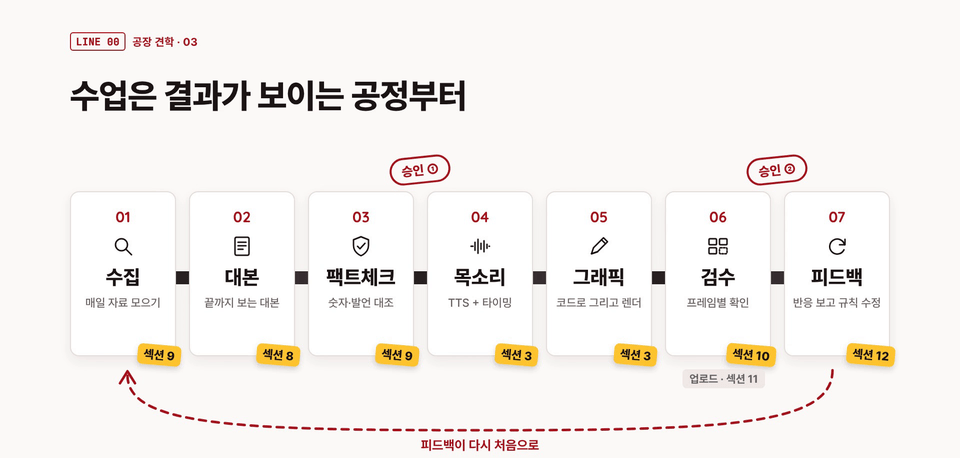
There are seven bot employees inside the factory.

  1. Research bot — It gathers the latest news in my field. It won’t accept anything without a source link and date.

  2. Script Bot — It writes in a structure that hooks viewers in the first 3 seconds and keeps them watching to the end, following my channel bible.

  3. Fact-checking bot — It pulls out every single number, date, person, and statement in the script, then has a “fresh pair of eyes” who didn’t write it compare them against the original sources.

  4. Voice — Gemini TTS reads it and records the timing of every word.

  5. Graphics — draw it in code so the image appears the moment the word is heard, then export it as an MP4.

  6. Review bot — The machine first flags safe-zone issues, garbled text, silent audio, and volume problems, then a fresh pair of eyes checks again using only the screenshots and checklist.

  7. Feedback — Use engagement data from uploaded videos to refine the rules for the next script.

And there’s a factory manager who ties all seven together. Just say, “Run the Shorts factory,” and the manager will set them to work one by one.

There are exactly two places where a person needs to step in: one stamp on the fact-checked script, and one stamp on the reviewed video.

The day changes like this.

  • Morning — A shortlist of candidate materials gathered by the overnight scheduled task is waiting for you (with links and dates attached).

  • Free time — “Run the Shorts factory for me”

  • About 20 minutes later — the finished video, three title options, a description, hashtags, a pinned comment, and a monetization policy checklist all arrive at once. Give it a look, say “Yes,” and you’re done.

  • Two days later — “Read the performance file.” It finds which sentence made people leave and feeds that back into the rules for the next script.


Just swap out the template, and the same script becomes a completely new video.

These are scenes generated from the same script using six different templates.

Data Briefing · Chalk Talk · 3D Metaphor, all generated from the same script and voice.

6 Templates to Choose From

  • Data Briefing — A newspaper with rising numbers. For comparing figures or showing changes.

  • Chalk Talk — The chalk draws as you speak. For explaining principles and processes.

  • 3D Metaphor — Use gold bars or crowds to represent numbers too big to grasp.

  • Papercut — Stop-motion made with torn colored paper.

  • Messenger — a twist revealed through group chat conversations.

  • Pixel game — scores · records · multiples in 8-bit.

You can also mix and match. Say, “Change only beat 4 to 3D,” and only that scene will change. If none of the options feel right, you can also create your own template.

Chalk talk: The chalk draws along with the words (Example 2: “The Rule of 72”)

3D metaphor: 104.4 tons of gold would make a cube about 1.76 m on each side (Example 3)

Change it to my style in 2 minutes and 30 seconds

With just “Switch it to my field: history,” the factory asks seven questions in a single table, and once you add your answers, it becomes a history factory in about 2 minutes and 30 seconds. It clears all previous records while keeping your rules and banned words intact.

Play the finished Short with the sound on and give it a watch.

It’s exactly the example included in the course kit.

Here are the numbers

These are all measurements taken from actual recordings in the course.

  • 9 min 08 sec — the second video made in the same conversation (Lecture 57)

  • About five and a half minutes — the time I actually spent making three episodes, including reading and answering questions (Lesson 57)

  • About 2 minutes 30 seconds — Switching the economic factory to the history factory (Lecture 55)

  • About 4 minutes — From “Make a Short using the example” to previewing the video on the web (Lecture 11)

  • 1.2 minutes — Rendering the 48-second data briefing Short as an MP4 (Lesson 26)

  • About 20 won — 60 seconds of voice (based on paid Gemini TTS rates)

These times were measured in my work environment, so they may vary a little in yours.

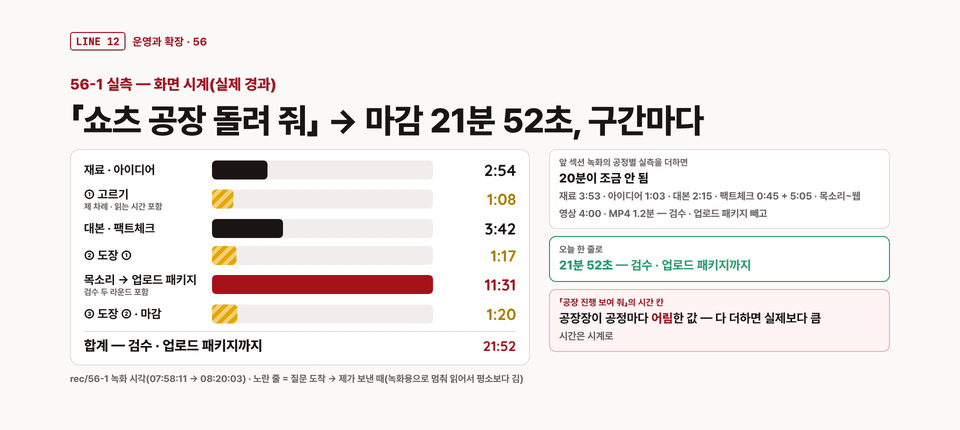
These are the times for each segment, measured using the on-screen clock during the actual recording of Lesson 56.

Generating 60 seconds of video with AI (top) and this factory’s video generation cost (bottom). SOURCE: Veo 3.1 Standard API pricing, as of 2026-10-08.

Perfect for people like this

Those who want to start earning side income through Shorts

If AI video generation credits are too expensive and you don’t have time to edit.

A solo creator sharing information

Channels that need to present numbers and concepts accurately and consistently, such as economics, history, science, general knowledge, and education.

For those already using Claude

If you want to turn Claude from something you just chat with into a “working factory.”

What You'll Take Away from the Course

  • A Shorts factory just for my channel — from raw materials to an upload package with one simple command: “Run the Shorts factory.”

  • Starter Kit zip (final v1.12) — factory core, 11 work manuals, rules board, inspection tools, forms (channel bible · review checklist · credits ledger · self-diagnosis sheet · daily operations checklist)

  • 6 templates — Say “Change the brand” and get your logo and colors incorporated

  • Example Shorts and practice examples — use the finished scripts as-is, and practice fact-checking, review (with intentionally broken examples), and performance data analysis.

  • Bot Employees and the Factory Manager — collection, scripting, fact-checking, review, and feedback bots, plus the factory manager who runs the entire process with a single command.

  • Self-Diagnostic Checklist for When You Get Stuck — 12 Issues Identified by Symptoms

Curriculum at a Glance

59 lessons in total · 5 hours 7 minutes

  • Section 1 · Tour the Shorts Factory — Start with the finished product, the real cost breakdown, and the factory map

  • Section 2 · Preparing the Factory Site — Choose a plan, do your first task with Claude, check the rendering tools, and keep your API key safe.

  • Section 3 · Your First Short — Your first MP4 using an example, your first review, fix just one thing

  • Section 4 · The Voice Sets the Pace — Choosing a voice, pronunciation, pauses · speed · BGM, word timing

  • Section 5 · One image in 4 seconds — Beats, motion, 13 illustrations, honest charts, and your channel’s look

  • Section 6 · Swap in Templates 1 — Chalk Talk, 3D Metaphors, and Mixing Them Up

  • Section 7 · Swapping Templates 2 — Paper Cut, Messenger, Pixel Game, Create Your Own Template

  • Section 8 · Script Production — The first 3 seconds, five beats that keep viewers watching to the end, sharing hooks, the length barrier, and the channel bible.

  • Section 9 · Material Collection Bot / Fact-Check Bot — Materials with links and dates, idea scores, fresh-eyes fact-checking

  • Section 10 · Review Bot and Production Line Integration — The Entire Process at a Glance — checklist, automated checks, fresh-eyes review, turning mistakes into rules, factory manager

  • Section 11 · Upload — Upload package, credit ledger, original monetization policy text, AI disclosure label

  • Section 12 · Feedback Loop — Engagement Metrics Report Card, Find the Drop-Off Line, Two-Week Experiment Playbook

  • Section 13 · Hands-on Project — Adapt it to your field, finish in one line, daily operating routine, self-assessment checklist, the next factory

Honestly, this isn’t for everyone.

  • For those who need live-action videos — You can’t create videos featuring real people or videos where a realistic look is important, like AI dramas.

  • Those expecting to make money with the push of a button — this course teaches you how to create videos. YouTube decides whether to approve monetization, and the course does not guarantee approval.

  • Those who want to do this without a paid Claude subscription — the factory kit in the course is designed specifically for Claude. It can work with other AI tools like ChatGPT and Grok, but you may need some time to adjust at first.


Recommended for
these people

Who is this course right for?

  • A beginner creator looking to start a YouTube Shorts channel

  • For those who want to create Shorts consistently every day without a video-generation AI subscription.

  • Operators of information channels in fields like economics, history, science, and education, where numbers and facts must be accurate.

  • Those looking to build a Shorts content and monetization foundation without showing their face

  • Learners who want hands-on experience with production, deployment, and performance improvement after taking an automation course.

Need to know before starting?

  • Not needed.

Hello
This is gongjangjang

Career Verified

I'm an AI factory manager.

I design and operate a one-person automation system powered by AI and code.

I delegate all repetitive tasks to the system, so people only have to supervise.

Curriculum

All

59 lectures ∙ (5hr 7min)

Course Materials:

Lecture resources
Published: 
Last updated: 

Reviews

Not enough reviews.
Please write a valuable review that helps everyone!

Similar courses

Explore other courses in the same field!

Limited time deal

$51.70

49%

$102.30