강의

멘토링

커뮤니티

Productivity

/

Office

Excel Data Visualization | Everything About Business Charts & Graphs

Data Visualization Storytelling That's Perfectly Achievable with Excel Alone

(5.0) 6 reviews

19 learners

Level Beginner

Course period Unlimited

  • niniexcel
Excel
Excel
Data literacy
Data literacy
Excel
Excel
Data literacy
Data literacy

Reviews from Early Learners

Reviews from Early Learners

5.0

5.0

녹산

45% enrolled

I was able to learn almost all the charts I used to know vaguely and use roughly in practice through this course. It was also impressive how you provided comments on how to approach things from a data analyst's perspective throughout the course. Thank you for the short but substantial lecture~! I recommend it!

5.0

망구미

85% enrolled

As I've been dealing more with reports and sharing data to persuade others, creating graphs that can be understood at a glance has become a real concern. The same data can have very different persuasive power depending on how you present it, which was something I was struggling with, but this was really helpful. Since I'll need different data and graphs for each report, I'll come back and review the relevant sections multiple times as needed~

5.0

홍민지

65% enrolled

It was a bit fast, but the class was clean and concise, so I listened to the full 2 hours in one go! I enjoyed it. I learned a lot.

What you will gain after the course

  • Learning charts that were vaguely understood through a systematic roadmap

  • Data Storytelling: Delivering Core Messages with a Single Chart

  • The mindset of data analysts who visually design the stories hidden behind numbers

Excel Data Visualization Master Class from a Data Analyst 📊

— A good-looking chart is ultimately a chart that reads better.


This course is not simply about decorating charts.
From a roadmap for designing charts according to the purpose of your data,
to the most persuasive visualization methods for delivering your message, we cover it all together.
You can complete practical visualizations using only Excel as your one tool, without any additional BI tools.

From a data analyst's perspective, you will learn how to persuade with data through charts.

I recommend this for people like this

After taking the course

After taking this course, you will be able to express complex data as a single persuasive chart.

  • You can complete practical visualizations with just Excel alone, without any additional BI tools.

  • You can create charts that convey core intent directly without text descriptions.

  • Even when looking at the same data, everyone can interpret it in the same direction.

  • You can structure metrics so that month-over-month comparisons, target comparisons, and factors of increase/decrease are visible at a glance.

  • Reports change from 'explanatory materials' to 'discussion-centered meeting materials'.

Charts become not just shapes, but 'messages'.

You'll learn this content


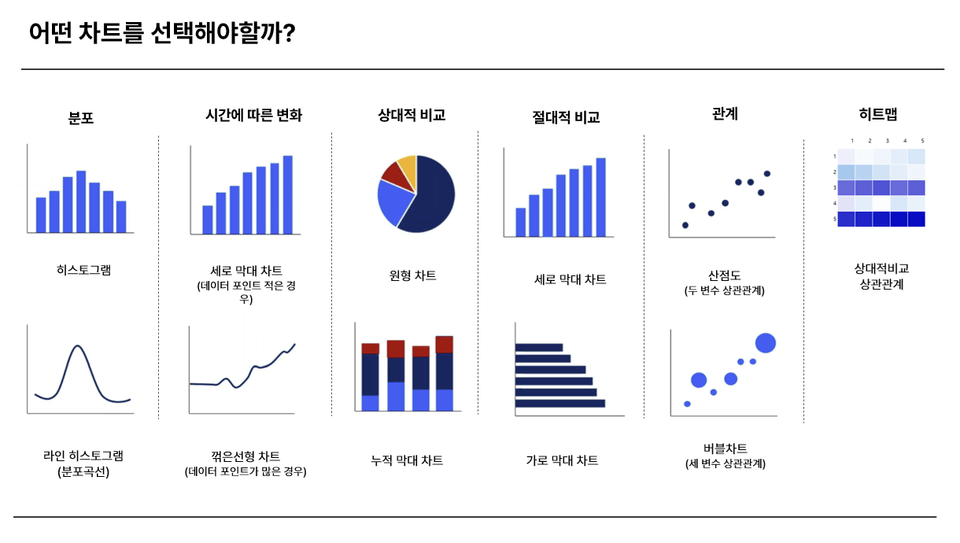
How to Choose Charts That Match Your Data Type

  • Learn a systematic roadmap for selecting the most suitable charts for each data type

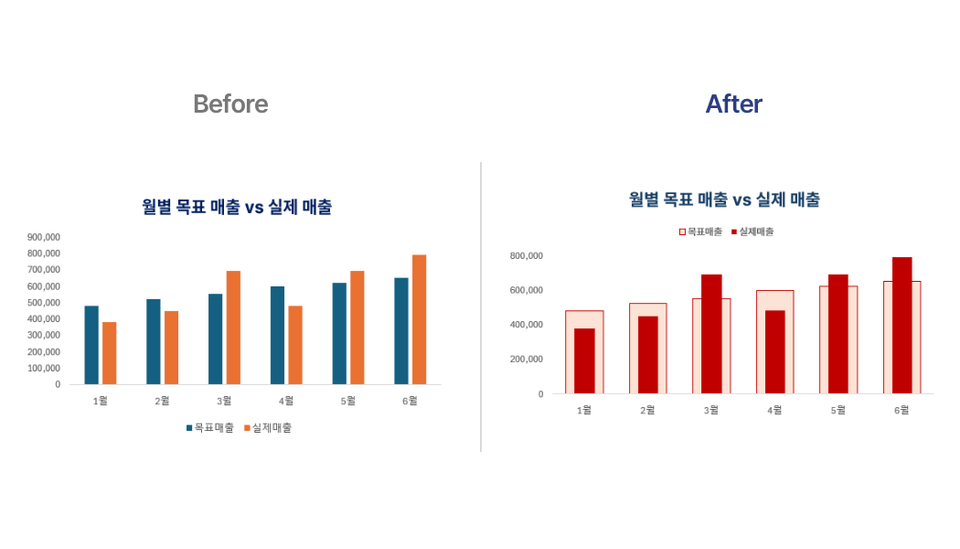
  • Example: When comparing target vs. actual/plan achievement rate/month-over-month and year-over-year comparisons, which charts to use and what to hide for each

Chart Design Principles to Enhance Readability

  • Design charts that remove unnecessary information and intuitively highlight only the information that needs to be emphasized


  • Design charts that match the viewer's perspective

Chart Automation and Practical Tips

  • Learn how to automatically update charts without manually updating them monthly

  • Learn practical know-how such as truncating to billions/thousands units, fixing axes, hiding combo chart axes, and more

Practical chart knowledge that has never been taught anywhere else

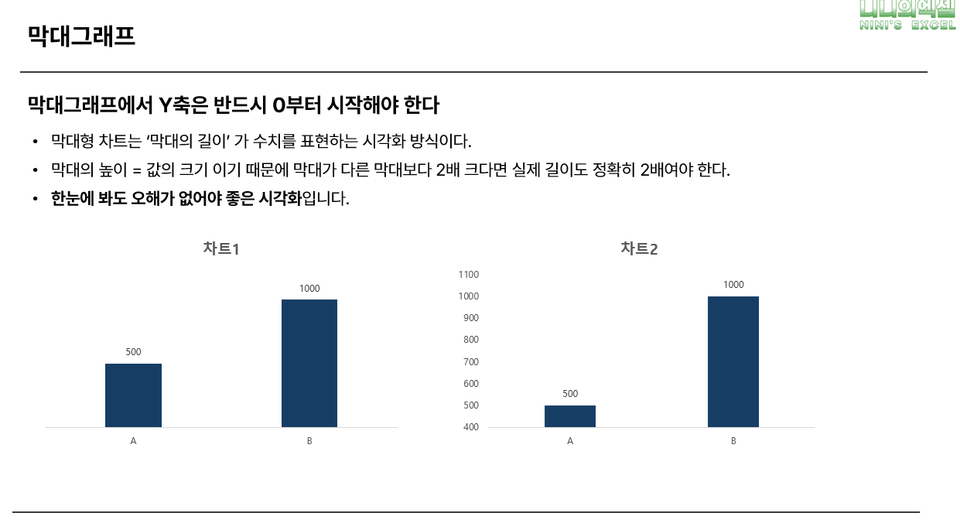
  • Why Bar Charts Should Start from Zero

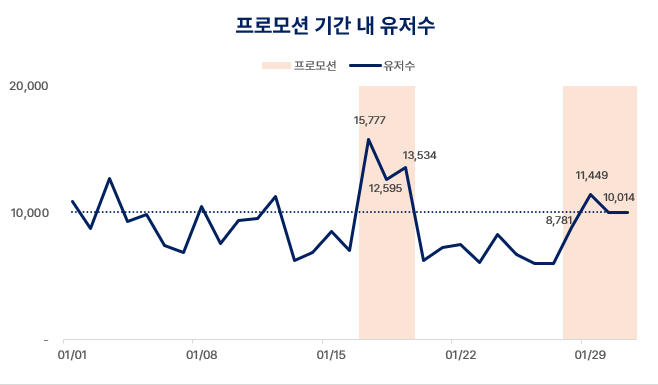
  • When can line graphs deviate from zero

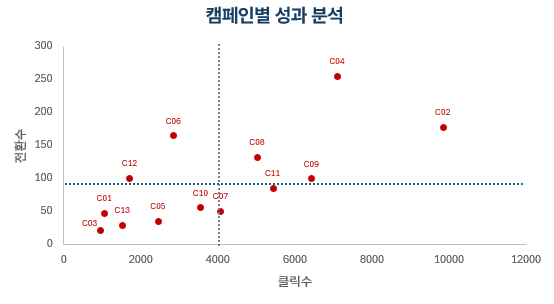
  • How are scatter plots interpreted and utilized in practical work


Key Features of This Course

Lectures structured from a data analyst's perspective

Based on the practical experience of a working analyst,
we explain "why you should use this chart" along with real work situations.
This is not just a simple visualization tutorial, but a course where you learn both analytical thinking and how to visually implement charts together.

We avoid charts that only look good and keep only the information necessary for decision-making.

There are many charts that look sophisticated but make it difficult to read the meaning of the data.
In this course, you'll learn how to retain only the essential information needed for decision-making along with good design.

Advanced Chart Practice: Scatter Plots, Histograms, Waterfall Charts, and More

Going beyond typical bar or pie charts,
we develop the analytical thinking to handle various visualization methods suited to the form and purpose of data.
This course covers advanced charts like scatter plots, histograms, and waterfall charts,
teaching how to select and apply appropriate representation methods based on data structure.

👇Class examples to be covered during lessons


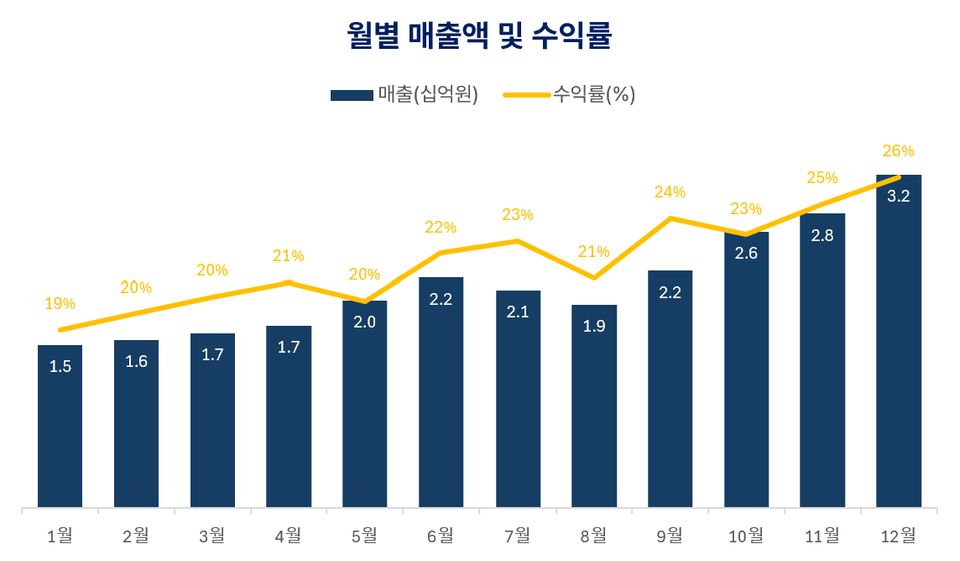
Combo Chart Applications

Scatter Plot

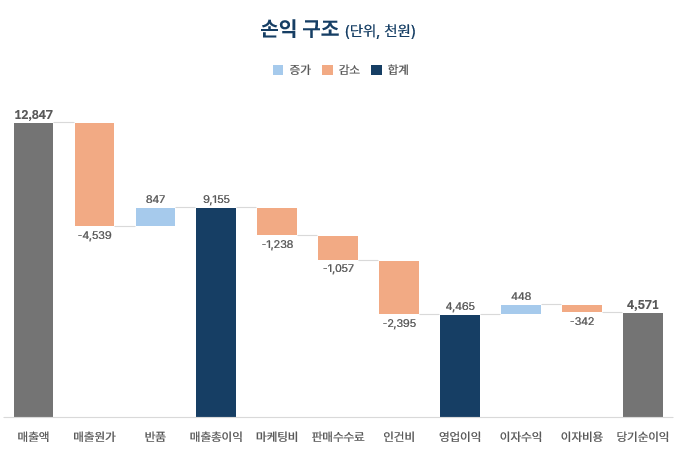
Waterfall Chart


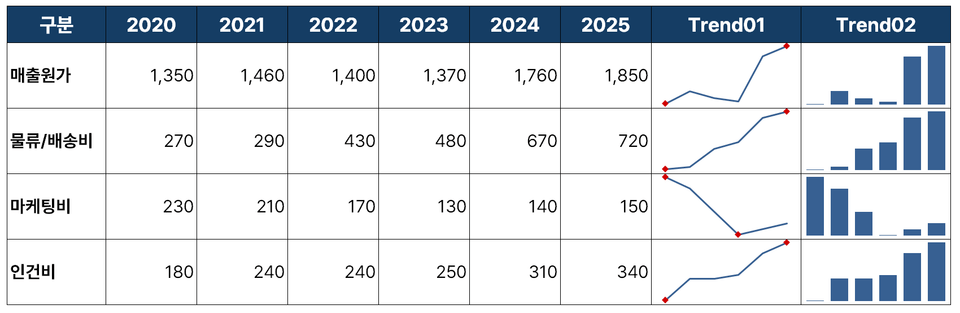
Sparkline


Prerequisites and Important Notes

  • You can take this course even without advanced Excel knowledge.

    This course is designed to help you understand Excel's basic chart functions and develop them for practical use. Even beginner to intermediate Excel users can easily follow along.

  • Microsoft Excel 2016 or higher required (Both Windows / Mac supported)


Recommended for
these people

Who is this course right for?

  • A practitioner who must convey messages rather than numbers

  • Someone who wants to create data visualizations that are both beautiful and logically sound

  • Those who want to create practical business insights with just Excel, without complex analysis tools

  • Someone who is familiar with practical Excel skills but still finds 'speaking with data' challenging

Hello
This is

19

Learners

6

Reviews

5.0

Rating

1

Course

Former MD for companies in various domains, including food, apparel, and education

Current B2B startup data analyst

Lectured at numerous companies and institutions, including Hanam City Hall, Kwangju Bank, SK, and Hanssem.


I worked as a Planning MD at a startup, where I handled vast amounts of data,

I became interested in establishing various plans and business strategies through data analysis,

I have now transitioned my career to become a data analyst.

We are now in an era where data analysis skills have become a fundamental requirement for almost every role, including sales, marketing, and CX.

That is why I have been helping those who were curious about data analysis but hesitated due to the high barriers to entry.

I am sharing practical knowledge and know-how applicable to real-world tasks from the perspective of non-majors and those in other fields.

I hope the changes and trial and error I have experienced can serve as a guide for someone starting their journey with data.

Curriculum

All

20 lectures ∙ (2hr 9min)

Course Materials:

Lecture resources
Published: 
Last updated: 

Reviews

All

6 reviews

5.0

6 reviews

  • nsr70250897님의 프로필 이미지
    nsr70250897

    Reviews 1

    Average Rating 5.0

    Edited

    5

    45% enrolled

    I was able to learn almost all the charts I used to know vaguely and use roughly in practice through this course. It was also impressive how you provided comments on how to approach things from a data analyst's perspective throughout the course. Thank you for the short but substantial lecture~! I recommend it!

    • jge01029552님의 프로필 이미지
      jge01029552

      Reviews 1

      Average Rating 5.0

      5

      85% enrolled

      As I've been dealing more with reports and sharing data to persuade others, creating graphs that can be understood at a glance has become a real concern. The same data can have very different persuasive power depending on how you present it, which was something I was struggling with, but this was really helpful. Since I'll need different data and graphs for each report, I'll come back and review the relevant sections multiple times as needed~

      • alslal251478님의 프로필 이미지
        alslal251478

        Reviews 1

        Average Rating 5.0

        5

        65% enrolled

        It was a bit fast, but the class was clean and concise, so I listened to the full 2 hours in one go! I enjoyed it. I learned a lot.

        • k58415182님의 프로필 이미지
          k58415182

          Reviews 3

          Average Rating 5.0

          5

          100% enrolled

          • zzjune07091635님의 프로필 이미지
            zzjune07091635

            Reviews 1

            Average Rating 5.0

            5

            15% enrolled

            I was able to listen to only the necessary content in a short amount of time, which was a huge help! I had been ignoring Excel charts, but there are surprisingly many useful applications😊😊

            $22.00

            Similar courses

            Explore other courses in the same field!