

분류 예측에서 결과값의 구체적 내용을 확인할수 있는지요?
461
1 asked
안녕하세요..
무척 유익한 강의 수회째 반복하여 듣고 있습니다. 깊은 감사드립니다.
강의안 # 작업형 유형2(기초쌓기)<-제7강 (팽귄의 Species 분류예측 모델)
마무리에서
#11. 파일저장
pd.DataFrame({'id': y_test.index, 'pred': pred3}).to_csv('003000000.csv', index=False) 형식으로 답안이 제출됩니다.
결과의 구체적 내용이 궁금하여
print(pd.DataFrame({'id': y_test.index, 'pred': pred3}).head(10))으로 확인해보니
id pred
0 57 0
1 173 1
2 213 1
3 50 0
4 25 0
5 207 1
6 166 1
7 244 2
8 234 2
9 61 0
분류 결과(pred3)가 0과2사이로 표현됩니다.
저의 이해에 오류가 없다면,
저숫자가팽귄의 종(Species) ' Adelie','Gentoo','Chinstrap' 중에 어느 종을 나타내는 것인지 확인할 방법이 있는지요?
감사합니다.
Answer 2
0
선생님, 감사합니다. 분류문제의 라벨인코딩의 에러 메시지의 원인 및 해결을 하고 싶습니다.
from sklearn.preprocessing import LabelEncoder
X_label = ['sex', 'embarked', 'class', 'who', 'adult_male', 'deck', 'embark_town', 'alone']
X_train[label] = X_train[label].apply(LabelEncoder().fit_transform)
X_test[label] = X_test[label].apply(LabelEncoder().fit_transform)
print(X_train.head())
[에러 메시지]
ypeError                                 Traceback (most recent call last)
C:\ProgramData\Anaconda3\lib\site-packages\sklearn\preprocessing\_label.py in _encode(values, uniques, encode, check_unknown)
    111         try:
--> 112             res = _encode_python(values, uniques, encode)
    113         except TypeError:

C:\ProgramData\Anaconda3\lib\site-packages\sklearn\preprocessing\_label.py in _encode_python(values, uniques, encode)
     59     if uniques is None:
---> 60         uniques = sorted(set(values))
     61         uniques = np.array(uniques, dtype=values.dtype)

TypeError: '<' not supported between instances of 'float' and 'str'

During handling of the above exception, another exception occurred:

TypeError                                 Traceback (most recent call last)
<ipython-input-14-d8de3af8ea81> in <module>
      1 from sklearn.preprocessing import LabelEncoder
      2 X_label = ['sex', 'embarked', 'class', 'who', 'adult_male', 'deck', 'embark_town', 'alone']
----> 3 X_train[label] = X_train[label].apply(LabelEncoder().fit_transform)
      4 X_test[label] = X_test[label].apply(LabelEncoder().fit_transform)
      5 print(X_train.head())

C:\ProgramData\Anaconda3\lib\site-packages\pandas\core\frame.py in apply(self, func, axis, raw, result_type, args, **kwds)
   6876             kwds=kwds,
   6877         )
-> 6878         return op.get_result()
   6879
   6880     def applymap(self, func) -> "DataFrame":

C:\ProgramData\Anaconda3\lib\site-packages\pandas\core\apply.py in get_result(self)
    184             return self.apply_raw()
    185
--> 186         return self.apply_standard()
    187
    188     def apply_empty_result(self):

C:\ProgramData\Anaconda3\lib\site-packages\pandas\core\apply.py in apply_standard(self)
    311
    312         # compute the result using the series generator
--> 313         results, res_index = self.apply_series_generator()
    314
    315         # wrap results

C:\ProgramData\Anaconda3\lib\site-packages\pandas\core\apply.py in apply_series_generator(self)
    339         else:
    340             for i, v in enumerate(series_gen):
--> 341                 results[i] = self.f(v)
    342                 keys.append(v.name)
    343

C:\ProgramData\Anaconda3\lib\site-packages\sklearn\preprocessing\_label.py in fit_transform(self, y)
    250         """
    251         y = column_or_1d(y, warn=True)
--> 252         self.classes_, y = _encode(y, encode=True)
    253         return y
    254

C:\ProgramData\Anaconda3\lib\site-packages\sklearn\preprocessing\_label.py in _encode(values, uniques, encode, check_unknown)
    112             res = _encode_python(values, uniques, encode)
    113         except TypeError:
--> 114             raise TypeError("argument must be a string or number")
    115         return res
    116     else:

TypeError: argument must be a string or number
0
안녕하세요.
숫자가 어떤 종을 나타내는 것인지 확인할 코드를 제공해드립니다.
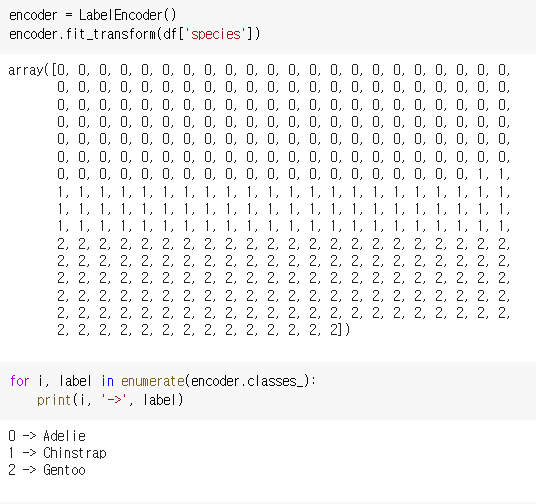
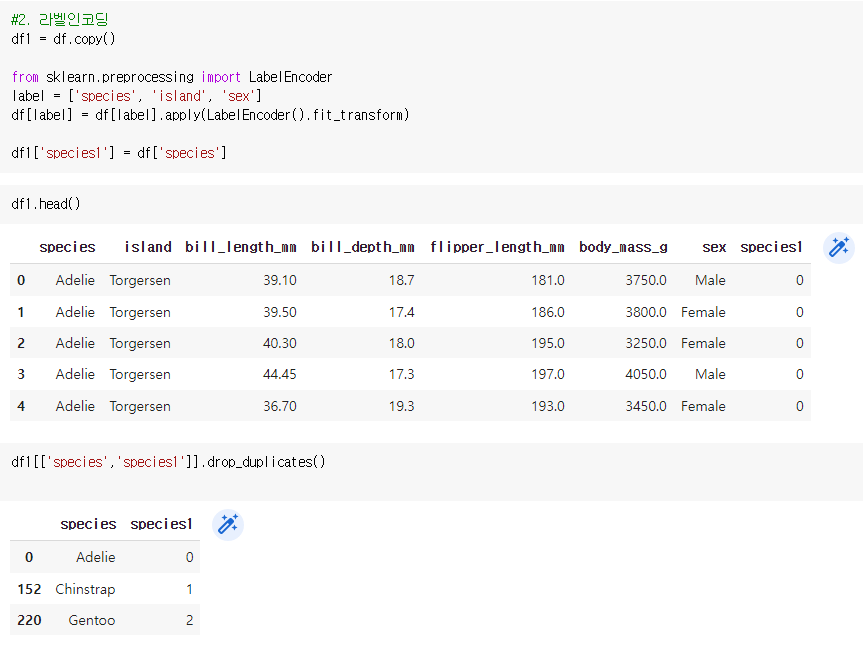
다른 방법으로는 새로운 데이터 프레임을 만들어 확인이 가능합니다.
강의의 라벨인코딩 과정에서 아래 코드를 추가하면 데이터 프레임으로 확인을 할 수 있습니다.
실기 문제 구성?
0
32
0
실기 문제 구성?
0
33
0
DataSet 다운 받는 방법
0
56
1
구름IDE 서비스 종료 이후 학습환경
0
230
1
10강 연습문제
0
215
1
VotingClassifier Hard 사용
0
150
1
구름IDE 실행 도움 요청
0
208
1
질문입니다 RandomForestClassifier
0
222
1
질문!
0
386
1
데이터 더미화 에러발생 질문.
0
372
1
많은 컬럼과 많은 결측치를 가지는 데이터
0
253
1
Dataset은 어디서 받을 수 있나요?
0
438
1
mpg 데이터셋 위치
0
386
1
교육영상 4강. 작업유형1-문제(1)에 대한 코드는 어디서 받을 수 있나요?
0
422
1
단순평균(1집단)T-test 1번 풀이
0
531
2
강의자료 문의
1
600
1
구름IDE 실행불가문제 ㅠㅠ
0
874
2
제7강 작업유형2-데이터 전처리: LabelEncoder 문법
0
492
1
5강 작업유형1-문제 2 질문입니다
0
451
1
7강 코드 질문드립니다
0
468
1
14강 실전 문제 카테고리 항목문의
0
451
1
작업2유형 문의
0
522
1
데이터셋 분리와 관련하여 질문이 있습니다.
0
499
1
5강의 작업형1-2문제 오류
0
515
1