inflearn logo
Challenge
Ended

4-Week Complete! Computer Application Skills Level 2 Practical Exam Pass Challenge

"4 weeks is enough! Computer Application Skills Level 2 Practical Exam - pass with us." If you've been putting off studying for the Computer Application Skills certification, now is the time to take on the challenge consistently for 4 weeks with Teacher Eunhee. Learn core functions step by step each week, and complete your practical skills by directly following past exam patterns. Complex formulas and functions are organized with a practical focus for easy understanding, ensuring not only certification success but also improved work efficiency! 1 hour a day, just 4 weeks! Studies that would be difficult alone can be completed when we do the challenge together. Start right now — in 4 weeks, you too will be a successful candidate.

Excel
Computer Specialist in Spreadsheet & Database
functions

47개 수업 학습

4회 미션 수행

성취의 증표, 수료증을 발급해요.

무제한 복습, 내 것으로 만들어요.

질문하고 즉시 답을 얻어요.

추가 자료를 통해 학습을 이어나가요.

dmsgml1030님과 함께해요!

Career Verified

480

Learners

55

Reviews

1

Answers

4.9

Rating

20

Courses


I am teaching office certification courses to help students preparing for employment with their self-development.

And I teach practical Excel classes for office workers to help them improve their job competencies

CEO of Eunhee-ssam Class

■ Professional Qualifications

Vocational Training Teacher Level 2 (General Administration & Office Work) Ministry of Employment and Labor

Vocational Training Instructor (Information Technology Operation & Management) Level 3 Ministry of Employment and Labor

Vocational Training Teacher Level 3 (General Administrative Affairs) Ministry of Employment and Labor

Computer Literacy Level 1 Korea Chamber of Commerce and Industry

ITQ Professional Training Instructor (PTI) Korea Productivity Center

ITQ Hangul A, Excel A, PowerPoint A, Internet A Korea Productivity Center

Computer Utilization Ability Level 2 Korea Chamber of Commerce and Industry

Industrial Engineer Information Processing Human Resources Development Service of Korea

■ Publications

85 Excel Functions to Pick and Use Like a Dictionary & Everything About Analysis Tasks (Bookk 2020)

■ Teaching Experience

Taught OA and ITQ certification courses at the Daechi 4-dong Information Education Center in Gangnam-gu as a member of GIT Academy, commissioned by Gangnam-gu Office 2009.03

Lectured on OA and ITQ certifications for people with disabilities and seniors at Gunpo Welfare Center for the Disabled, March 2011

Conducted OA lectures at the Geumcheon-gu Office Computer Training Center as part of Hanbit Computing, entrusted by Geumcheon-gu Office, 2012.03

Taught OA and ITQ certification courses for people with disabilities and seniors at Seodaemun Welfare Center for the Disabled 2013.03

Taught Computer Literacy Level 2 and ITQ OA Master courses for office workers and the general public at the Hwaseong U&I Center (Women's Vision Center) 2015.01

Taught Computer Literacy Level 2 and ITQ OA Master courses as part of the vocational training program for the unemployed at the Gyeonggi Vocational Education Center, 2015.03

Lectured Computer Literacy Level 1 and 2, and ITQ OA Master courses as vocational training programs for the unemployed at Green Computer Academy 2016.04

Obtained "A" grade in Office Administration Trainee Evaluation, Dec 2018

Awarded Star Instructor at Green Computer Academy 2020.10

Selling practical Excel and certification courses on Inflearn 2022.03

[Teacher Eunhee's Class] Launch of an online lecture site specializing in employment certifications, September 2022

[Mapo Youth Naru] Youth Employment Competency ITQ Excel Special Lecture



More

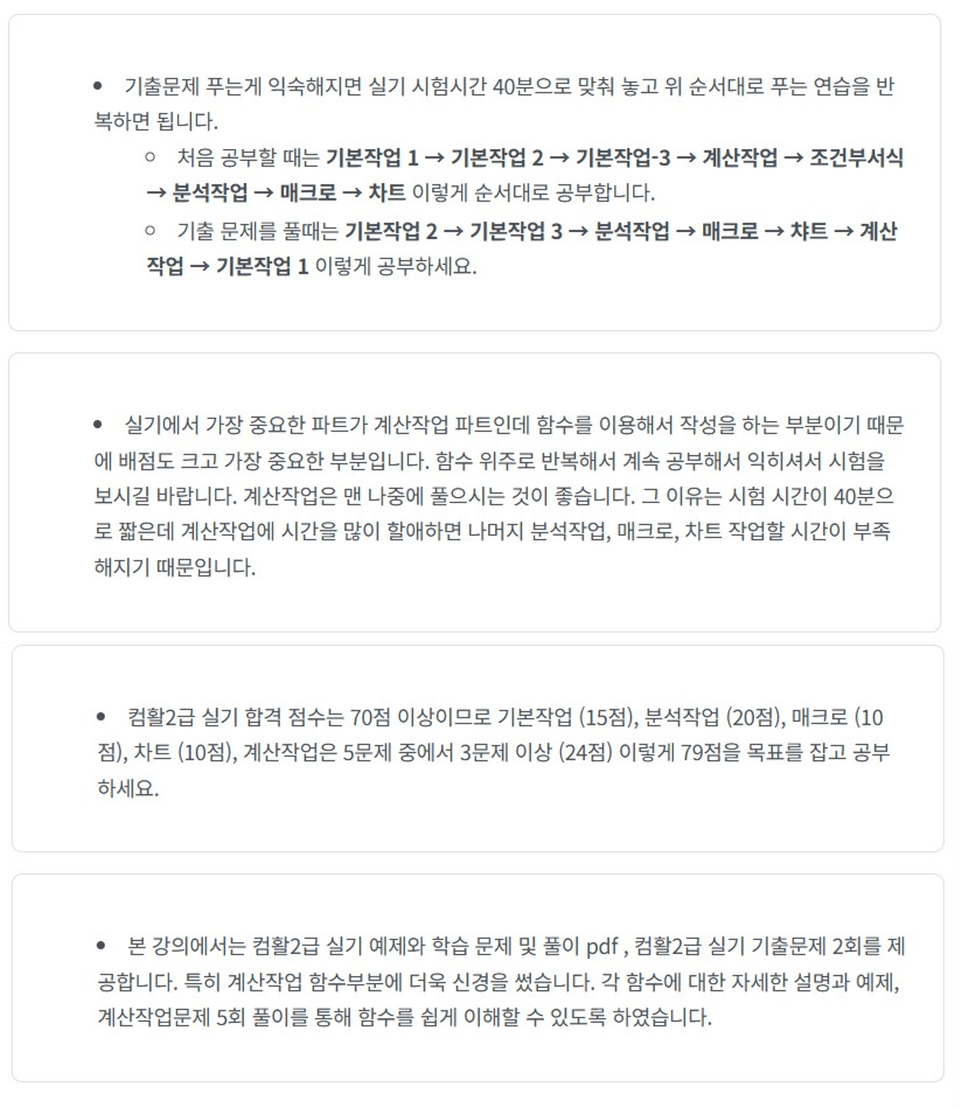
4-week completion!

Computer Applications Skills Level 2 Practical Exam Pass Challenge


"Computer skills practice that feels overwhelming when done alone, but with Teacher Eunhee, 4 weeks is enough."


Taking the Computer Skills Level 2 practical exam on your own can feel overwhelming - where do you even start?
This challenge is not just a simple lecture.


This is a '4-week intensive program' where you set weekly goals, practice hands-on, and complete missions


Complete your Excel skills with a curriculum that analyzes past exam patterns and practical examples, enabling you to not only pass the exam but also immediately apply Excel skills in actual work situations.


👩‍💻 We recommend this for people like:

  • Those who feel overwhelmed about where to start with Computer Skills Level 2 Practical Exam
    → Practice step by step from the basics with a structured curriculum.

  • Those who know functions but get stuck when they appear in problems
    → We'll help you develop "the sense of applying functions" through practical examples focused on past exam question types.

  • Working professionals and job seekers who want to obtain certification in a short period
    → With a 4-week completion routine, you can set weekly goals and consistently finish the course.

  • Those who want to properly utilize Excel in practical work
    → Learn not only for exam preparation but also practical skills for reports, data management, and more.


🧭 4-Week Complete Curriculum

✅ Week 1: Basic Operations and Calculation Operations (Functions) 1

This is a section that solidly builds the fundamentals of Excel
You'll practice data entry, cell formatting, conditional formatting, AutoFilter, advanced filters, and other functions that are the foundation of the exam and most frequently used in practical work.

  • Data Entry & Cell Formatting

  • Conditional Formatting, Import External Data

  • Organizing Data with AutoFilter and Advanced Filter

  • Summary of Date Functions in Calculation Operations (Functions)

  • 💪 Mission: Basic Tasks Past Exam Questions


Week 2: Computational Tasks (Functions) 2 Function Master

The key to passing the Computer Skills practical exam is 'functions'.
Learn essential functions frequently tested in exams such as IF, SUMIF, COUNTIF, VLOOKUP, INDEX, MATCH through example-based practice, and develop the ability to read problem requirements and solve them through function combinations.

  • Complete Guide to Date/Time, Logic, Math, Statistics, and Text Functions

  • Lookup Functions (VLOOKUP, HLOOKUP, INDEX, etc.) Practical Practice

  • 💪 Mission: Calculation Work Past Exam Questions

  • 🎥 Live Session 1: Intensive Special Lecture on Basic & Calculation Work Past Exam Problem Solving


Week 3: Calculation Tasks (Functions) Past Exam Problem Solving and Analysis Work

Using the functions learned in Week 2, you'll master function-solving methods by working through calculation tasks (functions) from past exam questions at least 5 times. Additionally, through analysis tasks, you'll learn to analyze data and visually represent results using pivot tables, subtotals, scenario manager, goal seek, and more, practicing with actual exam question formats to develop practical skills.

  • Sorting, Partial Sum, Integration, Pivot Table

  • Scenario Manager, What-If Analysis, Goal Seek

  • 💪 Mission: Analysis Work Past Exam Questions


Week 4: Macros and Charts & Computer Application Skills Level 2 Practical Exam Questions

Learn how to create macros and charts, and completely analyze 2 sets of Computer Application Skills Level 2 practical exam past questions in the same format as the actual test.
As a final preparation right before the exam, you'll definitely build up your practical skills and confidence.

  • Macro creation, chart practice

  • Practical Latest Past Exam Questions 2 Sets Solutions

  • 💪 Mission: Macro and Chart Work Past Exam Questions

  • 🎥 Live Session 2: Analysis, Macros, and Chart Problem Solving

  • 🎥 Live Session 3: Latest Exam Problem Solving & Special Gift


💡 Features of This Course

  • Form consistent routines with clear goals and missions every week
    → Clear weekly learning plans ensure your learning flow remains uninterrupted.

  • Practice files + past exam questions provided
    → Rather than just watching lectures, you'll develop practical skills by solving actual problems directly.

  • Professional feedback provided through 4 missions
    → When submitting missions, you can immediately improve areas that need work through instructor feedback.

  • Real-time feedback through 3 live special lectures
    → Ask questions immediately, solve the latest exam problems together, and build confidence.

  • Perfect preparation until the exam with Teacher Eunhee's know-how
    → We'll even share passing strategy tips so you won't waver in the actual test.


🎓 After completing this course

  • I can perfectly solve Computer Skills Level 2 practical exam questions on my own.

  • You will understand functions, filters, pivot tables, and macros at a professional level.

  • You will gain confidence that won't let you panic even in the exam room.


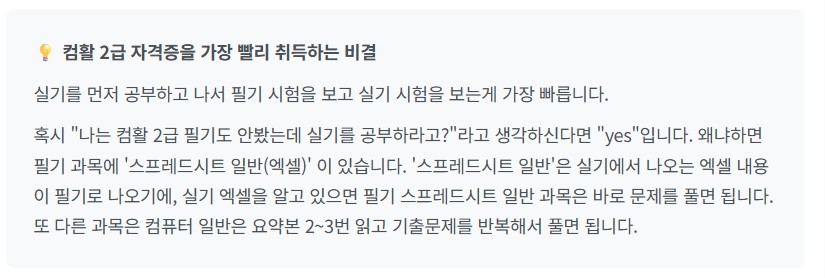
🎓 How to Study for Computer Skills Level 2 Certification


"In 4 weeks, you'll not only pass the certification
but also have the Excel practical skills you need."


🪄 Get started right now

1 hour a day, 5 days a week, just 4 weeks.
With Teacher Eunhee's practical curriculum and feedback,
we'll go from 'understanding-focused learning' → 'practical skills' → 'passing' together.


Now it's time to start your success routine.


11월

9일

챌린지 시작일

2025년 11월 9일 PM 03:00

챌린지 종료일

2025년 12월 7일 PM 02:59

챌린지 커리큘럼

All

51 lectures ∙ (20hr 19min)

Course Materials:

Lecture resources
챌린지 전용 수업

챌린지에서 배워요

  • You'll develop practical test-taking skills based on exam questions and learn solution techniques that can be immediately applied in the exam room.

  • Practice frequently tested functions through example-centered exercises to build the skills to handle any problem without hesitation.

  • You'll naturally learn essential functions needed for both practical work and exams, including sorting, filtering, subtotals, conditional formatting, and chart creation.

  • You can complete your studies with more focus than when studying alone through a challenge-based curriculum with clear weekly goals.

Recommended for
these people

Who is this course right for?

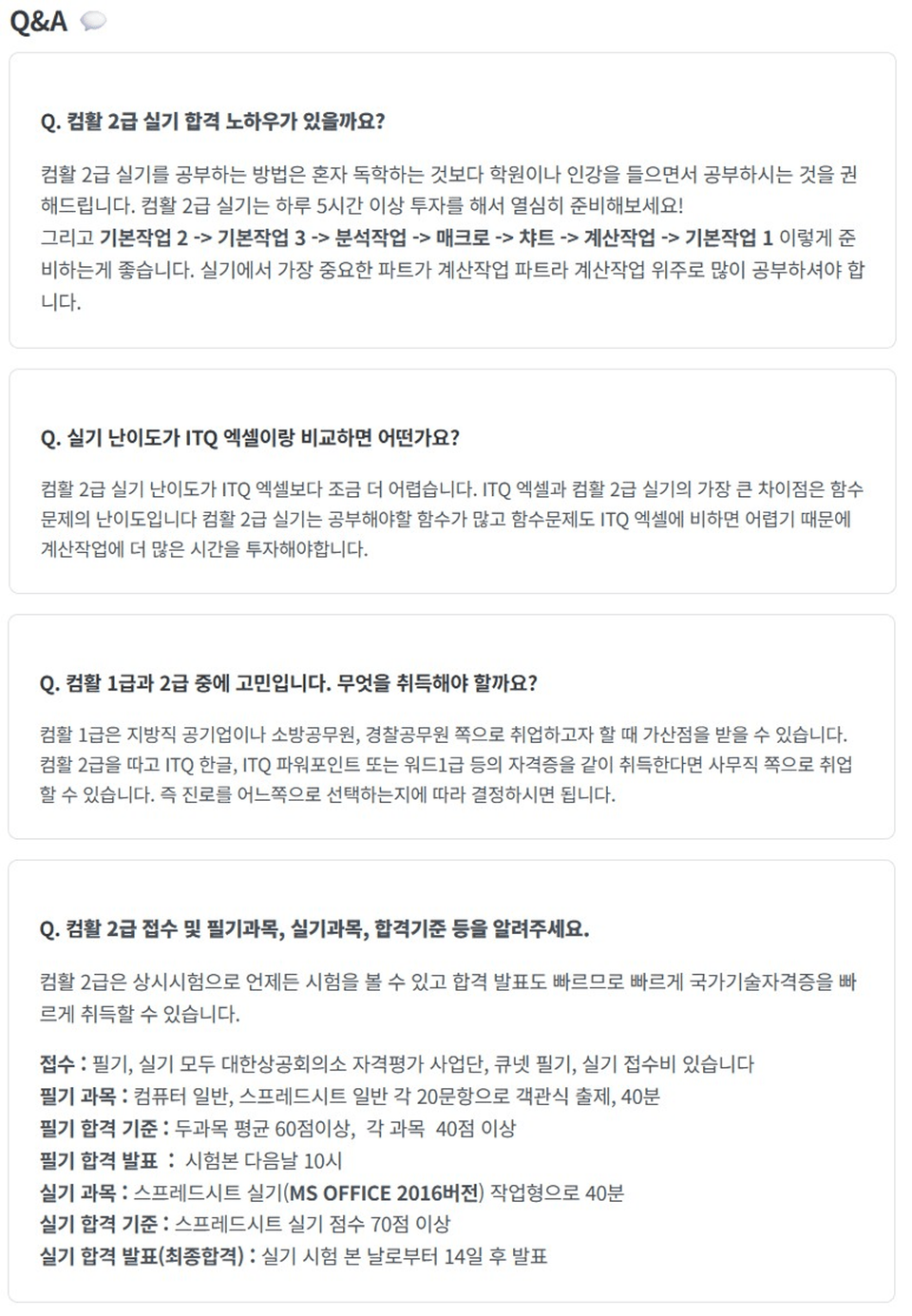
  • Those who really want to obtain the Computer Literacy Level 2 Practical Skills certification

  • Office workers who want to improve their practical Excel skills in a short period of time

  • Someone who has basic Excel knowledge but is weak in practical application

  • Those who need motivation to study consistently through a 5-week challenge format

  • Those who want to complete both 'certification + practical skills' exam preparation and practical learning at once

Need to know before starting?

  • It's good to know Excel's screen layout and basic terminology (for example, cells, rows and columns, worksheets, formula bar, etc.)

  • Experience with simple data entry and storage, and formatting changes

  • Basic arithmetic formula input (=A1+B1) level

  • Functions and advanced features are taught step-by-step from the beginning with a hands-on approach in the lectures, so even Excel beginners can easily follow along.

Reviews

Not enough reviews.
Please write a valuable review that helps everyone!

이 강의의 지난 수강평

취소 및 환불 규정
챌린지는 지식공유자가 설정한 수업 최소 정원이 충족되지 않을 경우, 폐강 안내가 고지되며 결제 내역이 자동취소됩니다.

dmsgml1030's other courses

Check out other courses by the instructor!

$61.60