inflearn logo
Challenge
Ended

Complete Data Analysis with Excel! 4-Week Challenge Season 2

Master Data Analysis with Excel! 4-Week Practical Challenge What You'll Learn! A hands-on analysis challenge that even those who only use Excel basics can easily follow! Learn through practice and master the core features of data analysis all at once. ✔ Pivot Tables & Pivot Charts → Summarize and visualize large volumes of data ✔ Subtotal Function → Find insights through group-by-group comparative analysis ✔ What-If Analysis (Scenario Analysis) → Methods to predict future data ✔ Data Consolidation Using Functions → Organize scattered materials neatly ✔ Conditional Formatting → Visualize only data that meets specific conditions 👉 After completing this challenge, you'll gain real analytical skills that go beyond simple organization—you'll be able to read, compare, predict, and visualize data. What You'll Learn! A hands-on analysis challenge that even those who only use Excel basics can easily follow! Learn through practice and master the core features of data analysis all at once. ✔ Pivot Tables & Pivot Charts → Summarize and visualize large volumes of data ✔ Subtotal Function → Find insights through group-by-group comparative analysis ✔ What-If Analysis (Scenario Analysis) → Methods to predict future data ✔ Data Consolidation Using Functions → Organize scattered materials neatly ✔ Conditional Formatting → Visualize only data that meets specific conditions 👉 After completing this challenge, you'll gain real analytical skills that go beyond simple organization—you'll be able to read, compare, predict, and visualize data.

Excel
MS-Office
Excel Power Pivot
Data literacy

13개 수업 학습

3회 미션 수행

라이브 2 회

성취의 증표, 수료증을 발급해요.

무제한 복습, 내 것으로 만들어요.

추가 자료를 통해 학습을 이어나가요.

질문하고 즉시 답을 얻어요.

dmsgml1030님과 함께해요!

Career Verified

480

Learners

55

Reviews

1

Answers

4.9

Rating

20

Courses


I am teaching office certification courses to help students preparing for employment with their self-development.

And I teach practical Excel classes for office workers to help them improve their job competencies

CEO of Eunhee-ssam Class

■ Professional Qualifications

Vocational Training Teacher Level 2 (General Administration & Office Work) Ministry of Employment and Labor

Vocational Training Instructor (Information Technology Operation & Management) Level 3 Ministry of Employment and Labor

Vocational Training Teacher Level 3 (General Administrative Affairs) Ministry of Employment and Labor

Computer Literacy Level 1 Korea Chamber of Commerce and Industry

ITQ Professional Training Instructor (PTI) Korea Productivity Center

ITQ Hangul A, Excel A, PowerPoint A, Internet A Korea Productivity Center

Computer Utilization Ability Level 2 Korea Chamber of Commerce and Industry

Industrial Engineer Information Processing Human Resources Development Service of Korea

■ Publications

85 Excel Functions to Pick and Use Like a Dictionary & Everything About Analysis Tasks (Bookk 2020)

■ Teaching Experience

Taught OA and ITQ certification courses at the Daechi 4-dong Information Education Center in Gangnam-gu as a member of GIT Academy, commissioned by Gangnam-gu Office 2009.03

Lectured on OA and ITQ certifications for people with disabilities and seniors at Gunpo Welfare Center for the Disabled, March 2011

Conducted OA lectures at the Geumcheon-gu Office Computer Training Center as part of Hanbit Computing, entrusted by Geumcheon-gu Office, 2012.03

Taught OA and ITQ certification courses for people with disabilities and seniors at Seodaemun Welfare Center for the Disabled 2013.03

Taught Computer Literacy Level 2 and ITQ OA Master courses for office workers and the general public at the Hwaseong U&I Center (Women's Vision Center) 2015.01

Taught Computer Literacy Level 2 and ITQ OA Master courses as part of the vocational training program for the unemployed at the Gyeonggi Vocational Education Center, 2015.03

Lectured Computer Literacy Level 1 and 2, and ITQ OA Master courses as vocational training programs for the unemployed at Green Computer Academy 2016.04

Obtained "A" grade in Office Administration Trainee Evaluation, Dec 2018

Awarded Star Instructor at Green Computer Academy 2020.10

Selling practical Excel and certification courses on Inflearn 2022.03

[Teacher Eunhee's Class] Launch of an online lecture site specializing in employment certifications, September 2022

[Mapo Youth Naru] Youth Employment Competency ITQ Excel Special Lecture



More


You use 'pivot tables' a lot for data analysis, right?

However, Excel provides various analysis tools suitable for different situations beyond pivot tables.

In this lecture, we'll provide a complete summary of Excel analysis work through 10 methodsfor you


📚 Course Planning Background

When working, there are many cases where you need to summarize or analyze large amounts of data.

While you can manually analyze and summarize data by hand, doing it manually every time not only takes a lot of time, but also results in lower accuracy compared to using Excel's features.

So through this course, I hope you will learn various analysis tasks in Excel and then improve your work efficiency by applying the right analysis task for each situation in your work


📚 Here's what you'll learn in this course

1. Summarizing and Analyzing Large Amounts of Data
When analyzing large amounts of data to create reports or proposals, you can use pivot tables, pivot charts, and sorting, subtotals, and consolidation features. By following this course, you will be able to understand and utilize these features proficiently


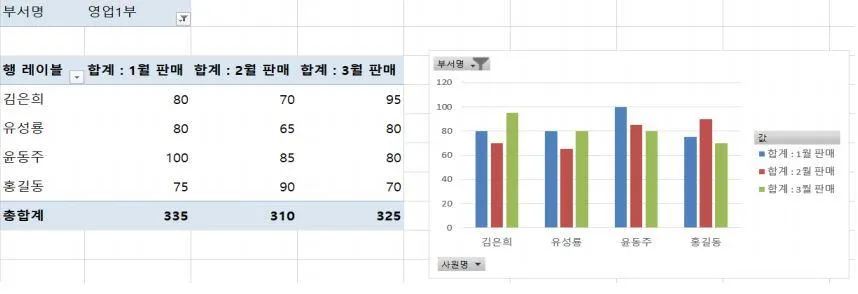
[Example of Pivot Table and Pivot Chart Analyzing First Quarter Performance by Salesperson]


2. Predicting Result Values When Data Changes
When you want to predict how results change by modifying current data, you can use what-if analysis
To find the desired target value by identifying the changing valuesGoal Seek, to display the changing results in table format when data is modifiedData Table, and to create hypothetical situations and see how results change Scenario Managercan be learned.


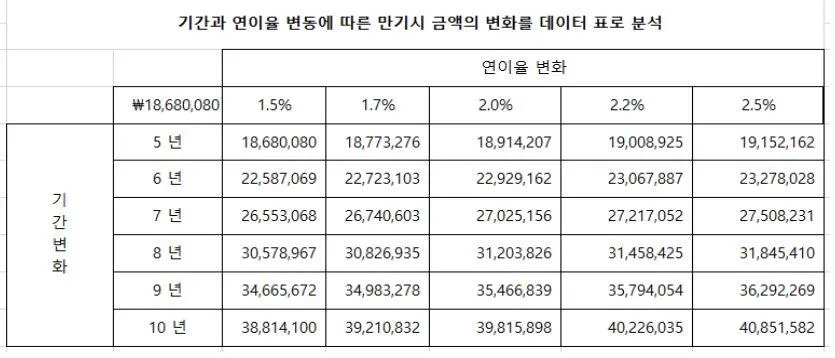
[Example data table predicting changes in amount based on period changes and annual interest rate variations]


3. Extracting and Visualizing Data that Meets Conditions
If you want to extract data that meets certain conditions and use it for other purposes, use Advanced Filter, and if you want to color the extracted data to distinguish it from other data, use Conditional Formatting

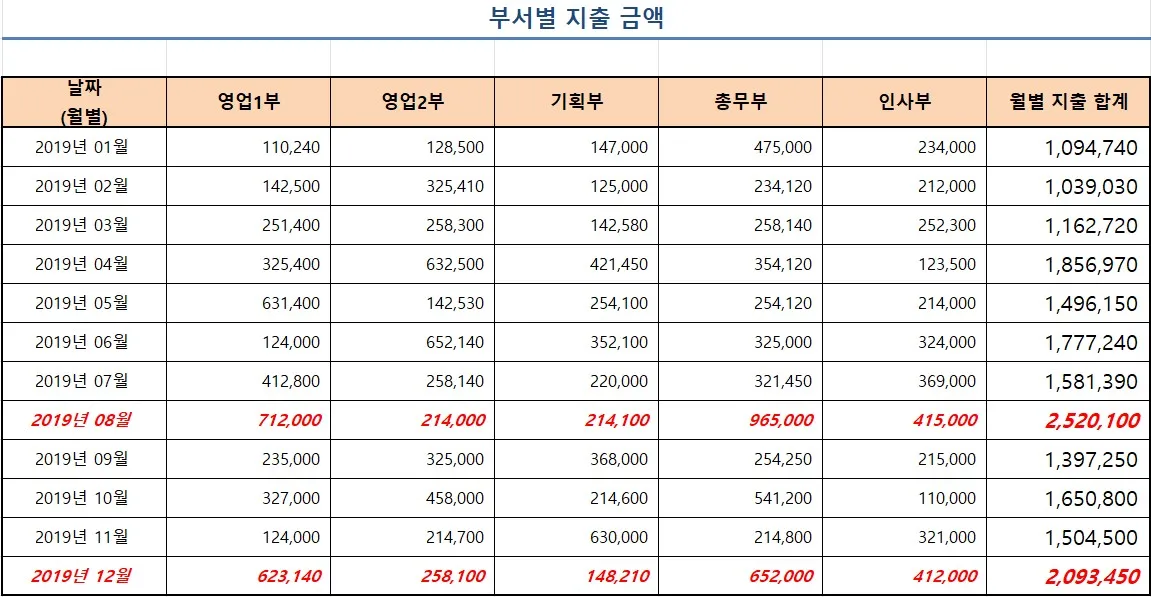
[Example of conditional formatting with red formatting applied to rows where monthly expenditure total is 2 million or more]


📚 Course Curriculum

Week 1: Organizing and Summarizing Data in a Clear and Concise Manner

  • Sorting Data: Organize your data neatly according to your desired criteria

  • Comparative Analysis by Group Using Subtotals: Analyze group totals and averages all at once

Mission 1: Perform data sorting and subtotal missions using practical examples


Week 2: Data Summarization and Visualization

  • Summarizing Data with Pivot Tables: Quickly aggregate large amounts of data

  • Visualizing with Pivot Charts: Visualize pivot tables as charts for at-a-glance analysis

  • Merging Multiple Tables with Consolidation: Gather scattered data in one place for analysis

Mission 2: Complete the mission of summarizing practical examples with pivot tables and expressing them in charts


Week 3: Predicting with Virtual Analysis

  • Goal Seek: You can find the target value needed to produce the desired result

  • Exploring Various Results with Data Tables: Simulate results as data changes, such as discount rates and profit margins

  • Scenario Manager: You can compare and analyze multiple hypothetical situations to select the best scenario


Week 4: Advanced Analysis and Conditional Visualization

  • Conditional Formatting: You can find data that meets certain conditions and apply formatting to emphasize it

  • Advanced Filter: You can extract data with complex conditions separately

Mission 3: Perform a mission to extract data that meets the conditions using practical examples and complete a report with visualization


📚 'Data Analysis with Excel!' Challenge course consists of the following steps

  1. While taking online classes for 4 weeks, I learned various Excel analysis features and

  2. Complete and submit 3 missions on the analysis tasks you've learned

  3. You'll learn how to use Excel's analysis features while receiving professional feedback


📚 How to Complete the Mission

Each section has missions prepared below the lectures
Read the mission description, download the mission attachment, solve it according to the instructions, and submit it


📚 Live special lectures are available

  • You can fill in the gaps from your mission performance by listening to and following along with Teacher Eunhee's vivid lectures on the detailed explanations of the three missions.

  • I'll explain useful Excel tips that are good to know for practical work


By the time the challenge course is coming to an end, the analysis work that once felt vague

By now, you will have transformed to the point where you can quickly create reports and analysis materials using Excel

Now you can finish your work quickly


📚 What You'll Learn After Taking This Course

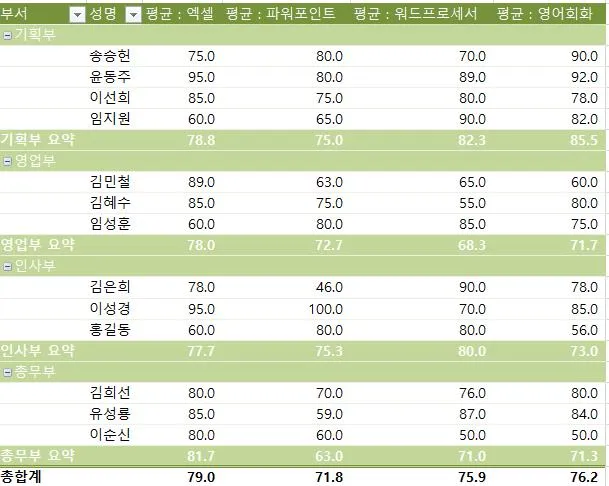
1. Using Excel's PivotTable feature, you can easily organize data as desired, such as totals and averages by category, without the need to manually analyze large amounts of data.


[Pivot table summarizing average evaluation scores by department]


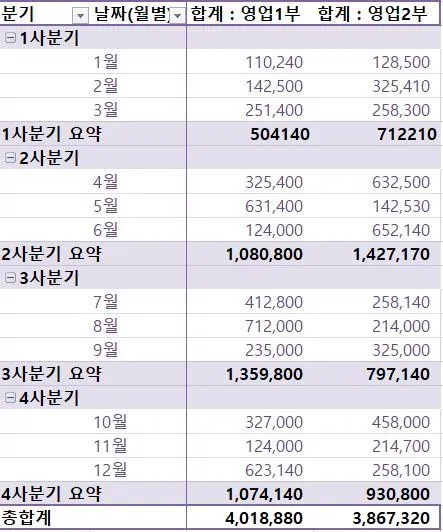
2. When there is a need to group large amounts of data and perform comparative analysis by group, you can use subtotals.


[Subtotal comparing quarterly performance by sales department]

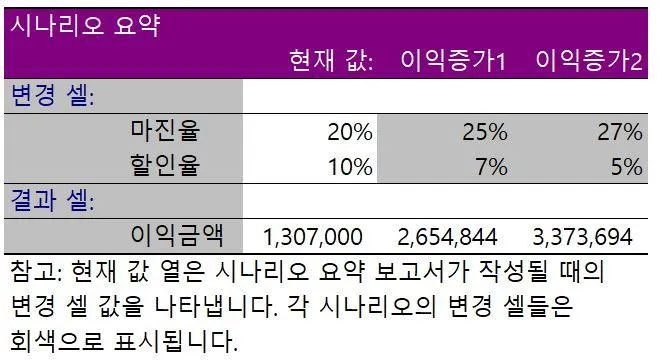
3. If you need to predict the future using current data, you can derive predicted results virtually using Goal Seek, Scenario Manager, Data Tables, and other tools.


[Scenario describing changes in profit amount as margin rate and discount rate vary]


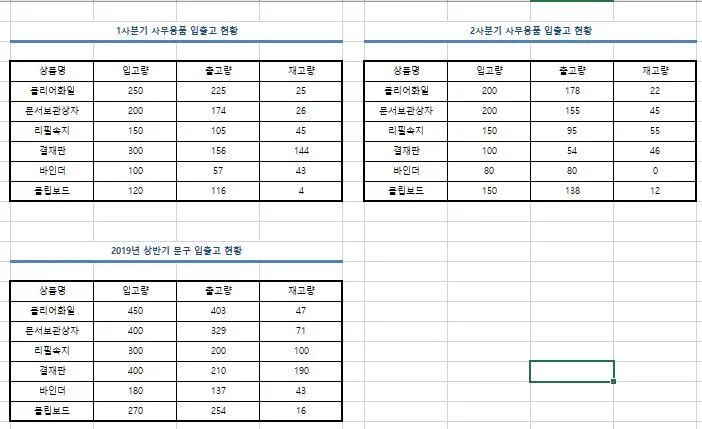
4. You can also use the consolidation feature to combine multiple tables into one. For example, there's a task to calculate the sum of incoming stock, sales volume, and inventory for each branch and consolidate them into a single table.


[Integrate Q1 and Q2 inventory status totals to complete the first half inventory status]


5. When analyzing and organizing data using advanced filters, conditional formatting, etc., you can extract the data you want more precisely and easily


🎁 Course Benefits

  • You can ask questions anytime during the course → The instructor will answer directly

  • When you submit a mission 2 or more times or write a course review, we will provide you with the "Excel Tips PDF for Improving Work Efficiency (100 pages)" e-book along with practice examples


📚Frequently Asked Questions Q&A

Q. Can non-majors take this course?

A. Yes. Excel is a program widely used in all types of work, so regardless of your major, it will be useful for anyone to know.


Q. Why should you learn Excel analysis work?

A. When working, large amounts of data inevitably accumulate. By utilizing pivot tables and subtotals when analyzing this data, not only will your work time be reduced, but you'll also become an Excel expert.


Q. Are there any important notes regarding course enrollment?

A. Please prepare Microsoft Office Excel 2016 or higher.


📚 Reviews from Students Who Took Eunhee's Classes

  • It was easy to understand because you explained everything thoroughly from the basics.

  • Thank you so much for teaching me so well!

  • I really appreciated how you explained things slowly and in an easy-to-understand way.

  • The instructor was very kind and the class pace was just right - not too fast - and the explanations were excellent, which made it a great experience

  • The instructor kindly taught everything step by step, which helped me understand things I had missed before!

  • It's not burdensome for beginners to take and there's no major difficulty in understanding. It helps improve one's abilities.

  • The course was easy to follow as the instructor explained everything step by step from the basics, making it easy to understand. Now that the course is finished, I feel satisfied that I've built a foundational knowledge of what I learned.

11월

30일

챌린지 시작일

2025년 11월 30일 PM 03:00

챌린지 종료일

2025년 12월 28일 PM 02:59

챌린지에서 배워요

  • You can organize data clearly and compare and analyze groups using sorting and subtotal features.

  • You can analyze and visualize large amounts of data using pivot tables and pivot charts.

  • If data can be integrated, it is possible to predict data using virtual analysis.

  • You can extract data that meets complex conditions using advanced filters.

  • You can highlight the data using conditional formatting

Recommended for
these people

Who is this course right for?

  • Office workers who are always short on time due to creating data reports at work

  • Those who have heard of pivot tables or subtotals but feel overwhelmed about how to actually use them

  • Those who want to learn data organization, summarization, and visualization all at once to improve work efficiency

  • Those who know basic functions but aren't confident with data analysis features

  • Someone who always runs short on time when creating data reports at work

  • Those who want to combine and analyze data scattered across multiple sheets/files at once

  • Those who want to compare results across different assumptions (scenarios) and create materials for decision-making

  • You know the basics (sorting/filtering), but aren't confident with advanced filters, conditional formatting, and what-if analysis

Reviews

All

1 reviews

5.0

1 reviews

  • ncy7676님의 프로필 이미지
    ncy7676

    Reviews 7

    Average Rating 5.0

    5

    100% enrolled

    Thank you for the really great challenge

    • dmsgml1030
      Instructor

      I'm so happy to hear that the challenge we did together was a good experience for you 😊 I'll continue to support you with Excel content that helps with your work.

이 강의의 지난 수강평

취소 및 환불 규정
챌린지는 지식공유자가 설정한 수업 최소 정원이 충족되지 않을 경우, 폐강 안내가 고지되며 결제 내역이 자동취소됩니다.

dmsgml1030's other courses

Check out other courses by the instructor!

$17.60