


티맵 앱 설치했으나 오류
1546
작성자 없음
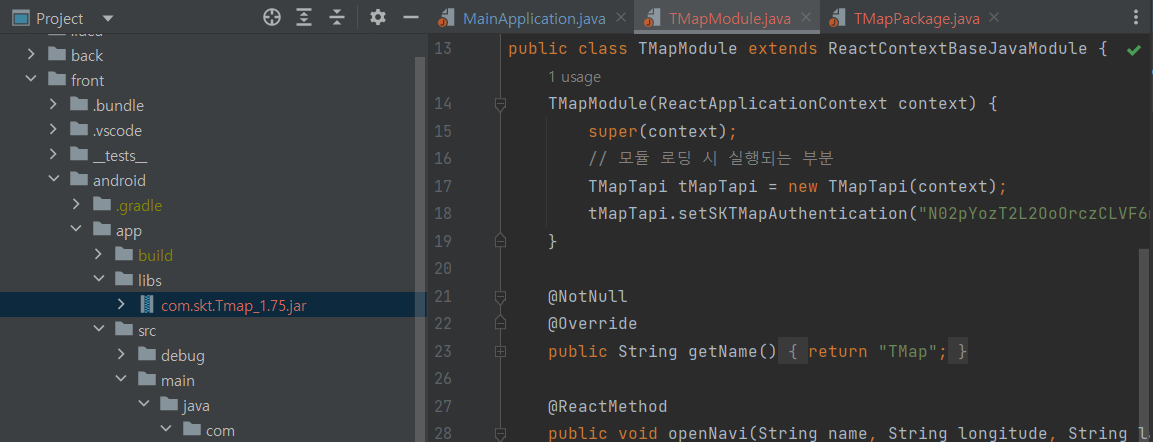
안드로이드 스튜디오에서 libs 파일 생성 후 sdk 다운로드 파일 넣었습니다
빨간 오류 표시가 떴고, 티맵 앱을 설치를 하였으나 여전히 빨간 오류 표시가 뜨고 있습니다
제로초님과 다르게 한 부분이라면, 사이트 디자인이 변경되는 바람에 sdk 파일 다운로드 페이지를 찾을 수 없어서 http://tmapapi.sktelecom.com/main.html#android/sample/androidSample.sdk_download
이 가이드 내에 있는 파일을 다운로드 하여 진행하였습니다
저는 최신 버전인 V 1.75 을 다운 받았고 제로초님과 똑같이 진행하였습니다. 하지만 sdk 버전 때문인지는 모르겠지만, 안드로이드 스튜디오에서 빨간색 오류가 뜨고 어느 곳이 오류인지 찾을 수 없습니다...
또한, 그것 때문인지 빌드가 안되고 있습니다.
PS C:\Users\user\fooddeliveryapp\front> npm run android

> fooddeliveryapp@0.0.1 android
> react-native run-android

info Starting JS server...
info Installing the app...

> Configure project :app
Reading env from: .env
WARNING:The specified Android SDK Build Tools version (28.0.3) is ignored, as it is below the minimum supported version (30.0.3) for Android Gradle Plugin 7.3.1.
Android SDK Build Tools 30.0.3 will be used.
To suppress this warning, remove "buildToolsVersion '28.0.3'" from your build.gradle file, as each version of the Android Gradle Plugin now has a default version of the build tools.

> Task :app:compileDebugJavaWithJavac FAILED

Deprecated Gradle features were used in this build, making it incompatible with Gradle 8.0.

You can use '--warning-mode all' to show the individual deprecation warnings and determine if they come from your own scripts or plugins.

See https://docs.gradle.org/7.5.1/userguide/command_line_interface.html#sec:command_line_warnings
141 actionable tasks: 2 executed, 139 up-to-date
C:\Users\user\fooddeliveryapp\front\android\app\src\main\java\com\zzz\fooddeliveryapp\TMapModule.java:9: error: package com.skt.Tmap does not
exist
import com.skt.Tmap.TMapTapi;
                   ^
C:\Users\user\fooddeliveryapp\front\android\app\src\main\java\com\zzz\fooddeliveryapp\TMapModule.java:17: error: cannot find symbol
        TMapTapi tMapTapi = new TMapTapi(context);
        ^
  symbol:   class TMapTapi
  location: class TMapModule
C:\Users\user\fooddeliveryapp\front\android\app\src\main\java\com\zzz\fooddeliveryapp\TMapModule.java:17: error: cannot find symbol
        TMapTapi tMapTapi = new TMapTapi(context);
                                ^
  symbol:   class TMapTapi
  location: class TMapModule
C:\Users\user\fooddeliveryapp\front\android\app\src\main\java\com\zzz\fooddeliveryapp\TMapModule.java:29: error: cannot find symbol
        TMapTapi tMapTapi = new TMapTapi(getReactApplicationContext());        ^
  symbol:   class TMapTapi
  location: class TMapModule
C:\Users\user\fooddeliveryapp\front\android\app\src\main\java\com\zzz\fooddeliveryapp\TMapModule.java:29: error: cannot find symbol
        TMapTapi tMapTapi = new TMapTapi(getReactApplicationContext());                                ^
  symbol:   class TMapTapi
  location: class TMapModule
Note: C:\Users\user\fooddeliveryapp\front\android\app\src\main\java\com\zzz\fooddeliveryapp\TMapModule.java uses unchecked or unsafe operations.
Note: Recompile with -Xlint:unchecked for details.
5 errors

FAILURE: Build completed with 2 failures.

1: Task failed with an exception.
-----------
* What went wrong:
Execution failed for task ':app:compileDebugJavaWithJavac'.
> Compilation failed; see the compiler error output for details.

* Try:
> Run with --stacktrace option to get the stack trace.
> Run with --info or --debug option to get more log output.
> Run with --scan to get full insights.
==============================================================================

2: Task failed with an exception.
-----------
* What went wrong:
java.lang.StackOverflowError (no error message)

* Try:
> Run with --stacktrace option to get the stack trace.
> Run with --info or --debug option to get more log output.
> Run with --scan to get full insights.
==============================================================================

* Get more help at https://help.gradle.org

BUILD FAILED in 38s

error Failed to install the app. Make sure you have the Android development environment set up: https://reactnative.dev/docs/environment-setup.
Error: Command failed: gradlew.bat app:installDebug -PreactNativeDevServerPort=8081
C:\Users\user\fooddeliveryapp\front\android\app\src\main\java\com\zzz\fooddeliveryapp\TMapModule.java:9: error: package com.skt.Tmap does not
exist
import com.skt.Tmap.TMapTapi;
                   ^
C:\Users\user\fooddeliveryapp\front\android\app\src\main\java\com\zzz\fooddeliveryapp\TMapModule.java:17: error: cannot find symbol
        TMapTapi tMapTapi = new TMapTapi(context);
        ^
  symbol:   class TMapTapi
  location: class TMapModule
C:\Users\user\fooddeliveryapp\front\android\app\src\main\java\com\zzz\fooddeliveryapp\TMapModule.java:17: error: cannot find symbol
        TMapTapi tMapTapi = new TMapTapi(context);
                                ^
  symbol:   class TMapTapi
  location: class TMapModule
C:\Users\user\fooddeliveryapp\front\android\app\src\main\java\com\zzz\fooddeliveryapp\TMapModule.java:29: error: cannot find symbol
        TMapTapi tMapTapi = new TMapTapi(getReactApplicationContext());        ^
  symbol:   class TMapTapi
  location: class TMapModule
C:\Users\user\fooddeliveryapp\front\android\app\src\main\java\com\zzz\fooddeliveryapp\TMapModule.java:29: error: cannot find symbol
        TMapTapi tMapTapi = new TMapTapi(getReactApplicationContext());                                ^
  symbol:   class TMapTapi
  location: class TMapModule
Note: C:\Users\user\fooddeliveryapp\front\android\app\src\main\java\com\zzz\fooddeliveryapp\TMapModule.java uses unchecked or unsafe operations.
Note: Recompile with -Xlint:unchecked for details.
5 errors

FAILURE: Build completed with 2 failures.

1: Task failed with an exception.
-----------
* What went wrong:
Execution failed for task ':app:compileDebugJavaWithJavac'.
> Compilation failed; see the compiler error output for details.

* Try:
> Run with --stacktrace option to get the stack trace.
> Run with --info or --debug option to get more log output.
> Run with --scan to get full insights.
==============================================================================

2: Task failed with an exception.
-----------
* What went wrong:
java.lang.StackOverflowError (no error message)

* Try:
> Run with --stacktrace option to get the stack trace.
> Run with --info or --debug option to get more log output.
> Run with --scan to get full insights.
==============================================================================

* Get more help at https://help.gradle.org

BUILD FAILED in 38s

    at makeError (C:\Users\user\fooddeliveryapp\front\node_modules\@react-native-community\cli-platform-android\node_modules\execa\index.js:174:9)
    at C:\Users\user\fooddeliveryapp\front\node_modules\@react-native-community\cli-platform-android\node_modules\execa\index.js:278:16
    at process.processTicksAndRejections (node:internal/process/task_queues:95:5)
    at async runOnAllDevices (C:\Users\user\fooddeliveryapp\front\node_modules\@react-native-community\cli-platform-android\build\commands\runAndroid\runOnAllDevices.js:85:5)
    at async Command.handleAction (C:\Users\user\fooddeliveryapp\front\node_modules\@react-native-community\cli\build\index.js:108:9)
info Run CLI with --verbose flag for more details.답변 1
0
지난 번에도 답변 드린 것 같은데요. 저 파일 Add as library 하셨나요

0
apply plugin: "com.android.application"
apply from: project(':react-native-config').projectDir.getPath() + "/dotenv.gradle"
apply plugin: "com.facebook.react"

import com.android.build.OutputFile

/**
 * This is the configuration block to customize your React Native Android app.
 * By default you don't need to apply any configuration, just uncomment the lines you need.
 */
react {
    /* Folders */
    //   The root of your project, i.e. where "package.json" lives. Default is '..'
    // root = file("../")
    //   The folder where the react-native NPM package is. Default is ../node_modules/react-native
    // reactNativeDir = file("../node_modules/react-native")
    //   The folder where the react-native Codegen package is. Default is ../node_modules/react-native-codegen
    // codegenDir = file("../node_modules/react-native-codegen")
    //   The cli.js file which is the React Native CLI entrypoint. Default is ../node_modules/react-native/cli.js
    // cliFile = file("../node_modules/react-native/cli.js")

    /* Variants */
    //   The list of variants to that are debuggable. For those we're going to
    //   skip the bundling of the JS bundle and the assets. By default is just 'debug'.
    //   If you add flavors like lite, prod, etc. you'll have to list your debuggableVariants.
    // debuggableVariants = ["liteDebug", "prodDebug"]

    /* Bundling */
    //   A list containing the node command and its flags. Default is just 'node'.
    // nodeExecutableAndArgs = ["node"]
    //
    //   The command to run when bundling. By default is 'bundle'
    // bundleCommand = "ram-bundle"
    //
    //   The path to the CLI configuration file. Default is empty.
    // bundleConfig = file(../rn-cli.config.js)
    //
    //   The name of the generated asset file containing your JS bundle
    // bundleAssetName = "MyApplication.android.bundle"
    //
    //   The entry file for bundle generation. Default is 'index.android.js' or 'index.js'
    // entryFile = file("../js/MyApplication.android.js")
    //
    //   A list of extra flags to pass to the 'bundle' commands.
    //   See https://github.com/react-native-community/cli/blob/main/docs/commands.md#bundle
    // extraPackagerArgs = []

    /* Hermes Commands */
    //   The hermes compiler command to run. By default it is 'hermesc'
    // hermesCommand = "$rootDir/my-custom-hermesc/bin/hermesc"
    //
    //   The list of flags to pass to the Hermes compiler. By default is "-O", "-output-source-map"
    // hermesFlags = ["-O", "-output-source-map"]
}

/**
 * Set this to true to create four separate APKs instead of one,
 * one for each native architecture. This is useful if you don't
 * use App Bundles (https://developer.android.com/guide/app-bundle/)
 * and want to have separate APKs to upload to the Play Store.
 */
def enableSeparateBuildPerCPUArchitecture = false

/**
 * Set this to true to Run Proguard on Release builds to minify the Java bytecode.
 */
def enableProguardInReleaseBuilds = false

/**
 * The preferred build flavor of JavaScriptCore (JSC)
 *
 * For example, to use the international variant, you can use:
 * `def jscFlavor = 'org.webkit:android-jsc-intl:+'`
 *
 * The international variant includes ICU i18n library and necessary data
 * allowing to use e.g. `Date.toLocaleString` and `String.localeCompare` that
 * give correct results when using with locales other than en-US. Note that
 * this variant is about 6MiB larger per architecture than default.
 */
def jscFlavor = 'org.webkit:android-jsc:+'

/**
 * Private function to get the list of Native Architectures you want to build.
 * This reads the value from reactNativeArchitectures in your gradle.properties
 * file and works together with the --active-arch-only flag of react-native run-android.
 */
def reactNativeArchitectures() {
    def value = project.getProperties().get("reactNativeArchitectures")
    return value ? value.split(",") : ["armeabi-v7a", "x86", "x86_64", "arm64-v8a"]
}

android {
    ndkVersion rootProject.ext.ndkVersion

    compileSdkVersion rootProject.ext.compileSdkVersion

    namespace "com.zzz.fooddeliveryapp"
    defaultConfig {
        applicationId "com.zzz.fooddeliveryapp"
        minSdkVersion rootProject.ext.minSdkVersion
        targetSdkVersion rootProject.ext.targetSdkVersion
        versionCode 1
        versionName "1.0"
        resValue "string", "build_config_package", "com.zzz.fooddeliveryapp"
    }

    splits {
        abi {
            reset()
            enable enableSeparateBuildPerCPUArchitecture
            universalApk false  // If true, also generate a universal APK
            include (*reactNativeArchitectures())
        }
    }
    signingConfigs {
        debug {
            storeFile file('debug.keystore')
            storePassword 'android'
            keyAlias 'androiddebugkey'
            keyPassword 'android'
        }
        release {
            if (project.hasProperty('RELEASE_STORE_FILE')) {
                storeFile file(RELEASE_STORE_FILE)
                storePassword RELEASE_STORE_PASSWORD
                keyAlias RELEASE_KEY_ALIAS
                keyPassword RELEASE_KEY_PASSWORD
            }
        }
    }
    buildTypes {
        debug {
            signingConfig signingConfigs.debug
        }
        release {
            // Caution! In production, you need to generate your own keystore file.
            // see https://reactnative.dev/docs/signed-apk-android.
            signingConfig signingConfigs.debug
            minifyEnabled enableProguardInReleaseBuilds
            proguardFiles getDefaultProguardFile("proguard-android.txt"), "proguard-rules.pro"
        }
    }

    // applicationVariants are e.g. debug, release
    applicationVariants.all { variant ->
        variant.outputs.each { output ->
            // For each separate APK per architecture, set a unique version code as described here:
            // https://developer.android.com/studio/build/configure-apk-splits.html
            // Example: versionCode 1 will generate 1001 for armeabi-v7a, 1002 for x86, etc.
            def versionCodes = ["armeabi-v7a": 1, "x86": 2, "arm64-v8a": 3, "x86_64": 4]
            def abi = output.getFilter(OutputFile.ABI)
            if (abi != null) {  // null for the universal-debug, universal-release variants
                output.versionCodeOverride =
                        defaultConfig.versionCode * 1000 + versionCodes.get(abi)
            }

        }
    }
}

dependencies {
    // The version of react-native is set by the React Native Gradle Plugin
    implementation("com.facebook.react:react-android")
    implementation("androidx.swiperefreshlayout:swiperefreshlayout:1.0.0")
    implementation files('libs/com.skt.Tmap_1.75.jar')

    debugImplementation("com.facebook.flipper:flipper:${FLIPPER_VERSION}")
    debugImplementation("com.facebook.flipper:flipper-network-plugin:${FLIPPER_VERSION}") {
        exclude group:'com.squareup.okhttp3', module:'okhttp'
    }

    debugImplementation("com.facebook.flipper:flipper-fresco-plugin:${FLIPPER_VERSION}")
    if (hermesEnabled.toBoolean()) {
        implementation("com.facebook.react:hermes-android")
    } else {
        implementation jscFlavor
    }
}

apply from: file("../../node_modules/@react-native-community/cli-platform-android/native_modules.gradle"); applyNativeModulesAppBuildGradle(project)
app/build.gradle
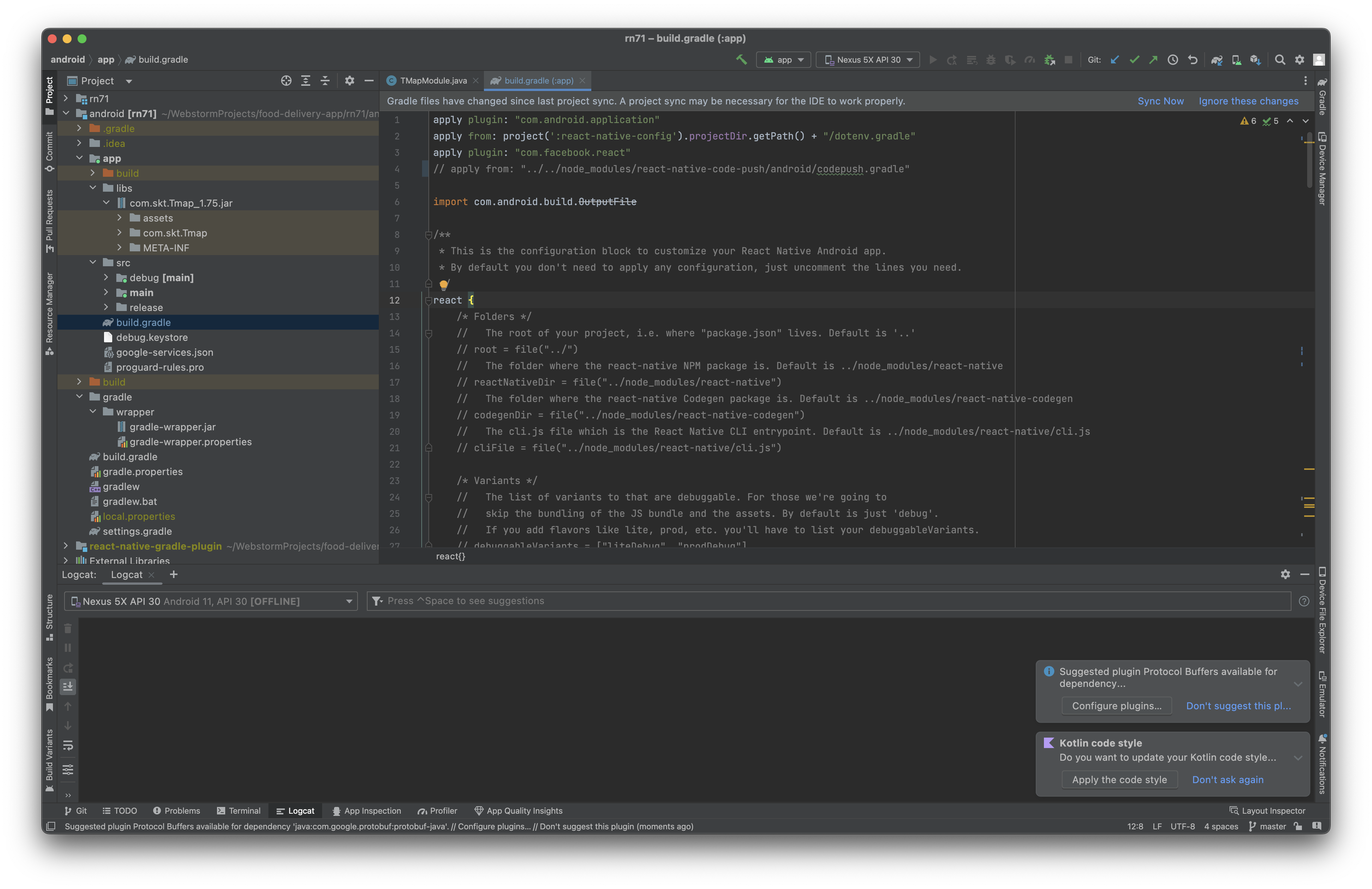 흠.. 에러가 발생하지 않네요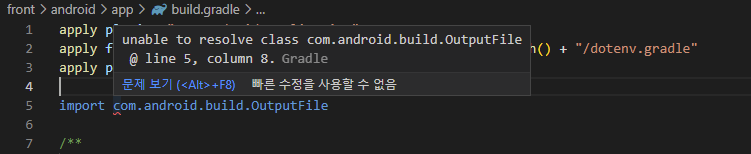
0
    dependencies {
        classpath('com.google.gms:google-services:4.3.3')
        classpath("com.android.tools.build:gradle:7.3.1")
        classpath("com.facebook.react:react-native-gradle-plugin")
    }
android/build.gradle 에 classpath("com.android.tools.build:gradle:7.3.1") 이 있네요
gradle-plugin을 따로 패키지나 확장프로그램 설치한 것은 없습니다
근데, 계속 vscode에서는 TMapModule 여기서 에러가 잡히는 것 같은데
C:\Users\user\fooddeliveryapp\front\android\app\src\main\java\com\zzz\fooddeliveryapp\TMapPackage.java:23: error: cannot find symbol
       modules.add(new TMapModule(reactContext));
                       ^
  symbol:   class TMapModule
  location: class TMapPackage
Note: C:\Users\user\fooddeliveryapp\front\android\app\src\main\java\com\zzz\fooddeliveryapp\TMapModule.java uses unchecked or unsafe operations.
Note: Recompile with -Xlint:unchecked for details.
안드로이드 스튜디오에서는 에러가 안 잡힙니다.
에뮬레이터를 껐다가 켜면 설치했던 티맵앱이 계속 사라지는데, 그 후에 티맵을 따로 설치를 안해줘도 앱이 있어야 실행되는 건가요?? 혹시 티맵 설치 문제때문일까요?
0
일단 vs code로는 java코드를 볼 필요가 없고요. 안드로이드스튜디오로 보는 게 맞습니다.
에뮬레이터에서도 설치 후에 껐다켜도 앱들이 남아있어야 합니다. 뭔가 컴퓨터의 설정이나 이런게 대단히 꼬인 것 같네요;;
앱실행시 네이버맵 [401] 에러
0
1215
2
스타일링 라이브러리
0
211
2
expo, cli 선택 중에 고민이 있습니다.
0
229
2
JDK 버전이 달라도 괜찮나요?
0
293
2
dimenstion usewindowdeminstion
0
188
3
[맥 전용]환경 설정하기 1편 & [맥 전용]환경 설정하기 2편의 영상이 안나옵니다.
0
251
1
jdk11 버전과 gradle 버전의 호환성 관련 질문드립니다.
0
457
2
강의 외 질문입니다!
0
197
2
react native랑 맞는 ui 라이브러리 어떤게 좋을까요?
0
1703
2
react native와 spring boot 연결
0
406
1
java가 아닌 .kt에서 code push 에러가 발생합니다.
0
263
2
flipper 239 에러가 발생합니다.
0
212
2
package.json에 /lib/panino.js 문제입니다.
0
537
2
window - mac 협업 과정 질문합니다
0
258
1
ios 빌드 중 RCTBridgeDelegate.h import 오류
0
334
2
ios 앱 빌드 중 hermesEnabled 관련 오류발생
0
288
2
Socket 연결시 질문 드립니다.!
0
201
2
wifi 환경에서 axios 통신이 로컬서버에서 안됩니다.
0
477
2
iOS render error 질문드립니다.
0
474
2
iOS 가상머신 오류
0
212
2
npc react init 명령어 실행시 발생되는 오류
0
252
1
nom start 시 오류
0
157
1
NextJS 기반으로 만들어서 웹뷰 React Native로 배포 가능한가요?
0
1086
2
안드로이드 rn75 버전에 맞게 설정 중에 android13 다운로드에 대해서 막혔습니다!
0
222
2