


html과 jsp요청 시 Whitelabel_Error_Page가 뜹니다.
699
작성한 질문수 1
1. 강의 내용과 관련된 질문인가요? (예/아니오)
2. 인프런의 질문 게시판과 자주 하는 질문에 없는 내용인가요? (예/아니오)
3. 질문 잘하기 메뉴얼을 읽어보셨나요? (예/아니오)
[질문 내용]
main/webapp/index.html을 위치시키면 Whitelabel_Error_Page가 떠서 main/resources/static에 index.html을 위치시키고 사용했었습니다. 그러나 new-form.jsp생성 후 main/resources/static에 위치시키면 역시나 Whitelabel_Error_Page가 뜹니다. 아래와 같은 로그가 뜰 시 어떻게 해결해야하는 지 알려주시면 감사합니다.
2022-08-18 00:53:28.053 DEBUG 26384 --- [nio-8080-exec-2] o.a.coyote.http11.Http11InputBuffer : Before fill(): parsingHeader: [true], parsingRequestLine: [true], parsingRequestLinePhase: [0], parsingRequestLineStart: [0], byteBuffer.position(): [0], byteBuffer.limit(): [0], end: [730]
2022-08-18 00:53:28.053 DEBUG 26384 --- [nio-8080-exec-2] o.a.coyote.http11.Http11InputBuffer : Received [GET / HTTP/1.1
Host: localhost:8080
Connection: keep-alive
Cache-Control: max-age=0
sec-ch-ua: "Chromium";v="104", " Not A;Brand";v="99", "Google Chrome";v="104"
sec-ch-ua-mobile: ?0
sec-ch-ua-platform: "Windows"
Upgrade-Insecure-Requests: 1
User-Agent: Mozilla/5.0 (Windows NT 10.0; Win64; x64) AppleWebKit/537.36 (KHTML, like Gecko) Chrome/104.0.0.0 Safari/537.36
Accept: text/html,application/xhtml+xml,application/xml;q=0.9,image/avif,image/webp,image/apng,*/*;q=0.8,application/signed-exchange;v=b3;q=0.9
Sec-Fetch-Site: none
Sec-Fetch-Mode: navigate
Sec-Fetch-User: ?1
Sec-Fetch-Dest: document
Accept-Encoding: gzip, deflate, br
Accept-Language: ko-KR,ko;q=0.9,en-US;q=0.8,en;q=0.7
]
2022-08-18 00:53:28.059 DEBUG 26384 --- [nio-8080-exec-2] o.a.coyote.http11.Http11InputBuffer : Before fill(): parsingHeader: [true], parsingRequestLine: [true], parsingRequestLinePhase: [0], parsingRequestLineStart: [0], byteBuffer.position(): [0], byteBuffer.limit(): [0], end: [706]
2022-08-18 00:53:28.060 DEBUG 26384 --- [nio-8080-exec-2] o.a.coyote.http11.Http11InputBuffer : Received []
2022-08-18 00:53:28.061 DEBUG 26384 --- [nio-8080-exec-2] o.apache.coyote.http11.Http11Processor : Socket: [org.apache.tomcat.util.net.NioEndpoint$NioSocketWrapper@46caa9e:org.apache.tomcat.util.net.NioChannel@5f497d5d:java.nio.channels.SocketChannel[connected local=/0:0:0:0:0:0:0:1:8080 remote=/0:0:0:0:0:0:0:1:61998]], Status in: [OPEN_READ], State out: [OPEN]
2. main/resources/static/new-form.jsp 시
2022-08-18 00:55:17.413 DEBUG 30912 --- [nio-8080-exec-3] o.a.coyote.http11.Http11InputBuffer : Before fill(): parsingHeader: [true], parsingRequestLine: [true], parsingRequestLinePhase: [0], parsingRequestLineStart: [0], byteBuffer.position(): [0], byteBuffer.limit(): [0], end: [706]
2022-08-18 00:55:17.415 DEBUG 30912 --- [nio-8080-exec-3] o.a.coyote.http11.Http11InputBuffer : Received [GET /jsp/members/new-form.jsp HTTP/1.1
Host: localhost:8080
Connection: keep-alive
sec-ch-ua: "Chromium";v="104", " Not A;Brand";v="99", "Google Chrome";v="104"
sec-ch-ua-mobile: ?0
sec-ch-ua-platform: "Windows"
Upgrade-Insecure-Requests: 1
User-Agent: Mozilla/5.0 (Windows NT 10.0; Win64; x64) AppleWebKit/537.36 (KHTML, like Gecko) Chrome/104.0.0.0 Safari/537.36
Accept: text/html,application/xhtml+xml,application/xml;q=0.9,image/avif,image/webp,image/apng,*/*;q=0.8,application/signed-exchange;v=b3;q=0.9
Sec-Fetch-Site: same-origin
Sec-Fetch-Mode: navigate
Sec-Fetch-User: ?1
Sec-Fetch-Dest: document
Referer: http://localhost:8080/
Accept-Encoding: gzip, deflate, br
Accept-Language: ko-KR,ko;q=0.9,en-US;q=0.8,en;q=0.7
]
2022-08-18 00:55:17.447 DEBUG 30912 --- [nio-8080-exec-3] o.a.coyote.http11.Http11InputBuffer : Before fill(): parsingHeader: [true], parsingRequestLine: [true], parsingRequestLinePhase: [0], parsingRequestLineStart: [0], byteBuffer.position(): [0], byteBuffer.limit(): [0], end: [744]
2022-08-18 00:55:17.447 DEBUG 30912 --- [nio-8080-exec-3] o.a.coyote.http11.Http11InputBuffer : Received []
2022-08-18 00:55:17.448 DEBUG 30912 --- [nio-8080-exec-3] o.apache.coyote.http11.Http11Processor : Socket: [org.apache.tomcat.util.net.NioEndpoint$NioSocketWrapper@1a562877:org.apache.tomcat.util.net.NioChannel@20872e84:java.nio.channels.SocketChannel[connected local=/0:0:0:0:0:0:0:1:8080 remote=/0:0:0:0:0:0:0:1:62069]], Status in: [OPEN_READ], State out: [OPEN]
답변 2
0
안녕하세요. 휘님, 공식 서포터즈 OMG입니다.
* 코드 수정
index.html
변경 전
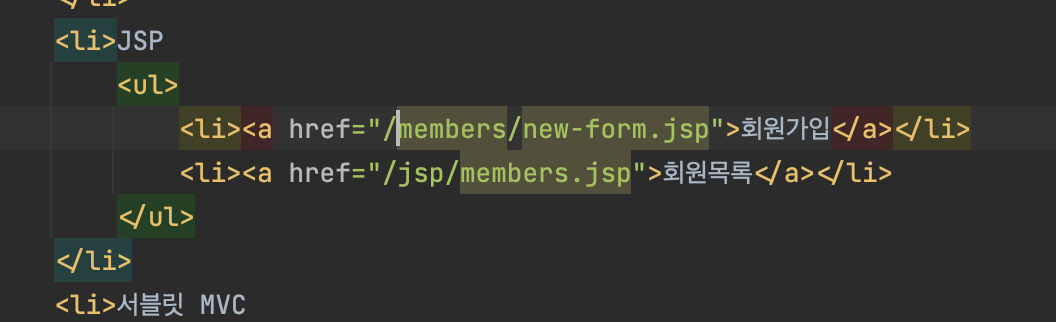
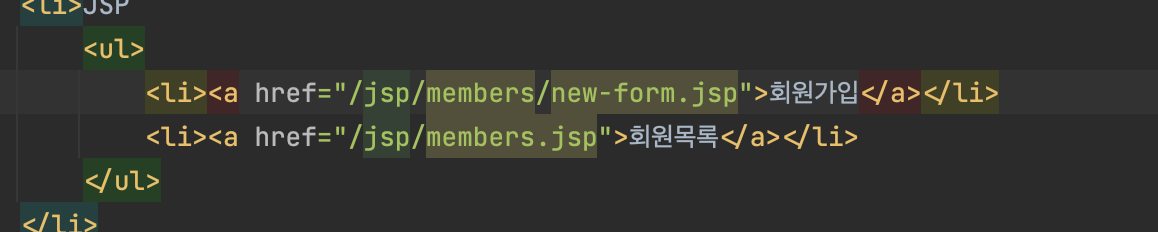
jsp 파일 및 디렉토리 구조,위치
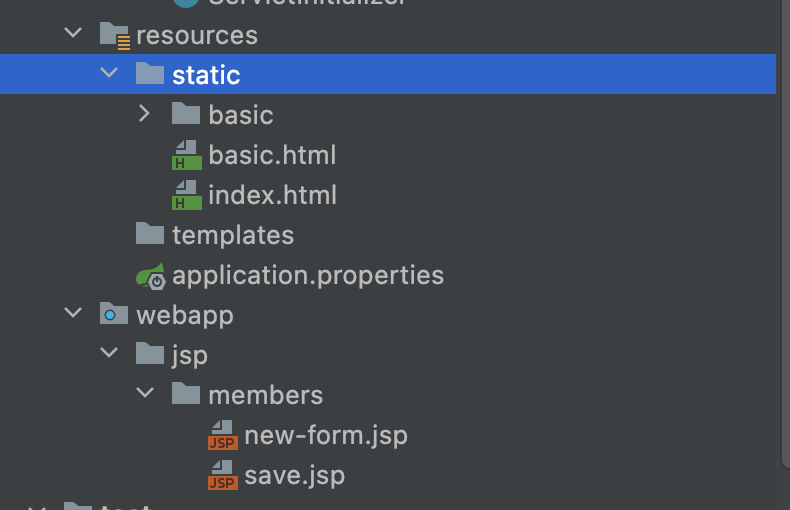
이렇게 변경하시고 확인하시면 해결 되실꺼에요.
감사합니다.
0
안녕하세요. 휘님, 공식 서포터즈 David입니다.
전체 프로젝트를 압축해서 구글 드라이브로 공유해서 링크를 남겨주세요.
구글 드라이브 업로드 방법은 다음을 참고해주세요.
https://bit.ly/3fX6ygx
주의: 업로드시 권한 문제 꼭 확인해주세요
추가로 다음 내용도 코멘트 부탁드립니다.
1. 실행 방법을 알려주세요.
2. 어떻게 문제를 확인할 수 있는지 자세한 설명을 남겨주세요.
감사합니다
0
링크 : https://drive.google.com/file/d/1M6UmPQSV2wIbTFpGlQCLU00sTeYeLF0x/view?usp=sharing
1. 실행방법 : 인텔리제이 무료버전에서 프로젝트 오픈 후 실행. html은 main/resources/static에 있어야만 인식되고, jsp는 이 경로에 있어도 인식 안 됩니다.
2. 프로젝트 실행 후 크롬에서 localhost:8080으로 접속-> main/webapp밑에 있는 html과 jsp는 인식 안 됩니다.
mvc 패턴 - 적용 강의에서 회원가입할 때 redirect가 아닌 forward인 이유가 궁금합니다.
0
31
1
servlet과 container에 대한 질문입니다
0
54
1
api를 어느 컨트롤러에 작성해야하는지는 어떤 기준으로 해야하나요?
0
86
1
jsp 의존성 수정 요청
0
128
2
요즘 웹 서버가 주로 사용되는 이유는 SPA 구조 때문일까요 ?
0
161
1
save() 메서드 문의
0
78
1
절대 경로로 templates/basic 하위 파일 열면 css 적용 안되는 현상
0
114
1
request-body-json
0
97
2
MVC 패턴의 적용 단위
0
103
1
RequestMapping을 이용한 핸들러, 어댑터
0
124
2
save 후 결과화면
0
101
2
jsp를 이용한 view
0
102
1
application.properties에 debug 추가해도 결과가 똑같습니다.
0
195
1
수업 코드 제공 관련 문의
0
107
2
RequestMappingHandlerAdapter의 Controller 호출 과정
0
109
3
파일 오픈 시
0
76
1
스프링 배치 관련
0
81
1
@RequestParam의 defaultValue가 blank 값도 처리하는 지 여부
0
115
1
postman으로 /request-body-json-v1 호출시 500 error
0
108
1
프론트엔드와 백엔드의 mvc, rest api에 대한 질문
0
90
1
모델의 역할과 계층 분리에 대한 이해 차이 + 추가질문
0
119
1
console log 출력 관련 질문입니다.
0
80
1
애플리케이션이 실행 되지 않습니다 ㅠㅠㅠ
0
149
1
html 변경하는 부분 적용 문제
0
109
1