


게시글 오류 관련해서 질문드리겠습니다
제로초님 강의를 들으면서 개인 프로젝트에 개념을 대입하면서 공부하고 있습니다.
근데 아래와 같이 post reducer의 데이터를 가져와서 페이지에 출력하려고 하면 아래와 같이 오류가 발생하는데 혹시 이유를 알 수 있을까요?
혼자서 찾아보고 구글링을 해봐도 도저히 답을 찾기 힘들어서 이렇게 질문드립니다.
import React from 'react';
import { useSelector } from 'react-redux';
import { Button } from 'antd';
import { PlusCircleOutlined } from '@ant-design/icons';
import Link from 'next/link';
import styled from 'styled-components';

import AppLayout from '../components/AppLayout';
import PostList from '../components/PostList';
import { PageMainText, PageSubText } from './_app';

const LogoHeader = styled.div`
  && {
    display: flex;
    justify-content: space-between;
    align-items: center;
    padding: 0.2em 1em;
    margin-bottom: 3em;
  }
`;

const LogoText = styled.div`
  && {
    display: flex;
    flex-direction: column;
    justify-content: start;
  }
`;

const PageWrapper = styled.div`
  && {
    padding: 0.5em 2em 1em 2em;
  }
`;

const Home = () => {
  const { isLoggedIn } = useSelector((state) => state.user);
  const { mainPosts } = useSelector((state) => state.post);

  return (
    <AppLayout>
      <PageWrapper>
        <LogoHeader>
          <LogoText>
            <PageMainText>Recipe.io</PageMainText>
            <PageSubText>Have a delicious meal today</PageSubText>
          </LogoText>
          {isLoggedIn && <Link href='/posting'><a><Button type='primary' size='large' icon={<PlusCircleOutlined />} >Create Recipe</Button></a></Link>}
        </LogoHeader>

        {mainPosts.map((post) => <PostList post={post} key={post.id}/>)};
      </PageWrapper>
    </AppLayout>
  )
};

export default Home;
import React from 'react';
import { Input, List } from 'antd';
import PropTypes from 'prop-types';
import styled from 'styled-components';
import PostCard from './PostCard';
const InputWrapper = styled(Input.Search)`
margin-bottom: 2em;
`;
const PostList = ({ post }) => {
return (
<>
<InputWrapper placeholder="Search for Recipe" size='large' allowClear="true" enterButton />
<List
grid={{
gutter: 16, xs: 2, md: 4,
}}
dataSource={post}
renderItem={(item) => (
<List.Item>
<PostCard post={item} />
</List.Item>
)}
/>
</>
)
};
PostList.propTypes = {
post: PropTypes.shape({
id: PropTypes.number,
User: PropTypes.object,
title: PropTypes.string,
desc: PropTypes.string,
content: PropTypes.arrayOf(PropTypes.object),
Images: PropTypes.arrayOf(PropTypes.object),
Comments: PropTypes.arrayOf(PropTypes.object),
})
};
export default PostList;import React, { useCallback, useState } from 'react';
import { HeartOutlined, EditOutlined, EllipsisOutlined } from '@ant-design/icons';
import { Card, Avatar, Modal, Popover } from 'antd';
import PropTypes from 'prop-types';
import styled from 'styled-components';
import PostCardModal from './PostCardModal';
const CardWrapper = styled(Card)`
&& {
width: 400px;
}
`;
const PostCard = ({ post }) => {
const [visible, setVisible] = useState(false);
const showPostModal = useCallback(() => {
console.log(visible);
setVisible(true);
}, []);
return (
<>
<CardWrapper
hoverable
cover={
<img alt="post image" src={post.Images[0]} onClick={showPostModal}/>
}
actions={[
<HeartOutlined key="like" />,
<EditOutlined key="edit" />,
<Popover key='more'>
<EllipsisOutlined key="ellipsis" />,
</Popover>
]}
>
<Card.Meta
avatar={<Avatar>{post.User.nickname[0]}</Avatar>}
title={post.title}
description={post.desc}
/>
</CardWrapper>
<Modal
centered
visible={visible}
onOk={() => setVisible(false)}
onCancel={() => setVisible(false)}
width={1000}
>
<PostCardModal />
</Modal>
</>
)
};
PostCard.propTypes = {
post: PropTypes.shape({
id: PropTypes.number,
User: PropTypes.object,
title: PropTypes.string,
desc: PropTypes.string,
content: PropTypes.arrayOf(PropTypes.object),
Images: PropTypes.arrayOf(PropTypes.object),
Comments: PropTypes.arrayOf(PropTypes.object),
})
};
export default PostCard;export const initialState = {
mainPosts: [{
id: 1,
User: {
id: 1,
nickname: 'Mirrer'
},
title: '돼지고기 갈비찜',
desc: '한국인이 좋아하는 대표 고기 요리 갈비찜 레시피!!',
content: [{
ingredient: '주 재료 = 갈비 600g, 당근 20g, 은행 10알, 밤 10개, 파 1대, 양파 50g, 양념장 재료 = 간장 3큰술, 설탕 2큰술, 육수 12큰술, 다진 생강 1작은술, 깨소금 2큰술, 청주 ¼컵, 다진 마늘 3큰술, 참기름 1큰술, 후춧가루 약간',
}, {
recipes: '1. 갈비는 사방 5㎝ 크기로 썰어 기름기를 제거한다., 2. 기름기를 없앤 갈빗살에 칼집을 낸 다음 찬물에 30분~한 시간쯤 담가 핏물을 빼주고, 혹시 모를 절단 과정에서 섞인 뼛가루나 뼛조각을 제거해준다. 이 핏물 빼는 과정을 속성으로 하고 싶으면, 한 번 끓여 데치는 거로 대체해도 되긴 된다, 3. 끓는 물에 핏물을 뺀 갈비와 토막 낸 양파·파를 넣어 속까지 익을 때까지 삶아낸다. 중간에 젓가락으로 고기를 찔러보아 핏물이 나오는지 확인한다. 핏물이 나오면 고기가 덜 익은 것., 4. 고기가 익으면 체에 받친다. 이 국물은 걸러서 지저분한 것을 제거하고 양념장의 육수로 이용한다.'
}, {
tips: '갈비를 한 번 끓여서 핏물이나 기름기를 어느 정도 빼준 후, 재료들을 압력밥솥에 싹 때려넣고 그대로 푹 익혀버리면 질긴 고기가 녹아드는 수준이 되어 부드럽게 먹을 수 있다.'
}],
Images: [{
src: 'https://recipe1.ezmember.co.kr/cache/recipe/2015/06/03/f6551b241deba537266c7dfe668e09821.jpg',
}, {
src: 'https://recipe1.ezmember.co.kr/cache/recipe/2017/09/15/af5ed61b01ce6d0c8ded20d59f0d15e31.jpg',
}, {
src: 'https://www.cj.co.kr/images/theKitchen/PHON/0000002320/0000009726/0000002320.jpg',
}],
Comments: [{
User: {
nickname: 'AppleLover',
},
content: '우와 정말 맛있을것 같아요 ㅎㅎ',
}, {
User: {
nickname: 'Nightmare',
}
}, {
content: '오늘 저녁은 갈비찜이다!!',
}],
}],
imagePaths: [],
postAdded: false,
};
const dummyPost = {
id: 2,
User: {
id: 2,
nickname: 'ZeroCho',
},
title: '한류 대표 음식 비빔밥',
desc: '한국을 대표하는 대표적인 한류음식 맛있는 비빔밥을 만들어보자 ㅎㅎ',
content: [{
ingredient: '콩나물, 오이, 고사리, 당근, 버섯, 양파, 무(생채), 도라지, 시금치 등 각종 나물',
}, {
recipes: '1. 냉장고를 열어 나물류를 비롯한 있는 반찬을 꺼낸다., 2. 밥을 퍼서 큰 그릇에 담는다., 3. 꺼낸 반찬을 모두 밥 퍼놓은 그릇 위에 얹는다.'
}, {
tips: '젓가락을 비비면 재료가 뭉개지지 않게 맛있게 먹을 수 있다'
}],
Images: [{
src: 'https://w.namu.la/s/02034f3c4f5bce39b228d9e368727f091d03ac093efec038a1bcd28f1d046eacfc918db2fad3d98bdda454966eb61895654f4ec4e68a4c35de5a337759028cc47d2ed541554353ba9b7d91dcf23e6f97f09ff287aee488e2b03a27c4313801240b273147ef1f426a82cbd4323e9d5240'
}, {
src: 'https://w.namu.la/s/ad2bee50b8267c381e01dea6c82aa0ea0e13a3d39feb22f9f32ef66e04bdaeb01206634140b5375aa6176e15add1bd9393f407f2e9bcc5426866663bd01595382207ca414ae02d8ac0aa109a94872e25174a1f8db20bf24198f1a27c915b33ced6c526cc571b2b07decfa1b4775d444e'
}],
Comments: [{
User: {
nickname: 'Korean',
},
content: '역시 한국인은 밥심이죠 ㅎㅎ',
}],
};
export const addPost = {
type: 'ADD_POST'
};
const reducer = (state = initialState, action) => {
switch (action.type) {
case 'ADD_POST':
return {
...state,
mainPosts: [dummyPost, ...state.mainPosts],
postAdded: true,
}
default:
return state;
}
};
export default reducer;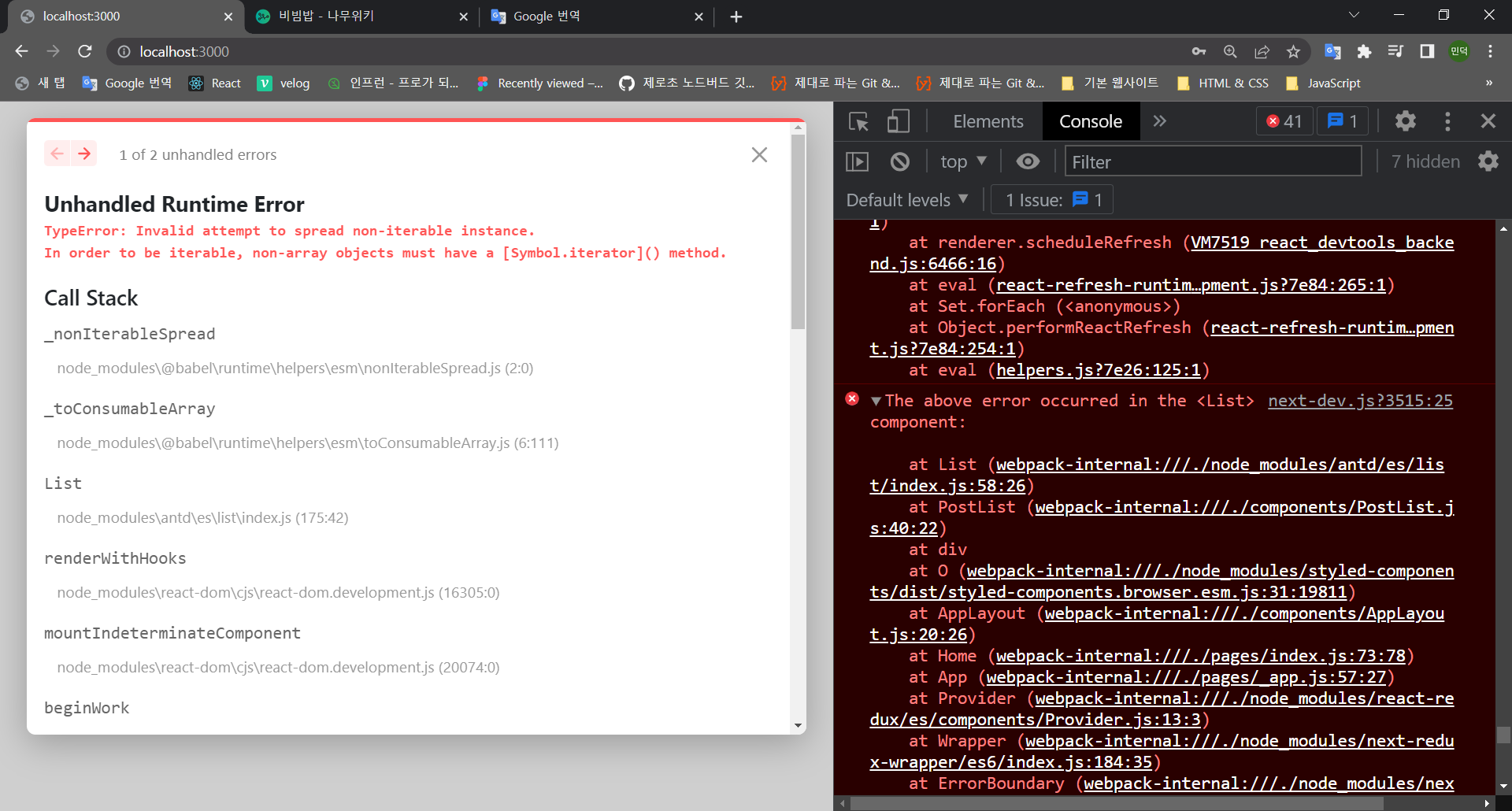
답변 1
0
PostList의 List는 포스트의 배열을 받는데 post는 그냥 포스트 하나인 것 같습니다.
0
바쁘신데 답변 감사합니다 postlist말고 poscard의 반복문을 적용하니까 오류가 해결됬습니다
근데 강의 예제에서 추가로 질문이 있는데 post reducer의 정보를 postcard의 props로 전달해서 구현하셨는데
postcard에서 useSelecor를 통해 바로 데이터를 받아서 구현하지 않으신 이유가 무엇인가요?
0
postcard에서 redux로부터 데이터를 받아오려면 결국은 부모로부터 index를 props로 받아와서 다시 useSelector에서 찾아서 꺼내야 합니다. 어차피 부모로부터 props를 전달받아야하는 입장이라 그냥 props로 받는게 낫습니다.
0
자세한 설명 너무 감사합니다 ㅎㅎ 근데 제가 아직 부족해서인지 답변만으로는 이해하기가 조금 힘드네요 ㅜㅜ
정말 죄송한데 말씀해주신부분을 조금 더 이해하기 쉽게 설명해주실수 있으실까요?
넥스트 버젼 질문
0
90
2
로그인시 401 Unauthorized 오류가 뜹니다
0
104
1
무한 스크롤 중 스크롤 튐 현상
0
199
1
특정 페이지 접근을 막고 싶을 때
0
117
2
createGlobalStyle의 위치와 영향범위
0
104
2
인라인 스타일 리렌더링 관련
0
98
2
vsc 에서 npm init 설치시 오류
0
159
2
nextjs 15버전 사용 가능할까요?
0
166
1
화면 새로고침 문의
0
129
1
RTK에서 draft, state 차이가 있나요?
0
164
2
Next 14 사용해도 될까요?
0
455
1
next, node 버전 / 폴더 구조 질문 드립니다.
0
359
1
url 오류 질문있습니다
0
218
1
ssh xxxxx로 우분투에 들어가려니까 port 22: Connection timed out
0
393
1
sudo certbot --nginx 에러
0
1298
2
Minified React error 콘솔에러 (hydrate)
0
481
1
카카오 공유했을 때 이전에 작성했던 글이 나오는 버그
0
257
1
프론트서버 배포 후 EADDRINUSE에러 발생
0
341
1
npm run build 에러
0
526
1
front 서버 npm run build 중에 발생한 에러들
0
399
1
서버 실행하고 브라우저로 들어갔을때 404에러
0
351
2
css 서버사이드 랜더링이 적용되지 않아서 문의 드립니다.
0
291
1
팔로워 3명씩 불러오고 데이터 합쳐주는걸로 바꾸고 서버요청을 무한으로하고있습니다.
0
252
2
해시태그 검색에서 throttle에 관해 질문있습니다.
0
207
1