


position 속성으로 인한 높이값문의
3874
작성한 질문수 105
답변 4
0
Great blog post! I found the information really helpful and well-written. Thanks for sharing this valuable content. As providers of Nationwide truck repair, we appreciate the insights you've shared here. Looking forward to reading more from you in the future. Keep up the good work! 😊👍
0
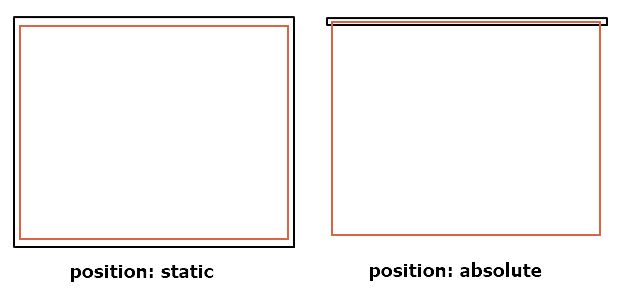
As shown in the figure below, if a child element has absolute, it floats in the air like a float and is attached by coordinates, so the parent element thinks that there is no child element, so the height value disappears. This is because the height value of the parent element is height: auto. truck repair shops
0
position 속성은 웹 문서 안 요소들을 어떻게 배치할 지를 정하는 속성입니다 pacman 30th anniversary. position 속성을 이용하면 텍스트나 이미지를 원하는 위치로 배치할 수 있고 어떤 방식으로 놓을 지를 결정할 수 있죠.
0
아래 그림처럼 자식요소가 absolute를 가지면 float 처럼 공중에 떠서 좌표로 붙는 것이기 때문에 부모요소가 자식요소가 없다고 생각해서 높이 값이 없어집니다. 부모요소의 높이 값은 height: auto인 상태라서 그렇습니다.
그래서 부모요소에 높이 값을 지정해서 주어야 합니다.
말씀하신 것 처럼 자식요소가 bsolute를 가지면서 부모요소가 높이 값을 자식요소 만큼 자동으로 가질 수 있는 방법은 제가 알기로는 없습니다.
0
The position property is a fundamental CSS property that controls the positioning of an element within its containing element. It can take various values, including:
static: This is the default value, and the element is positioned according to the normal flow of the document. Theheightproperty determines the element's height, and it's not affected byposition: static.relative: When you set an element'spositiontorelative, you can use thetop,right,bottom, andleftproperties to shift the element from its normal position. However, the space it occupies in the layout is not altered. Theheightproperty still determines the element's height.absolute: Elements withposition: absoluteare positioned relative to the nearest positioned (non-static) ancestor. They are removed from the normal document flow, and their height doesn't affect the layout of other elements. Theheightproperty can still be used to set their height.fixed: Elements withposition: fixedare positioned relative to the viewport (the browser window). They do not affect the layout of other elements, and theheightproperty can be used to set their height.sticky: Elements withposition: stickybehave as if they were relatively positioned until they reach a specified scroll position, at which point they become fixed. Theheightproperty determines their height when they are in the normal flow and are not fixed or relative to the viewport.
So, the position property affects the positioning of an element within the layout, but the height property continues to determine the element's height regardless of the position value. However, for elements with position: absolute, position: fixed, or position: sticky, their positioning can potentially overlap or affect the positioning of other elements on the page. 24 hours trailer repair shop
span 태그에 여백이 들어간 것 같은데 왜 그런건가요?
1
149
5
class 값 한 번에 부여하는법
2
137
1
@media에서의 flex-direction: column으로 세로배치 관련 질문드립니다.
1
121
1
div#css-checker-widget의 해결방
1
119
2
input의 포커스되었을때 검정선이 사라지지 않아요
0
134
2
강의듣는법
1
124
1
아코디언 만들기 100%이하의 화면으로 보았을때
1
123
2
input checked 질문합니다.
0
123
1
Bracket Pair Colorizer - 비주얼 스튜디오
1
211
2
Part 1 영상 안나옵니다
1
132
1
제이쿼리 작동이 안됩니다
1
264
3
강의 내용 질문있습니다.
1
180
2
일정 부분만 주석하는 방법
1
302
2
폰트어썸
1
188
2
인접선택자에 대한 질문드립니다!
1
170
2
delay 적용 안됨
1
169
1
rotateY(360deg)가 적용이 안됩니다!
1
239
2
세로이동할때 height값
1
177
2
폰트어썸이 안되요..
1
568
2
화면 정중앙에 오게끔 할수있나요?
1
207
1
어코디언 네비게이션 중
1
157
1
라이브서버 문제
1
295
2
넷플릭스 어코디언 예제 질문
1
135
1
이번 강의에선 display flex가 무조건 적으로 필요한건가요 ?
1
197
1