


파일을 클릭하면 제일 1번라인 import에 빨간줄 문의드립니다
1264
작성한 질문수 14
안녕하세요 강사님 궁금하게 생겨
문의 드립니다.
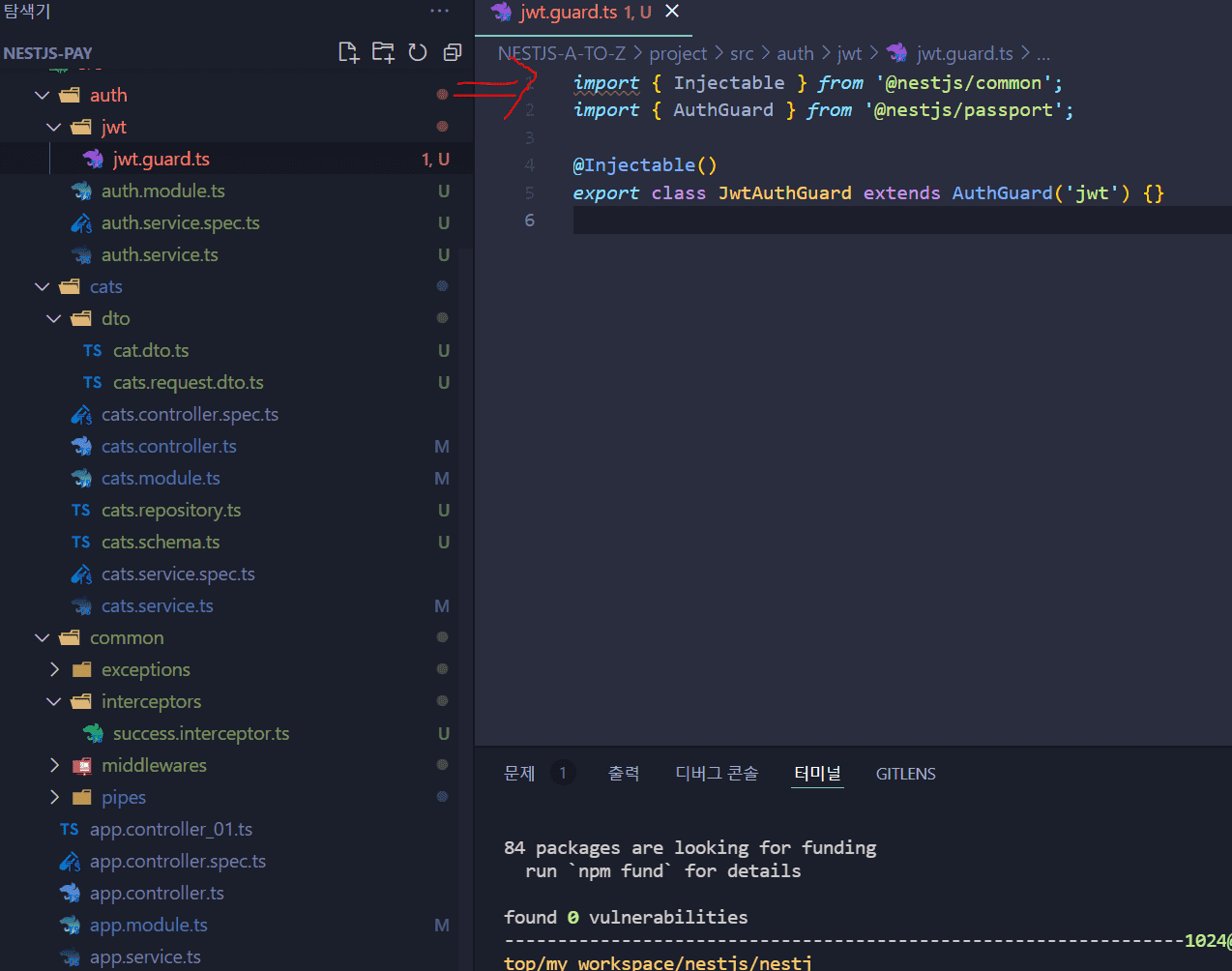
다음 사진처럼 항상 파일을 클릭하면
상단 import줄이 저렇게 변하는데요
파일을 다시 닫으면 빨간줄이 사라집니다.
깃허브에 있는 tsconfig.json과 .eslintrc.js는 그대로 복붙했습니다. 제가놓친게있을까요?
답변 1
0
vscode 에디터에서 eslint를 파싱하지 못하는 이슈일 가능성이 큽니다!
.vscode 폴더를 만들고 아래의 파일을 프로젝트 루트 경로에 추가해주세요
.vscode/settings.json
프로젝트 환경 세팅할 때 최신 노드 버젼을 사용하시는 분들은 참고하셔도 좋을 것 같아요~
2
101
1
DTO에 대한 질문
1
98
2
백엔드 MVC에서 View의 역할은 무엇인가요?
1
112
2
추가 업데이트 관련 건
0
106
2
nest js 버전문제
0
97
2
mongdb 스키마 공식 문서와 형태가 다른 이유 궁금합니다.
0
113
1
라인 끝에 에러 표시(eslint) 때문에 구글 찾아 보니.
0
83
1
전체 고양이 조회 라우터 중 error.message 오류
0
82
1
캡슐화 추가 설명 중 단일책임원칙 관련 질문
0
115
0
42강 고양이끼리 소통 댓글 구현 중 Schema hasn't been registered for model 'comments' 에러 해결
0
86
1
채팅 이슈
0
137
1
모듈이 더 이상 지원하지 않는답니다
0
216
1
오류가 있습니다
0
114
1
import 에서 오류가 납니다
0
131
1
이런 오류가 나옵니다
0
109
1
에러가 발생합니다
0
117
1
프론트 에러 뜨는데 수정 안해주시나요
0
169
1
emit() broadcast.emit() 질문있습니다
0
107
1
서버연결이 안됩니다.
1
408
1
[PM2][ERROR] Command not found
0
529
1
S3에 업로드까지는 성공했는데 사진이 나오지 않습니다.
0
254
1
error_code : Property 'user' does not exist on type 'Request<ParamsDictionary, any, any, ParsedQs, Record<string, any>>'.ts(2339)
0
607
1
jwt를 따로 연습하고 있는데 env를 못읽는 것 같습니다.
0
331
2
Ec2로 안하시는 이유가 있을까요?
0
346
1