


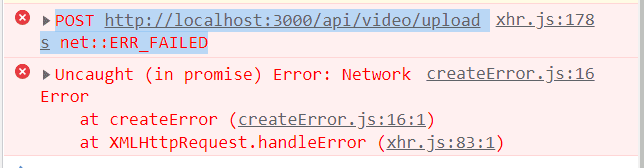
너무 답답해요 ㅠㅠ POST http://localhost:3000/api/video/uploads net::ERR_FAILED 라고만 뜹니다.
3205
작성한 질문수 4
다른 에러 로그도 안 뜨니 사람 미치고 팔짝 뛸 노릇이네요. 몇시간째 삽질 중인데 해결방책이 안 나와요. 검색해봐도 cors관련 에러 해결만 뜨고....
server/index.js
const express = require('express');
const router = express.Router();
const multer = require('multer');
//var ffmpeg = require('fluent-ffmpeg');

//const { Video } = require("../models/Video");
//const { Subscriber } = require("../models/Subscriber");
//const { auth } = require("../middleware/auth");

const storage = multer.diskStorage({

    destination: (req, file, cb) => {
        cb(null, 'uploads/')
    },
    filename: (req, file, cb) => {
        cb(null, `${Date.now()}_${file.originalname}`)
    }
})

const fileFilter = (req, file, cb) => {
    // mime type 체크하여 원하는 타입만 필터링
    if (file.mimetype == 'video/mp4' ) {
        cb(null, true);
    } else {
        cb({msg:'mp4 파일만 업로드 가능합니다.'}, false);
    }
}

const upload = multer({ storage: storage, fileFilter: fileFilter }).single("file")


router.post("/uploads", (req, res) => {
    upload(req, res, err => {
        if (err) {
            return res.json({ success: false, err })
        }

        else {

            return res.json({ success: true, filePath: res.req.file.path, fileName: res.req.file.filename })

        }
    })
});

module.exports = router;
[routes/video.js]
const express = require("express");
const app = express();
const bodyParser = require("body-parser");
const cookieParser = require("cookie-parser");

const config = require("./config/key");

// const mongoose = require("mongoose");
// mongoose
//   .connect(config.mongoURI, { useNewUrlParser: true })
//   .then(() => console.log("DB connected"))
//   .catch(err => console.error(err));

const mongoose = require("mongoose");
const connect = mongoose.connect(config.mongoURI, { useNewUrlParser: true, useUnifiedTopology: true })
  .then(() => console.log('MongoDB Connected...'))
  .catch(err => console.log(err));


app.use(bodyParser.urlencoded({ extended: true }));
app.use(bodyParser.json());
app.use(cookieParser());

app.use('/api/users', require('./routes/users'));
app.use('/api/video', require('./routes/video'));
//app.use('/api/subscribe', require('./routes/subscribe'));
//app.use('/api/comment', require('./routes/comment'));
//app.use('/api/like', require('./routes/like'));


//use this to show the image you have in node js server to client (react js)
//https://stackoverflow.com/questions/48914987/send-image-path-from-node-js-express-server-to-react-client
app.use('/uploads', express.static('uploads'));

// Serve static assets if in production
if (process.env.NODE_ENV === "production") {

  // Set static folder
  app.use(express.static("client/build"));

  // index.html for all page routes
  app.get("*", (req, res) => {
    res.sendFile(path.resolve(__dirname, "client", "build", "index.html"));
  });
}

const port = process.env.PORT || 5000

app.listen(port, () => {
  console.log(`Server Running at ${port}`)
});
[VideoUploadPage.js]
import React, { useState } from 'react';
import { Typography, Button, Form, message, Input, icon } from 'antd';
import Dropzone from 'react-dropzone';
import * as axios from 'axios';
import icons from '@ant-design/icons';

const { TextArea } = Input;
const { Title } = Typography;

const PrivateOptions = [
    {value: 0, label: "Private"},
    {value: 1, label: "Public"}
];

const CategoryOptions = [
    {value: 0, label: "Film & Animation"},
    {value: 1, label: "Autos & Vehicles"},
    {value: 2, label: "Music"},
    {value: 3, label: "Pets & Animals"}
];

function VideoUploadPage(props) {
    const [VideoTitle, setVideoTitle] = useState("");
    const [Description, setDescription] = useState("");
    const [Private, setPrivate] = useState(0);
    const [Category, setCategory] = useState("Film & Animation");

    const onTitleChange = (e) => {
        setVideoTitle(e.currentTarget.value);
    }

    const onDescriptionChange = (e) => {
        setDescription(e.currentTarget.value);
    }

    const onPrivateChange = (e) => {
        setPrivate(e.currentTarget.value);
    }


    const onCategoryChange = (e) => {
        setCategory(e.currentTarget.value);
    }

    const onDrop = (files) => {
        let formData = new FormData;
        const config = {
            header: { 'content-type': 'multipart/form-data' }
        }
        //console.log(files)
        formData.append("file", files[0])

        axios.post('/api/video/uploads', formData, config)
            .then(response => {
                if(response.data.success) {
                    console.log(response.data);
                } else {
                    alert('Video upload failed');
                }
            })
    }

    const onSubmit = () => {
        console.log('submit');
    }

    return (
        <div style={{ maxWidth: '700px', margin: '2rem auto' }}>
            <div style={{ textAlign: 'center', marginBottom: '2rem' }}>
                <Title level={2}>Upload Video</Title>
            </div>

            <Form onSubmit>
                <div style={{ display: 'flex', justifyContent: 'space-between' }}>
                    {/* Drop zone */}
                    <Dropzone
                        onDrop={onDrop}
                        multiple={false}
                        maxSize={800000000}>
                        {({ getRootProps, getInputProps }) => (
                            <div style={{ width: '300px', height: '240px', border: '1px solid lightgray', display: 'flex', alignItems: 'center', justifyContent: 'center' }}
                                {...getRootProps()}
                            >
                                <input {...getInputProps()} />
                                <icon type="plus" style={{ fontSize: '3rem' }} />

                            </div>
                        )}
                    </Dropzone>

                    {/* Thumbnail */}
                    <div>
                        <img src alt />
                    </div>
                </div>

                <br />
                <br />
                <label>Title</label>
                <Input
                    onChange={onTitleChange}
                    value={VideoTitle}
                />

                <br />
                <br />
                <label>Description</label>
                <TextArea
                    onChange={onDescriptionChange}
                    value={Description}
                />

                <br />
                <br />
                <select onChange={onPrivateChange}>
                    {PrivateOptions.map((item, index) => (
                        <option key={index} value={item.value}>{item.label}</option>
                    ))}
                </select>

                <br />
                <br />

                <select onChange={onCategoryChange}>
                    {CategoryOptions.map((item, index) => (
                        <option key={index} value={item.value}>{item.label}</option>
                    ))}
                </select>


                <br />
                <br />

                <Button type="primary" size="large" onClick={onSubmit}>
                    Submit
                </Button>
            </Form>
        </div>
    );
}

export default VideoUploadPage;
답변 1
npm i하면 바로, 라이브러리 오류없이 받아지고, 구동되는 소스는 없나요?
0
72
1
ERROR in ./node_modules/antd/es/version/index.js 2:15-22
0
242
1
자료 없음
0
348
1
이미지 깨짐
0
368
1
npm run dev 동작 에러
0
326
1
npm run dev 동작 에러
0
314
1
npm run dev 동작에러납니다...
0
673
1
npm run dev 실행 오류
0
679
1
비디오 업로드, 로그인, 회원가입 504 error
0
1076
1
시작부터 오류생기시는 분들 해결법입니다.
1
489
1
오류 해결 공유
0
489
1
npm install 에러 질문드립니다.
0
1151
2
아예 몽고DB에 연결한다고만 하고 연결이 안되고 있습니다.
0
561
1
해당 오류 해결 방법 좀 알려주세요 ㅠㅠ
0
559
1
로컬스토리지에 대한 질문입니다!!
0
531
0
video가 안 나타나는 문제
0
919
1
ffmpeg 설치 후 cannot read property 'format' of undefined 500 에러 해결
0
490
0
typeError or 콘솔 500 뜨는분..
0
353
0
npm run dev 관련 오류
0
596
1
답글이 달리지않고 디비에도 저장되지않으며 새로고침이 됩니다.
0
264
0
useState 자동 생성
0
360
1
TypeError: Cannot read properties of undefined (reading 'format')
0
1267
2
userData undefined / state에 user.userData가 없습니다.
0
257
0
antd Input background color 변경
0
249
0