


loadable 사용해서 코드스플리팅 적용시 나타나는 에러
416
다삐
작성한 질문수 3
0
안녕하세요
로더블 적용후 npm start 하면 이러한 청크에러가 뜹니다.
해결방법이 무엇인지 모르겠습니다..
-
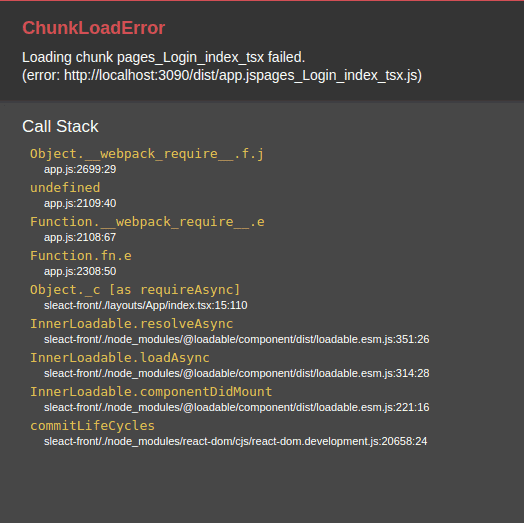
아래 코드는 run dev 했을때 터미널에 나타나는 코드 입니다.
```js
> sleact-front@1.0.0 dev /home/dahee/projects/inflearn/sleact/alecture > cross-env TS_NODE_PROJECT="tsconfig-for-webpack-config.json" webpack serve --env development <w> [webpack-dev-server] "hot: true" automatically applies HMR plugin, you don't have to add it manually to your webpack configuration. <i> [webpack-dev-server] [HPM] Proxy created: /api/ -> http://localhost:3095 <i> [webpack-dev-server] Project is running at: <i> [webpack-dev-server] Loopback: http://localhost:3090/ <i> [webpack-dev-server] On Your Network (IPv4): http://172.30.1.10:3090/ <i> [webpack-dev-server] Content not from webpack is served from '/home/dahee/projects/inflearn/sleact/alecture' directory <i> [webpack-dev-server] 404s will fallback to '/index.html' @babel/preset-env: `DEBUG` option Using targets: { "chrome": "94" } Using modules transform: auto Using plugins: syntax-class-static-block syntax-private-property-in-object syntax-class-properties syntax-numeric-separator syntax-nullish-coalescing-operator syntax-optional-chaining syntax-json-strings syntax-optional-catch-binding syntax-async-generators syntax-object-rest-spread syntax-dynamic-import proposal-export-namespace-from { } syntax-top-level-await Using polyfills: No polyfills were added, since the `useBuiltIns` option was not set. asset app.js 1.73 MiB [emitted] (name: app) asset vendors-node_modules_emotion_styled_base_dist_emotion-styled-base_browser_esm_js-node_modules-55caac.js 170 KiB [emitted] (id hint: vendors) asset pages_SignUp_index_tsx.js 48.8 KiB [emitted] asset layouts_Workspace_index_tsx.js 3.2 KiB [emitted] asset pages_Login_index_tsx.js 3.15 KiB [emitted] runtime modules 31.4 KiB 16 modules orphan modules 10.3 KiB [orphan] 2 modules modules by path ./node_modules/ 1.59 MiB 219 modules modules by path ./pages/ 43 KiB ./pages/Login/index.tsx 1.19 KiB [built] [code generated] ./pages/SignUp/index.tsx 5.27 KiB [built] [code generated] ./pages/SignUp/styles.tsx 36.5 KiB [built] [code generated] modules by path ./layouts/ 3.3 KiB ./layouts/App/index.tsx 2.09 KiB [built] [code generated] ./layouts/Workspace/index.tsx 1.21 KiB [built] [code generated] ./client.tsx 1.26 KiB [built] [code generated] ./hooks/useinput.ts 1.33 KiB [built] [code generated] sleact (webpack 5.63.0) compiled successfully in 4851 ms
```
아래는 App.js에 있는 라우팅 코드 입니다.
```js
import loadable from '@loadable/component'
import React from "react";
import { Route, Switch, Redirect } from "react-router-dom";
const LogIn = loadable(() => import('@pages/Login'));
const SignUp = loadable(() => import('@pages/SignUp'));
const Workspace = loadable(() => import('@layouts/Workspace'));
const App = () => {
return (
<Switch>
<Redirect exact path="/" to="/login" />
<Route path="/login" component={LogIn} />
<Route path="/signup" component={SignUp} />
<Route path="/workspace/:workspace" component={Workspace} />
</Switch>
)
}
export default App;
```
현재시점 webpack.config파일입니다
```js
import path from 'path';
import ReactRefreshWebpackPlugin from '@pmmmwh/react-refresh-webpack-plugin';
import webpack from 'webpack';
import ForkTsCheckerWebpackPlugin from 'fork-ts-checker-webpack-plugin';
// import { BundleAnalyzerPlugin } from 'webpack-bundle-analyzer';
const isDevelopment = process.env.NODE_ENV !== 'production';
const config: webpack.Configuration = {
name: 'sleact',
mode: isDevelopment ? 'development' : 'production',
devtool: !isDevelopment ? 'hidden-source-map' : 'eval',
resolve: {
extensions: ['.js', '.jsx', '.ts', '.tsx', '.json'],
alias: {
'@hooks': path.resolve(__dirname, 'hooks'),
'@components': path.resolve(__dirname, 'components'),
'@layouts': path.resolve(__dirname, 'layouts'),
'@pages': path.resolve(__dirname, 'pages'),
'@utils': path.resolve(__dirname, 'utils'),
'@typings': path.resolve(__dirname, 'typings'),
},
},
entry: {
app: './client',
},
module: {
rules: [
{
test: /\.tsx?$/,
loader: 'babel-loader',
options: {
presets: [
[
'@babel/preset-env',
{
targets: { browsers: ['last 2 chrome versions'] },
debug: isDevelopment,
},
],
'@babel/preset-react',
'@babel/preset-typescript',
],
env: {
development: {
plugins: [['@emotion', { sourceMap: true }], require.resolve('react-refresh/babel')],
},
production: {
plugins: ['@emotion'],
},
},
},
exclude: path.join(__dirname, 'node_modules'),
},
{
test: /\.css?$/,
use: ['style-loader', 'css-loader'],
},
],
},
plugins: [
new ForkTsCheckerWebpackPlugin({
async: false,
}),
new ReactRefreshWebpackPlugin(),
new webpack.HotModuleReplacementPlugin()
],
output: {
path: path.join(__dirname, 'dist'),
filename: '[name].js',
publicPath: '/dist/app.js',
},
devServer: {
historyApiFallback: true,
port: 3090,
devMiddleware: { publicPath: "/dist/" },
static: { directory: path.resolve(__dirname) },
proxy : {
'/api/': {
changeOrigin: true,
target:'http://localhost:3095'
}
}
},
};
```
답변 0
클로드코드 계획 보고 방법 알고싶어요.
0
9
1
실무 버전 출시는 언제?
0
7
0
예시 1, 2, 3에서 질문있습니다.
0
16
2
Cursor 프로젝트 목록 및 작업 환경 동기화 문의
0
14
1
파워쉘, 터미널
0
14
2
스킬과 서브에이전트 병행 사용 질문
0
21
2
강의 잘 들었습니다.
0
20
1
터미널에서 커서 AI 직접 실행
0
32
2
해결했습니다
0
34
1
이런 경우는 어떤 조치를 취해야할까요?
0
38
2
hooks 설정이 안되요
0
45
2
영상 최신으로 엡데이트 요청
0
67
2
소스 코드가 회사 보안 프로그램에 막혀서 안 보여요.
0
55
2
claude code 상태표시줄 궁금합니다!
0
51
2
수파베이스 데모 버전
0
39
1
10월 15일 삭제예정 강의 문의
0
41
1
설치의 필요성
0
77
2
modal-root질문드립니다.
0
62
2
모달 여러개 질문드립니다
0
53
2
npm install 안될 때
0
240
0
WebSocket이 제대로 연결되지 않는 것 같습니다
0
329
1
cannot get/ 에러 원인
0
3893
1
back 폴더에서 npm install 시 에러가 발생하시는 분들 참고
1
270
0
폴더구조 질문입니다.
0
245
0