인프런 커뮤니티 질문&답변
선생님 B1 타입 연습중에 질문이요
작성
·
163
1
■ 질문 남기실 때 꼭! 참고해주세요.
@charset "UTF-8";
<!DOCTYPE html>
<html lang="ko">
<head>
<meta charset="UTF-8">
<title>대한은행</title>
<link rel="stylesheet" href="css/style.css">
</head>
<body>
<div class="container">
<div class="header-inner">
<header>
<div class="header-logo">
<a href="#none"><img src="images/logo-header.png" alt="로고"></a>
</div>
<div class="navi">
<ul class="menu">
<li>
<a href="#none">개인</a>
<div class="sub-menu">
<a href="#none">조회</a>
<a href="#none">이체</a>
<a href="#none">공과금</a>
<a href="#none">예금/신탁</a>
</div>
</li>
<li>
<a href="#none">기업</a>
<div class="sub-menu">
<a href="#none">조회</a>
<a href="#none">이체</a>
<a href="#none">전자결재</a>
<a href="#none">수표/어음</a>
</div>
</li>
<li>
<a href="#none">금융상품</a>
<div class="sub-menu">
<a href="#none">저축상품</a>
<a href="#none">대출상품</a>
<a href="#none">투자상품</a>
</div>
</li>
<li>
<a href="#none">카드</a>
<div class="sub-menu">
<a href="#none">카드 정보</a>
<a href="#none">카드 신청</a>
<a href="#none">이용내역조회</a>
</div>
</li>
</ul>
</div>
</header>
</div>
<div class="slide">
<div>
<a href="#none"><img src="images/slide1.jpg" alt="슬라이드배너1"></a>
<a href="#none"><img src="images/slide2.jpg" alt="슬라이드배너2"></a>
<a href="#none"><img src="images/slide3.jpg" alt="슬라이드배너3"></a>
</div>
</div>
<div class="items">
<div class="news">
<div class="tab-inner">
<div class="btn">
<span class="active">공지사항</span>
<span>갤러리</span>
</div>
<div class="tabs">
<div class="tab1">
<a href="#none">골든라이프 서비스 오픈안내</a>
<a href="#none">재난기본소득 신청 안내</a>
<a href="#none">오픈뱅킹 대상기관 확대 안내</a>
<a href="#none">간편결재 이벤트 안내</a>
</div>
<div class="tab2">
<a href="#none"><img src="images/gallery1.jpg" alt="갤러리1"></a>
<a href="#none"><img src="images/gallery2.jpg" alt="갤러리2"></a>
<a href="#none"><img src="images/gallery1.jpg" alt="갤러리3"></a>
</div>
</div>
</div>
<div class="banner">
<a href="#none"><img src="images/banner.jpg" alt="배너"></a>
</div>
<div class="shortcut">
<a href="#none"><img src="images/shortcut.jpg" alt="바로가기"></a>
</div>
</div>
<div class="footer-inner">
<footer>
<div class="footer-logo">
<a href="#none"><img src="images/logo-footer.png" alt="푸터로고"></a>
</div>
<div class="copyright">
<div>
<a href="#none">이용상담</a>
<a href="#none">보안프로그램</a>
<a href="#none">사고신고</a>
<a href="#none">개인정보처리방침</a>
<a href="#none">신용정보활용체제</a>
</div>
<div>Copyright KB Kookmin Bank. All Rights Reserved</div>
</div>
</footer>
</div>
</div>
<script src="script/jquery-1.12.4.min.js"></script>
<script src="script/custom.js"></script>
</body>
</html>

@charset "UTF-8";
* {margin: 0; padding: 0;}
ul {list-style: none;}
a {text-decoration: none; color: #333;}
body {
background: #fff;
color: #333;
font-size: 15px;
font-family: "맑은 고딕";
line-height: 25px;
}
.container {}
.header-inner {
width: 100%;
height: 100px;
background: #eee;
}
header {
width: 1200px;
margin: auto;
position: relative;
z-index: 10;
}
header > div {
height: 100px;
}
.header-logo {
width: 200px;
float: left;
}
.navi {
width: 600px;
float: right;
}
.slide {
width: 1200px;
margin: auto;
}
.slide > div {
height: 300px;
}
.items {
width: 1200px;
margin: auto;
overflow: hidden;
}
.items > div {
height: 200px;
float: left;
box-sizing: border-box;
padding-top: 5px;
}
.news {
width: 600px;
}
.banner {
width: 300px;
}
.shortcut {
width: 300px;
}
.footer-inner {
width: 100%;
height: 100px;
background: #eee;
}
footer {
width: 1200px;
margin: auto;
overflow: hidden;
}
footer > div {
height: 100px;
float: left;
box-sizing: border-box;
}
.footer-logo {
width: 200px;
}
.copyright {
width: 1000px;
}
.copyright div {
height: 50px;
}
/* 이미지&텍스트 */
.header-logo,
.footer-logo {
line-height: 9em;
}
.copyright div{
text-align: center;
}
.copyright div a {
display: inline-block;
padding: 5px;
margin-top: 20px;
}
.copyright div a:hover {
text-decoration: underline;
}
/* 슬라이드 배너 */
.slide {
position: relative;
overflow: hidden;
height: 300px;
}
.slide > div {
width: 3600px;
float: left;
font-size: 0;
position: absolute;
top: 0;
left: 0;
animation: slide 10s linear infinite;
}
@keyframes slide {
0% {
left: 0;
}
30% {
left: 0;
}
35% {
left: -1200px;
}
65% {
left: -1200px;
}
70% {
left: -2400px;
}
95% {
left: -2400px;
}
100% {
left: 0;
}
}
/* 네비게이션 */
.menu {
margin-top: 3.5em;
}
.menu li {
width: 150px;
float: left;
background: #fff;
text-align: center;
}
.menu li > a {
display: block;
padding: 10px;
font-weight: bold;
border: 1px solid #000;
transition: 0.5s;
}
.menu li:hover > a {
background: #000;
color: #fff;
}
.sub-menu {
border-bottom: 1px solid #000;
display: none;
}
.sub-menu a {
display: block;
padding: 5px;
transition: 0.5s;
}
.sub-menu a:hover {
background: #000;
color: #fff;
}
.menu li:nth-child(1) .sub-menu {
border-left: 1px solid #000;
}
.menu li:nth-child(4) .sub-menu {
border-right: 1px solid #000;
}
.menu li:nth-child(3) .sub-menu {
padding-bottom: 10px;
}
.menu li:nth-child(4) .sub-menu {
padding-bottom: 10px;
}
/* 공지사항&갤러리 탭 */
.tab-inner {
width: 98%;
margin: auto;
}
.btn {}
.btn span {
display: inline-block;
padding: 5px;
width: 120px;
text-align: center;
border: 1px solid #000;
border-radius: 5px 5px 0 0;
background: #eee;
border-bottom: none;
margin-bottom: -1px;
font-weight: bold;
margin-right: -6px;
}
.btn span.active {
background: #fff;
}
.tabs {}
.tabs > div {
border: 1px solid #000;
height: 155px;
box-sizing: border-box;
}
.tab1 {
padding: 0 10px;
}
.tab1 a {
display: block;
padding: 5px;
border-bottom: 1px solid #000;
}
.tab1 a:last-child {
border-bottom: none;
}
.tab2 {
display: none;
}
.tab2 a img {
width: 180px;
display: inline-block;
padding: 5px;
}
/* 네비게이션 */
$('.menu li').mouseenter(function(){
$('.sub-menu').stop().slideDown()
})
$('.menu li').mouseleave(function(){
$('.sub-menu').stop().slideUp()
})
/* 공지사항&갤러리 탭*/
$('.btn span:first-child').click(function(){
$('.tab1').show()
$('.tab2').hide()
$(this).addClass('active')
$(this).siblings().removeClass('active')
})
$('.btn span:last-child').click(function(){
$('.tab1').hide()
$('.tab2').show()
$(this).addClass('active')
$(this).siblings().removeClass('active')
})
선생님, B1타입 연습중에 items 부분에 문제가 생겨서 도저히 뭐가 잘못됐는지 찾질 못해서
이렇게 문의 드립니다. 이거 가지고 몇시간째 넘어가질 못하고 있네요...
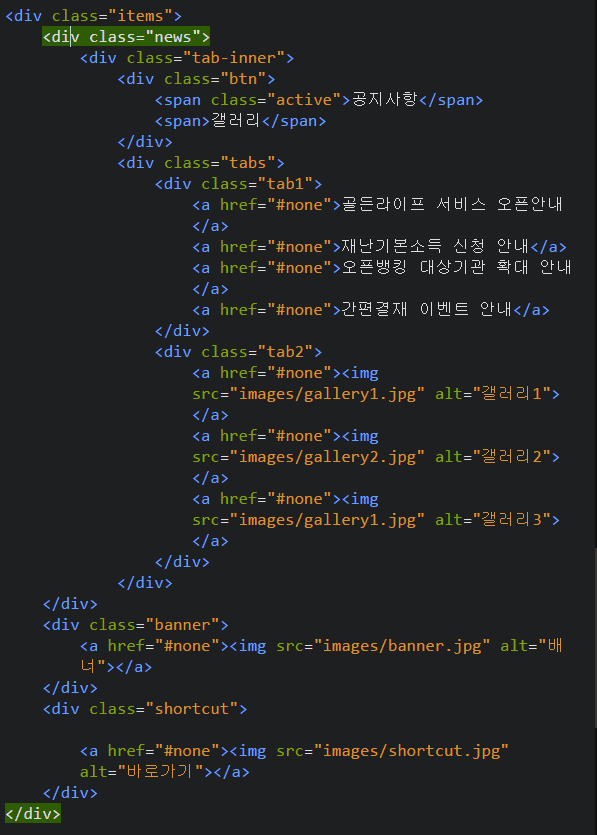
공지사항 갤러리 탭 하는 과정에서 이렇게 배너부분과 바로가기 부분이 공지사항 div 뒤로 숨어버렸어요
퀴즈
웹디자인 실기 시험 제출 폴더 내에 필수로 포함되어야 하는 하위 폴더 구성은 무엇일까요?
html, css, js, img
css, script, images
style, custom, photo
src, dist, assets
답변 1
0
코딩웍스(Coding Works)
지식공유자
전체적으로 html 구조가 잘못된 곳이 너무 많아요.
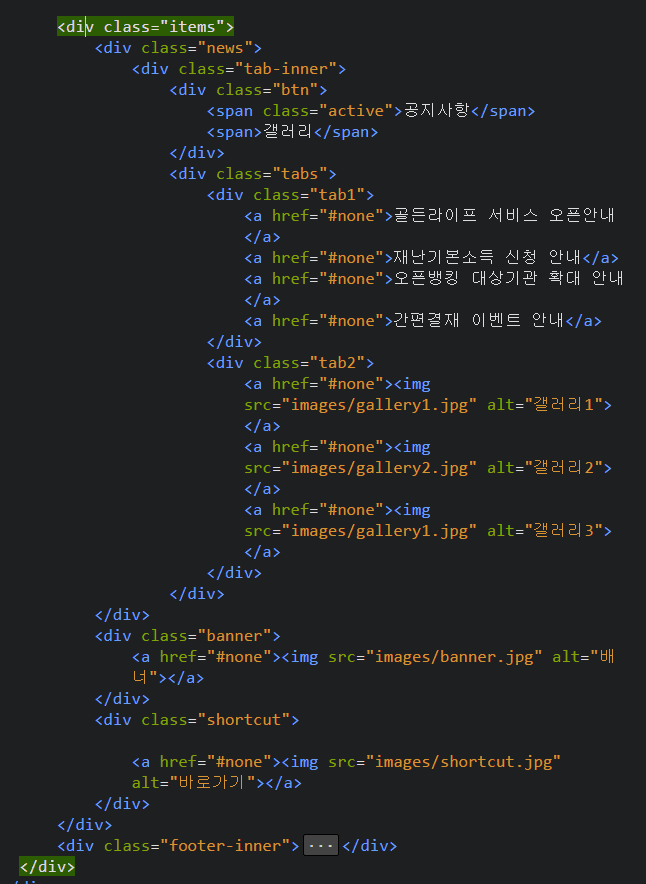
<div class="container"> 에 마감 </div>가 없어서 코드미스가 났습니다. 마감 태그 잊지마세요.
.news가 .banner랑 .shortcut을 담고 있으면 안됩니다. 그래서 숨게된거구요.
.items가 footer까지 감싸고 있습니다. 이것도 이렇게 하시면 다른 것들도 엉망이 될거에요.


아.. 마감태그의 문제였네요... 감사합니다 ^^