


인프런 커뮤니티 질문&답변

작성한 질문수

윈도우에서 진행하는데 오류가 납니다
해결된 질문
작성
·
1.6K
1
안녕하세요 선생님
선생님은 맥에서 리눅스 환경으로
로 진행하셨는데, 저는 윈도우에서 진행중입니다!
https://sharp.pixelplumbing.com/install 을 참고해
위에 명령어로 설치해봐도
2021-08-20T11:43:36.173Z undefined ERROR
Something went wrong installing the "sharp" module
Cannot find module '../build/Release/sharp-linux-x64.node'
Require stack:
- /var/task/node_modules/sharp/lib/sharp.js
- /var/task/node_modules/sharp/lib/constructor.js
- /var/task/node_modules/sharp/lib/index.js
- /var/task/index.js
- /var/runtime/UserFunction.js
- /var/runtime/index.js
Possible solutions:
- Install with the --verbose flag and look for errors: "npm install --ignore-scripts=false --verbose sharp"
- Install for the current runtime: "npm install --platform=linux --arch=x64 sharp"
- Consult the installation documentation: https://sharp.pixelplumbing.com/install
이러한 에러가 납니다.
해결방안이 있을까요?
+추가로 npm install --platform=linux --arch=x64 sharp도 설치해봐도 같은 에러가 떠요!
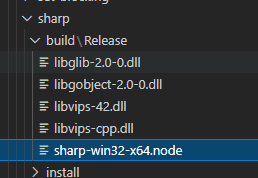
답변 1
0

강전욱님 안녕하세요 :)
sharp uninstall 되어 있는 상태에서 npm install --arch=x64 --platform=linux sharp 이걸 실행하셨나요? 기존 sharp가 설치되어 있으면 안될거에요.
그리고 윈도우 환경이어도 platform을 linux로 해줘야 되요. 윈도우 로컬 환경에서 sharp를 사용하지 않고 linux환경인 람다에서 sharp를 사용할거라서요
앗... 감사합니다 ㅎㅎ..
처음에 난 윈도우니까 윈도우 버전 설치해야지 하고 오류가나서 에러잡기위해 여러가지 실행해볼때 노드모듈파일만 삭제하고 npm uninstall sharp 를 안했었엇네요 ㅎㅎ..
npm install --platform=linux --arch=x64 sharp 만 설치하면 되네요!
저같은 분들을 위해 남겨놓겠습니다 ㅎㅎ..