


안녕하세요 설치를 도와주는 베이그런트(Vagrant) 수업을 듣고 다른부분이 있어 질문 드립닌다
- 학습 관련 질문을 남겨주세요. 상세히 작성하면 더 좋아요!
- 먼저 유사한 질문이 있었는지 검색해보세요. 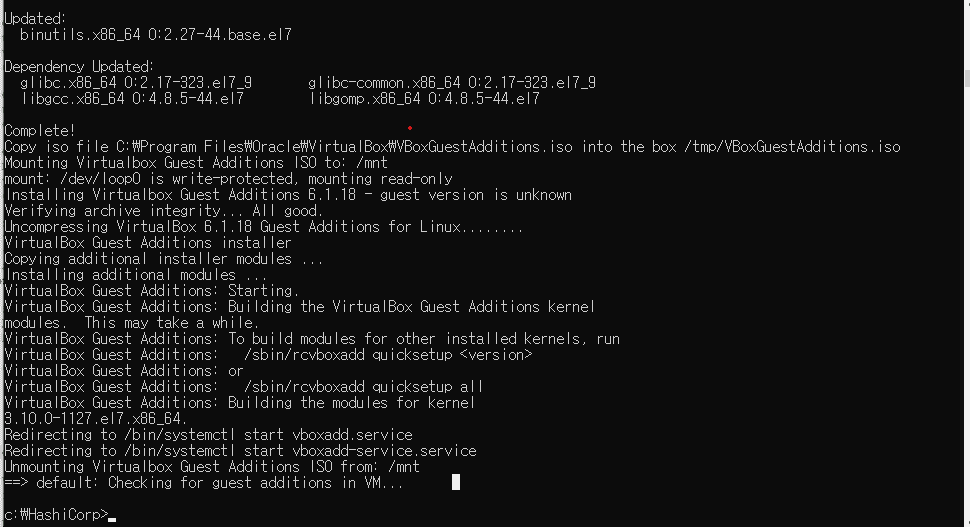
막단에 보면
Unmounting Virtualbox Guest Additions ISO from: /mnt ==> default: Checking for guest additions in VM...
이 코드 부분이 영상에 있는 부분과 다르게 나옵니다
vagrant file에서
config.vm.synced_folder ".", "/vagrant", disabled: true
베이그런트 파일에서 공유 폴더 설정을 위와 같이 바꿨는데
혹시 어떤 조치를 취해야 저 오류를 없앨 수 있을까요...
- 잠깐! 인프런 서비스 운영 관련 문의는 1:1 문의하기를 이용해주세요.
답변 5
1
일단 적어주신 이 부분은 오류가 아니고요.
Unmounting Virtualbox Guest Additions ISO from: /mnt ==> default: Checking for guest additions in VM...
VirtualBox의 Guest Additions 이라고 해서 기능을 좀 추가해주는게 있는데
(https://docs.oracle.com/cd/E36500_01/E36502/html/qs-guest-additions.html)
그걸 이미 설치하신 경우에 따라서 조금씩 메시지가 틀릴 수가 있어서요.
위의 메시지를 해석하자면(메시지만)
Virtualbox Guest Additions 이미지를 /mnt에 마운트했는데 umount함 >>> VM에 guest addions를 설치되었는지 체크
이런 의미에요
그래서 딱히 그걸 신경쓰지 않으셔도 될꺼 같아요
원래 지금 disable하는 옵션은 기본적으로 호스트(노트북/데스크탑)과 가상머신에 서로 공유할 수 있는 디렉터리는 설정하는 건데 그걸 disable하는거라서요.
참고로
기본 설정에서는 아래와 같이 나오고요.
```bash
<중략>
default: Inserting generated public key within guest...
default: Removing insecure key from the guest if it's present...
default: Key inserted! Disconnecting and reconnecting using new SSH key...
==> default: Machine booted and ready!
==> default: Checking for guest additions in VM...
default: No guest additions were detected on the base box for this VM! Guest
default: additions are required for forwarded ports, shared folders, host only
default: networking, and more. If SSH fails on this machine, please install
default: the guest additions and repackage the box to continue.
default:
default: This is not an error message; everything may continue to work properly,
default: in which case you may ignore this message.
```
plugin 중에 vagrant-vbguest를 설치한 경우는 아래와 같이 나온답니다.
(https://github.com/dotless-de/vagrant-vbguest)
```bash
<중략>
No package kernel-devel-3.10.0-1127.el7.x86_64 available.
Error: Nothing to do
Unmounting Virtualbox Guest Additions ISO from: /mnt
umount: /mnt: not mounted
==> default: Checking for guest additions in VM...
default: No guest additions were detected on the base box for this VM! Guest
default: additions are required for forwarded ports, shared folders, host only
default: networking, and more. If SSH fails on this machine, please install
default: the guest additions and repackage the box to continue.
default:
default: This is not an error message; everything may continue to work properly,
default: in which case you may ignore this message.
The following SSH command responded with a non-zero exit status.
Vagrant assumes that this means the command failed!
umount /mnt
Stdout from the command:
Stderr from the command:
umount: /mnt: not mounted
c:\HashiCorp\_Lecture_Ansible.adv\ch0\0.2>
```
또 진행하시면서 궁금하신게 있으면, 얘기해주세요 :)
조훈 드림.
0
안녕하십니까 조훈님. 강의를 들으면서 centos8로 실습을 진행한지라 오류가 있어서 문의 드립니다!
윈도우10 사용중이며 centos8로 진행하였습니다. 왜 이런 오류들이 뜨는걸까요...,.?
c:\HashiCorp>vagrant up
Bringing machine 'default' up with 'virtualbox' provider...
==> default: Importing base box 'centos/8'...
==> default: Matching MAC address for NAT networking...
==> default: Setting the name of the VM: HashiCorp_default_1630292514085_76022
==> default: Clearing any previously set network interfaces...
==> default: Preparing network interfaces based on configuration...
default: Adapter 1: nat
==> default: Forwarding ports...
default: 22 (guest) => 2222 (host) (adapter 1)
==> default: Booting VM...
==> default: Waiting for machine to boot. This may take a few minutes...
default: SSH address: 127.0.0.1:2222
default: SSH username: vagrant
default: SSH auth method: private key
default:
default: Vagrant insecure key detected. Vagrant will automatically replace
default: this with a newly generated keypair for better security.
default:
default: Inserting generated public key within guest...
default: Removing insecure key from the guest if it's present...
default: Key inserted! Disconnecting and reconnecting using new SSH key...
==> default: Machine booted and ready!
[default] No Virtualbox Guest Additions installation found.
Last metadata expiration check: 0:00:02 ago on Mon 30 Aug 2021 03:03:05 AM UTC.
Package centos-release-8.1-1.1911.0.8.el8.x86_64 is already installed.
Dependencies resolved.
================================================================================
Package Arch Version Repository Size
================================================================================
Installing:
centos-linux-release noarch 8.4-1.2105.el8 BaseOS 22 k
replacing centos-release.x86_64 8.1-1.1911.0.8.el8
replacing centos-repos.x86_64 8.1-1.1911.0.8.el8
Upgrading:
centos-gpg-keys noarch 1:8-2.el8 BaseOS 12 k
Installing dependencies:
centos-linux-repos noarch 8-2.el8 BaseOS 20 k
Transaction Summary
================================================================================
Install 2 Packages
Upgrade 1 Package
Total download size: 53 k
Downloading Packages:
(1/3): centos-gpg-keys-8-2.el8.noarch.rpm 201 kB/s | 12 kB 00:00
(2/3): centos-linux-repos-8-2.el8.noarch.rpm 310 kB/s | 20 kB 00:00
(3/3): centos-linux-release-8.4-1.2105.el8.noar 333 kB/s | 22 kB 00:00
--------------------------------------------------------------------------------
Total 84 kB/s | 53 kB 00:00
CentOS-8 - Base 1.6 MB/s | 1.6 kB 00:00
warning: /var/cache/dnf/BaseOS-31c79d9833c65cf7/packages/centos-linux-release-8.4-1.2105.el8.noarch.rpm: Header V3 RSA/SHA256 Signature, key ID 8483c65d: NOKEY
Importing GPG key 0x8483C65D:
Userid : "CentOS (CentOS Official Signing Key) <security@centos.org>"
Fingerprint: 99DB 70FA E1D7 CE22 7FB6 4882 05B5 55B3 8483 C65D
From : /etc/pki/rpm-gpg/RPM-GPG-KEY-centosofficial
Key imported successfully
Running transaction check
Transaction check succeeded.
Running transaction test
Transaction test succeeded.
Running transaction
Preparing : 1/1
Running scriptlet: centos-gpg-keys-1:8-2.el8.noarch 1/1
Upgrading : centos-gpg-keys-1:8-2.el8.noarch 1/6
Installing : centos-linux-repos-8-2.el8.noarch 2/6
Installing : centos-linux-release-8.4-1.2105.el8.noarch 3/6
Obsoleting : centos-release-8.1-1.1911.0.8.el8.x86_64 4/6
Obsoleting : centos-repos-8.1-1.1911.0.8.el8.x86_64 5/6
Cleanup : centos-gpg-keys-8.1-1.1911.0.8.el8.noarch 6/6
Running scriptlet: centos-gpg-keys-8.1-1.1911.0.8.el8.noarch 6/6
Verifying : centos-linux-release-8.4-1.2105.el8.noarch 1/6
Verifying : centos-release-8.1-1.1911.0.8.el8.x86_64 2/6
Verifying : centos-repos-8.1-1.1911.0.8.el8.x86_64 3/6
Verifying : centos-linux-repos-8-2.el8.noarch 4/6
Verifying : centos-gpg-keys-1:8-2.el8.noarch 5/6
Verifying : centos-gpg-keys-8.1-1.1911.0.8.el8.noarch 6/6
Upgraded:
centos-gpg-keys-1:8-2.el8.noarch
Installed:
centos-linux-release-8.4-1.2105.el8.noarch centos-linux-repos-8-2.el8.noarch
Complete!
Error: Unknown repo: 'C*-base'
==> default: Checking for guest additions in VM...
default: No guest additions were detected on the base box for this VM! Guest
default: additions are required for forwarded ports, shared folders, host only
default: networking, and more. If SSH fails on this machine, please install
default: the guest additions and repackage the box to continue.
default:
default: This is not an error message; everything may continue to work properly,
default: in which case you may ignore this message.
The following SSH command responded with a non-zero exit status.
Vagrant assumes that this means the command failed!
yum install -y kernel-devel-`uname -r` --enablerepo=C*-base --enablerepo=C*-updates
Stdout from the command:
Stderr from the command:
Error: Unknown repo: 'C*-base'
0
다른 환경에서 생기는 문제는 제가 잘 알기는 어려운데...
메세지 상으로는 베이그런트가 현재 인식한 CentOS8에 날린 명령어에 정상적으로 응답받지 못했다는 내용입니다. (더 정확하게는 repo에 대해서요)
해당 내용은 box 이미지 제작자 및 구글에 물어보시는게 아마 해결이 도움이 되실꺼에요.
Installed:
centos-linux-release-8.4-1.2105.el8.noarch centos-linux-repos-8-2.el8.noarch
Complete!
Error: Unknown repo: 'C*-base'
0
넵 돌려보고 말씀드릴께요 호스트 환경이 윈도우인지 맥인지도 말씀해 주실수 있을까요?
그리고 제가 공유드린 코드는 어떤 결과가 나오나요?
0
# Create a forwarded port mapping which allows access to a specific port
# within the machine from a port on the host machine. In the example below,
# accessing "localhost:8080" will access port 80 on the guest machine.
# NOTE: This will enable public access to the opened port
# config.vm.network "forwarded_port", guest: 80, host: 8080
# Create a forwarded port mapping which allows access to a specific port
# within the machine from a port on the host machine and only allow access
# via 127.0.0.1 to disable public access
# config.vm.network "forwarded_port", guest: 80, host: 8080, host_ip: "127.0.0.1"
# Create a private network, which allows host-only access to the machine
# using a specific IP.
# config.vm.network "private_network", ip: "192.168.33.10"
# Create a public network, which generally matched to bridged network.
# Bridged networks make the machine appear as another physical device on
# your network.
# config.vm.network "public_network"
# Share an additional folder to the guest VM. The first argument is
# the path on the host to the actual folder. The second argument is
# the path on the guest to mount the folder. And the optional third
# argument is a set of non-required options.
config.vm.synced_folder ".", "/vagrant", disabled: true
# Provider-specific configuration so you can fine-tune various
# backing providers for Vagrant. These expose provider-specific options.
# Example for VirtualBox:
#
# config.vm.provider "virtualbox" do |vb|
# # Display the VirtualBox GUI when booting the machine
# vb.gui = true
#
# # Customize the amount of memory on the VM:
# vb.memory = "1024"
# end
#
# View the documentation for the provider you are using for more
# information on available options.
# Enable provisioning with a shell script. Additional provisioners such as
# Puppet, Chef, Ansible, Salt, and Docker are also available. Please see the
# documentation for more information about their specific syntax and use.
# config.vm.provision "shell", inline: <<-SHELL
# apt-get update
# apt-get install -y apache2
# SHELL
end
https://github.com/sysnet4admin/_Lecture_Ansible.adv/blob/master/0.%20%EB%8B%A4%EC%96%91%ED%95%9C%20%ED%99%98%EA%B2%BD%EC%9D%84%20%EC%95%A4%EC%84%9C%EB%B8%94%EB%A1%9C%20%EA%B4%80%EB%A6%AC%ED%95%B4%20%EB%B3%B4%EA%B8%B0%20with%20%EB%B2%A0%EC%9D%B4%EA%B7%B8%EB%9F%B0%ED%8A%B8/1%EC%9E%A5%20-%20%EA%B0%95%EC%9D%98%EB%A5%BC%20%EC%8B%9C%EC%9E%91%ED%95%98%EB%A9%B0/1.%20%EC%84%A4%EC%B9%98%EB%A5%BC%20%EB%8F%84%EC%99%80%EC%A3%BC%EB%8A%94%20%EB%B2%A0%EC%9D%B4%EA%B7%B8%EB%9F%B0%ED%8A%B8(Vagrant)/Vagrantfile
깃허브에 있는 내용을 그대로 복사하여 vagrant 파일을 구성하고 돌렸습니다...
방금 다시 해봤는데도 동일한 오류가 발생하네요
0
안녕하세요
언급해 주신 것처럼
vagrant file에서 config.vm.synced_folder ".", "/vagrant", disabled: true
설정이 되어 있다면, 나오지 않아야 할 메시지라서요.
그래서 아침에 좀 돌려봤는데요
11.Github/_Lecture_Ansible.adv/0. 다양한 환경을 앤서블로 관리해 보기 with 베이그런트/2장 - 베이그런트를 이용한 기초 실습 환경 구성 및 설명/2-1. 앤서블 서버에 앤서블 코어의 환경 구성하기
돌린 내용은 다음과 같고요.
❯
❯ cat Vagrantfile
───────┬───────────────────────────────────────────────────────────────────────────────────────────────────────────────────────────────────────────────────────────────────────────────────────────────
│ File: Vagrantfile
───────┼───────────────────────────────────────────────────────────────────────────────────────────────────────────────────────────────────────────────────────────────────────────────────────────────
1 │ # -*- mode: ruby -*-
2 │ # vi: set ft=ruby :
3 │
4 │ # All Vagrant configuration is done below. The "2" in Vagrant.configure
5 │ # configures the configuration version (we support older styles for
6 │ # backwards compatibility). Please don't change it unless you know what
7 │ # you're doing.
8 │ Vagrant.configure("2") do |config|
9 │ config.vm.define:"ansible-server" do |cfg|
10 │ cfg.vm.box = "sysnet4admin/CentOS-k8s"
11 │ cfg.vm.provider:virtualbox do |vb|
12 │ vb.name="Ansible-Server(github_SysNet4Admin)"
13 │ end
14 │ cfg.vm.host_name="ansible-server"
15 │ cfg.vm.synced_folder ".", "/vagrant", disabled: true
16 │ cfg.vm.network "public_network", ip: "192.168.1.10"
17 │ cfg.vm.network "forwarded_port", guest: 22, host: 19210, auto_correct: false, id: "ssh"
18 │ cfg.vm.provision "shell", path: "bootstrap.sh"
19 │ end
20 │
21 │ end
말씀해 주신 부분이 발생하지 않아서요.
혹시 돌린 Vagrantfile을 제공해 주실수 있을까요? 돌려 볼께요 :)
❯ vagrant up
Bringing machine 'ansible-server' up with 'virtualbox' provider...
==> ansible-server: Importing base box 'sysnet4admin/CentOS-k8s'...
==> ansible-server: Matching MAC address for NAT networking...
==> ansible-server: Checking if box 'sysnet4admin/CentOS-k8s' version '0.7.4' is up to date...
==> ansible-server: Setting the name of the VM: Ansible-Server(github_SysNet4Admin)
==> ansible-server: Clearing any previously set network interfaces...
==> ansible-server: Available bridged network interfaces:
1) en0: Wi-Fi (Wireless)
2) en5: USB Ethernet(?)
3) en2: Thunderbolt 0
4) en1: Thunderbolt 0
5) en3: Thunderbolt 1
6) en4: Thunderbolt 2
7) en7: USB 10/100/1000 LAN
8) bridge0
9) awdl0
10) llw0
==> ansible-server: When choosing an interface, it is usually the one that is
==> ansible-server: being used to connect to the internet.
==> ansible-server:
ansible-server: Which interface should the network bridge to? 1
==> ansible-server: Preparing network interfaces based on configuration...
ansible-server: Adapter 1: nat
ansible-server: Adapter 2: bridged
==> ansible-server: Forwarding ports...
ansible-server: 22 (guest) => 19210 (host) (adapter 1)
==> ansible-server: Booting VM...
==> ansible-server: Waiting for machine to boot. This may take a few minutes...
ansible-server: SSH address: 127.0.0.1:19210
ansible-server: SSH username: vagrant
ansible-server: SSH auth method: private key
ansible-server:
ansible-server: Vagrant insecure key detected. Vagrant will automatically replace
ansible-server: this with a newly generated keypair for better security.
ansible-server:
ansible-server: Inserting generated public key within guest...
ansible-server: Removing insecure key from the guest if it's present...
ansible-server: Key inserted! Disconnecting and reconnecting using new SSH key...
==> ansible-server: Machine booted and ready!
==> ansible-server: Checking for guest additions in VM...
ansible-server: The guest additions on this VM do not match the installed version of
ansible-server: VirtualBox! In most cases this is fine, but in rare cases it can
ansible-server: prevent things such as shared folders from working properly. If you see
ansible-server: shared folder errors, please make sure the guest additions within the
ansible-server: virtual machine match the version of VirtualBox you have installed on
ansible-server: your host and reload your VM.
ansible-server:
ansible-server: Guest Additions Version: 5.2.12
ansible-server: VirtualBox Version: 6.1
==> ansible-server: Setting hostname...
==> ansible-server: Configuring and enabling network interfaces...
==> ansible-server: Running provisioner: shell...
ansible-server: Running: /var/folders/57/629sgzyn5wng9wyrwry2325m0000gn/T/vagrant-shell20210428-68105-361scr.sh
ansible-server: Loaded plugins: fastestmirror
ansible-server: Determining fastest mirrors
ansible-server: * base: mirror.kakao.com
ansible-server: * extras: mirror.kakao.com
ansible-server: * updates: ftp.kaist.ac.kr
ansible-server: Resolving Dependencies
ansible-server: --> Running transaction check
ansible-server: ---> Package epel-release.noarch 0:7-11 will be installed
ansible-server: --> Finished Dependency Resolution
ansible-server:
ansible-server: Dependencies Resolved
ansible-server:
ansible-server: ================================================================================
ansible-server: Package Arch Version Repository Size
ansible-server: ================================================================================
ansible-server: Installing:
ansible-server: epel-release noarch 7-11 extras 15 k
ansible-server:
ansible-server: Transaction Summary
ansible-server: ================================================================================
ansible-server: Install 1 Package
ansible-server: Total download size: 15 k
ansible-server: Installed size: 24 k
ansible-server: Downloading packages:
ansible-server: Running transaction check
ansible-server: Running transaction test
ansible-server: Transaction test succeeded
ansible-server: Running transaction
ansible-server: Installing : epel-release-7-11.noarch 1/1
ansible-server:
ansible-server: Verifying : epel-release-7-11.noarch 1/1
ansible-server:
ansible-server:
ansible-server: Installed:
ansible-server: epel-release.noarch 0:7-11
ansible-server: Complete!
ansible-server: Loaded plugins: fastestmirror
ansible-server: Loading mirror speeds from cached hostfile
ansible-server: * base: mirror.kakao.com
ansible-server: * epel: ftp.jaist.ac.jp
ansible-server: * extras: mirror.kakao.com
ansible-server: * updates: ftp.kaist.ac.kr
ansible-server: Resolving Dependencies
ansible-server: --> Running transaction check
ansible-server: ---> Package ansible.noarch 0:2.9.18-1.el7 will be installed
ansible-server: --> Processing Dependency: PyYAML for package: ansible-2.9.18-1.el7.noarch
ansible-server: --> Processing Dependency: python-httplib2 for package: ansible-2.9.18-1.el7.noarch
ansible-server: --> Processing Dependency: python-jinja2 for package: ansible-2.9.18-1.el7.noarch
ansible-server: --> Processing Dependency: python-paramiko for package: ansible-2.9.18-1.el7.noarch
ansible-server: --> Processing Dependency: python-setuptools for package: ansible-2.9.18-1.el7.noarch
ansible-server: --> Processing Dependency: python-six for package: ansible-2.9.18-1.el7.noarch
ansible-server: --> Processing Dependency: python2-cryptography for package: ansible-2.9.18-1.el7.noarch
ansible-server: --> Processing Dependency: python2-jmespath for package: ansible-2.9.18-1.el7.noarch
ansible-server: --> Processing Dependency: sshpass for package: ansible-2.9.18-1.el7.noarch
ansible-server: --> Running transaction check
ansible-server: ---> Package PyYAML.x86_64 0:3.10-11.el7 will be installed
ansible-server: --> Processing Dependency: libyaml-0.so.2()(64bit) for package: PyYAML-3.10-11.el7.x86_64
ansible-server: ---> Package python-jinja2.noarch 0:2.7.2-4.el7 will be installed
ansible-server: --> Processing Dependency: python-babel >= 0.8 for package: python-jinja2-2.7.2-4.el7.noarch
ansible-server: --> Processing Dependency: python-markupsafe for package: python-jinja2-2.7.2-4.el7.noarch
ansible-server: ---> Package python-paramiko.noarch 0:2.1.1-9.el7 will be installed
ansible-server: --> Processing Dependency: python2-pyasn1 for package: python-paramiko-2.1.1-9.el7.noarch
ansible-server: ---> Package python-setuptools.noarch 0:0.9.8-7.el7 will be installed
ansible-server: --> Processing Dependency: python-backports-ssl_match_hostname for package: python-setuptools-0.9.8-7.el7.noarch
ansible-server: ---> Package python-six.noarch 0:1.9.0-2.el7 will be installed
ansible-server: ---> Package python2-cryptography.x86_64 0:1.7.2-2.el7 will be installed
ansible-server: --> Processing Dependency: python-idna >= 2.0 for package: python2-cryptography-1.7.2-2.el7.x86_64
ansible-server: --> Processing Dependency: python-cffi >= 1.4.1 for package: python2-cryptography-1.7.2-2.el7.x86_64
ansible-server: --> Processing Dependency: python-ipaddress for package: python2-cryptography-1.7.2-2.el7.x86_64
ansible-server: --> Processing Dependency: python-enum34 for package: python2-cryptography-1.7.2-2.el7.x86_64
ansible-server: ---> Package python2-httplib2.noarch 0:0.18.1-3.el7 will be installed
ansible-server: ---> Package python2-jmespath.noarch 0:0.9.4-2.el7 will be installed
ansible-server: ---> Package sshpass.x86_64 0:1.06-2.el7 will be installed
ansible-server: --> Running transaction check
ansible-server: ---> Package libyaml.x86_64 0:0.1.4-11.el7_0 will be installed
ansible-server: ---> Package python-babel.noarch 0:0.9.6-8.el7 will be installed
ansible-server: ---> Package python-backports-ssl_match_hostname.noarch 0:3.5.0.1-1.el7 will be installed
ansible-server: --> Processing Dependency: python-backports for package: python-backports-ssl_match_hostname-3.5.0.1-1.el7.noarch
ansible-server: ---> Package python-cffi.x86_64 0:1.6.0-5.el7 will be installed
ansible-server: --> Processing Dependency: python-pycparser for package: python-cffi-1.6.0-5.el7.x86_64
ansible-server: ---> Package python-enum34.noarch 0:1.0.4-1.el7 will be installed
ansible-server: ---> Package python-idna.noarch 0:2.4-1.el7 will be installed
ansible-server: ---> Package python-ipaddress.noarch 0:1.0.16-2.el7 will be installed
ansible-server: ---> Package python-markupsafe.x86_64 0:0.11-10.el7 will be installed
ansible-server: ---> Package python2-pyasn1.noarch 0:0.1.9-7.el7 will be installed
ansible-server: --> Running transaction check
ansible-server: ---> Package python-backports.x86_64 0:1.0-8.el7 will be installed
ansible-server: ---> Package python-pycparser.noarch 0:2.14-1.el7 will be installed
ansible-server: --> Processing Dependency: python-ply for package: python-pycparser-2.14-1.el7.noarch
ansible-server: --> Running transaction check
ansible-server: ---> Package python-ply.noarch 0:3.4-11.el7 will be installed
ansible-server: --> Finished Dependency Resolution
ansible-server:
ansible-server: Dependencies Resolved
ansible-server:
ansible-server: ================================================================================
ansible-server: Package Arch Version Repository
ansible-server: Size
ansible-server: ================================================================================
ansible-server: Installing:
ansible-server: ansible noarch 2.9.18-1.el7 epel 17 M
ansible-server: Installing for dependencies:
ansible-server: PyYAML x86_64 3.10-11.el7 base 153 k
ansible-server: libyaml x86_64 0.1.4-11.el7_0 base 55 k
ansible-server: python-babel noarch 0.9.6-8.el7 base 1.4 M
ansible-server: python-backports x86_64 1.0-8.el7 base 5.8 k
ansible-server: python-backports-ssl_match_hostname noarch 3.5.0.1-1.el7 base 13 k
ansible-server: python-cffi x86_64 1.6.0-5.el7 base 218 k
ansible-server: python-enum34 noarch 1.0.4-1.el7 base 52 k
ansible-server: python-idna noarch 2.4-1.el7 base 94 k
ansible-server: python-ipaddress noarch 1.0.16-2.el7 base 34 k
ansible-server: python-jinja2 noarch 2.7.2-4.el7 base 519 k
ansible-server: python-markupsafe x86_64 0.11-10.el7 base 25 k
ansible-server: python-paramiko noarch 2.1.1-9.el7 base 269 k
ansible-server: python-ply noarch 3.4-11.el7 base 123 k
ansible-server: python-pycparser noarch 2.14-1.el7 base 104 k
ansible-server: python-setuptools noarch 0.9.8-7.el7 base 397 k
ansible-server: python-six noarch 1.9.0-2.el7 base 29 k
ansible-server: python2-cryptography x86_64 1.7.2-2.el7 base 502 k
ansible-server: python2-httplib2 noarch 0.18.1-3.el7 epel 125 k
ansible-server: python2-jmespath noarch 0.9.4-2.el7 epel 41 k
ansible-server: python2-pyasn1 noarch 0.1.9-7.el7 base 100 k
ansible-server: sshpass x86_64 1.06-2.el7 extras 21 k
ansible-server:
ansible-server: Transaction Summary
ansible-server: ================================================================================
ansible-server: Install 1 Package (+21 Dependent packages)
ansible-server: Total download size: 22 M
ansible-server: Installed size: 124 M
ansible-server: Downloading packages:
ansible-server: warning:
ansible-server: /var/cache/yum/x86_64/7/epel/packages/python2-httplib2-0.18.1-3.el7.noarch.rpm: Header V4 RSA/SHA256 Signature, key ID 352c64e5: NOKEY
ansible-server: Public key for python2-httplib2-0.18.1-3.el7.noarch.rpm is not installed
ansible-server: --------------------------------------------------------------------------------
ansible-server: Total 3.7 MB/s | 22 MB 00:05
ansible-server: Retrieving key from file:///etc/pki/rpm-gpg/RPM-GPG-KEY-EPEL-7
ansible-server: Importing GPG key 0x352C64E5:
ansible-server: Userid : "Fedora EPEL (7) <epel@fedoraproject.org>"
ansible-server: Fingerprint: 91e9 7d7c 4a5e 96f1 7f3e 888f 6a2f aea2 352c 64e5
ansible-server: Package : epel-release-7-11.noarch (@extras)
ansible-server: From : /etc/pki/rpm-gpg/RPM-GPG-KEY-EPEL-7
ansible-server: Running transaction check
ansible-server: Running transaction test
ansible-server: Transaction test succeeded
ansible-server: Running transaction
ansible-server: Installing : python2-pyasn1-0.1.9-7.el7.noarch 1/22
ansible-server:
ansible-server: Installing : python-ipaddress-1.0.16-2.el7.noarch 2/22
ansible-server:
ansible-server: Installing : python-six-1.9.0-2.el7.noarch 3/22
ansible-server:
ansible-server: Installing : sshpass-1.06-2.el7.x86_64 4/22
ansible-server:
ansible-server: Installing : libyaml-0.1.4-11.el7_0.x86_64 5/22
ansible-server:
ansible-server: Installing : PyYAML-3.10-11.el7.x86_64 6/22
ansible-server:
ansible-server: Installing : python-backports-1.0-8.el7.x86_64 7/22
ansible-server:
ansible-server: Installing : python-backports-ssl_match_hostname-3.5.0.1-1.el7.noarch 8/22
ansible-server:
ansible-server: Installing : python-setuptools-0.9.8-7.el7.noarch 9/22
ansible-server:
ansible-server: Installing : python2-httplib2-0.18.1-3.el7.noarch 10/22
ansible-server:
ansible-server: Installing : python-babel-0.9.6-8.el7.noarch 11/22
ansible-server:
ansible-server: Installing : python2-jmespath-0.9.4-2.el7.noarch 12/22
ansible-server:
ansible-server: Installing : python-ply-3.4-11.el7.noarch 13/22
ansible-server:
ansible-server: Installing : python-pycparser-2.14-1.el7.noarch 14/22
ansible-server:
ansible-server: Installing : python-cffi-1.6.0-5.el7.x86_64 15/22
ansible-server:
ansible-server: Installing : python-markupsafe-0.11-10.el7.x86_64 16/22
ansible-server:
ansible-server: Installing : python-jinja2-2.7.2-4.el7.noarch 17/22
ansible-server:
ansible-server: Installing : python-idna-2.4-1.el7.noarch 18/22
ansible-server:
ansible-server: Installing : python-enum34-1.0.4-1.el7.noarch 19/22
ansible-server:
ansible-server: Installing : python2-cryptography-1.7.2-2.el7.x86_64 20/22
ansible-server:
ansible-server: Installing : python-paramiko-2.1.1-9.el7.noarch 21/22
ansible-server:
ansible-server: Installing : ansible-2.9.18-1.el7.noarch 22/22
ansible-server:
ansible-server: Verifying : python-backports-ssl_match_hostname-3.5.0.1-1.el7.noarch 1/22
ansible-server:
ansible-server: Verifying : python-enum34-1.0.4-1.el7.noarch 2/22
ansible-server:
ansible-server: Verifying : python-setuptools-0.9.8-7.el7.noarch 3/22
ansible-server:
ansible-server: Verifying : python-jinja2-2.7.2-4.el7.noarch 4/22
ansible-server:
ansible-server: Verifying : python-six-1.9.0-2.el7.noarch 5/22
ansible-server:
ansible-server: Verifying : ansible-2.9.18-1.el7.noarch 6/22
ansible-server:
ansible-server: Verifying : python-idna-2.4-1.el7.noarch 7/22
ansible-server:
ansible-server: Verifying : python-markupsafe-0.11-10.el7.x86_64 8/22
ansible-server:
ansible-server: Verifying : python-ply-3.4-11.el7.noarch 9/22
ansible-server:
ansible-server: Verifying : python-paramiko-2.1.1-9.el7.noarch 10/22
ansible-server:
ansible-server: Verifying : python2-jmespath-0.9.4-2.el7.noarch 11/22
ansible-server:
ansible-server: Verifying : python-babel-0.9.6-8.el7.noarch 12/22
ansible-server:
ansible-server: Verifying : python2-httplib2-0.18.1-3.el7.noarch 13/22
ansible-server:
ansible-server: Verifying : python-backports-1.0-8.el7.x86_64 14/22
ansible-server:
ansible-server: Verifying : python-cffi-1.6.0-5.el7.x86_64 15/22
ansible-server:
ansible-server: Verifying : python-pycparser-2.14-1.el7.noarch 16/22
ansible-server:
ansible-server: Verifying : libyaml-0.1.4-11.el7_0.x86_64 17/22
ansible-server:
ansible-server: Verifying : python-ipaddress-1.0.16-2.el7.noarch 18/22
ansible-server:
ansible-server: Verifying : sshpass-1.06-2.el7.x86_64 19/22
ansible-server:
ansible-server: Verifying : python2-pyasn1-0.1.9-7.el7.noarch 20/22
ansible-server:
ansible-server: Verifying : PyYAML-3.10-11.el7.x86_64 21/22
ansible-server:
ansible-server: Verifying : python2-cryptography-1.7.2-2.el7.x86_64 22/22
ansible-server:
ansible-server:
ansible-server: Installed:
ansible-server: ansible.noarch 0:2.9.18-1.el7
ansible-server:
ansible-server: Dependency Installed:
ansible-server: PyYAML.x86_64 0:3.10-11.el7
ansible-server: libyaml.x86_64 0:0.1.4-11.el7_0
ansible-server: python-babel.noarch 0:0.9.6-8.el7
ansible-server: python-backports.x86_64 0:1.0-8.el7
ansible-server: python-backports-ssl_match_hostname.noarch 0:3.5.0.1-1.el7
ansible-server: python-cffi.x86_64 0:1.6.0-5.el7
ansible-server: python-enum34.noarch 0:1.0.4-1.el7
ansible-server: python-idna.noarch 0:2.4-1.el7
ansible-server: python-ipaddress.noarch 0:1.0.16-2.el7
ansible-server: python-jinja2.noarch 0:2.7.2-4.el7
ansible-server: python-markupsafe.x86_64 0:0.11-10.el7
ansible-server: python-paramiko.noarch 0:2.1.1-9.el7
ansible-server: python-ply.noarch 0:3.4-11.el7
ansible-server: python-pycparser.noarch 0:2.14-1.el7
ansible-server: python-setuptools.noarch 0:0.9.8-7.el7
ansible-server: python-six.noarch 0:1.9.0-2.el7
ansible-server: python2-cryptography.x86_64 0:1.7.2-2.el7
ansible-server: python2-httplib2.noarch 0:0.18.1-3.el7
ansible-server: python2-jmespath.noarch 0:0.9.4-2.el7
ansible-server: python2-pyasn1.noarch 0:0.1.9-7.el7
ansible-server: sshpass.x86_64 0:1.06-2.el7
ansible-server: Complete!
CentOS Minimal ISO 버전 다운로드 받을 수 있는 경로 질문
0
766
1
"vagrant up" 실행이 안되네요
0
615
1
Vagrantfile 이용하여 vm 구성시 질문드립니다.
0
394
1
게이트웨이에 ping 할 수 없습니다.
0
1431
1
vagrant 질문 사항.
0
321
1
기본적인 오류 확인 한번만 부탁 드립니다.
0
245
1
password change를 위한 playbook
0
332
1
vagrant up 결과가 조금 다른거 같습니다
0
340
2
사이트에 연결할 수 없음
1
334
1
cfg.vm.provision 질문이 있습니다
1
256
1
windows2012r2 구성관련
1
365
2
안녕하세요 문의드립니다.
0
273
1
질문 있습니다
0
277
1
yml파일이 안보입니다.
0
226
1
개인적인 질문
1
229
1
베이그런트 vs 도커
1
480
1
vagrantfile for using VMware Workstation
1
669
2
Vagrant file 이 VM 생성시 자동 적용이 되지 않음
1
546
2
centos vm 자동 생성에 관해 질문드립니다
1
282
1
opentable/win-2012r2-standard-amd64-nocm 이미지 실행시 403 Forbidden에러가 납니다.
1
244
1
다른 환경 질문
1
1019
2
ansible 까지 설치가 되지 않습니다....
0
1024
18
Ansible-Server에서 Windows node로 ping test가 안돼서 질문드립니다.
0
578
4
vagrant up 명령시 영상과 다른 결과가 나옵니다.
0
1000
3