


사진 촬영 후 갤러리 저장 시 권한 문제
126
작성한 질문수 1
안녕하세요, 제로초님! 강의 잘 듣고 있습니다.
다름이 아니라 ImagePicker로 카메라 사진 촬영 후 MediaLibrary를 사용해서 갤러리에 저장할 때, 다음과 같은 에러가 발생합니다.
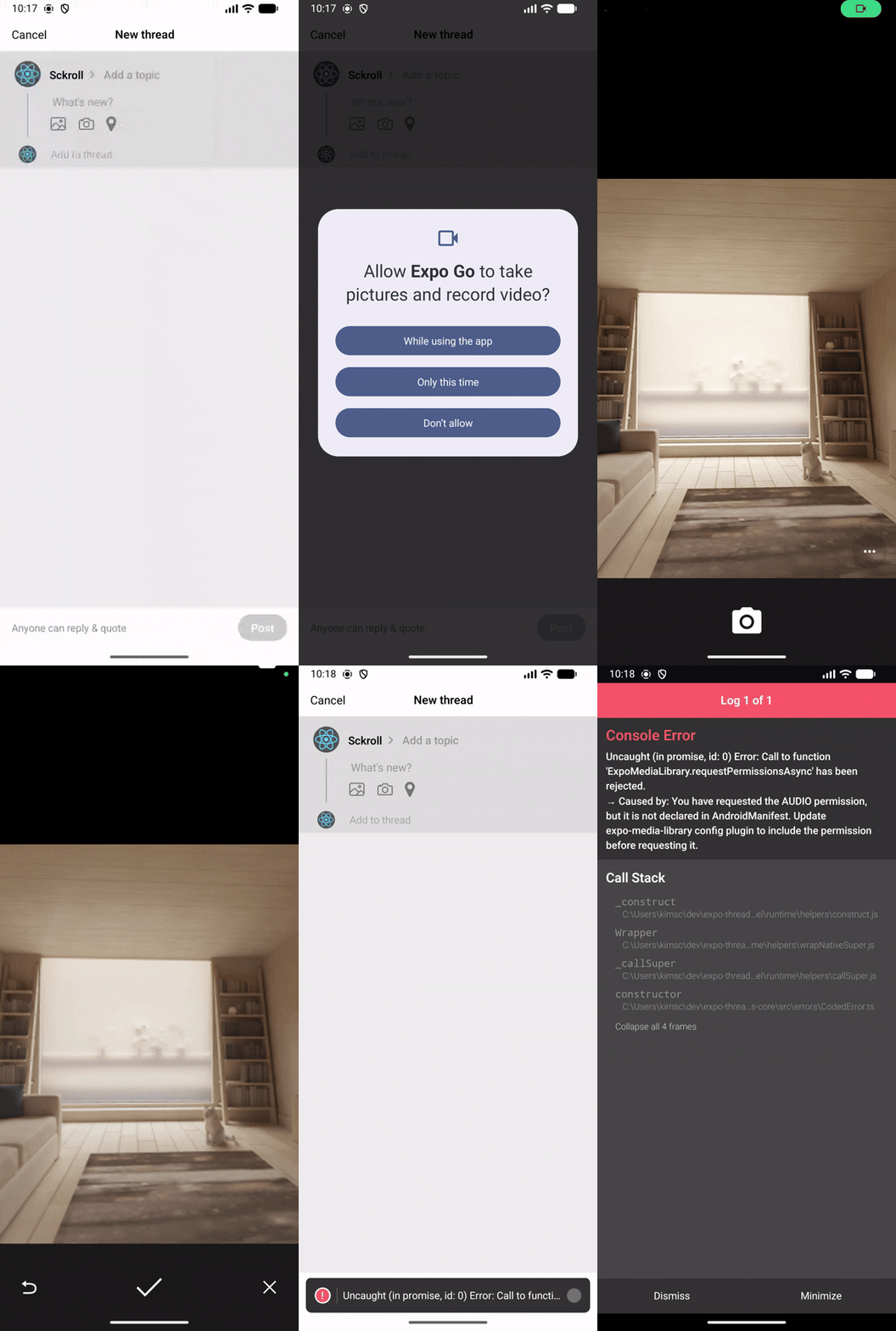
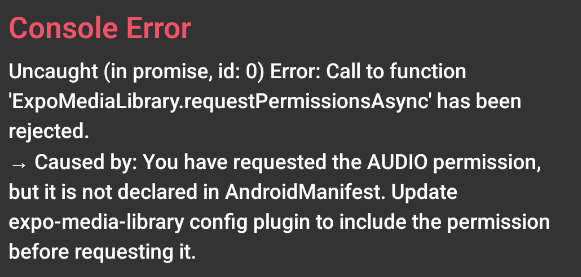
확인해보니 AUDIO 권한이 선언되지 않았다고 하는데, 아래와 같이 app.json의 plugin에 권한을 추가해도 동일한 에러가 발생합니다.
{
    "expo": {
        // ...
        "plugins": [
            // ...
            [
                "expo-media-library",
                {
                    "photosPermission": "Allow $(PRODUCT_NAME) to access your photos.",
                    "savePhotosPermission": "Allow $(PRODUCT_NAME) to save photos.",
                    "isAccessMediaLocationEnabled": true,
                    "granularPermissions": ["audio", "photo"]
                }
            ]
        ],
        // ...
    }
}
제로초님이 올려주신 코드를 그대로 복사 & 붙여넣기 해봐도 같은 문제가 발생하는데, 혹시 제가 놓친 부분이 있을까요...? 강의에서 다룬 부분의 코드와 package.json 첨부하겠습니다.
import { FontAwesome, Ionicons } from '@expo/vector-icons';
import * as ImagePicker from 'expo-image-picker';
import * as Location from 'expo-location';
import * as MediaLibrary from 'expo-media-library';
import { useRouter } from 'expo-router';
import React, { useState } from 'react';
import {
    Alert,
    FlatList,
    Image,
    Linking,
    Pressable,
    StyleSheet,
    Text,
    TextInput,
    TouchableOpacity,
    View,
} from 'react-native';
import { useSafeAreaInsets } from 'react-native-safe-area-context';

// ...

export default function Modal() {
    // ...

    const canAddThread =
        (threads.at(-1)?.text.trim().length ?? 0) > 0 ||
        (threads.at(-1)?.imageUris.length ?? 0) > 0;
    const canPost = threads.every(
        thread => thread.text.trim().length > 0 || thread.imageUris.length > 0,
    );

    const removeThread = (id: string) => {
        setThreads(prevThreads =>
            prevThreads.filter(thread => thread.id !== id),
        );
    };

    const pickImage = async (id: string) => {
        let { status } =
            await ImagePicker.requestMediaLibraryPermissionsAsync();

        if (status !== 'granted') {
            Alert.alert(
                'Permission not granted',
                'Please grant camera roll permission to use this feature',
                [
                    {
                        text: 'Open settings',
                        onPress: () => {
                            Linking.openSettings();
                        },
                    },
                    {
                        text: 'Cancel',
                    },
                ],
            );
            return;
        }

        let result = await ImagePicker.launchImageLibraryAsync({
            mediaTypes: ['images', 'livePhotos', 'videos'],
            allowsMultipleSelection: true,
            selectionLimit: 5,
        });
        console.log('image result:', result);

        if (result.canceled) return;

        setThreads(prevThreads =>
            prevThreads.map(thread =>
                thread.id === id
                    ? {
                          ...thread,
                          imageUris: thread.imageUris.concat(
                              result.assets?.map(asset => asset.uri) ?? [],
                          ),
                      }
                    : thread,
            ),
        );
    };

    const takePhoto = async (id: string) => {
        let { status } = await ImagePicker.requestCameraPermissionsAsync();
        if (status !== 'granted') {
            Alert.alert(
                'Permission not granted',
                'Please grant camera permission to use this feature',
                [
                    {
                        text: 'Open settings',
                        onPress: () => {
                            Linking.openSettings();
                        },
                    },
                    {
                        text: 'Cancel',
                    },
                ],
            );
            return;
        }

        let result = await ImagePicker.launchCameraAsync({
            mediaTypes: ['images', 'livePhotos', 'videos'],
            allowsMultipleSelection: true,
            selectionLimit: 5,
        });
        console.log('camera result:', result);

        // MediaLibrary 권한 요청 및 사진 저장
        status = (await MediaLibrary.requestPermissionsAsync()).status;
        if (status === 'granted' && result.assets?.[0].uri) {
            await MediaLibrary.saveToLibraryAsync(result.assets[0].uri);
        }

        if (result.canceled) return;

        setThreads(prevThreads =>
            prevThreads.map(thread =>
                thread.id === id
                    ? {
                          ...thread,
                          imageUris: thread.imageUris.concat(
                              result.assets?.map(asset => asset.uri) ?? [],
                          ),
                      }
                    : thread,
            ),
        );
    };

    const removeImageFromThread = (id: string, uriToRemove: string) => {
        setThreads(prevThreads =>
            prevThreads.map(thread =>
                thread.id === id
                    ? {
                          ...thread,
                          imageUris: thread.imageUris.filter(
                              uri => uri !== uriToRemove,
                          ),
                      }
                    : thread,
            ),
        );
    };

    // ...
}
{
"name": "expo-threads-clone",
"main": "expo-router/entry",
"version": "1.0.0",
"scripts": {
"start": "expo start",
"reset-project": "node ./scripts/reset-project.js",
"android": "expo start --android",
"ios": "expo start --ios",
"web": "expo start --web",
"lint": "expo lint"
},
"dependencies": {
"@expo/vector-icons": "^15.0.2",
"@react-navigation/bottom-tabs": "^7.4.0",
"@react-navigation/elements": "^2.6.3",
"@react-navigation/native": "^7.1.8",
"expo": "~54.0.12",
"expo-blur": "~15.0.7",
"expo-constants": "~18.0.9",
"expo-dev-client": "~6.0.13",
"expo-font": "~14.0.8",
"expo-haptics": "~15.0.7",
"expo-image": "~3.0.8",
"expo-image-picker": "~17.0.8",
"expo-linking": "~8.0.8",
"expo-location": "~19.0.7",
"expo-media-library": "~18.2.0",
"expo-router": "~6.0.10",
"expo-splash-screen": "~31.0.10",
"expo-status-bar": "~3.0.8",
"expo-symbols": "~1.0.7",
"expo-system-ui": "~6.0.7",
"expo-web-browser": "~15.0.8",
"react": "19.1.0",
"react-dom": "19.1.0",
"react-native": "0.81.4",
"react-native-gesture-handler": "~2.28.0",
"react-native-reanimated": "~4.1.1",
"react-native-safe-area-context": "~5.6.0",
"react-native-screens": "~4.16.0",
"react-native-web": "~0.21.0",
"react-native-worklets": "0.5.1"
},
"devDependencies": {
"@types/react": "~19.1.0",
"typescript": "~5.9.2",
"eslint": "^9.25.0",
"eslint-config-expo": "~10.0.0"
},
"private": true
}답변 1
1
{"expo":{"plugins":[["expo-media-library",{"photosPermission":"Allow $(PRODUCT_NAME) to access your photos.","savePhotosPermission":"Allow $(PRODUCT_NAME) to save photos.","isAccessMediaLocationEnabled":true,"granularPermissions":["audio","photo"]}]]}}
granularPermissions를 하면 원래 되어야 합니다. 빌드를 다시 해야하는것으로 보이는데 expo go 지웠다가 다시 실행해보시겠어요?
1
해결했습니다!
Expo Go 지웠다가 다시 설치하면서 확인해봤는데, 처음부터 Development build가 아닌 Expo Go에서 실행하고 있었던 것이 원인이었습니다... 네이티브 모듈은 Expo Go에서 사용할 수 없다는 걸 생각하지 못했네요 ㅜ Development build 전환 후 테스트해보니 잘 동작하는 걸 확인했습니다. 감사합니다!
Before

After

miragejs 강의 건
0
65
2
saveToLibraryAsync
0
54
2
expo-blur 사용하면서 생긴 버그입니다.
0
196
3
router.navigate 동작이 달라졌을까요?
0
111
1
Toast 기능
0
128
2
onEndReached 함수가 바로 호출 되지 않는 이슈
1
103
1
expo push service에 관한 질문
0
127
2
ios에서 개발중이신 분들은
1
110
1
[질문아님] tabBarLabel 대신 tabBarShowLabel
1
94
1
Location.getCurrentPositionAsync({}); 에러
1
181
3
.
0
141
2
EAS preview 빌드 후 Device에서 카카오 로그인 브라우저가 안켜짐
0
161
2
폴더 구조 관련 질문
0
167
2
혹시 리액트네이티브 관련해서 좋은 참고서도 있을까요??
0
148
1
제로초님께서는 Nativewind는 사용안하지는지 궁금합니다.
1
389
2
.
0
117
2
eas build:configure 안되는데, "git"이 반드시 설치되어 있어야 하나요?
0
136
2
.
0
137
2
혹시 해당 강의 보면서 테스트용으로 사용할 맥북을 구매할 예정인데 어느정도 스펙 이상으로 사야 할지 의견 받아볼수있을까요?
0
97
2
.
0
141
1
.
0
155
2
기기에서는 네트워크 에러가 납니다.
0
147
2
빌드 문의드립니다.
0
103
1
.
0
167
2