


code 강조가 안됨니다..
코드블럭 테스트
language::typescript
export const { auth, signIn, signOut, handlers } = NextAuth({
등등을 존재하는데
아래와같이 코드는 작성했는데 코드 강조가 안되고있습니다. 뭐가문제일까요?
import React from 'react'
import {
  ContentfulRichTextGatsbyReference,
  renderRichText,
} from 'gatsby-source-contentful/rich-text'
import { getImage } from 'gatsby-plugin-image'
import { NodeRenderer, Options } from '@contentful/rich-text-react-renderer'
import { BLOCKS, INLINES, MARKS } from '@contentful/rich-text-types'
import {
  Blockquote,
  Heading,
  Image,
  HorizontalRule,
  OrderedList,
  UnorderedList,
  Link,
  Code,
} from './node'

export const HEADERS = [
  BLOCKS.HEADING_1,
  BLOCKS.HEADING_2,
  BLOCKS.HEADING_3,
] as const
const CODE_METADATA_REGEX = /^language::(\w+)/

const options: Options = {
  renderMark: {
    [MARKS.CODE]: text => {
      const isBlock = !!text && CODE_METADATA_REGEX.test(text.toString())

      if (!isBlock) return <Code>{text}</Code>
      else
        return (
          <Code
            isBlock
            className={`language-${
              CODE_METADATA_REGEX.exec(text.toString())?.[1]
            }`}
          >
            {text.toString().replace(CODE_METADATA_REGEX, '').trimStart()}
          </Code>
        )
    },
  },
  renderNode: {
    ...HEADERS.reduce<{ [block: string]: NodeRenderer }>((nodes, header) => {
      nodes[header] = (node, children) => (
        <Heading type={header}>{children}</Heading>
      )

      return nodes
    }, {}),
    [BLOCKS.OL_LIST]: (_node, children) => (
      <OrderedList>{children}</OrderedList>
    ),
    [BLOCKS.UL_LIST]: (_node, children) => (
      <UnorderedList>{children}</UnorderedList>
    ),
    [BLOCKS.HR]: () => <HorizontalRule />,
    [BLOCKS.QUOTE]: (_node, children) => <Blockquote>{children}</Blockquote>,
    [BLOCKS.EMBEDDED_ASSET]: node => {
      const { gatsbyImageData, description } = node.data.target
      const image = getImage(gatsbyImageData)

      if (image) return <Image image={image} alt={description} />
    },
    [INLINES.HYPERLINK]: (node, children) => (
      <Link
        href={node.data.uri as string}
        target="_blank"
        rel="noopener noreferrer"
      >
        {children}
      </Link>
    ),
  },
}

export default function useRenderRichText({
  raw,
  references,
}: Queries.ContentfulPostContent) {
  if (!raw) return null

  return renderRichText(
    {
      raw,
      references: references as unknown as ContentfulRichTextGatsbyReference[],
    },
    options,
  )
}
import React from 'react' import { GatsbyBrowser } from 'gatsby' import Layout from './src/components/common/Layout' import 'prismjs/themes/prism-tomorrow.min.css' export const wrapPageElement: GatsbyBrowser['wrapPageElement'] = ({ element, props, }) => { return <Layout {...props}>{element}</Layout> }
import React from 'react'
import { GatsbyBrowser } from 'gatsby'
import Layout from './src/components/common/Layout'
import 'prismjs/themes/prism-tomorrow.min.css'

export const wrapPageElement: GatsbyBrowser['wrapPageElement'] = ({
  element,
  props,
}) => {
  return <Layout {...props}>{element}</Layout>
}
import React, { useEffect } from 'react' import styled from 'styled-components' import { TPostBodyProps } from '../../types/PostBody' import Prism from 'prismjs' import 'prismjs/components/prism-typescript' import useRenderRichText from '../../hooks/useRenderRichText' const Wrapper = styled.div` position: relative; display: grid; grid-template-columns: 1fr 220px; grid-gap: 30px; justify-content: space-between; align-items: flex-start; padding-top: 100px; ` const Content = styled.div` overflow: auto; display: flex; flex-direction: column; gap: 100px; font-size: 16px; line-height: 2; word-break: break-word; ` export default function PostBody({ content }: TPostBodyProps) { const richText = useRenderRichText(content) useEffect(() => { Prism.highlightAll() }, []) return ( <Wrapper> <Content> <div id="content">{richText}</div> {/* 댓글 컴포넌트가 들어갈 자리 */} </Content> {/* 플로팅 목차 컴포넌트가 들어갈 자리 */} </Wrapper> ) }
답변 3
1
Contentful 게시글을 렌더링하는 과정에서 모든 요소들이 각각 p 태그로 래핑되는데, 해당 강의에서 코드를 표현하기 위한 목적으로 사용되는 pre 태그 또한 p 태그로 래핑됩니다. 그래서 p 태그 내에 pre 태그가 위치하여 해당 에러가 발생하는데, 동작 과정에서 문제가 되는 부분은 없기에 무시하고 넘어가셔도 상관없습니다!
0
감사합니다 해결되었습니다!!
그런데 해당 부분이 해결되고나니
head-export-handler-for-browser.js:72 Warning: validateDOMNesting(...): <pre> cannot appear as a descendant of <p>.
이러한 에러가 발생하는데 뭐가 문제일까요?
0
안녕하세요 정훈님!
정확한 확인을 위해 블로그 페이지 캡쳐본과 Contentful에 작성한 코드 부분을 올려주실 수 있나요?
그리고 Contentful에서 코드를 작성하는 과정에서 코드 영역이 제대로 인식되지 않는 경우도 존재합니다.
따라서 명확하게 코드 영역을 다시 설정하신 후, pnpm clean && pnpm develop 명령어를 통해 캐시를 삭제하고 다시 로컬 서버를 실행해보시겠어요?
1
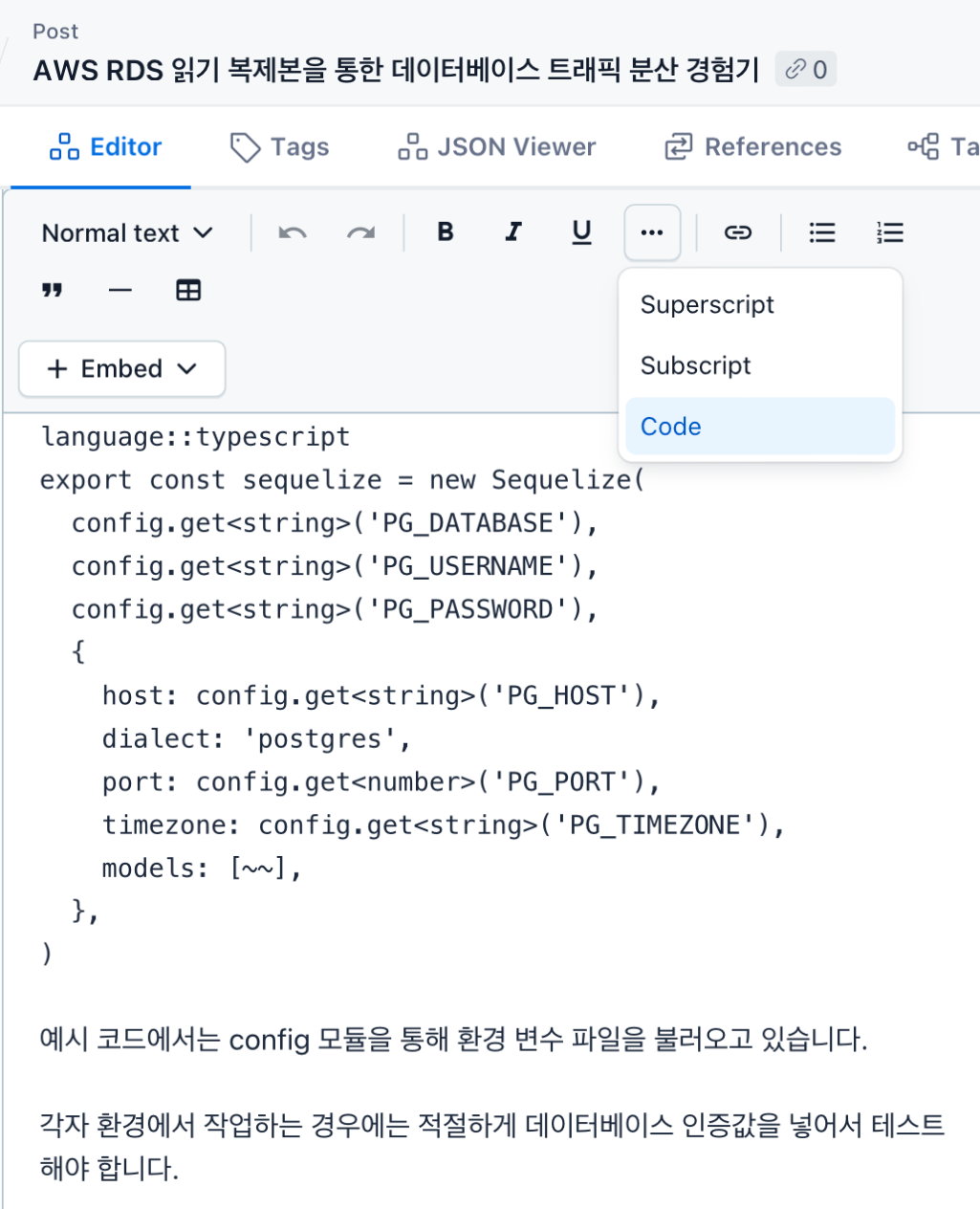
Contentful에서 위 사진과 같이 코드 영역을 등록하면 다른 일반 텍스트와 다른 폰트가 적용되는데, 정훈님께서 올려주신 사진은 그렇지 않아보입니다!
사진과 같이 코드 설정을 하신 후에 다시 로컬 서버를 실행해보시겠어요?
mission 09-01 을 수행할 수 없어요
0
9
1
outputStyle 설정하는데 어디서 문제일까요?
0
9
2
test.txt파일 삭제시 rm명령어이니 클로드의 질문이 있어야 한다고 하셨는데
0
6
1
검은화면
0
13
2
강의교환링크안열려요.....
0
14
1
영상재생에러 [확인부탁드려요!!!]
0
13
1
클로드 채팅에서 코드로 넘어가기
0
16
1
Context API vs Zustand 그리고 Auth
0
19
2
110강부터 따라가기가 힘듭니다...
0
38
1
커서에서 붙여넣기
0
22
1
깃허브 사용시 폴더경로 관련질문
0
18
1
[reducer] 기능별 폴더 구조 설계/ 파일 분리로 유지 보수 가능한 아키텍처 구축
0
14
2
순수 함수 / 순수 컴포넌트
0
18
1
스니펫이 이상해요
0
30
2
/output-style 명령어는 폐기 되었다고 나오네요.
0
37
1
프롬프트 작성시 html, css, javascript
0
30
1
Editor Component의 최적화 불가능 이슈
0
37
2
깃허브 배포시 하얀화면
0
114
1
GaphQL reference 질문
0
173
2
렌더링 문제
0
321
2
깃 액션 활용
0
413
3
Github Actions 배포 이후 ReadMe만 보이는 에러
0
394
1
Property 'references' does not exist on type 'ContentfulPostContent' 에러
0
365
2
정규 표현식 질문
1
289
2