


찜하기하고 해당글 상세페이지 이동시 찜 정보제대로 안내려오는 현상
202
작성한 질문수 40
안녕하세요 선생님
홈에서 찜했다, 안했다 잘 작동하고
상세페이지로 이동하면 찜하기 데이터가 제대로 내려오지 않는 부분을 확인했습니다.
호출은 아래와 같이 하고있습니다.
/src/app/(afterLogin)/[username]/status/[id]/page.tsx
import BackButton from "@/app/(afterLogin)/_component/BackButton";
import style from './singlePost.module.scss';
import Post from "@/app/(afterLogin)/_component/Post";
import CommentForm from "@/app/(afterLogin)/[username]/status/[id]/_component/CommentForm";
import SinglePost from '@/app/(afterLogin)/[username]/status/[id]/_component/SinglePost';
import Comments from '@/app/(afterLogin)/[username]/status/[id]/_component/Comments';
import { HydrationBoundary, QueryClient, dehydrate } from '@tanstack/react-query';
import { getSinglePost } from '@/app/(afterLogin)/[username]/status/[id]/_lib/getSinglePost';
import { getComments } from '@/app/(afterLogin)/[username]/status/[id]/_lib/getComments';

type Props = {
  params: { id: string}
}

export default async function Pasge({ params }: Props) {
  console.log('----------------------------- single post params', params);
  const { id } = params;
  const queryClient = new QueryClient();
  await queryClient.prefetchQuery({ queryKey: ['posts', id], queryFn: getSinglePost });
  await queryClient.prefetchQuery({ queryKey: ['posts', id, 'comments'], queryFn: getComments });
  const dehydratedState = dehydrate(queryClient);
  return (
    <div className={style.main}>
      <HydrationBoundary state={dehydratedState}>
        <div className={style.header}>
          <BackButton/>
          <h3 className={style.headerTitle}>게시하기</h3>
        </div>
        <SinglePost id={id} />
        <CommentForm id={id} />
        <div>
          <Comments id={id} />
        </div>
      </HydrationBoundary>
    </div>
  )
}
/src/app/(afterLogin)/[username]/status/[id]/_component/SinglePost.tsx
'use client';

import { Post as IPost } from '@/models/Post'
import { useQuery } from '@tanstack/react-query'
import { getSinglePost } from '@/app/(afterLogin)/[username]/status/[id]/_lib/getSinglePost';
import Post from '@/app/(afterLogin)/_component/Post';

export default function SinglePost({id, noImage}: {id: string, noImage?: boolean}) {
  const { data: post, error } = useQuery<IPost, Object, IPost, [_1: string,  _2: string]>({
    queryKey: ['posts', id],
    queryFn: getSinglePost,
    staleTime: 60 * 1000,
    gcTime: 300 * 100,
  });
  console.log(post, '--------------------------single post');
  if (error) {
    return (
      <div style={{
        height: 100, alignItems: 'center', fontSize: 31, fontWeight: 'bold', display: 'flex', justifyContent: 'center'
      }}>게시글을 찾을 수 없습니다.</div>
    )
  }
  if (!post) {
    return null;
  }
  return <Post post={post} key={post.postId} noImage={noImage} />
}
찜하기 코드
export default function ActionButtons({ white, post }: Props) {
  const queryClient = useQueryClient();
  const { data: session } = useSession();
  const commented = !!post.Comments?.find(d => d.userId === session?.user?.email);
  const reposted = !!post.Reposts?.find(d => d.userId === session?.user?.email);
  const liked = !!post.Hearts?.find(d => d.userId === session?.user?.email);
  const { postId } = post;

  const heart = useMutation({
    mutationFn: () => {
      return fetch(`${process.env.NEXT_PUBLIC_BASE_URL}/api/posts/${postId}/heart`, {
        method: 'post',
        credentials: 'include',
      })
    },
    onMutate() {
      const queryCache = queryClient.getQueryCache();
      const queryKeys = queryCache.getAll().map(cache => cache.queryKey);
      console.log('queryKey', queryKeys);
      queryKeys.forEach((queryKey) => {
        if (queryKey[0] === 'posts') {
          const value: Post | InfiniteData<Post[]> | undefined = queryClient.getQueryData(queryKey);
          if (value && 'pages' in value) {
            const obj = value.pages.flat().find(d => d.postId === postId);
            if (obj) { // 존재는 하는지?
              const pageIndex = value.pages.findIndex(page => page.includes(obj));
              const index = value.pages[pageIndex].findIndex(d => d.postId === postId);
              const shallow = produce(value, draft => {
                draft.pages[pageIndex][index].Hearts = [{ userId: session?.user?.email as string }];
                draft.pages[pageIndex][index]._count.Hearts += 1;
              })
              queryClient.setQueryData(queryKey, shallow);
            }
          } else if (value) {
            // 싱글 포스트인 경우
            if (value.postId === postId) {
              const shallow = {
                ...value,
                Hearts: [...value.Hearts, { userId: session?.user?.email as string }],
                _count: {
                  ...value._count,
                  Hearts: value._count.Hearts + 1,
                }
              }
              queryClient.setQueryData(queryKey, shallow);
            }
          }
        }
      })
    },
    onError() {

    },
    onSettled() {

    }
  });
다른 찜하기 질문에서
키를가지고 호출하지 않해서라고 하신걸 봤었는데,
위와 같은 경우에는 클라이언트 서버에서 쿼리키를 가지고 호출했는데 데이터가 잘 안내려오는 것을 확인했습니다.
찜을 눌렀을때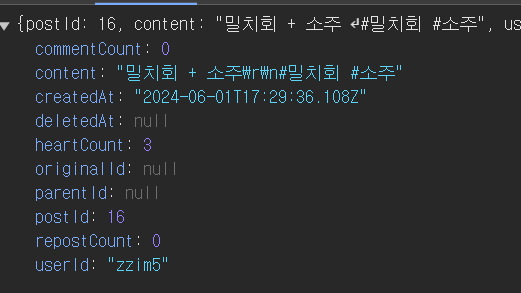
찜을 누르고 해당글 상세로 이동했을때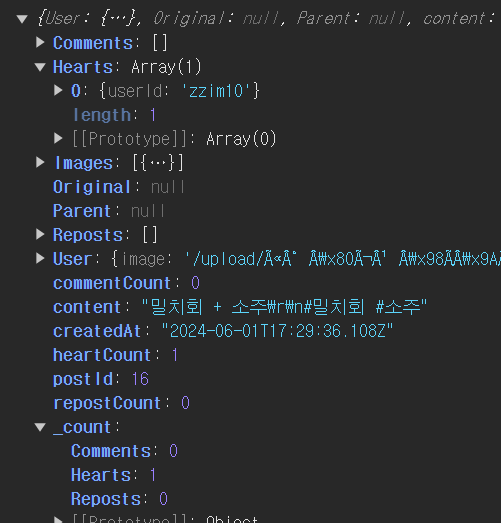
이러한 경우에는 찜하기를 누르고 추가적인 작업이 필요한지 궁금합니다. 예를들면 찜하기를 누르고 해당 쿼리키의 데이터를 호출해야한다는지... 혹은 제가 잘못호출한것이라면 알려주시면 감사하겠습니다.
답변 1
캡처링부분 질문있습니다.
0
100
2
깃에 소스코드를 찾을 수 없습니다.
0
131
2
useInfiniteQuery promise와 react use 사용시 페이지 무한 로딩
0
107
1
import 파일 경로를 찾지 못 해서 에러가 발생합니다.
0
127
2
css 라이브러리 추천 부탁드립니다
0
163
2
팔로우 추천 목록이 빈 배열로 들어옵니다.
0
142
1
게시물 업로드 시 userId가 undefined로 들어가는 오류
0
124
1
useSuspenseQuery 사용 시 SSR 401 이슈 관련
0
184
1
리액트 쿼리 useinfinitequery 무한스크롤 구현 시 페이지가 이동할 경우 데이터가 보존되게 할 수 있나요??
0
199
3
폴링이 필요없는 이유
0
107
2
next Request Memoization과 react cache
0
119
2
seo 최적화 기준은 데이터 fetching인가요 아님 데이터 렌더링인가요?
0
96
2
next.js 서버fetch 에러 fallback ui 구현 방법
0
178
2
프레임워크 여론 파악법
0
137
2
필터옵션이 많은 페이지에서 서버 fetch를 하는게 맞는걸까요??
0
114
2
서버 fetch suspense 로 감싸고 새로고침 시 잠시 빈 화면이 노출된 후 fallback ui가 노출됩니다.
0
112
2
template.tsx 내 서버fetch 응답값과 클라이언트 컴포넌트 상태값 싱크가 맞지 않는 이슈
0
72
2
Auth.js 사용 시 authorize 함수가 호출되지 않습니다
0
140
2
next.js 에서 로그인에 관하여
0
145
1
Next의 route handler에 대한 질문이 있습니다.
0
104
2
게시판 리스트 만들때 use client를 어디서부터 집어넣어야할지 모르겠습니다
0
105
2
프라이빗 폴더를 해야 하는 이유가 모호한 것 같아요.
0
98
2
vanilla-extract 못찾는 문제
0
238
2
fetch 캐싱과 revalidate 관련
0
96
2