


로그인후 바로 뒤로가기, 회원가입 후 홈으로 이동하고 session에 정보 안쌓임
501
작성한 질문수 40
안녕하세요 선생님.
로그인 후에 새로고침이나 url을 치고 /(메인)으로 가면 홈으로 잘 리다이렉트 되는데 로그인 후 바로 뒤로가기를 누르면 리다이렉트되지 않고 / 페이지로 이동합니다. 이 부분 어떻게 하면 좋을지 문의 드립니다.
회원가입 후
303뜨면서 홈으로 이동하는데, 이 303이 괜찮은건지와
이동 후에 로그아웃버튼에서 session 정보를 가져오지 못하고 있습니다. 새로고침하면 잘 나옵니다. me정보를 가져올때 useEffect로 바꿔야할지 문의 드립니다.
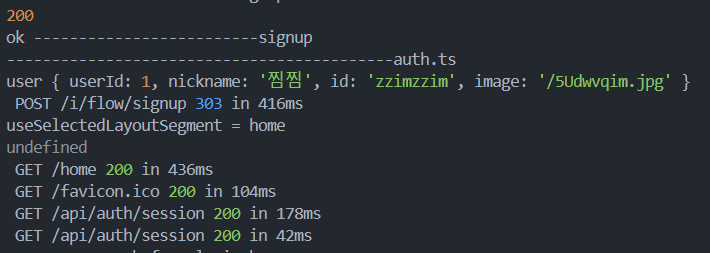 로그를 보면 회원가입 후, 로그인도 잘 되는것 같은데 어떤부분을 확인해야할지 알려주시면 감사하겠습니다.
@/app/(beforelogin)/_lib/signup.tsx
'use server';

import { signIn } from '@/auth';
import { redirect } from 'next/navigation';

const onSubmit = async (prevState: any, formData: FormData) => {
  if (!formData.get('id') || !(formData.get('id') as string).trim()) {
    return { message: 'no_id' };
  }
  if (!formData.get('name') || !(formData.get('name') as string).trim()) {
    return { message: 'no_name' };
  }
  if (!formData.get('password') || !(formData.get('password') as string).trim()) {
    return { message: 'no_password' };
  }
  if (!formData.get('image')) {
    return { message: 'no_image' };
  }

  let shouldRedirect = false;
  try {
    console.log('-------------------------signup start');
    const response = await fetch(`${process.env.NEXT_PUBLIC_BASE_URL}/api/users`, {
      method: 'post',
      body: formData,
      credentials: 'include', // cookie 전달 위해서
    });
    // console.log(response);
    console.log(response.status);
    if (response.status === 403) {
      return { message: 'user_exists' };
    }
    const user = await response.json();
    console.log(user, '-------------------------signup');
    shouldRedirect = true;
    // 회원가입 성공하고 로그인 시도
    await signIn("credentials", {
      username: formData.get('id'),
      password: formData.get('password'),
      redirect: false,
    })
  } catch (error) {
    console.error(error);
    return { message: null };
  }

  if (shouldRedirect) {
    redirect('/home'); // redirect는 try/catch문에서 쓰면 안된다.
  }
}

export default onSubmit;
@/auth.ts
import NextAuth from "next-auth"
// import CredentialsProvider from "next-auth/providers/credentials"
import Credentials from "next-auth/providers/credentials"

export const {
  // api 라우트
  handlers: { GET, POST },
  // auth 함수 실행하면 로그인 유무알 수 있다.
  auth,
  // 로그인 하는 함수
  signIn
} = NextAuth({
  pages: {
    signIn: "/i/flow/login",
    newUser: '/i/flow/signup',
  },
  providers: [
    Credentials({
      // You can specify which fields should be submitted, by adding keys to the `credentials` object.
      // e.g. domain, username, password, 2FA token, etc.
      credentials: {
        id: {},
        password: {},
      },
      authorize: async (credentials) => {
        console.log('-------------------------------------------auth.ts');
        const authResponse = await fetch(`${process.env.NEXT_PUBLIC_BASE_URL}/api/login`, {
          method: 'POST',
          headers: {
            'Content-Type': 'application/json'
          },
          body: JSON.stringify(credentials)
        })

        // console.log('authResponse-----------------------------------', authResponse);
        // 로그인 실패
        if (!authResponse.ok) {
          return null
        }

        // 로그인 성공
        const user = await authResponse.json();
        console.log('user', user);

        // return user object with the their profile data
        return {
          ...user,
          name: user.nickname
        }
      },
    }),
  ]
})
@/app/(beforelogin)/_component/loginmodal.tsx
'use client';

import style from '@/app/(beforeLogin)/_component/login.module.scss';
import { useRouter } from 'next/navigation';
import { SubmitHandler, useForm } from 'react-hook-form';
// import { signIn } from '@/auth'; // 서버환경일 때
import { signIn } from 'next-auth/react'; // 클라이언트일 때

type formProps = {
	id: string, password: string,
}

export default function LoginModal() {
	const { register, handleSubmit, formState: { errors } } = useForm<formProps>();
	const router = useRouter();
	const onClickClose = () => {
		router.back();
		// TODO: 뒤로가기가 /home이 아니면 /home으로 보내기
	};

	const onSubmit: SubmitHandler<formProps> = async (data: formProps) => {
		console.log(data);
		try {
			await signIn('credentials', { ...data, redirect: false });
			router.replace('/home');
		} catch(error) {
			console.error(error);
			console.log('아이디와 비밀번호가 일치히자 않습니다.');
		}
	};

	return (
		<div className={style.modalBackground}>
			<div className={style.modal}>
				<div className={style.modalHeader}>
					<button className={style.closeButton} onClick={onClickClose}>
						<svg width={24} viewBox='0 0 24 24' aria-hidden='true' className='r-18jsvk2 r-4qtqp9 r-yyyyoo r-z80fyv r-dnmrzs r-bnwqim r-1plcrui r-lrvibr r-19wmn03'>
							<g>
								<path d='M10.59 12L4.54 5.96l1.42-1.42L12 10.59l6.04-6.05 1.42 1.42L13.41 12l6.05 6.04-1.42 1.42L12 13.41l-6.04 6.05-1.42-1.42L10.59 12z'></path>
							</g>
						</svg>
					</button>
					<div>로그인하세요.</div>
				</div>
				<form onSubmit={handleSubmit(onSubmit)}>
					<div className={style.modalBody}>
						<div className={style.inputDiv}>
							<label className={style.inputLabel} htmlFor='id'>
								아이디
							</label>
							<input id='id' className={style.input} type='text' placeholder='' {...register('id', { required: '아이디를 입력해주세요.' })} />
							{errors.id?.message && typeof errors.id.message === 'string' && <p>{errors.id.message}</p>}
						</div>
						<div className={style.inputDiv}>
							<label className={style.inputLabel} htmlFor='password'>
								비밀번호
							</label>
							<input id='password' className={style.input} type='password' placeholder='' {...register('password', { required: '비밀번호를 입력해주세요.' })} />
							{errors.password?.message && typeof errors.password.message === 'string' && <p>{errors.password.message}</p>}
						</div>
					</div>
					<div className={style.modalFooter}>
						<button className={style.actionButton}>로그인하기</button>
					</div>
				</form>
			</div>
		</div>
	);
}
@/app/(beforelogin)/page.tsx
import Main from '@/app/(beforeLogin)/_component/Main';
import { auth } from '@/auth';
import { redirect } from 'next/navigation';

export default async function Home() {
	console.log('--------------before login home');
	const session = await auth();
	if (session?.user) {
		redirect('/home');
		return null;
	}
	return (
		<>
			<Main />
		</>
	);
}
답변 1
0
303은 서버액션시 응답코드로 오는 것이고, 로그아웃버튼을 쓰는 곳을 보여주셔아할 것 같습니다. auth()에서 유저 정보를 받아서 로그아웃버튼의 props로 전달해야합니다. useSession은 안 먹습니다
0
로그아웃 버튼의 로직은 아래와 같습니다.
그럼 회원가입해서 로그인될때는 usession이 아니라 다른 방식을 써야한다는 말씀이실까요?
'use client';

import { useCallback } from 'react';
import style from './logoutButton.module.scss';
import { signOut, useSession } from 'next-auth/react';
import { useRouter } from 'next/navigation';

export default function LogoutButton() {
	const router = useRouter();
	const { data: me } = useSession();

	const onLogout = useCallback(async () => {
		await signOut({ redirect: false });
		router.replace('/');
	}, [router]);

	console.log(me, '-------------------------logout button');
	if (!me?.user) {
		return null;
	}

	return (
		<button className={style.logOutButton} onClick={onLogout}>
      <div className={style.logOutUserImage}>
				<img src={me.user?.image!} alt={me.user?.email!}/>
      </div>
      <div className={style.logOutUserName}>
        <div>{me.user?.name}</div>
        <div>@{me.user?.email}</div>
      </div>
    </button>
	);
}
캡처링부분 질문있습니다.
0
157
2
깃에 소스코드를 찾을 수 없습니다.
0
176
2
useInfiniteQuery promise와 react use 사용시 페이지 무한 로딩
0
152
1
import 파일 경로를 찾지 못 해서 에러가 발생합니다.
0
220
2
css 라이브러리 추천 부탁드립니다
0
243
2
팔로우 추천 목록이 빈 배열로 들어옵니다.
0
192
1
게시물 업로드 시 userId가 undefined로 들어가는 오류
0
155
1
useSuspenseQuery 사용 시 SSR 401 이슈 관련
0
226
1
리액트 쿼리 useinfinitequery 무한스크롤 구현 시 페이지가 이동할 경우 데이터가 보존되게 할 수 있나요??
0
238
3
폴링이 필요없는 이유
0
153
2
next Request Memoization과 react cache
0
158
2
seo 최적화 기준은 데이터 fetching인가요 아님 데이터 렌더링인가요?
0
131
2
next.js 서버fetch 에러 fallback ui 구현 방법
0
221
2
프레임워크 여론 파악법
0
178
2
필터옵션이 많은 페이지에서 서버 fetch를 하는게 맞는걸까요??
0
159
2
서버 fetch suspense 로 감싸고 새로고침 시 잠시 빈 화면이 노출된 후 fallback ui가 노출됩니다.
0
153
2
template.tsx 내 서버fetch 응답값과 클라이언트 컴포넌트 상태값 싱크가 맞지 않는 이슈
0
116
2
Auth.js 사용 시 authorize 함수가 호출되지 않습니다
0
187
2
next.js 에서 로그인에 관하여
0
180
1
Next의 route handler에 대한 질문이 있습니다.
0
139
2
게시판 리스트 만들때 use client를 어디서부터 집어넣어야할지 모르겠습니다
0
143
2
프라이빗 폴더를 해야 하는 이유가 모호한 것 같아요.
0
127
2
vanilla-extract 못찾는 문제
0
281
2
fetch 캐싱과 revalidate 관련
0
145
2