


특정인 정보 api 질문
안녕하세요 제로초님,
특정인 정보 api(api/users/{id}) response 관련 질문이 있습니다.
response에 Followers 배열이 있어
해당 유저를 팔로우 한 다른 사용자들을 얻고자 했습니다.
처음 시도는 강의에서 진행했던대로
prefetchQuery + useQuery 조합으로 데이터를 끌어오고자 했습니다.
하지만 이 경우에 Followers 배열이 빠진 상태로 응답이 돌아오고 있습니다.
한 100번 새로고침하면 1~2번만 붙어서 옵니다.
아래는 prefetchQuery + useQuery 조합 코드입니다.
// page.tsx
import Link from "next/link";
import { QueryClient, HydrationBoundary, dehydrate } from "@tanstack/react-query";

import getUserInfo from "./_lib/getUserInfo";
import getUserPosts from "./_lib/getUserPosts";

import Nav from "./_component/Nav";
import ProfileUserData from "./_component/ProfileUserData";
import UserPosts from "./_component/UserPosts";

import { Container, Userzone, Profile, HeaderPhotoZone } from "./page-style";

type Props = {
  params: { username: string };
};

export default async function Username({ params }: Props) {
  const { username } = params;
  console.log("username : ", username);
  const queryClient = new QueryClient();
  await queryClient.prefetchQuery({
    queryKey: ["user", username],
    queryFn: getUserInfo,
  });
  await queryClient.prefetchQuery({
    queryKey: ["posts", "user", username],
    queryFn: getUserPosts,
  });

  return (
    <Container>
      <HydrationBoundary state={dehydrate(queryClient)}>
        <Nav username={username} />
        <Userzone>
          <Profile>
            <HeaderPhotoZone>
              <Link href="/home">{/* <Image src={이미지} alt="header_photo"></Image> */}</Link>
            </HeaderPhotoZone>
            <ProfileUserData username={username} />
          </Profile>
          <UserPosts username={username} />
        </Userzone>
      </HydrationBoundary>
    </Container>
  );
}
//Nav.tsx
"use client";

import { useQuery, useQueryClient } from "@tanstack/react-query";
import getUserInfo from "../_lib/getUserInfo";
import BackBtn from "../../_component/BackBtn";
import { Navigation } from "./style";
import { User } from "@/model/User";

type Prop = {
  username: string;
};

export default function Nav({ username }: Prop) {
  const { data } = useQuery<User, Object, User, [_1: string, _2: string]>({ queryKey: ["user", username], queryFn: getUserInfo });

  console.log("네비게이션 유저 데이터 : ", data);
  return (
    <Navigation>
      <BackBtn></BackBtn>
      {data === undefined ? (
        <div>프로필</div>
      ) : (
        <div>
          <div>{data?.nickname}</div>
          <div>0 게시물</div>
        </div>
      )}
    </Navigation>
  );
}
//ProfileUserData.tsx
"use client";

import { useQuery, useQueryClient } from "@tanstack/react-query";
import Link from "next/link";
import { useSession } from "next-auth/react";

import Tab from "./Tab";
import FollowButton from "../../_component/FollowButton";
import { ProfileUserdataMid, UserName, SignupDate, AboutFollower, ProfileUserdata, NoAccountId, NoAccountMsg, ProfileUserdataTop, AbsoluteProfileContainer } from "./style";

import { User } from "@/model/User";
import getUserInfo from "../_lib/getUserInfo";

type Prop = {
  username: string;
};

export default function ProfileUserData({ username }: Prop) {
  const { data: session } = useSession();

  const { data } = useQuery<User, Object, User, [_1: string, _2: string]>({ queryKey: ["user", username], queryFn: getUserInfo });

  console.log("프로필 유저 데이터 : ", data);
  // const createdDate = new Date(data?.createdAt!);

  if (data === undefined) {
    return (
      <>
        <NoAccountId>@{username}</NoAccountId>
        <NoAccountMsg>계정이 존재하지 않음</NoAccountMsg>
      </>
    );
  }

  // return null;
  // 팔로우, 팔로잉 데이터 추가 필요
  return (
    <ProfileUserdata>
      <ProfileUserdataTop>
        <AbsoluteProfileContainer>
          <div>아 몰랑</div>
        </AbsoluteProfileContainer>
        {/* 팔로우 버튼 확인 */}
        {/* <Link href="/settings/profile">프로필 수정</Link> */}
        {/* {session?.user?.email === data?.id ? <Link href="/settings/profile">프로필 수정</Link> : <FollowButton user={data} />} */}
      </ProfileUserdataTop>
      <ProfileUserdataMid>
        <UserName>
          <div>{data?.nickname}</div>
          <div>@{data?.id}</div>
        </UserName>
        <SignupDate>
          <svg viewBox="0 0 24 24" aria-hidden="true" height="1.25rem">
            <g>
              <path d="M7 4V3h2v1h6V3h2v1h1.5C19.89 4 21 5.12 21 6.5v12c0 1.38-1.11 2.5-2.5 2.5h-13C4.12 21 3 19.88 3 18.5v-12C3 5.12 4.12 4 5.5 4H7zm0 2H5.5c-.27 0-.5.22-.5.5v12c0 .28.23.5.5.5h13c.28 0 .5-.22.5-.5v-12c0-.28-.22-.5-.5-.5H17v1h-2V6H9v1H7V6zm0 6h2v-2H7v2zm0 4h2v-2H7v2zm4-4h2v-2h-2v2zm0 4h2v-2h-2v2zm4-4h2v-2h-2v2z"></path>
            </g>
          </svg>
          {/* <div>{`가입일 ${createdDate.getFullYear()}년 ${createdDate.getMonth() + 1}월`}</div> */}
        </SignupDate>
        <AboutFollower>
          <Link href="/follow">
            <span>{data._count.Followings}</span> 팔로우 중
          </Link>
          <Link href="/followers">
            <span>{data._count.Followers}</span> 팔로워
          </Link>
        </AboutFollower>
        <Tab></Tab>
      </ProfileUserdataMid>
    </ProfileUserdata>
  );
}
react-query 결과

때문에 다른 방법으로 prefetchQuery를 사용하지 않고
useQuery만을 사용해서 특정인 정보를 가져오는 시도를 했는데
이 경우에는 모두 Followers 배열이 같이 날아오더군요.
왜 이런 현상이 일어나는지 궁금해 질문 남깁니다.
아래는 useQuery만 사용한 코드는 page.tsx에 prefetchQuery만 빠진 것 이외에 다른 부분은 동일합니다.
//page.tsx
import Link from "next/link";
import { QueryClient, HydrationBoundary, dehydrate } from "@tanstack/react-query";

import getUserInfo from "./_lib/getUserInfo";
import getUserPosts from "./_lib/getUserPosts";

import Nav from "./_component/Nav";
import ProfileUserData from "./_component/ProfileUserData";
import UserPosts from "./_component/UserPosts";

import { Container, Userzone, Profile, HeaderPhotoZone } from "./page-style";

type Props = {
  params: { username: string };
};

export default async function Username({ params }: Props) {
  const { username } = params;
  console.log("username : ", username);
  const queryClient = new QueryClient();
  // await queryClient.prefetchQuery({
  //   queryKey: ["user", username],
  //   queryFn: getUserInfo,
  // });
  await queryClient.prefetchQuery({
    queryKey: ["posts", "user", username],
    queryFn: getUserPosts,
  });
  // 개인 사용자 데이터 가져오는 것으로 수정해ㅑ함
  // 이거 서버 컴포넌트인데 Nav 같은거는 client란 말이야 그래서 깜박거리는데 어카지;
  return (
    <Container>
      <HydrationBoundary state={dehydrate(queryClient)}>
        <Nav username={username} />
        <Userzone>
          <Profile>
            <HeaderPhotoZone>
              <Link href="/home">{/* <Image src={이미지} alt="header_photo"></Image> */}</Link>
            </HeaderPhotoZone>
            <ProfileUserData username={username} />
          </Profile>
          <UserPosts username={username} />
        </Userzone>
      </HydrationBoundary>
    </Container>
  );
}
react - query 결과
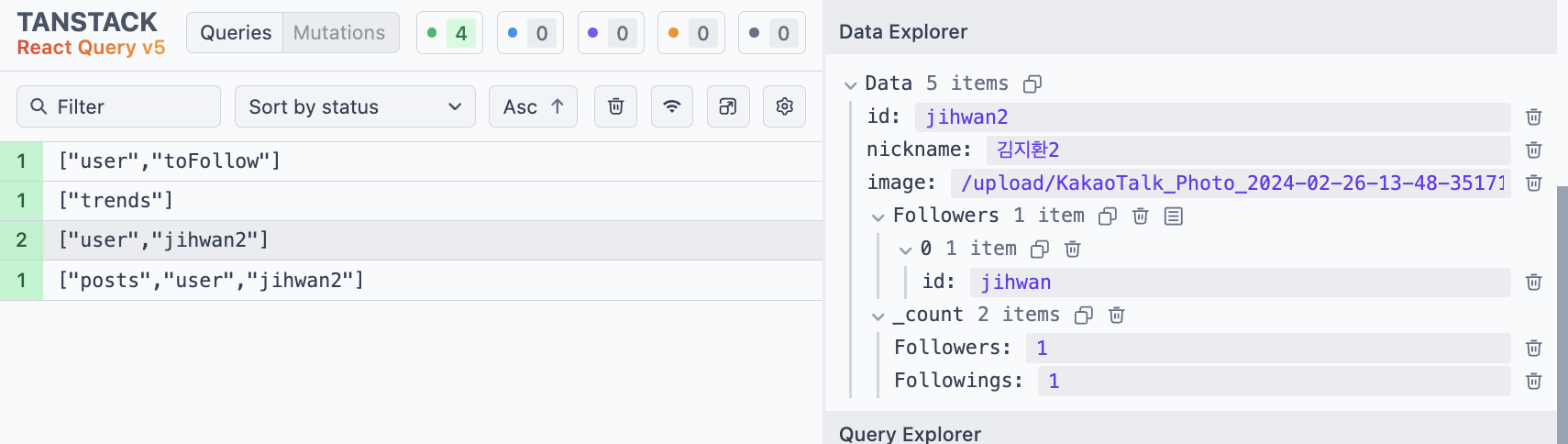 useQuery만 사용했을 때의 네트워크 탭

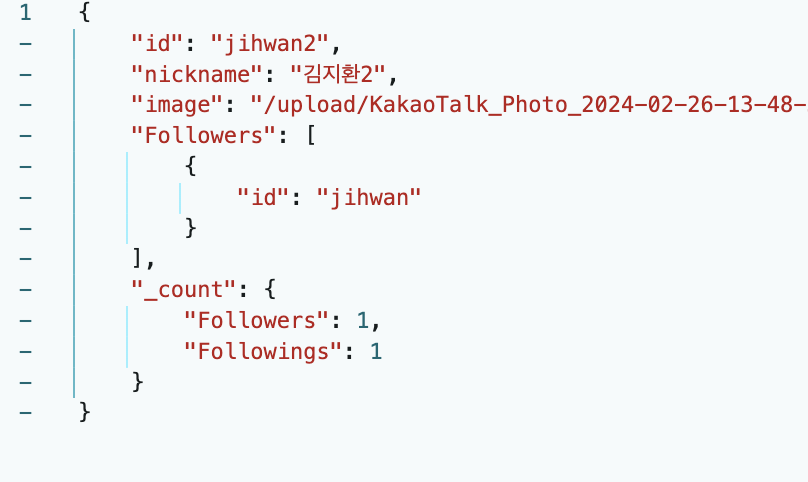
getUserInfo.tsx는 다음과 같습니다.
import { QueryFunction } from "@tanstack/query-core";
import { User } from "@/model/User";

const getUserInfo: QueryFunction<User, [_1: string, _2: string]> = async ({ queryKey }) => {
  const [_1, username] = queryKey;
  const response = await fetch(`${process.env.NEXT_PUBLIC_BASE_URL}/api/users/${username}`, {
    credentials: "include",
  });

  if (response.ok) return response.json();
};

export default getUserInfo;
답변 1
캡처링부분 질문있습니다.
0
157
2
깃에 소스코드를 찾을 수 없습니다.
0
176
2
useInfiniteQuery promise와 react use 사용시 페이지 무한 로딩
0
152
1
import 파일 경로를 찾지 못 해서 에러가 발생합니다.
0
220
2
css 라이브러리 추천 부탁드립니다
0
243
2
팔로우 추천 목록이 빈 배열로 들어옵니다.
0
192
1
게시물 업로드 시 userId가 undefined로 들어가는 오류
0
155
1
useSuspenseQuery 사용 시 SSR 401 이슈 관련
0
226
1
리액트 쿼리 useinfinitequery 무한스크롤 구현 시 페이지가 이동할 경우 데이터가 보존되게 할 수 있나요??
0
238
3
폴링이 필요없는 이유
0
153
2
next Request Memoization과 react cache
0
158
2
seo 최적화 기준은 데이터 fetching인가요 아님 데이터 렌더링인가요?
0
131
2
next.js 서버fetch 에러 fallback ui 구현 방법
0
221
2
프레임워크 여론 파악법
0
178
2
필터옵션이 많은 페이지에서 서버 fetch를 하는게 맞는걸까요??
0
159
2
서버 fetch suspense 로 감싸고 새로고침 시 잠시 빈 화면이 노출된 후 fallback ui가 노출됩니다.
0
153
2
template.tsx 내 서버fetch 응답값과 클라이언트 컴포넌트 상태값 싱크가 맞지 않는 이슈
0
116
2
Auth.js 사용 시 authorize 함수가 호출되지 않습니다
0
187
2
next.js 에서 로그인에 관하여
0
180
1
Next의 route handler에 대한 질문이 있습니다.
0
139
2
게시판 리스트 만들때 use client를 어디서부터 집어넣어야할지 모르겠습니다
0
143
2
프라이빗 폴더를 해야 하는 이유가 모호한 것 같아요.
0
127
2
vanilla-extract 못찾는 문제
0
281
2
fetch 캐싱과 revalidate 관련
0
145
2