


8.17 프로필 사진 캐싱 관련 질문
252
작성한 질문수 7
안녕하세요,
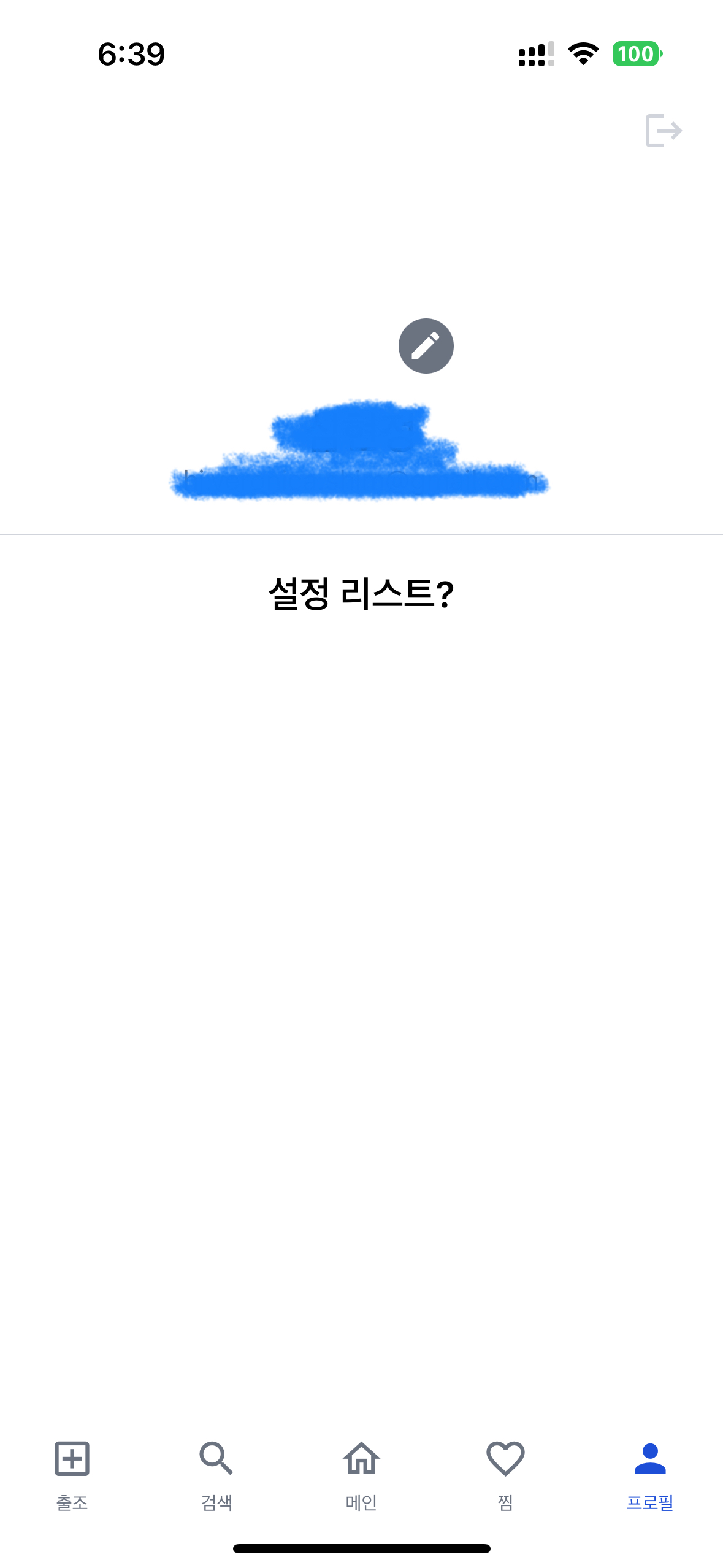
8.17 코드를 그대로 따라갔는데 마지막에 앱을 새로고침하면 이미지가 아예 안 뜹니다. (첨부 이미지 참고)
에러 메세지도 따로 없고, 그냥 이미지가 뜨지 않습니다.
source.uri에는 firebase 스토리지에 올린 기본 프로필 이미지 링크가 들어있는 것을 확인했습니다.
코드는 github 까지 비교해가며 봤는데 동일합니다.
혹시 몰라 FastImage.js 및 ProfileScreen.js 코드 전문 첨부합니다.
무엇이 문제일까요..?ㅠ 그동안 라이브러리가 업데이트 된걸까요?
FastImage.js
import { Image } from 'react-native';
import PropTypes from 'prop-types';
import { useEffect, useState } from 'react';
import * as Crypto from 'expo-crypto';
import * as FileSystem from 'expo-file-system';

const FastImage = ({ source, ...props }) => {
  const [uri, setUri] = useState(source.uri);

  useEffect(() => {
    (async () => {
      try {
        console.log('source.uri', source.uri);
        const hashed = await Crypto.digestStringAsync(
          Crypto.CryptoDigestAlgorithm.SHA256,
          source.uri
        ); // Hash the URL
        const fileSystemUri = `${FileSystem.cacheDirectory}${hashed}`; // Create a file path

        const metadata = await FileSystem.getInfoAsync(fileSystemUri); // Check if the file exists
        if (!metadata.exists) {
          await FileSystem.downloadAsync(source.uri, fileSystemUri); // Download the file
        }

        setUri(fileSystemUri); // Set the file path
      } catch (error) {
        setUri(source.uri);
      }
    })();
  }, [source.uri]);

  return <Image source={{ uri }} {...props} />;
};

FastImage.propTypes = {
  source: PropTypes.object.isRequired,
};

export default FastImage;
ProfileScreen.js
import { StyleSheet, Text, View, Pressable } from 'react-native';
import PropTypes from 'prop-types';
import { useUserState } from '../context/UserContext';
import { signOut } from '../api/auth';
import { GRAY, WHITE } from '../colors';
import { useSafeAreaInsets } from 'react-native-safe-area-context';
import { MaterialIcons } from '@expo/vector-icons';
import { MaterialCommunityIcons } from '@expo/vector-icons';
import FastImage from '../components/FastImage';

const ProfileScreen = () => {
  const [user, setUser] = useUserState(); // [user, setUser]
  const { top } = useSafeAreaInsets();

  return (
    <View style={[styles.container, { paddingTop: top }]}>
      <View style={styles.settingButton}>
        <Pressable
          onPress={async () => {
            await signOut();
            setUser({});
          }}
          hitSlop={10}
        >
          <MaterialIcons name="logout" size={24} color={GRAY.DEFAULT} />
        </Pressable>
      </View>

      <View style={styles.profile}>
        <View
          style={[
            styles.photo,
            user.photoURL || { backgroundColor: GRAY.DEFAULT },
          ]}
        >
          <FastImage source={{ uri: user.photoURL }} style={styles.photo} />
          <Pressable style={styles.editButton} onPress={() => {}}>
            <MaterialCommunityIcons name="pencil" size={20} color={WHITE} />
          </Pressable>
        </View>

        <Text style={styles.nickname}>{user.displayName || '닉네임'}</Text>
        <Text style={styles.email}>{user.email}</Text>
      </View>

      <View style={styles.listContainer}>
        <Text style={styles.listText}>설정 리스트?</Text>
      </View>
    </View>
  );
};

ProfileScreen.propTypes = {};

const styles = StyleSheet.create({
  container: {
    flex: 1,
    backgroundColor: WHITE,
  },
  settingButton: {
    alignItems: 'flex-end',
    paddingHorizontal: 20,
  },
  profile: {
    justifyContent: 'center',
    alignItems: 'center',
    borderBottomWidth: 0.5,
    borderBottomColor: GRAY.DEFAULT,
    paddingVertical: 20,
  },
  photo: {
    width: 100,
    height: 100,
    borderRadius: 50,
  },
  editButton: {
    position: 'absolute',
    bottom: 0,
    right: 0,
    width: 30,
    height: 30,
    borderRadius: 15,
    backgroundColor: GRAY.DARK,
    justifyContent: 'center',
    alignItems: 'center',
  },
  nickname: {
    fontSize: 24,
    fontWeight: '600',
    marginTop: 20,
  },
  email: {
    fontSize: 15,
    // fontWeight: '600',
    color: GRAY.DARK,
    marginTop: 5,
  },
  listContainer: {
    flex: 1,
    alignItems: 'center',
  },
  listText: {
    fontSize: 20,
    fontWeight: '600',
    marginVertical: 20,
    marginHorizontal: 20,
  },
});

export default ProfileScreen;
답변 1
0
안녕하세요,
질문을 할 때, 본인의 코드를 깃헙에 올리고 깃헙 링크를 남겨주세요. 그래야 조금 더 정확한 확인이 가능합니다.
올려준 코드에 큰 문제는 없어보입니다.
먼저, Firebase에서 받아온 이미지 url을 브라우저에 복사-붙여넣기를 해서 확인해보세요. 브라우저에서 잘 나타나나요?
만약 이미지가 나타나지 않고 권한 에러 화면이 나오면, Firebase의 Storage에서 '규칙' 부분을 수정해야 합니다. (강의 8.15 Storage와 보안 규칙)
추가로, 현재는 Expo 에서 제공하는 Image 컴포넌트가 강의에서 만든 FastImage 컴포넌트를 대체할 수 있습니다. Expo에서 제공하는 Image 컴포넌트를 사용하는 것을 권장합니다.
https://docs.expo.dev/versions/latest/sdk/image/
0
보안규칙은 잘 설정되어있었습니다!
레파지토리가 private이라서 공유 못드렸던 점 죄송합니다 ㅠㅠ
말씀하신 Expo Image 컴포넌트 사용해서 캐싱 간단하게 설정 완료했습니다! 감사합니다!!
expo 가 업데이트 되면서 문제가 발생한거같습니다.
0
412
2
navigation.replace() 작동하지 않습니다.
0
187
2
UpdateProfileScreen 에서 사진 버튼 클릭시 오류발생.
0
189
2
닉네임 수정 후 확인 버튼을 누를시 한글자만 출력됩니다.
0
209
2
모달창에서 버튼이 출력되지 않습니다.
0
146
2
로그인 에러 출력시 default값만 나옵니다.
0
189
2
안드로이드 기기에서 SignUp 화면 관련 질문드립니다.
0
121
2
간단한 질문 하나만 드리겠습니다!
0
119
2
text.trim() 부분에서 오류가 발생합니다.
0
172
2
profile 화면에서 내가 쓴 글이 나타나지 않습니다.
0
170
2
글 저장시 파일 저장위치 관련 질문드립니다!
0
139
2
구글 지도 API 관련 오류로 질문드립니다!
0
170
1
HeaderRight 버튼이 작동하지 않습니다.
0
115
2
사진이 나오지 않는 문제로 질문드립니다.
0
134
2
defaultProps 관련 문의 드립니당
0
276
2
이미지 목록을 받아오는 부분에서 IOS 에서 문제가 발생합니다.
0
163
2
안드로이드 기기에서 헤더 부분이 작동이 안됩니다.
0
117
2
[TypeError: unsubscribe is not a function (it is undefined)] 오류 발생으로 질문드립니다.
0
143
2
7.15 :: 상태 변수와 컴포넌트 언마운트 관련 질문드립니다!
0
119
2
SIgnIn SignUp 화면이 안나옵니다.
0
139
2
마지막 useEffect 부분 질문드립니다.
0
123
2
ImagPickerScreen을 만드는 과정에서 문제가 발생하여 글을 남깁니다.
0
229
2
eslint.config.mjs 파일에 plugin 설정방법
0
798
1
ESLint.json 파일이 생성되지 않습니다.
0
258
2