


virustotal 코덱 문제 해결 요청합니다.
안녕하세요 이번 실습부터 갑자기 wazuh 서버로 이벤트 로그를 잘 보내던 Windows 클라이언트로부터 더 이상 이벤트를 받지 못하고 있습니다. 도와주셨으면 합니다.
둘이 서로 네트워크 연결 문제 및 설정이 제대로 되어있는지 확인 및 에이전트 / 서비스 재시작을 다수 해봤으며, 에러로그는 아래와 virus total codec 문제인것을 볼 수 있었습니다.
지금 alerts.log는 virustotal 다른 사람들의 결과물에 비해 좀 부실하게 작성되어서 나와있길레 가져왔습니다. (해당 로그에서 시스템 무결성 체크나 netstat 명령을 가져오는건 잘 보입니다.)
또한, 강좌에서 나온것 처럼 sysmon 이벤트로그에서 calc, vss 관련로그도 정상적으로 등장하는것을 확인했습니다.
-wazuh server-
/var/ossec/logs/ossec.log
2024/01/25 03:07:15 wazuh-integratord: ERROR: Unable to run integration for virustotal -> integrations
2024/01/25 03:07:15 wazuh-integratord: ERROR: While running virustotal -> integrations. Output: UnicodeDecodeError: 'utf-8' codec can't decode byte 0xbb in position 1481: invalid start byte
var/ossec/logs/alerts/alerts.log
** Alert 1706119676.269841153: - virustotal,
2024 Jan 25 03:07:56 (DESKTOP-8KIVUDS) 윈도우IP->virustotal
Rule: 87103 (level 3) -> 'VirusTotal: Alert - No records in VirusTotal database'
{"virustotal": {"found": 0, "malicious": 0, "source": {"alert_id": "1706119670.269839011", "file": "HKEY_LOCAL_MACHINE\\System\\CurrentControlSet\\Services\\bam\\State\\UserSettings\\S-1-5-21-2409306197-2214590480-1851912469-1000", "md5": "a1d87ba945282fbbd3276dc1b9918a23", "sha1": "4b6965b3c854f07763683c778774221fecf263b4"}}, "integration": "virustotal"}
virustotal.found: 0
virustotal.malicious: 0
virustotal.source.alert_id: 1706119670.269839011
virustotal.source.file: HKEY_LOCAL_MACHINE\System\CurrentControlSet\Services\bam\State\UserSettings\S-1-5-21-2409306197-2214590480-1851912469-1000
virustotal.source.md5: a1d87ba945282fbbd3276dc1b9918a23
virustotal.source.sha1: 4b6965b3c854f07763683c778774221fecf263b4
integration: virustotal
local_rules.xml 파일 설정 내용은 아래와 같습니다.
<!-- Sysmon Wazuh Rules version 1.0-->
<group name="local,syscheck,">
<!-- Rule for ZEROMINI_RANSOM_NOTE.txt -->
<rule id="100001" level="10">
<decoded_as>json</decoded_as>
<field name="syscheck.path">C:\\Users\\User\\Desktop\\ransom_test\\ZEROMINI_RANSOM_NOTE.txt</field>
<description>ZEROMINI_RANSOM_NOTE.txt file detected.</description>
</rule>
<!-- Rule for .koyange extension -->
<rule id="100002" level="10">
<decoded_as>json</decoded_as>
<field name="syscheck.path">\.koyange$</field>
<description>File with .koyange extension detected.</description>
</rule>
</group>
<group name="sysmon,sysmon_process-anomalies,">
<rule id="300001" level="13">
<if_group>sysmon_event1</if_group>
<field name="win.eventdata.Image">calc.exe</field>
<description>Calc process started (possible ransomware simulation)</description>
</rule>
<rule id="300002" level="13">
<if_group>sysmon_event1</if_group>
<field name="win.eventdata.CommandLine">vssadmin delete shadows</field>
<description>Shadow copy deletion command detected (possible ransomware simulation)</description>
</rule>
<rule id="300003" level="13">
<if_group>sysmon_event1</if_group>
<field name="win.eventdata.TargetFilename">ZEROMINI_RANSOM_NOTE.txt</field>
<description>Ransom note detected (possible ransomware activity)</description>
</rule>
<rule id="300004" level="13">
<if_group>sysmon_event1</if_group>
<field name="win.eventdata.parentImage">python.exe</field>
<description>File with python extension detected (possible ransomware activity)</description>
</rule>
<rule id="300005" level="13">
<if_group>sysmon_event1</if_group>
<field name="win.eventdata.CommandLine">ping 8.8.8.8</field>
<description>Ping to 8.8.8.8 detected (possible network test or exfiltration attempt)</description>
</rule>
</group>
답변 2
1
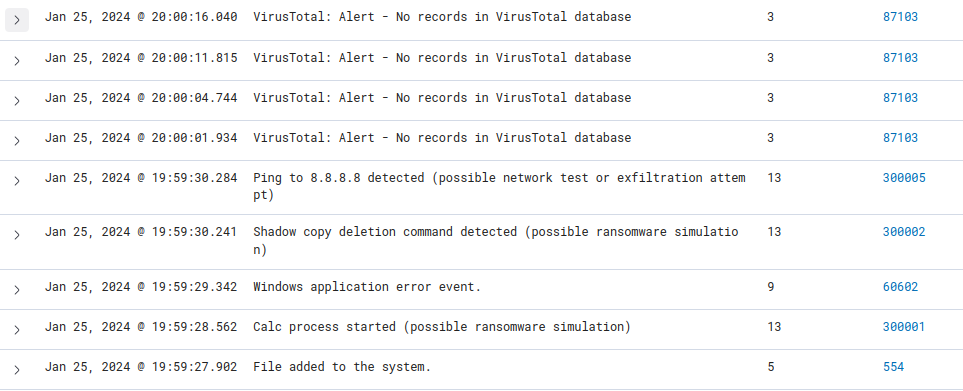
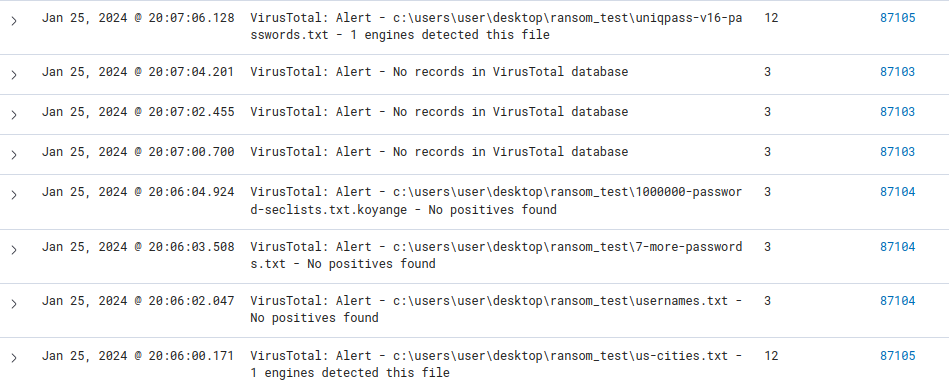 삽질을 해보니, 정답은 버전문제였습니다. 최신 버전으로 서버 및 에이전트를 설치하니 해결이 되었고, 드디어 원하는 로그가 보입니다!!
0
안녕하세요 Zeromini 입니다 저와 함께 처리해보시죠!
우선 virustotal과 통신은 되고있는것 같고요 아래 사항을 한번더 체크해보시고
ossec.conf 내용중 <integration> 태그 부분을 보내주시면 상세하게 체크할수
있을것 같습니다
문제점 1 : /var/ossec/logs/ossec.log 파일에서 virustotal -> integrations와 관련된 오류가 발생하고 있습니다. UnicodeDecodeError는 문자 인코딩 문제와 관련이 있어 보입니다. 이 경우, VirusTotal 통합 설정을 검토하고 필요한 경우 인코딩 설정을 조정해야 할 수 있습니다.
아래방법으로 해결해보세요!
#1) 레퍼런스 참고 : https://documentation.wazuh.com/4.3/user-manual/capabilities/malware-detection/virus-total-integration.html 참고
여기에서 ossec.conf에서
<integration>
<name>virustotal</name>
<api_key>API_KEY</api_key> <!-- Replace with your VirusTotal API key -->
<group>syscheck</group>
<alert_format>json</alert_format>
</integration>
** alert 포멧이 json으로 들어가있는지 확인해보세요
문제점 2 : 레퍼런스 체크 : https://github.com/wazuh/wazuh/issues/13825
문제점 3 : 세부 설정을 비교해서 확인을 해보셔야할것 같습니다 (네이버 드라이브에 업로드된 VM 머신을 활용하여 conf 부분 확인 및 디렉토리명이 한글로 되어있는지도 확인)
위 3가지를 체크해보시고 안되시면 말씀해주시면 체크해드리도록하겠습니다~!
에이전트 프로그램 다운로드 불가
0
17
2
재수강 할인이 있는지 문의 드립니다.
0
31
2
섹션 2 DNS 강의자료가 34페이지가 마지막일까요?
1
70
2
실습환경(비쥬얼스튜디오)에 대한 질문입니다.
0
60
1
추가질문)
0
61
1
tgz 백업파일
0
66
2
강의 자료
0
40
1
APM 보안 셋팅
1
62
1
"도커 이미지 생성" 18:59부분에 텍스트 파일로 정리 된거는 어디서 볼수 있나요?
0
79
1
ls -al /var/log/nginx
0
85
2
이번강의
0
75
2
버추얼박스 오류
0
83
1
세월이 흘러 문제가 바뀐 것 같습니다.
0
78
2
수업자료는 없나요?
0
40
1
실습환경
0
56
2
에이전트 정책 배포 방법 문의
0
165
1
sysmon -accepteula -i ./config.xml 오류
0
118
1
로그 한글 지원 등
1
266
1
우분투 24.04에서 Install Sysmon설치시 에러 발생
1
399
1
실습파일 다운로드 링크 비밀번호가 틀리다고 나옵니다.
1
305
1
웹사이트에 파일 업로드가 안됩니다.
1
639
2
맨마지막 agenetless 제거 시도 시 .passlist가 보이지 않던 이유
1
240
1
해상도 개선 요청
1
388
1
local_rules.xml 설정했는데 "Microsoft Office Product Spawning Windows Shell" 로만 뜹니다
1
352
1