


disabled 디자인 이렇게 하면 될까요?
안녕하세요...
강의 3분 8초에 나오는 체크된 부분 퍼블리싱에 대해 질문드립니다..
라이브 서버로는 되는 것 같기는 한데
혹시 더 낫게 하는 방법이나 실무에서 더 선호되는 방법이 있다면 알려주시면 감사하겠습니다...
<!DOCTYPE html>
<html lang="ko">
<head>
  <meta charset="UTF-8">
  <meta name="viewport" content="width=device-width, initial-scale=1.0">
  <title>Document</title>
  <script src="https://kit.fontawesome.com/c0fe093804.js" crossorigin="anonymous"></script>
  <link rel="stylesheet" href="02.fontawesome-active.css">
</head>
<body>
  <form>
    <input type="checkbox" id="chk1" checked>
    <label for="chk1">HTML</label>

    <input type="checkbox" id="chk2">
    <label for="chk2">CSS</label>

    <input type="checkbox" id="chk3">
    <label for="chk3">Javascript</label>

    <input type="checkbox" id="chk4" disabled>
    <label for="chk4">UIKit</label>
  </form>

</body>
</html>
/* Google Web Fonts CDN Raleway */
@import url('https://fonts.googleapis.com/css?family=Raleway&display=swap');

/* Google Web Fonts CDN Noto Sans KR */
@import url('https://fonts.googleapis.com/css?family=Noto+Sans+KR:300,400,500,700,900&display=swap');

@import url('https://kit.fontawesome.com/c0fe093804.js" crossorigin="anonymous');


body{
  font-family: 'Raleway', sans-serif;
  /* font-family: 'Noto Sans KR', sans-serif; */
  color: #222;
  line-height: 1.5em;
  font-weight: 300;
  margin: 0;
  font-size: 30px;
  display: flex;
  justify-content: center;
  align-items: center;
  height: 100vh;
}
a{
  color: #222;
  text-decoration: none;
  font-size: 12px;
}

form input[type=checkbox]{
  display: none;
}
form label{
  display: block;
  margin-bottom: 3px;
}
form label:before{
  content: '\f00c';
  text-align: center;
  line-height: 30px;
  font-family: fontawesome;
  margin-right: 8px;
  border: 1px solid #292929;
  color: transparent;
  display: inline-block;
  width: 30px;
  height: 30px;
  vertical-align: middle;
  padding: 2px;
  border-radius: 3px;
  font-size: 30px;
  transition: 0.2s;
}
form input[type=checkbox]:checked + label:before{
  background-color: crimson;
  color: #fff;
  border: 1px solid crimson;
  /* border-color: transparent; */
}

/* 눌리는 효과 */
form input[type=checkbox] + label:active:before{
  transform: scale(0);
}

form input[type=checkbox]:disabled + label:before{
  border: 1px solid rgba(220, 20, 60, 0.233);
  background-color: rgba(220, 20, 60, 0.233);
  color: #fff;
}
form input[type=checkbox]:disabled + label:active:before{
  transform: scale(100%);
}
답변 1
0
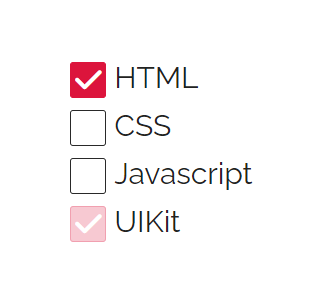 충분히 예쁘게 디자인 하셨습니다.
그리고 다음에는 스크린샷을 올려주세요.
안그러면 지금처럼 제가 에디터 열어서 모든 코드 넣어서 라이브로 브라우저에서 확인까지 해야 하거든요.
class 값 한 번에 부여하는법
2
95
1
@media에서의 flex-direction: column으로 세로배치 관련 질문드립니다.
1
79
1
div#css-checker-widget의 해결방
1
71
2
input의 포커스되었을때 검정선이 사라지지 않아요
0
95
2
강의듣는법
1
86
1
아코디언 만들기 100%이하의 화면으로 보았을때
1
77
2
input checked 질문합니다.
0
81
1
Bracket Pair Colorizer - 비주얼 스튜디오
1
153
2
Part 1 영상 안나옵니다
1
98
1
제이쿼리 작동이 안됩니다
1
212
3
강의 내용 질문있습니다.
1
129
2
일정 부분만 주석하는 방법
1
225
2
폰트어썸
1
144
2
인접선택자에 대한 질문드립니다!
1
135
2
delay 적용 안됨
1
137
1
rotateY(360deg)가 적용이 안됩니다!
1
190
2
세로이동할때 height값
1
142
2
폰트어썸이 안되요..
1
505
2
화면 정중앙에 오게끔 할수있나요?
1
175
1
어코디언 네비게이션 중
1
127
1
라이브서버 문제
1
241
2
넷플릭스 어코디언 예제 질문
1
107
1
이번 강의에선 display flex가 무조건 적으로 필요한건가요 ?
1
163
1
active 관련 질문
1
150
2