


강좌 끝나고 댓글 수정 기능 만들어 보고 있습니다
305
작성한 질문수 11
{commentFormOpened && (
  <div>
    {commentEditMode
      ?
        <CommentContent post={post} commentEditMode={commentEditMode} onClickUpdateComment={onClickUpdateComment} onCancelUpdateComment={onCancelUpdateComment} />
      : (
          <>
            <CommentForm post={post} />
            <CommentContent post={post} commentEditMode={commentEditMode} onClickUpdateComment={onClickUpdateComment} onCancelUpdateComment={onCancelUpdateComment} />
          </>
        )
    }
  </div>
)}

//PostCard.js
import React, { useCallback, useEffect, useState } from 'react';
import { Avatar, Comment, List, Input, Button, Popover } from 'antd';
import { useDispatch, useSelector } from 'react-redux';
import Link from 'next/link';
import PropTypes from 'prop-types';
import { EllipsisOutlined } from '@ant-design/icons';

import { UPDATE_COMMENT_REQUEST } from '../reducers/post';


const {TextArea} = Input;

const CommentContent = ({ post, onCancelUpdateComment, commentEditMode, onClickUpdateComment }) => {
  const dispatch = useDispatch();
  const id = useSelector((state) => state.user?.me.id);
  const { updateCommentLoading, updateCommentDone } = useSelector((state) => state.post);
  const [editText, setEditText] = useState(post.Comments.content);

  useEffect(() => {
    if (updateCommentDone) {
      onCancelUpdateComment();
    }
  }, [updateCommentDone]);

  const onChangeCommentText = useCallback((e) => {
    setEditText(e.target.value);
  }, []);

  const onChangeComment = useCallback(() => {
    dispatch({
      type: UPDATE_COMMENT_REQUEST,
      data: {
        PostId: post.id,
        CommentId: post.Comments.id,
        UserId: id,
        content: editText,
      },
    });
  }, [post, id, editText, post.Comments.id]);


  return (
    <div>
      {commentEditMode
        ? (
          <>
            <TextArea value={editText} onChange={onChangeCommentText} />
            <Button.Group>
              <Button loading={updateCommentLoading} onClick={onChangeComment}>수정</Button>
              <Button type="danger" onClick={onCancelUpdateComment}>수정 취소</Button>
            </Button.Group>
          </>
        )
        :
        <List
          header={`${post.Comments.length}개의 댓글`}
          itemLayout="horizontal"
          dataSource={post.Comments}
          renderItem={(item) => (
            <li>
              <Comment
                actions={[<Popover
                  key="more"
                  content={
                    <Button.Group>
                      {id && item.User.id === id ? (
                        <>
                          <Button onClick={onClickUpdateComment}>수정</Button>
                          <Button type="danger">
                            삭제
                          </Button>
                        </>
                      ) : (
                        <Button>신고</Button>
                      )}
                    </Button.Group>
                  }
                >
                  <EllipsisOutlined />
                </Popover>,]}
                author={item.User.nickname}
                avatar={
                  <Link href={`/user/${item.User.id}`}>
                    <a><Avatar>{item.User.nickname[0]}</Avatar></a>
                  </Link>
                }
                content={item.content}
              />
            </li>
          )}
        />
      }
    </div>
  )
}

CommentContent.propTypes = {
  post: PropTypes.shape({
    id: PropTypes.number.isRequired,
    Comments: PropTypes.arrayOf(PropTypes.shape({
      id: PropTypes.number.isRequired,
      content: PropTypes.string.isRequired,
    }))
  }),
  onCancelUpdateComment: PropTypes.func.isRequired,
  onClickUpdateComment: PropTypes.func.isRequired,
  commentEditMode: PropTypes.bool
};

CommentContent.defaultsProps = {
  commentEditMode: false,
}

export default CommentContent;

//CommentContent.js
case UPDATE_COMMENT_REQUEST:
  draft.updateCommentLoading = true;
  draft.updateCommentDone = false;
  draft.updateCommentError = null;
  break;
case UPDATE_COMMENT_SUCCESS:
  draft.updateCommentLoading = false;
  draft.updateCommentDone = true;
  const post = draft.mainPosts.find((v) => v.id === action.data.PostId);
  post.Comments = post.Comments.find((v) => v.id === action.data.CommentId);
  post.Comments = post.Comments.find((v) => v.id === action.data.UserId);
  post.Comments.content = action.data.content;
  break;
case UPDATE_COMMENT_FAILURE:
  draft.updateCommentLoading = false;
  draft.updateCommentError = action.error;
  break;

//reducers/post.js
function updateCommentAPI(data) {
  return axios.patch(`/post/${data.PostId}/comment`, data);
}

function* updateComment(action) {
  try {
    const result = yield call(updateCommentAPI, action.data);
    yield put({
      type: UPDATE_COMMENT_SUCCESS,
      data: result.data,
    });
  } catch (err) {
    console.error(err);
    yield put({
      type: UPDATE_COMMENT_FAILURE,
      error: err.response.data,
    });
  }
}

// sagas/post.js
router.patch('/:postId/comment', isLoggedIn, async (req, res, next) => { // PATCH post/2/comment
  try {
    await Comment.update({
      content: req.body.content,
    }, {
      where: {
        PostId: req.params.postId,
        UserId: req.user.id,
      },
    });
    res.status(200).json({
      PostId: parseInt(req.params.postId, 10),
      UserId: req.user.id,
      content: req.body.content,
    });
  } catch (error) {
    console.error(error);
    next(error);
  }
});

//routes/post.js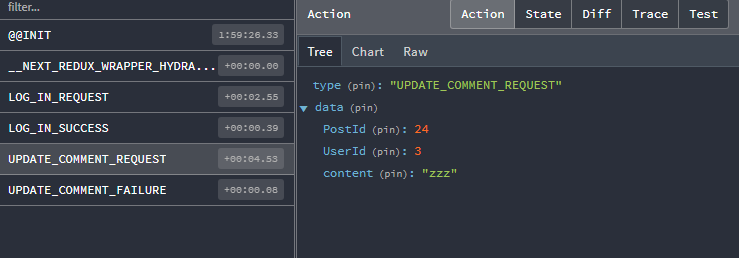
이렇게 PostId, UserId, content가 보내지고, 실패가 뜨면서 새로고침을 하면 해당 글에 달았던 댓글들이 모두 다 "zzz"로 변경되어 있습니다. 그래서 CommentId를 보내줘야 될 거 같은데 여기서 막혀서 감이 도무지 잡히질 않습니다.
답변 1
0
지금 댓글창 자체를 댓글수정창으로 재사용하고 계신 것 같은데 commentEditMode를 true로 바꿀 때 commentId도 같이 redux에 저장해두세요.
아니면 댓글 수정창을 따로 Comment component에 만드시면 됩니다. Comment 컴포넌트에서는 comment.id에 접근 가능하게 되니까요.
서버에서는 where: { id: commentId } 이런 식으로 특정 comment만 타겟해서 수정해야 합니다.
리듀서 부분도 다음과 같이 하나만 찾아서 수정해야 합니다.
const comment = post.Comments.find((v) => v.id === action.data.CommentId);
comment.content = action.data.content;
0
답변 감사합니다. commentEditMode를 true로 바꿀 때 commentId도 같이 redux에 저장하라고 하셨는데 이해가 잘 안가서 힌트 좀만 더 주실 수 있으신가요?
1
수정 버튼을 누를 때 그 버튼에 딸린 commentId를 같이 redux로 보내시면 됩니다. 지금 CommentForm이랑 Comment 컴포넌트 분리되어 있나요?
넥스트 버젼 질문
0
125
2
로그인시 401 Unauthorized 오류가 뜹니다
0
127
1
무한 스크롤 중 스크롤 튐 현상
0
227
1
특정 페이지 접근을 막고 싶을 때
0
144
2
createGlobalStyle의 위치와 영향범위
0
124
2
인라인 스타일 리렌더링 관련
0
121
2
vsc 에서 npm init 설치시 오류
0
185
2
nextjs 15버전 사용 가능할까요?
0
183
1
화면 새로고침 문의
0
147
1
RTK에서 draft, state 차이가 있나요?
0
188
2
Next 14 사용해도 될까요?
0
476
1
next, node 버전 / 폴더 구조 질문 드립니다.
0
382
1
url 오류 질문있습니다
0
234
1
ssh xxxxx로 우분투에 들어가려니까 port 22: Connection timed out
0
417
1
sudo certbot --nginx 에러
0
1333
2
Minified React error 콘솔에러 (hydrate)
0
522
1
카카오 공유했을 때 이전에 작성했던 글이 나오는 버그
0
281
1
프론트서버 배포 후 EADDRINUSE에러 발생
0
367
1
npm run build 에러
0
565
1
front 서버 npm run build 중에 발생한 에러들
0
437
1
서버 실행하고 브라우저로 들어갔을때 404에러
0
367
2
css 서버사이드 랜더링이 적용되지 않아서 문의 드립니다.
0
312
1
팔로워 3명씩 불러오고 데이터 합쳐주는걸로 바꾸고 서버요청을 무한으로하고있습니다.
0
280
2
해시태그 검색에서 throttle에 관해 질문있습니다.
0
225
1